- A component (React component type) takes in parameters, called
props(short for “properties”), and returns a hierarchy of views to display via therendermethod. renderreturns a React element, which is a lightweight description of what to render. Most React developers use a special syntax called “JSX” which makes these structures easier to write.- All React component classes that have a
constructorshould start it with asuper(props)call.
- JSX comes with the full power of JavaScript. You can put any JavaScript expressions within braces inside JSX. Each React element is a JavaScript object that you can store in a variable or pass around in your program.
- To render multiple items in React, we can use an array of React elements.
- but we need to add a key e.g. (
<li key={user.id}>), otherwise we'll get an error: Warning: Each child in an array or iterator should have a unique “key” prop. Check the render method of “Game”. - Keys do not need to be globally unique; they only need to be unique between components and their siblings.
- It’s strongly recommended that you assign proper keys whenever you build dynamic lists. If you don’t have an appropriate key, you may want to consider restructuring your data so that you do.
- but we need to add a key e.g. (
- creating "loop-ed" UI in renderer
- React does not like for loops in its render() method
- you can put it out of it in a function and add the function result
- https://stackoverflow.com/questions/22876978/loop-inside-react-jsx
- To “remember” things, components use state. React components can have state by setting
this.statein their constructors.this.stateshould be considered as private to a React component that it’s defined in. - NEVER mutate this.state directly (this.state = X), as calling setState() afterwards may replace the mutation you made. Treat this.state as if it were immutable."
- https://medium.com/react-ecosystem/how-to-handle-state-in-react-6f2d3cd73a0c
- since
setState()automatically merges a partial state into the current state, we only needed to call it with the changed parts. The merging is shallow.
-
it is common when React components are refactored
-
if we want to manage/use states from child components in their parent component, We may think that parent component should just ask each child component for its state. Although this approach is possible in React, we discourage it because the code becomes difficult to understand, susceptible to bugs, and hard to refactor. Instead, the best approach is to store that state in the parent component instead of in each child.
-
To collect data from multiple children, or to have two child components communicate with each other, you need to declare the shared state in their parent component instead. The parent component can pass the state back down to the children by using props; this keeps the child components in sync with each other and with the parent component.
-
Since state is considered to be private to a component that defines it, we cannot update the parent’s state directly from its child. Instead, we’ll pass down a function from the parent to the child, and we’ll have child call that function when it wants to change the parent's state.
-
Since the child components no longer maintain state, the child components receive values from the parent component and inform the parent component when they’re clicked. In React terms, the child components are now controlled components. The parent has full control over them.
-
In React, it’s conventional to use
on[Event]names for props which represent events andhandle[Event]for the methods which handle the events.
https://reactjs.org/tutorial/tutorial.html#why-immutability-is-important
- Complex Features Become Simple
- Detecting Changes
- Determining When to Re-Render in React
The main benefit of immutability is that it helps you build pure components in React. You can learn more about
shouldComponentUpdate()and how you can build pure components by reading Optimizing Performance. 4. Unlike the arraypush()method you might be more familiar with, theconcat()method doesn’t mutate the original array, so we prefer it.
- Props should never be changed in a child component, so if there’s something going on that alters some variable, that variable should belong to the component state.
- Props are also used to allow child components to access methods defined in the parent component. This is a good way to centralize managing the state in the parent component, and avoid children to have the need to have their own state.
- Most of your components will just display some kind of information based on the props they received, and stay stateless.
- There are three things that cause a React component to re-render:
(https://www.reddit.com/r/reactjs/comments/54gl72/why_use_state_vs_class_properties/)
- The parent component re-rendered
- So: When you call
setStatein a component, React automatically updates the child components inside of it too.
- So: When you call
- The component called
this.setState() - The component called
this.forceUpdate()
- The parent component re-rendered
- One of the core concepts of React is that a component's render output should be solely based on its props and state. So, if you want to use something for rendering, you should put it in state, and the correct way to do that is with
this.setState().
-
The React documentation on manipulating class names suggests the
classnamesNPM package. The docs for the package are great.-
If you often find yourself writing code like this, classnames package can simplify it.
-
-
React can be used to power animations. See React Transition Group and React Motion, for example.
- https://reactjs.org/docs/forms.html
- https://redux-form.com/6.7.0/examples/material-ui/
- https://material-ui.com/components/text-fields/
- https://material-ui.com/api/form-control/
- https://itnext.io/keep-calm-and-handle-forms-in-react-js-52c67eea340e
- Controlled Components
- In HTML, form elements such as
<input>,<textarea>, and<select>typically maintain their own state and update it based on user input. In React, mutable state is typically kept in the state property of components, and only updated withsetState(). - We can combine the two by making the React state be the “single source of truth”. Then the React component that renders a form also controls what happens in that form on subsequent user input. An input form element whose value is controlled by React in this way is called a “controlled component”.
- When you need to handle multiple controlled
inputelements, you can add anameattribute to each element and let the handler function choose what to do based on the value ofevent.target.name.
- In HTML, form elements such as
- Uncontrolled Components
- form elements whose values are read-only (e.g.
<input type="file" />) are uncontrolled components in React. They are discussed together with other uncontrolled components in https://reactjs.org/docs/uncontrolled-components.html - It can sometimes be tedious to use controlled components, because you need to write an event handler for every way your data can change and pipe all of the input state through a React component. This can become particularly annoying when you are converting a preexisting codebase to React, or integrating a React application with a non-React library. In these situations, you might want to check out uncontrolled components, an alternative technique for implementing input forms.
- form elements whose values are read-only (e.g.
- Fully-Fledged Solutions
- If you’re looking for a complete solution including validation, keeping track of the visited fields, and handling form submission, Formik is one of the popular choices. However, it is built on the same principles of controlled components and managing state — so don’t neglect to learn them.
-
https://www.sitepoint.com/getting-started-with-react-graphql-and-relay-part-1-of-2/
-
https://www.quora.com/How-do-React-Flux-GraphQL-and-Relay-work-together

- always be careful to not accidentally mutate the original state while working with redux app. Because in case you mutate state, store’s state may get updated but react will not detect it and you would not be able to witness changes in your react app. FYI 90% of errors in any redux app happens due to mutated state.

- STATE MANAGEMENT For state management, I stick to redux because it has the largest community and support, as well as it has been around for as long state management libraries have been around. This provides many benefits. Another library used in state management that has gained a lot of popularity is Apollo. I’ve personally used Apollo more for making requests to my graphql API, and have used it very little for state management. The React context API has also been gaining traction as it has improved its functionality in the latest versions of react. REDUX uses the react.context API behind the scenes, so yea.
-
- ERROR “redux action “is not a function” when dispatched from component”
Solution:/* WARNING! We have to import component
FlowersGridas DEFAULT export (even though we have exported it as a named one) / in order Redux to work; in order to import the reduxconnectthat was exported as a default export in the same file: (more about it at https://stackoverflow.com/a/53500452/4742336 */
- ERROR “redux action “is not a function” when dispatched from component”
Solution:/* WARNING! We have to import component
https://medium.com/dailyjs/testing-react-an-overview-56204839cbad
- The seven principles of software testing
- Testing shows the presence of defectsTesting can only assure you have bugs in your application, it can’t prove your application is error-free.
- Exhaustive testing is impossibleYou can’t cover each possible scenario, focus on the most important aspects to test.
- Early testingThe sooner you start testing during an iteration or in your whole project lifetime the better you can direct your development flow. Earlier found bugs are cheaper to fix than those found later.
- Defect clusteringMost of the reported defects will occur in clustered regions within your code e.g. 80% of the problems are found in 20% of the modules.
- The pesticide paradoxRunning the same tests over time will not detect new defects in your application. As your applications evolve your tests need to evolve too
- Testing is context dependentTesting can happen with different focus depending on your application. A medical application needs to be flawless whereby a professional website has to be performant
- The absence of errors fallacyRelated to the first principle the absence of errors does not mean there are no errors that will occur in a shipped version
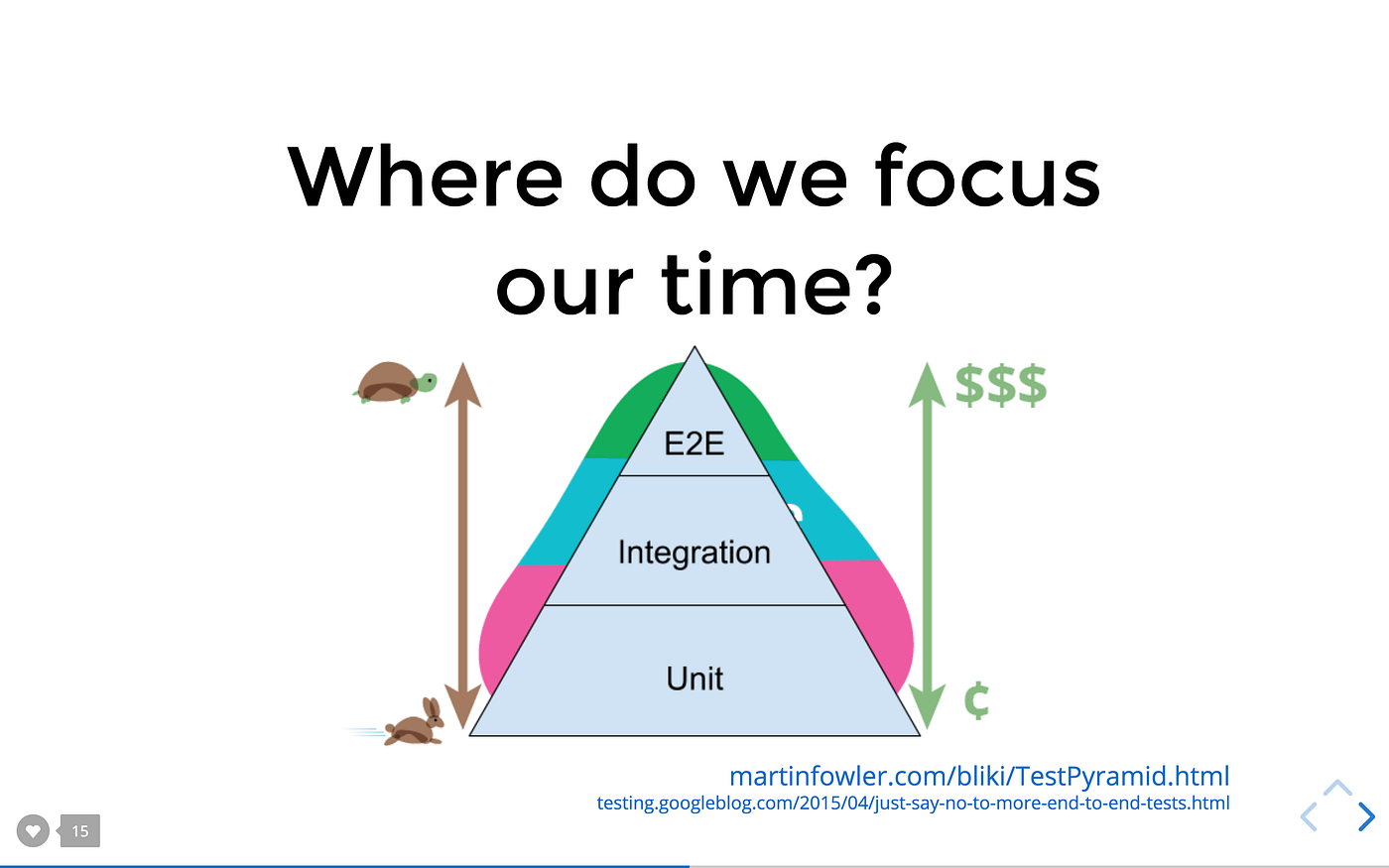
- there a three separate levels of testing: Unit, Integration, and End to End(E2E) tests.
- The difference between those kinds of tests is mainly the amount of code that is covered by a single test. While you focus on the validity of a single component or function in a unit test. You want to ensure the manner of function between certain components/function in an integration test till you test a certain behavior of your system while imitating the actions a possible user may trigger in your system with an E2E test.
- Distribution of your effort to test the different levels
You may know the testing pyramid? Its shape defines the number of tests that should be written. As you are moving up on the pyramid the tests are getting larger and less frequent. Developers at Google suggest 70/20/10 distribution, 70% unit test, 20% integration and 10% end-to-end test.
testing pyramid from Kent C. Dodds’ slides
- Snapshots Another neat feature Jest provides is the possibility to snapshot a certain state of your application. During each test run your previous snapshot will be compared with the current snapshot. If a difference occurs the snapshot test will fail. Snapshot tests are useful if you do not want your UI or certain function results to change unexpectedly.
- The tools you use for integration testing are the same as you use for Unit testing. The difference starts when you decide on what to render and test. In general, the best thing to do when writing integration tests is to stop mocking other components or functions. Also, render every component which is defined on a global level throughout your application, e.g. react-router or redux. If one of your components uses one of those libraries, eventually it would call a function of those libraries during execution. In this case, you want to validate whether the integration works out as planned.
- Mocking server communication So in general with an integration test, you literally test the integration between certain components within your frontend. Also, you want to be sure to mock all requests to a possible backend or third party with the expected output the request would result with.
- Use Presentational and Container component pattern
- Presentational components are those who don’t have internal state. Their role is to show certain pieces of UI. They are provided data via props or context api.
- Container components are those which deals with business logic. They usually have some state and only render presentational components based on the logic.
- This way Presentational and Container components complete the puzzle together. By dividing the responsibilities, code becomes easier to maintain and debug.