中文版: README.md




TSBot Mod is a Minecraft Forge server-side mod. It aims to break down the barriers between games and voice software, allowing players to search, play, and control music bots in TeamSpeak 3 channels directly through chat commands in MC, achieving a seamless "MC Request → TS3 Playback" experience.
- Demo
- Core Prerequisites
- Project Background and Principles
- Technical Architecture and Design Highlights
- ServerQuery Protocol and Implementation Details
- Features
- Deployment Guide
- Building from Source
- Command Reference
- Troubleshooting Guide
- Acknowledgments
- License
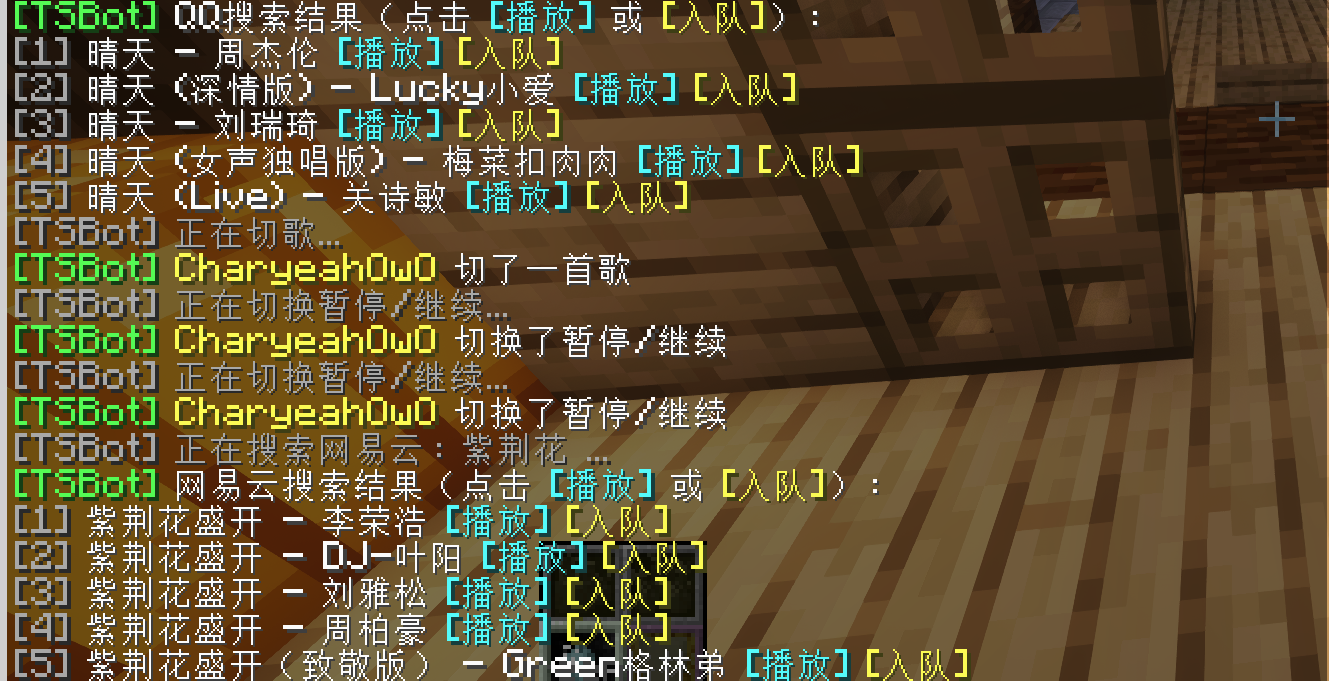
| Minecraft In-Game Interaction (Request/Skip) | TeamSpeak 3 Bot Response |
|---|---|
 |
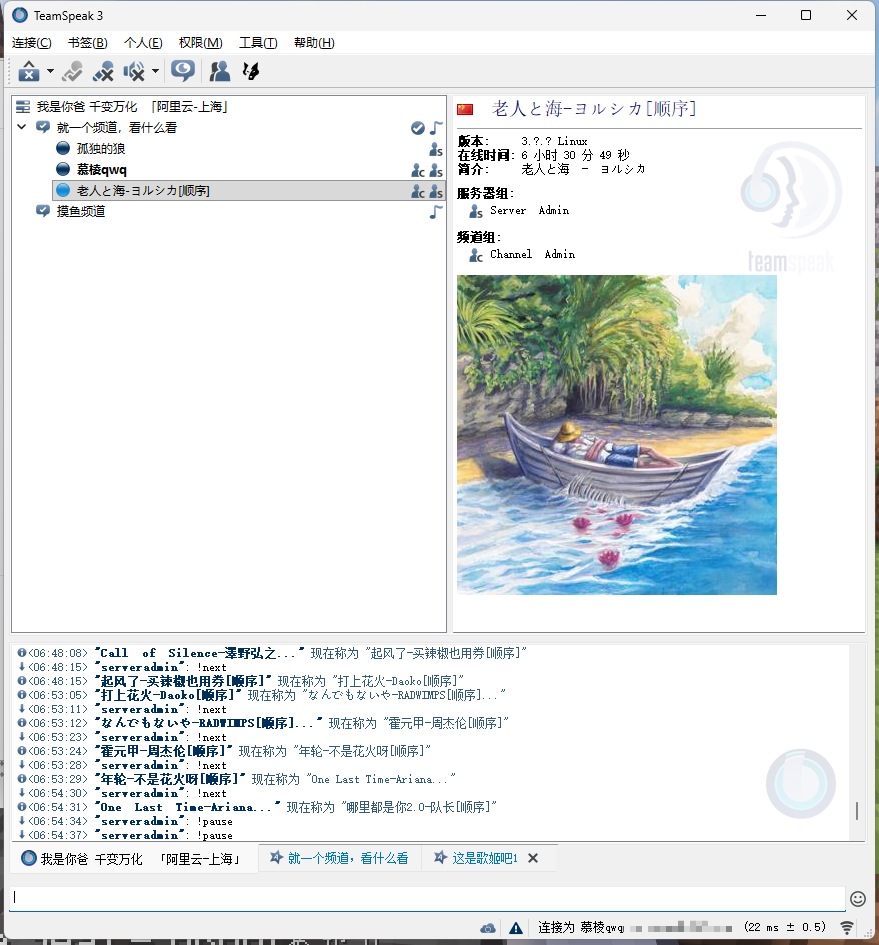 |
| Players search and click play in chat | Bot plays music synchronously, displaying cover and info |
Important
This mod essentially serves as an "MC-side extended control client" for the following projects, acting merely as a "command transporter." Before using this mod, please ensure you have fully met all the following conditions, otherwise this mod will have no practical effect.
This mod strongly depends on TeamSpeak 3's ServerQuery port (default 10011) and an account with corresponding execution permissions (such as serveradmin).
If you are using cheap shared servers or channel servers purchased from Taobao or other channels, merchants usually do not provide ServerQuery permissions. In this case, this mod absolutely cannot be used! Please ensure you have full underlying control of the TS3 server (recommended to use an independent VPS to build your own TS3 server).
- Core Playback Engine: TS3AudioBot-Plugin-Netease-QQ
- An excellent TS3 music plugin developed by @RayQuantum. Supports NetEase Cloud Music/QQ Music dual-platform playback, VIP song login, lyrics, and multiple playback modes.
- All playback commands sent by TSBot Mod (such as
!wyy play, etc.) are ultimately executed by this plugin on the TeamSpeak 3 side. - Deployment Recommendation: Recommended to deploy using Docker, see its official README for details.
- Underlying Bot Framework: TS3AudioBot
- The underlying runtime carrier for TeamSpeak 3 audio bots.
- Music API Services (Shared by Both Ends)
Many hardcore gaming communities are accustomed to using both Minecraft servers and TeamSpeak 3 for voice communication. With the above TS3 plugin, channels already have powerful music request capabilities.
The Pain Point: Players must Alt + Tab to switch to the TS3 client every time they want to request or skip songs, severely interrupting game immersion.
The Solution: TSBot Mod acts as a bridge, precisely distributing player interactions in the MC chat bar to music APIs (to get data) or TS3 ServerQuery (to execute playback), allowing players to completely stay within the game interface.
Warning
This mod divides commands into two independent data paths at the underlying level: "Search and Request" and "Basic Control":
sequenceDiagram
    actor Player as MC Player
    participant Mod as TSBot Mod (Server)
    participant API as Music API (NetEase/QQ)
    participant TS3 as TS3AudioBot

    Note over Player, TS3: Path One: Search and Request Flow
    Player->>Mod: Input /ts qq/wyy search xxx
    Mod->>API: [Async] Call HTTP interface to search
    API-->>Mod: Return JSON search results
    Mod-->>Player: Display search results list in-game
    Player->>Mod: Click [Play] button in chat
    Mod->>TS3: Convert to !wyy/qq play xxx command via ServerQuery

    Note over Player, TS3: Path Two: Control Flow (Completely bypasses Music API)
    Player->>Mod: Input /ts pause or /ts next
    Mod->>TS3: Send !pause / !next command directly via ServerQuery
- 🚀 Fully Asynchronous (Non-blocking): This is the most core performance guarantee of this Mod. All network I/O operations involving calls to music APIs are executed asynchronously using
CompletableFuture, absolutely never blocking the Minecraft main thread. Even if the API responds slowly, it will not affect the server's TPS at all. - 🔌 Minimal Control Flow: As shown in the diagram above, for simple control commands (such as skip, pause), the mod directly communicates with TS3 through ServerQuery, avoiding unnecessary API request overhead.
- ⚙️ Lightweight ServerQuery Client Implementation: Instead of relying on bloated third-party libraries, it implements a minimal ServerQuery loop (escaping, Welcome Banner consumption, login, text-message send, disconnect) to keep behavior explicit and debuggable.
- 🛡️ Robust Error Handling: Complete exception handling for connection timeouts, authentication failures, API downtime, or empty configurations, with clear error feedback to players in-game.
| Core Class Name | Core Responsibility |
|---|---|
TSBotMod |
Forge Mod entry point, Brigadier command tree registration, receives player commands |
MusicSearchService |
Asynchronous HTTP search implementation, responsible for calling NetEase / QQ Music APIs and parsing results |
PlayQueue |
Playback queue management, distinguishes "play immediately" and "enqueue", and is responsible for broadcasting notifications to the entire server |
TS3QueryClient |
TS3 ServerQuery protocol underlying client implementation, responsible for sending !play / !next and other commands |
This section is for server owners/developers who want to understand exactly how the mod talks to TeamSpeak 3, including current behavior and boundaries.
The current implementation creates a new TCP connection for each send, with 5s connect timeout + 5s read timeout. The per-command sequence is:
- Connect to
host:port - Consume the Welcome Banner (read line-by-line, up to 10 lines)
login client_login_name=... client_login_password=...(hard-requireserror id=0, otherwise treated as auth failure)use 1(fixed virtual server id=1; failures are logged as warnings)sendtextmessage targetmode=3 msg=...(sends the bot command as a text message; failures are logged as warnings)quit
The mod does not call TS3AudioBot's HTTP/Web API. Instead, it constructs native commands the bot/plugin understands and sends them via sendtextmessage:
- Request:
!wyy play <songId>/!qq play <songId> - Enqueue:
!wyy add <songId>/!qq add <songId> - Control:
!next,!pause
targetmode=3 means a server message. If your bot/plugin only listens to channel messages (targetmode=2) or other sources, you may see "sent" logs but no bot reaction.
To comply with ServerQuery parameter encoding, both login credentials and the msg= payload are escaped first (common substitutions below):
| Raw | Escaped |
|---|---|
\ |
\\ |
/ |
\/ |
| space | \s |
| ` | ` |
\n |
\n |
\r |
\r |
\t |
\t |
For each ServerQuery command, the client reads lines until it encounters a line starting with error and treats it as the final result (up to 20 lines).
login: must beerror id=0, otherwise the send is aborted as authentication failureuse 1/sendtextmessage: non-zeroerror idis logged as a warning and does not throw
- Virtual server is hardcoded as
use 1; if your TS3 instance uses a different virtual server id, the message may go to the wrong instance - Message delivery is hardcoded as
targetmode=3; if your bot/plugin does not process server messages, you may need to adjust bot-side settings or modify the implementation
- 🔍 Dual-Source Search: Supports NetEase Cloud Music / QQ Music keyword search, results displayed as interactive text in MC chat.
▶️ Quick Interaction: Search results come with[Play]and[Enqueue]hover buttons, click to play.- ⏭ Basic Control: Supports
/ts next(skip) and/ts pause(pause/resume). - 📢 Server-Wide Broadcast: When players request or skip songs, triggers server-wide dynamic notifications (including operator and song name), creating a great atmosphere.
- ⚙️ Out-of-the-Box: Automatically generates annotated
tsbot-config.tomlon first launch. - 🔓 No Permission Barrier: No OP permissions required, all online players can use it.
Prerequisites: Please ensure all services in the above [Core Prerequisites] are running, and you have TS3 ServerQuery permissions, before installing this mod.
Go to Releases to download the latest tsbotmod-x.x.x.jar, place it in the Minecraft server's mods/ folder and start the server once.
After the server starts, it will generate a config/tsbot-config.toml file. Please configure according to your actual situation:
[General]
# TS3 ServerQuery connection information
host = "your-ts3-server.com"       # TS3 server IP/domain
port = 10011                       # ServerQuery port (default 10011)
user = "serveradmin"               # Administrator account
password = "YOUR_PASSWORD"         # ⚠️ Note: This is the Query password, not the channel password!

# Default music source (wyy or qq)
default_source = "wyy"

# Music API addresses (must include http:// and no trailing slash)
netease_api = "http://127.0.0.1:3000"
qq_api = "http://127.0.0.1:3300"
Notes:
- ServerQuery virtual server is currently fixed as
use 1(virtual server id=1) - Bot commands are currently delivered via server messages (
sendtextmessage targetmode=3)
After saving the configuration, restart the server. If the console outputs the following content, it means the connection is successful:
[TSBotMod] TSBotMod V2.0 loaded, waiting for server commands.
[TSBotMod]   TS3 server connection ready...
[TSBotMod]   NetEase API: Connected normally
[TSBotMod]   QQ Music API: Connected normally
Environment Requirements: JDK 17 (Required)
git clone https://github.com/CharyeahOwO/TSBot-Mod.git
cd TSBot-Mod
# Linux / macOS
JAVA_HOME=/path/to/jdk17 ./gradlew build
# Windows
gradlew build -Dorg.gradle.java.home="C:\path\to\jdk17"
Build artifacts are located in the build/libs/ directory.
Warning
Do not use JDK 21 or higher for compilation, otherwise it will cause Forge to throw an Unsupported class file major version 65 exception during loading.
| Command Syntax | Function | Usage Example |
|---|---|---|
/ts wyy search <keyword> |
Search NetEase Cloud Music | /ts wyy search Sunny Day |
/ts qq search <keyword> |
Search QQ Music | /ts qq search Qi Li Xiang |
/ts wyy play <ID> |
Play immediately (NetEase) | Click [Play] on search results directly |
/ts wyy add <ID> |
Add to queue (NetEase) | Click [Enqueue] on search results directly |
/ts next |
Skip to next song | /ts next |
/ts pause |
Pause / Resume playback | /ts pause |
Note: The above MC commands are parsed into native TS3 bot commands such as !wyy play in the background and sent for execution via ServerQuery.
- Q: Why does the console report an error unable to connect to ServerQuery or port 10011?
- A: First check if your TS3 server firewall/security group has allowed port 10011 (TCP). Second, if you are using a shared TS3 channel server purchased from Taobao for tens of dollars, merchants will not give you ServerQuery permissions and ports. This situation has no solution. Please rent a VPS to build your own TS3.
- Q: Why does TS3 log keep reporting
invalid loginname or passworderrors?- A: The
passwordin the configuration file is incorrect. The ServerQuery password is generated in the console when the TS3 server is first initialized. If you forgot it, you may need to reset the TS3 server database or use related scripts to regenerate it.
- A: The
- Q: Search works fine, but clicking play has no response/no sound?
- A: This Mod only sends commands. Please check if your deployed TS3AudioBot and Netease-QQ plugin are working normally, if the bot is in your channel, and if the bot itself has playback permissions.
- Q: The console says "sent", but the bot never reacts at all. Why?
- A: Check whether your message delivery chain matches your bot setup. The current implementation sends
sendtextmessage targetmode=3(server messages) and usesuse 1(virtual server id=1). Make sure your bot/plugin listens to server messages and your TS3 runs on id=1.
- A: Check whether your message delivery chain matches your bot setup. The current implementation sends
- Q: How can I see low-level TS3 responses to locate the failure stage?
- A: Set the logger level for
TS3QueryClienttoDEBUG. It prints line-by-line ServerQuery responses, including the finalerror id=...line, which helps determine whether the failure is at auth, server selection, or message sending.
- A: Set the logger level for
- Q: QQ Music search results are always empty?
- A: Please check your QQ Music API container status. You can use
curl http://your-IP:3300/search?key=testin the server background to see if there is JSON data returned.
- A: Please check your QQ Music API container status. You can use
This project stands on the shoulders of giants. Special thanks to the following open-source projects and communities:
- 🌟 TS3AudioBot-Plugin-Netease-QQ (by @RayQuantum) — Provides core playback parsing capabilities.
- Splamy/TS3AudioBot
- Binaryify/NeteaseCloudMusicApi
- jsososo/QQMusicApi
- Minecraft Forge
(This README was initially generated by Claude Opus 4.6 and manually polished and proofread. If you have any issues, please submit Issues)
This project is for learning and exchange purposes only, and does not involve any commercial use. If you have any questions or suggestions, please provide feedback through Issues If the project becomes popular, we will consider making an official version, including Paper version and Fabric However, it's so niche that it probably won't become popular
All Rights Reserved. See LICENSE.txt.