Reimagining UICollectionView
A modern Swift framework for building composable data-driven collection view.






- Rewritten
UICollectionViewon top ofUIScrollView. - Automatically diff data changes and update UI.
- Superb performance through cell reuse, batched reload, visible-only diff, & the use of swift value types.
- Builtin layout & animation systems specifically built for collections.
- Composable sections with independent layout.
- Strong type checking powered by Swift Generics.
CollectionView is CollectionKit's alternative to UICollectionView. You give it a CollectionProvider object that tells CollectionView how to display & handle a collection.
Provider is easy to construct and composable as well. You can combine multiple providers together and easily create sections within a single CollectionView. Each provider can also have its own layout and presenter.
CollectionKit implements its own powerful layout system. Each provider can have its own layout. You can also specify a layout when combining multiple providers together. CollectionKit provides some of the common layouts out of the box, but you can also create your own layout.
- FlowLayout - better
UICollectionFlowLayout- supportsalignItems,justifyContent, &alignContent - WaterfallLayout - a pinterest like waterfall layout
- RowLayout - a single row flowlayout that allows cell to fill up empty spaces.
- InsetLayout - adds extra padding around a existing layout
- TransposeLayout - rotate an existing layout. (vertical to horizontal or vice versa)
- OverlayLayout - overlay items on top of each other.
CollectionKit offers a presenter system which allows you to create fancy animations and adjust how cells are displayed. Presenter can be applied to individual providers, cells, or to entire CollectionView.
Here are some examples of custom presenters that is included in the example project. Note that they can be used in combination with any layout. Here we are using a transposed waterfall layout.
| Wobble | Edge Shrink | Zoom |
|---|---|---|
 |
 |
 |
Presenter can also perform animations when a cell is added/moved/deleted. Here is an example showing a 3d scale animation with a cascading effect.

CocoaPods
pod "CollectionKit"Carthage
github "SoySauceLab/CollectionKit"
To build a basic provider, here is what you need:
let provider1 = CollectionProvider(
    data: [1,2,3, 4], // provide an array of data, data can be any type
    viewUpdater: { (label: UILabel, index: Int, data: Int) in
        // update your view according to your data, view can be any subclass of UIView
        label.backgroundColor = .red
        label.layer.cornerRadius = 8
        label.textAlignment = .center
        label.text = "\(data)"
    },
    sizeProvider: { (index: Int, data: Int, collectionSize: CGSize) -> CGSize in
        return CGSize(width: 50, height: 50) // return your cell size
    }
)
To display the content, just assign this provider to any instance of CollectionView.
collectionView.provider = provider1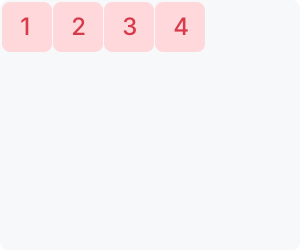
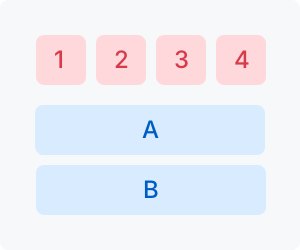
Use CollectionComposer to combine multiple providers into one. You can also supply layout objects to Provider & Composer.
provider1.layout = FlowLayout(spacing: 10)

let provider2 = CollectionProvider(
    data: ["A", "B"],
    viewUpdater: { (label: UILabel, index: Int, data: String) in
        label.backgroundColor = .blue
        label.layer.cornerRadius = 8
        label.textAlignment = .center
        label.text = data
    },
    layout: FlowLayout(spacing: 10),
    sizeProvider: { (index: Int, data: String, collectionSize: CGSize) -> CGSize in
        return CGSize(width: 230, height: 50)
    }
)

collectionView.provider = CollectionComposer(
    layout: FlowLayout(spacing: 20, justifyContent: .center, alignItems: .center),
    provider1,
    provider2
)
// apply to the entire CollectionView
collectionView.presenter = WobblePresenter()

// apply to a single section, will override CollectionView's presenter
provider1.presenter = WobblePresenter()

// apply to a single view, will take priority over all other presenters
view.collectionPresenter = WobblePresenter()
See the Getting Started Guide for a in-depth tutorial on how to use CollectionKit.
Join our public Slack!