An alternative to sending DfE::Analytics database events is database replication.
DfE::Analytics database events are also used for replicating data. However, there have been a number issues outlined in the Data health import issues section. Using Airbyte database replication avoids these issues.
Airbyte is a an open source data integration platform that handles database replication reliably. The decision to use Airbyte for database replication is documented in this ADR.
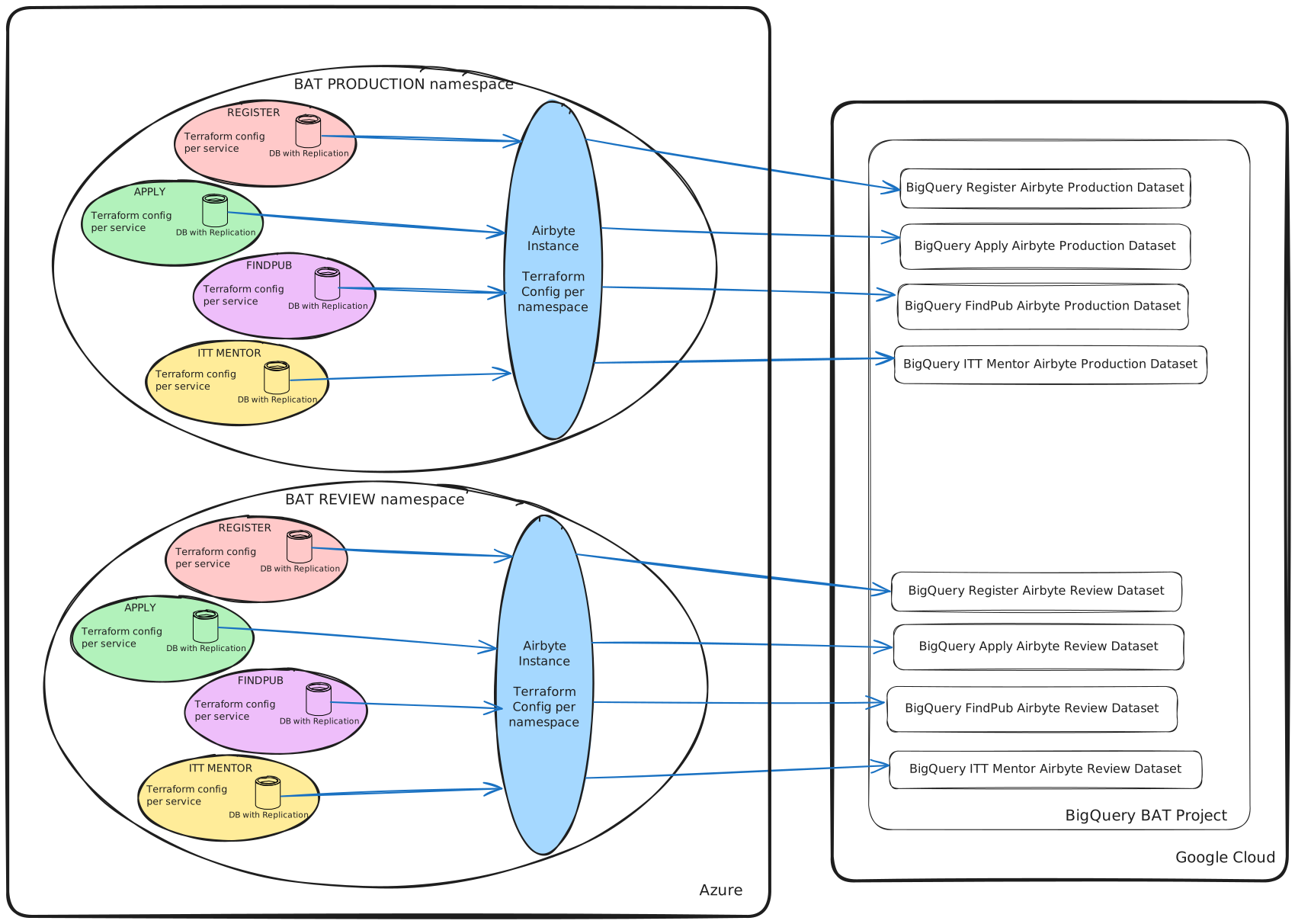
There will be a single instance of Airbyte per namesapce. Note the Airbyte is installed and configured by SD DevOps through Terraform configuration.
Main configuration options for Airbyte:
-
Only final Airbyte tables are used in BigQuery. The final tables mirror the synchronised data, column names, and column types of the source tables
-
The internal Airbyte raw tables are present in BigQuery, but they will not be used. Any data columns in raw tables will have the hidden policy tag applied
-
Rails schema changes are automatically propagated and the schema maintained
-
Airbyte has standard Postgres to BigQuery type mapping for column types
-
The service database is synchronised with BigQuery every 15 minutes
-
The final tables are using incremental append mode, with no deduplication. This results in a new row in the final table for every change in the service table. This allows Dashboards and Reports to have access the latest and historical versions of the data.
-
Most of the configuration is maintained by SD DevOps using terraform. Any service specific configuration is delegated to the service.
-
Only tables and columns specified in the
analytics.ymlconfig file are synchronised -
Any columns with sensitive data listed in the
analytics_blocklist.ymlconfig file will have the hidden policy tag applied. A rails rake task is available for this:
rake dfe:analytics:big_query_apply_policy_tags -
An airbyte configuration file (
airbyte_stream_config.json) required by terraform for provisioning the connection can be generated fromanalytics.yml. A rails rake task is available for this:
SUPPRESS_DFE_ANALYTICS_INIT=1 rake dfe:analytics:regenerate_airbyte_stream_config -
Following a schema migration the airbyte connection config can be regenerated by the rails rake task:
rake dfe:analytics:airbyte_connection_refresh -
Following a DevOps deployment all required airbyte deployment tasks (see below) can be executed by the rails rake task:
rake dfe:analytics:airbyte_deploy_tasks -
The tasks required following a DevOps deployment are summarised below:
- Wait for any rails database migrations
- Refresh the airbyte connection to update airbyte with any schema changes
- Retrieve status of the last airbyte sync job
- If the status of the last airbyte sync job is not 'running' then start a new sync
- Wait for the sync job to finish - note that the wait time is currently up to 1 hour to cater for large databases
- Apply hidden policy tags to all PII fields in the final airbyte tables
-
DfE Analytics will still be used to stream the following event types to BigQuery:
- Web request events
- API request events
- Custom events
The steps below outline how to setup Airbyte for a Rails App with Postgres.
The source should be set to the Postgres database with replication using CDC. See the Airbyte Postgres Source documentation for further details. SD DevOps provide this setup through terraform configuration.
WIF Should be used as the authentication method for the Airbyte connection to BigQuery. WIF is set through the service account JSON (See note below)
A dedicated dataset for the final airbyte tables with a service account and permissions should be setup. See the sections below for BigQuery Datasets and WIF Configuration.
See the Airbyte BigQuery Destination documentation for further details on setting up the destination. SD DevOps provide this setup through terraform configuration.
NOTES:
- Due to the inability to control the Airbyte destination connector process though ENV variables we are unable to retrieve an azure token from the azure tenant token endpoint. To workaround this we to use a proxy for the credential source. The proxy is an API server that runs the ruby server from the dfe-azure-access-token repo. This is controlled through the Service Account JSON. See the section below for WIF Configuration.
Note that the raw internal Airbyte tables are not required in the destination. However, this option is not configurable and it is not possible to remove internal Airbyte tables from the destination.
SD DevOps provide this setup through terraform configuration.
A connection defines the source and destination as well as schema mappings ie which tables and columns to synchronise. See the Airbyte Connections and Streams documentation for further details.
SD DevOps provide this setup through terraform configuration.
We require the following datasets for the Airbyte setup.
-
A dataset for the internal airbyte raw tables with fixed name:
airbyte_internal- One required per BigQuery project
- The expiry on the table should be set to 1 day
- Encryption should be changed to the project Cloud KMS Key
- The GCP Service account used by Airbyte should have permissions below on this dataset:
BigQuery Data Owner
Data Catalog Admin
-
A dataset for the final airbyte tables with naming convention:
<service_name>_airbyte_<environment>Eg.register_airbyte_qa- One required per service
- An expiry should NOT be set
- Encryption should be changed to the project Cloud KMS Key
- The GCP Service account used by Airbyte should have permissions below on this dataset:
BigQuery Data Owner
Data Catalog Admin
The steps below outline how to setup WIF for service accounts using either gcloud shell scripts or gcloud console.
The client process connecting to GCP should have WIF enabled. SD DevOps provide this through terraform configuration.
If the client process is enabled for WIF, then it will have the following properties per environment (namespace):
The following environment variables will be set:
AZURE_CLIENT_ID
AZURE_FEDERATED_TOKEN_FILE
AZURE_TENANT_ID
Within Azure a managed identity will also exist for each namespace. The managed identity will have the text gcp-wif within it's name.
Please note the Managed Identity Object ID for each namespace. This a uuid that will be required in later steps below.
If WIF is not enabled, then contact SD DevOps in the #teacher_services_infra on getting this enabled.
For each project a workload identity pool with the name azure-cip-identity-pool should exist.
If this does not exist then one can be created with either the create gcp workload identity pool gcloud script or from the IAM gcloud console using the attributes specified in the gcloud script.
For each project a workload identity pool with the name azure-cip-oidc-provider should exist.
If this does not exist then one can be created with either the create gcp workload identity pool provider gcloud script or from the IAM gcloud console using the attributes specified in the gcloud script.
A service account with the correct permissions on the airbyte final and internal raw datasets should exist.
If this does not exist then follow the steps below:
- Use the exist WIF account for the events table (Create an appender service account) or create a new service account for the airibyte dataset
The service account should be given the following permissions for the given entities:
| Entity | Permission |
|---|---|
| Dataset | BigQuery Data Owner Data Catalog Admin |
| IAM | BigQuery Job User |
| Policy Tag Taxomy | Data Catalog Viewer |
SD DevOps create and configure the service account through terraform configuration.
The service account defined in step 4 above should be granted access using service account impersonation.
If this does not exist then access can be granted with either the update wif service account permissions gcloud script or from the IAM gcloud console, by navigating to the "GRANT ACCESS" window. Use the the attributes specified in the gcloud script.
Download the JSON WIF Credentials file either the create wif client credentials gcloud script or from the IAM gcloud console, by navigating to the "CONNECTED SERVICE ACCOUNTS" tab. Use the the attributes specified in the gcloud script.
In the JSON WIF Credentials file, set the credential source to the dfe-azure-access-token API endpoint. These credentials can then be used to set the Service Account Key JSON in the airbyte destination connector.
SD DevOps create and configure the JSON WIF Credentials file through terraform configuration.
Migration of sending events from DfE Analytics to Airbyte will be done in several phases.
The first phase will focus on migrating the database create, update and delete events from being sent as events to database replication using Airbyte. A subsequent phase will focus on the mechanism used to send Web request events, API request events, Custom events from being emitted using queueing to database replication of an events database table.
A more detailed document on the migration can be in the Data Ingestion Migration Plan.
In summary the first phase of the migration will focus on the following:
- Designing and implementing dual-running for DfE::Analytics and Airbyte for database events
- Amending dfe-analytics-dataform project to support Airbyte-based replicated data
- Validation and reconciliation of data between old and new sources
- Updating lineage, documentation, and metadata for transitioned datasets
- Health checks and monitoring integrations for Airbyte jobs
- Coordinating service-by-service migration across multiple BigQuery projects
| ISSUE | MITIGATION | RISK (L/M/H) |
|---|---|---|
| AIrbyte uses disk space for logging. Default setup allocates minimal disk space. |
Use Azure storage used with lifecycle rule. Delete blobs not modified for 14 days. Add disk space monitoring |
L |
| Airbyte uses internal Postgres database for operational purposes. Default setup allocates minimal db storage space. |
Use larger Azure Postgres database. Use Airbyte config: TEMPORAL_HISTORY_RETENTION_IN_DAYS=7Add Database size monitoring |
L |
| Single Airbyte instance per namespace maybe overloaded for projects with numerous services. | Add CPU/Memory monitoring and alerts and resize CPU/Memory if required | M |
| Airbyte outage may cause replication log bloat and lead to a service database outage. |
Limit max replication log size to prevent log bloat. This must be customised per service. May result in changes being missed during Airbyte outage. Add replication monitoring, |
M |
| Airbyte ongoing version maintenance. Upgrades may break APIs being called if APIs are not backwards compatible. |
Check release notes before version upgrades. |
L |