The following section is meant to explain how to plug-and-play algorithms in DIDA platform.
Generally speaking, there are two kind of algorithms:
- Batch algorithms usually runned on livy docker container with the help of Draco
- Usually they need to install library dependencies on livy container (dependencies expressed in solution's guide)
- Real time algorithms usually runned on sparkmaster container
- They should have every dependency already installed on sparkmaster container, however further modifications may need other libraries
In both case is reccomended to check if the execution starts correctly and wait for the first results to be displayed on screen.
Before running algorithms it is necessary
docker exec -it  sparkmasterdemo bash

# make folders in hdfs

hdfs dfs -mkdir /user/
hdfs dfs -mkdir /user/hdfs/
hdfs dfs -mkdir /user/hdfs/jobs/
hdfs dfs -mkdir /user/hdfs/jobs/algo
hdfs dfs -mkdir /user/hdfs/jobs/algo/code
hdfs dfs -mkdir /user/hdfs/jobs/algo/data


# Copy necessary data to HDFS
hdfs dfs -copyFromLocal /data/jobs/py/algorithm.py /user/hdfs/jobs/algo
hdfs dfs -copyFromLocal /data/jobs/py/data.csv /user/hdfs/jobs/data
From inside docker container
docker exec -it sparkmasterdemo bash
Following example runs python algorithm with one input parameter - data.csv. Both files needs to be uploaded to HDFS before executing command. How to do that, please check section above.
spark-submit --master yarn
--driver-memory 512m --num-executors 2 --executor-cores 1 --executor-memory 512m
--py-files algorithm.py --data hdfs://master:9000/user/hdfs/jobs/algo/data/data.csv
Then open nifi at localhost:9090 and create a workflow like this:
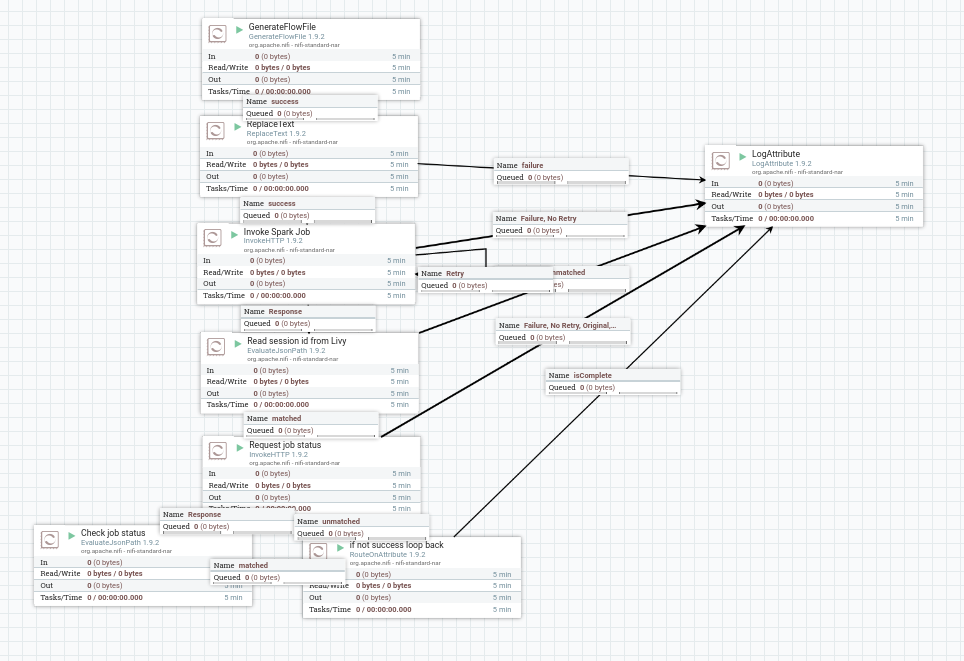
In NIFI "ReplaceText" Process, under Properties, change "Replacement Value" to:
{"file": "${algorithm}", "queue":"root.PROJECT", "executorMemory":"512mg", "executorCores":1, "numExectors":2, "driverMemory":512m, "args":["--data", "${data}"]}

where:
Under NIFI variables
-----------------------------------------
algorithm: hdfs://master:9000/user/hdfs/jobs/algo/code/algorithm.py
data:  hdfs://master:9000/user/hdfs/jobs/algo/data/data.csv
Same logic occurs when Draco executes Submit REST processor
curl --location --request POST 'http://localhost:8998/batches' \
--header 'Content-Type: application/json' \
--data-raw '{
    "file" : "hdfs://master:9000/user/hdfs/jobs/algo/code/algorithm.py",
    "conf": {
        "spark.jars.packages": "org.apache.spark:spark-sql-kafka-0-10_2.11:2.4.5"
        },
    "args" : ["hdfs://master:9000/user/hdfs/jobs/algo/data/data.csv"]
}'
docker exec -it  livy bash

for x in $(yarn application -list -appStates ACCEPTED | awk 'NR > 2 { print $1 }'); do yarn application -kill $x; done