-
Notifications
You must be signed in to change notification settings - Fork 0
Expand file tree
/
Copy pathREADME.md
More file actions
440 lines (337 loc) · 25 KB
/
README.md
File metadata and controls
440 lines (337 loc) · 25 KB
1
2
3
4
5
6
7
8
9
10
11
12
13
14
15
16
17
18
19
20
21
22
23
24
25
26
27
28
29
30
31
32
33
34
35
36
37
38
39
40
41
42
43
44
45
46
47
48
49
50
51
52
53
54
55
56
57
58
59
60
61
62
63
64
65
66
67
68
69
70
71
72
73
74
75
76
77
78
79
80
81
82
83
84
85
86
87
88
89
90
91
92
93
94
95
96
97
98
99
100
101
102
103
104
105
106
107
108
109
110
111
112
113
114
115
116
117
118
119
120
121
122
123
124
125
126
127
128
129
130
131
132
133
134
135
136
137
138
139
140
141
142
143
144
145
146
147
148
149
150
151
152
153
154
155
156
157
158
159
160
161
162
163
164
165
166
167
168
169
170
171
172
173
174
175
176
177
178
179
180
181
182
183
184
185
186
187
188
189
190
191
192
193
194
195
196
197
198
199
200
201
202
203
204
205
206
207
208
209
210
211
212
213
214
215
216
217
218
219
220
221
222
223
224
225
226
227
228
229
230
231
232
233
234
235
236
237
238
239
240
241
242
243
244
245
246
247
248
249
250
251
252
253
254
255
256
257
258
259
260
261
262
263
264
265
266
267
268
269
270
271
272
273
274
275
276
277
278
279
280
281
282
283
284
285
286
287
288
289
290
291
292
293
294
295
296
297
298
299
300
301
302
303
304
305
306
307
308
309
310
311
312
313
314
315
316
317
318
319
320
321
322
323
324
325
326
327
328
329
330
331
332
333
334
335
336
337
338
339
340
341
342
343
344
345
346
347
348
349
350
351
352
353
354
355
356
357
358
359
360
361
362
363
364
365
366
367
368
369
370
371
372
373
374
375
376
377
378
379
380
381
382
383
384
385
386
387
388
389
390
391
392
393
394
395
396
397
398
399
400
401
402
403
404
405
406
407
408
409
410
411
412
413
414
415
416
417
418
419
420
421
422
423
424
425
426
427
428
429
430
431
432
433
434
435
436
437
438
439
440
# react-multi-carousel 👋
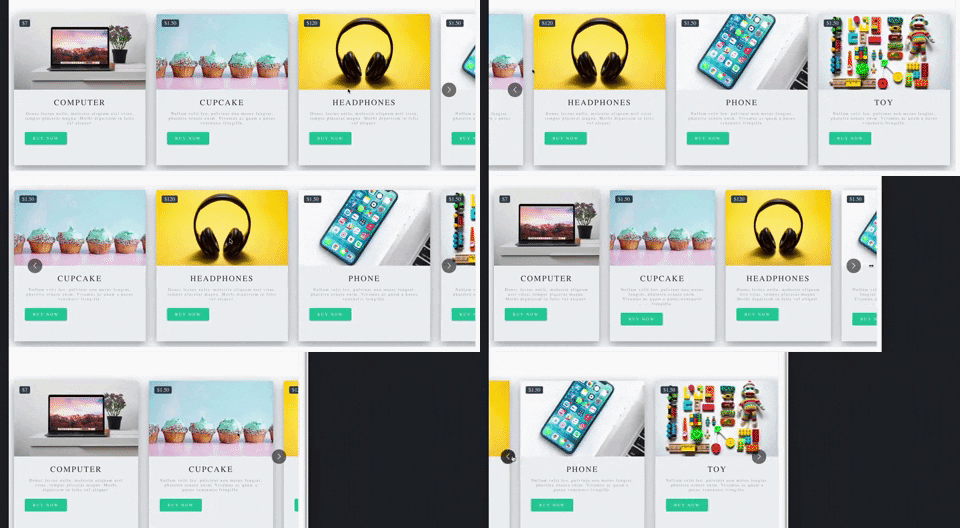
Production-ready, lightweight fully customizable React carousel component that rocks supports multiple items and SSR(Server-side rendering) with typescript.
Don't forget to leave a star if this project help you reduce time to develop.
[](https://packagequality.com/#?package=react-multi-carousel)
[](https://www.npmjs.com/package/react-multi-carousel)
[](https://travis-ci.org/YIZHUANG/react-multi-carousel)
<a href="https://w3js.com/react-multi-carousel">
<img alt="Documentation" src="https://img.shields.io/badge/documentation-yes-brightgreen.svg" target="_blank" />
</a>
<a href="https://github.com/YIZHUANG/react-multi-carousel/graphs/commit-activity">
<img alt="Maintenance" src="https://img.shields.io/badge/Maintained%3F-yes-green.svg" target="_blank" />
</a>
<a href="https://github.com/YIZHUANG/react-multi-carousel/blob/master/LICENSE">
<img alt="License: MIT" src="https://img.shields.io/badge/License-MIT-yellow.svg" target="_blank" />
</a>
[](https://app.fossa.io/projects/git%2Bgithub.com%2FYIZHUANG%2Freact-multi-carousel?ref=badge_shield)
[](https://david-dm.org/YIZHUANG/react-multi-carousel)
[](https://snyk.io/test/github/YIZHUANG/react-multi-carousel?targetFile=package.json)

### Features.
- Server-side rendering
- Infinite mode
- Custom animation
- AutoPlay mode
- Auto play interval
- Supports images, videos, everything.
- Responsive
- Swipe to slide
- Mouse drag to slide
- Keyboard control to slide
- Multiple items
- Show / hide arrows
- Custom arrows / control buttons
- Custom dots
- Custom styling
- Accessibility support
- Center mode.
- Show next/previous set of items partially
### Shoutouts 🙏
<img src="/browserstack-logo-600x315.png" height="80" title="BrowserStack Logo" alt="BrowserStack Logo" />
Big thanks to [BrowserStack](https://www.browserstack.com) for letting the maintainers use their service to debug browser issues.
## [Documentation](https://w3js.com/react-multi-carousel/)
## Show your support
Give a ⭐️ if this project helped you!
## Other important links.
- [Code sandbox](https://codesandbox.io/embed/2omn67p8kj)
- [Contributing](https://github.com/YIZHUANG/react-multi-carousel/blob/master/contributing.md)
- [Changelog](https://github.com/YIZHUANG/react-multi-carousel/blob/master/CHANGELOG.md)
- [Releases](https://github.com/YIZHUANG/react-multi-carousel/releases)
- [TypeScript usage](https://github.com/YIZHUANG/react-multi-carousel/blob/master/TypeScriptUsage.md)
- [SSR demo](https://react-multi-carousel.now.sh/)
## Bundle size
[Bundle-size](https://bundlephobia.com/result?p=react-multi-carousel).
2.5kB
## Demo.
Documentation is [here](https://w3js.com/react-multi-carousel/).
Demo for the SSR <https://react-multi-carousel.now.sh/>
Try to disable JavaScript to test if it renders on the server-side.
Codes for SSR at [github](https://github.com/YIZHUANG/react-multi-carousel/blob/master/examples/ssr/pages/index.js).
Codes for the documentation at [github](https://github.com/YIZHUANG/react-multi-carousel/blob/master/stories/index.stories.js).
## Install
```
$ npm install react-multi-carousel --save
import Carousel from 'react-multi-carousel';
import 'react-multi-carousel/lib/styles.css';
```
### How the SSR mode works?
The current most common solution is to detect the device type of the user based on the user agent. (server-side).
Based based on the device type, we decided how many items we are showing in the Carousel.
For example, we want to show 3 items at the same time on desktop (screen size 1024 - 2000px possibily) and 2 items on tablet(700px - 1024px) and 1 item on mobile. ---> this can be achieved through user-agent detection.
Codes for SSR at [github](https://github.com/YIZHUANG/react-multi-carousel/blob/master/examples/ssr/pages/index.js).
- Demo for the SSR are at [here](https://react-multi-carousel.now.sh/)
- Try to disable JavaScript to test if it renders on the server-side.
Here is a lighter version of the library for detecting the user's device type [alternative](https://github.com/faisalman/ua-parser-js)
If you are using Nextjs, you can choose to only bundle it on the server-side to improve performance, if you are interested in how, open up an issue.
## Common Usage
```js
import Carousel from "react-multi-carousel";
import "react-multi-carousel/lib/styles.css";
const responsive = {
desktop: {
breakpoint: { max: 3000, min: 1024 },
items: 3,
},
tablet: {
breakpoint: { max: 1024, min: 464 },
items: 2,
},
mobile: {
breakpoint: { max: 464, min: 0 },
items: 1,
},
};
<Carousel
swipeable={false}
draggable={false}
showDots={true}
responsive={responsive}
ssr={true} // means to render carousel on server-side.
slidesToSlide={2}
infinite={true}
autoPlay={this.props.deviceType !== "mobile" ? true : false}
autoPlaySpeed={1000}
keyBoardControl={true}
customTransition="all .5"
transitionDuration={500}
containerClass="carousel-container"
removeArrowOnDeviceType={["tablet", "mobile"]}
deviceType={this.props.deviceType}
dotListClass="custom-dot-list-style"
itemClass="carousel-item-padding-40-px"
>
<div>Item 1</div>
<div>Item 2</div>
<div>Item 3</div>
<div>Item 4</div>
</Carousel>;
```
## Custom Arrows.
You can pass your own custom arrows to make it the way you want, the same for the position. For example, add media query for the arrows to go under when on smaller screens.
You custom arrows will receive a list of props/state that's passed back by the carousel such as the currentSide, is dragging or swiping in progress.
[An Example](https://w3js.com/react-multi-carousel/?selectedKind=Carousel&selectedStory=Custom%20arrow&full=0&addons=1&stories=1&panelRight=0&addonPanel=storybook%2Factions%2Factions-panel)
[Code](https://github.com/YIZHUANG/react-multi-carousel/blob/master/stories/CustomArrows.js)
```js
const CustomRightArrow = ({ onClick, ...rest }) => {
const {
onMove,
state: { currentSlide, deviceType },
} = rest;
// onMove means if dragging or swiping in progress.
return <button onClick={() => onClick()} />;
};
<Carousel customRightArrow={<CustomRightArrow />} />;
```
## Custom button group.
This is very useful if you don't want the dots, or arrows and you want to fully customize the control functionality and styling yourself.
[Example](https://w3js.com/react-multi-carousel/?selectedKind=Carousel&selectedStory=With%20custom%20button%20group&full=0&addons=1&stories=1&panelRight=0&addonPanel=storybook%2Factions%2Factions-panel)
[Code](https://github.com/YIZHUANG/react-multi-carousel/blob/master/stories/CustomArrows.js)
```js
const ButtonGroup = ({ next, previous, goToSlide ...rest }) => {
const { carouselState: { currentSlide } } = rest;
return (
<div className="carousel-button-group"> // remember to give it position:absolute
<ButtonOne className={currentSlide === 0 : 'disable' : ''} onClick={() => previous()} />
<ButtonTwo onClick={() => next()} />
<ButtonThree onClick={() => goToSlide(currentSlide + 1)}> Go to any slide </ButtonThree>
</div>
);
};
<Carousel arrows={false} customButtonGroup={<ButtonGroup />}>
<ItemOne>
<ItemTwo>
</Carousel>
```
## Custom dots.
You can pass your own custom dots to replace the default one.
Custom dots can also be a copy or an image of your carousel item. See example in this [one](https://react-multi-carousel.now.sh/)
The codes for this [example](https://github.com/YIZHUANG/react-multi-carousel/blob/master/examples/ssr/components/carousel-with-custom-dots.js)
You custom dots will receive a list of props/state that's passed back by the carousel such as the currentSide, is dragging or swiping in progress.
[An Example](https://w3js.com/react-multi-carousel/?selectedKind=Carousel&selectedStory=custom%20dots&full=0&addons=1&stories=1&panelRight=0&addonPanel=storybook%2Factions%2Factions-panel)
[Code](https://github.com/YIZHUANG/react-multi-carousel/blob/master/stories/CustomDot.js)
```js
const CustomDot = ({ onClick, ...rest }) => {
const { onMove, index, active, carouselState: { currentSlide, deviceType } } = rest;
const carouselItems = [<CarouselItem1, CaourselItem2, CarouselItem3];
// onMove means if dragging or swiping in progress.
// active is provided by this lib for checking if the item is active or not.
return (
<button className={active ? 'active' : 'inactive'} onClick={() => onClick()}>
{React.Children.toArray(carouselItems)[index]}
</button>
)
}
<Carousel showDots customDot={<CustomDot />}>
{carouselItems}
</Carousel>
```
## partialVisbile props.
Shows the next items paritially, this is very useful if you want to indicate to the users that this carousel component is swipable, has more items behind it.
This is different from the "centerMode" prop, as it only shows the next items. For the centerMode, it shows both.
[An Example](https://w3js.com/react-multi-carousel/?selectedKind=Carousel&selectedStory=paritially%20visibie%20on%20next%20items&full=0&addons=1&stories=1&panelRight=0&addonPanel=storybook%2Factions%2Factions-panel).
```js
const responsive = {
desktop: {
breakpoint: { max: 3000, min: 1024 },
items: 3,
paritialVisibilityGutter: 40 // this is needed to tell the amount of px that should be visible.
},
tablet: {
breakpoint: { max: 1024, min: 464 },
items: 2,
paritialVisibilityGutter: 30 // this is needed to tell the amount of px that should be visible.
},
mobile: {
breakpoint: { max: 464, min: 0 },
items: 1,
paritialVisibilityGutter: 30 // this is needed to tell the amount of px that should be visible.
}
}
<Carousel partialVisbile={true} responsive={responsive}>
<ItemOne />
<ItemTwo />
</Carousel>
```
## centerMode
Shows the next items and previous items paritially.
```js
<Carousel centerMode={true} />
```
## afterChange callback.
This is a callback function that is invoked each time when there has been a sliding.
[An Example](https://w3js.com/react-multi-carousel/?selectedKind=Carousel&selectedStory=afterChanged%20function%2C%20a%20callback%20function&full=0&addons=1&stories=1&panelRight=0&addonPanel=storybook%2Factions%2Factions-panel).
```js
<Carousel
afterChange={(previousSlide, { currentSlide, onMove }) => {
doSpeicalThing();
}}
/>
```
## beforeChange call back
This is a callback function that is invoked each time before a sliding.
[An Example](https://w3js.com/react-multi-carousel/?selectedKind=Carousel&selectedStory=beforeChanged%20function%2C%20a%20callback%20function&full=0&addons=1&stories=1&panelRight=0&addonPanel=storybook%2Factions%2Factions-panel).
```js
<Carousel
beforeChange={(nextSlide, { currentSlide, onMove }) => {
doSpeicalThing();
}}
/>
```
## Combine beforeChange and nextChange, real usage.
They are very useful in the following cases:
- The carousel item is clickable, but you don't want it to be clickable while the user is dragging it or swiping it.
```js
<Carousel
beforeChange={() => this.setState({ isMoving: true })}
afterChange={() => this.setState({ isMoving: false })}
>
<a
onClick={e => {
if (this.state.isMoving) {
e.preventDefault();
}
}}
href="https://w3js.com"
>
Click me
</a>
</Carousel>
```
- Preparing for the next slide.
```js
<Carousel beforeChange={nextSlide => this.setState({ nextSlide: nextSlide })}>
<div>Initial slide</div>
<div
onClick={() => {
if (this.state.nextSlide === 1) {
doVerySpecialThing();
}
}}
>
Second slide
</div>
</Carousel>
```
## focusOnSelect
Go to slide on click and make the slide a current slide.
```js
<Carousel focusOnSelect={true} />
```
## Using ref.
```js
<Carousel ref={(el) => (this.Carousel = el)} arrows={false} responsive={responsive}>
<ItemOne />
<ItemTwo />
</Carousel>
<button onClick={() => {
const nextSlide = this.Carousel.state.currentSlide + 1;
// this.Carousel.next()
// this.Carousel.goToSlide(nextSlide)
}}>Click me</button>
```
## additionalTransfrom Props.
This is very useful when you are fully customizing the control functionality by yourself like this [one](https://w3js.com/react-multi-carousel/?selectedKind=Carousel&selectedStory=With%20custom%20control%20functionality&full=0&addons=1&stories=1&panelRight=0&addonPanel=storybook%2Factions%2Factions-panel)
[Code](https://github.com/YIZHUANG/react-multi-carousel/blob/master/stories/WithScrollbar.js)
For example if you give to your carousel item padding left and padding right 20px. And you have 5 items in total, you might want to do the following:
```js
<Carousel ref={el => (this.Carousel = el)} additionalTransfrom={-20 * 5} /> // it needs to be a negative number
```
## Specific Props
| Name | Type | Default | Description |
| :---------------------- | :------------------------------------------------------------------------------------------------------------------------------------------------: | :-------------------------------: | :-------------------------------------------------------------------------------------------------------------------------------------------------------------------- |
| responsive | `object` | `{}` | Numbers of slides to show at each breakpoint |
| deviceType | `string` | `''` | Only pass this when use for server-side rendering, what to pass can be found in the example folder |
| ssr | `boolean` | `false` | Use in conjunction with responsive and deviceType prop |
| slidesToSlide | `Number` | `1` | How many slides to slide. |
| draggable | `boolean` | `true` | Optionally disable/enable dragging on desktop |
| swipeable | `boolean` | `true` | Optionally disable/enable swiping on mobile |
| arrows | `boolean` | `true` | Hide/Show the default arrows |
| removeArrowOnDeviceType | `string or array` | `''` | Hide the default arrows at different break point, should be used with `responsive` props. Value could be `mobile` or `['mobile', 'tablet'], can be a string or array` |
| customLeftArrow | `jsx` | `null` | Replace the default arrow with your own |
| customRightArrow | `jsx` | `null` | Replace the default arrow with your own |
| customDot | `jsx` | null | Replace the default dots with your own |
| customButtonGroup | `jsx` | null | Fully customize your own control functionality if you don't want arrows or dots |
| infinite | `boolean` | false | Infinite loop |
| minimumTouchDrag | `number` | `50` | The amount of distance to drag / swipe in order to move to the next slide. |
| afterChange | `function` | `null` | A callback after sliding everytime. |
| beforeChange | `function` | `null` | A callback before sliding everytime. |
| sliderClass | `string` | `'react-multi-carousel-track'` | CSS class for inner slider div, use this to style your own track list. |
| itemClass | `string` | `''` | CSS class for carousel item, use this to style your own Carousel item. For example add padding-left and padding-right |
| containerClass | `string` | `'react-multi-carousel-list'` | Use this to style the whole container. For example add padding to allow the "dots" or "arrows" to go to other places without being overflown. |
| dotListClass | `string` | `'react-multi-carousel-dot-list'` | Use this to style the dot list. |
| keyBoardControl | `boolean` | `true` | Use keyboard to navigate to next/previous slide |
| autoPlay | `boolean` | `false` | Auto play |
| autoPlaySpeed | `number` | 3000 | The unit is ms |
| showDots | `boolean` | `false` | Hide the default dot list |
| partialVisbile | `boolean | string` | `false` | Show partial next slides. This is use with the `responsive` prop, see example for details |
| customTransition | `string` | `transform 300ms ease-in-out` | Configure your own anaimation when sliding |
| transitionDuration | `number |`300` | The unit is ms, if you are using customTransition, make sure to put the duration here as this is needed for the resizing to work. |
| focusOnSelect | `boolean |`false` | Go to slide on click and make the slide a current slide. |
| centerMode | `boolean |`false` | Shows the next items and previous items paritially. |
| additionalTransfrom | `number |`0` | additional transfrom to the current one. |
## Author
👤 **Yi Zhuang**
- Github: [@YIZHUANG](https://github.com/YIZHUANG)
## 🤝 Contribute
Please read https://github.com/YIZHUANG/react-multi-carousel/blob/master/contributing.md
Submit an issue for feature request or submit a pr.
## Locale development.
- cd app
- npm install
- npm run dev
## Donation
If this project help you reduce time to develop, you can give me a cup of coffee :)
[](https://www.paypal.com/cgi-bin/webscr?cmd=_s-xclick&hosted_button_id=GJSPRG9RKSJLQ&source=url)
## License
[](https://app.fossa.io/projects/git%2Bgithub.com%2FYIZHUANG%2Freact-multi-carousel?ref=badge_large)