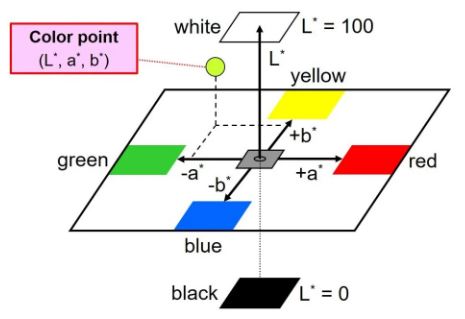
For find_red_and_green() in nav_cv.py, I used HSV to find the value. However, according to this post, it will be easier to capture the range of red and green (red especially because it would be on both 2 sides of the HSV map) if we use the LAB color representation method.
@jjeerryy @khushee-g feel free to play around with this or other methods for the best result.
This is a useful source if you want to get the HSV value by clicking on the image 🔢
This is a discussion post on how you can draw OpenCV segmentation on the image


For
find_red_and_green()innav_cv.py, I used HSV to find the value. However, according to this post, it will be easier to capture the range of red and green (red especially because it would be on both 2 sides of the HSV map) if we use the LAB color representation method.@jjeerryy @khushee-g feel free to play around with this or other methods for the best result.
This is a useful source if you want to get the HSV value by clicking on the image 🔢
This is a discussion post on how you can draw OpenCV segmentation on the image