Evaluating LoRaWAN performance in intentional and unintentional DoS attacks by legacy 900MHz network devices
Due to the growth of AI and network technology that complement the Internet of Things(IoT), the IoT market is gradually growing and the supply of IoT devices is expanding. Compared to other network technologies used in IoT such as Wi-Fi, Bluetooth, and NB-IoT, LoRa provides benefits which are low-power and long-distance data transmission with long-lasting batteries.
While investigating prior studies, security issues and vulnerabilities in LoRaWAN were found. However, the easiest and most effective attack method is jamming. Jamming is a technology that prevents the operation of specific frequencies by disrupting radio waves. Since LoRa is based on the Chirp Spread Spectrum(CSS) and operates in the predetermined frequency band, attackers are able to exploit the chirp frequency to make LoRa more vulnerable to wideband jamming attacks.
For these reasons, the goal of 454P is to evaluate the performance of LoRaWAN by conducting intentional and unintentional Denial of Service(DoS) attacks with legacy 900MHz network devices.
The experiments are divided into indoor and outdoor to simulate real-world industrial sites. The experiment result demonstrates the potential risk to the security of LoRaWAN against jamming attacks.
LoRaWAN networks have several vulnerabilities of security. As LoRaWAN is wireless network system using RF(Radio Frequency) to send data, it has general vulnerabilities same as other wireless networks. Thus, several security vulnerabilities like sniffing, jamming and so on exists on LoRaWAN. To be specific, LoRaWAN has two vulnerabilities that can be hacked.
- The join request is not encrypted. When end-nodes want to join the server, end-nodes send a join request to gateway to make authentication of this device. In LoRaWAN, join request is not encrypted. Since, it can be hacked by the other listening device like HackRF.
- The Nonce is fixed. Nonce is an arbitrary number that can be used just once in a cryptographic communication. In LoRa, this nonce number is fixed after it is set at first time.
Since of these vulnerabilities of security, there are six methods to hack LoRaWAN that are generally known.
- Jamming: making a big noise to interfere sending the data.
- Replay Attack: repeating the transmission of valid data by intercepting and retransmitting data, resulting in Denial of Service(DoS) attack.
- ACK spoofing: exploiting the fact that it does not specify which message is confirmed
- Eavesdropping: repeating reset, attacker can get plaintext
- Bit-Fipping: changing the context of the packet
- LoRa class B attack: accelerating battery exhaustion by increasing the power consumption of the sensor.
This research aims to assess the network performance of LoRaWAN according to Jamming by conducting indoor and outdoor experiments.
The indoor experiment was conducted in a complex building to simulate the medical field where the LoRa end devices are applied. The outdoor experiment was conducted on the farm to simulate the environment in agriculture.
There are several prior studies measuring the performance of LoRaWAN in urban environments or tree farms which have a lot of obstacles. However, few studies have analyzed how jamming affects the performance in real-world industrial sites. Therefore, this research consentrates in evaluating the network performance of LoRaWAN according to intentional and unintentional Denial of Service(DoS) attacks by conducting experiments.
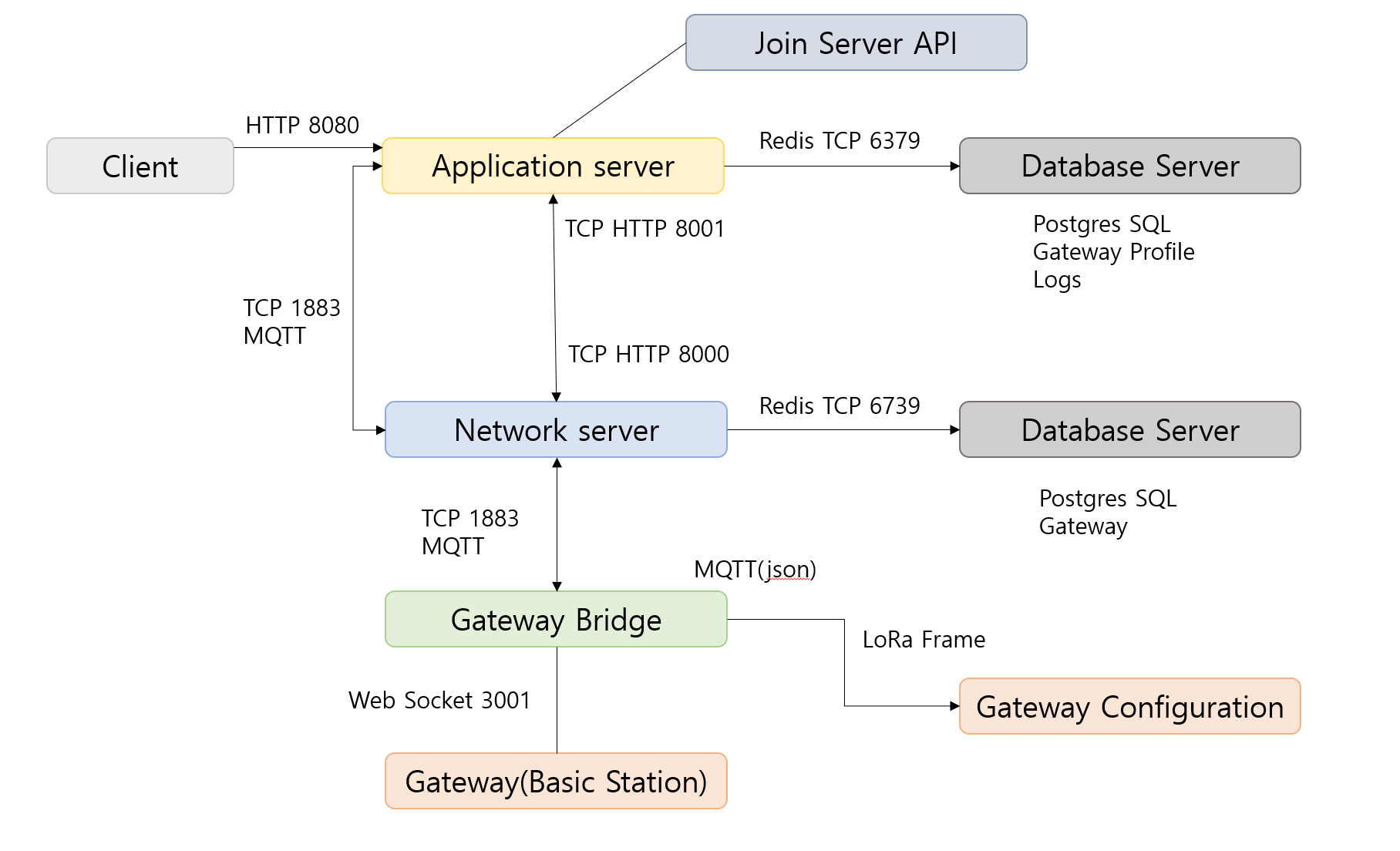
Fig. 1. Set up of local LoRaWAN
- The whole network consists of gateway, gateway bridge, network server, application server, and two Database servers.
- Using Raspberry Pi as a network server and an application server. RAK7249 as a gateway
- Local LoRaWAN was a mandatory because this project aims to hack a LoRaWAN, which might cause legal problems, which might cause a problem once hacking is operated in Layer 2 or higher layers.
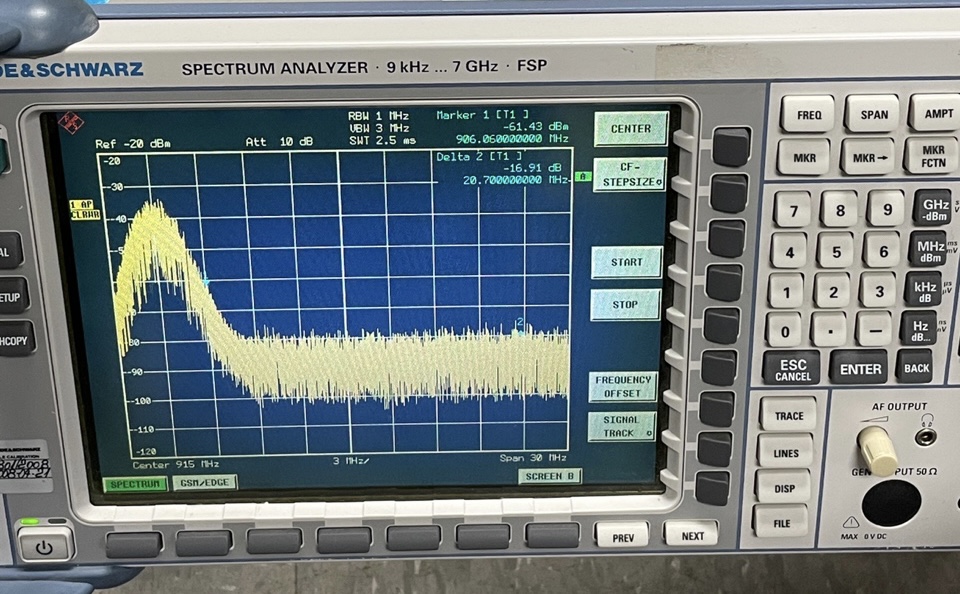
Fig. 2. Result of jamming using SDR on spectrum analyzer
- Jamming was conducted by Software Defined Radio(SDR). HackRF one and USRP B200 were used as SDR.
- dBm of SDR was not as much powerful as signals sent by a node device. It can not conduct jamming successfully.
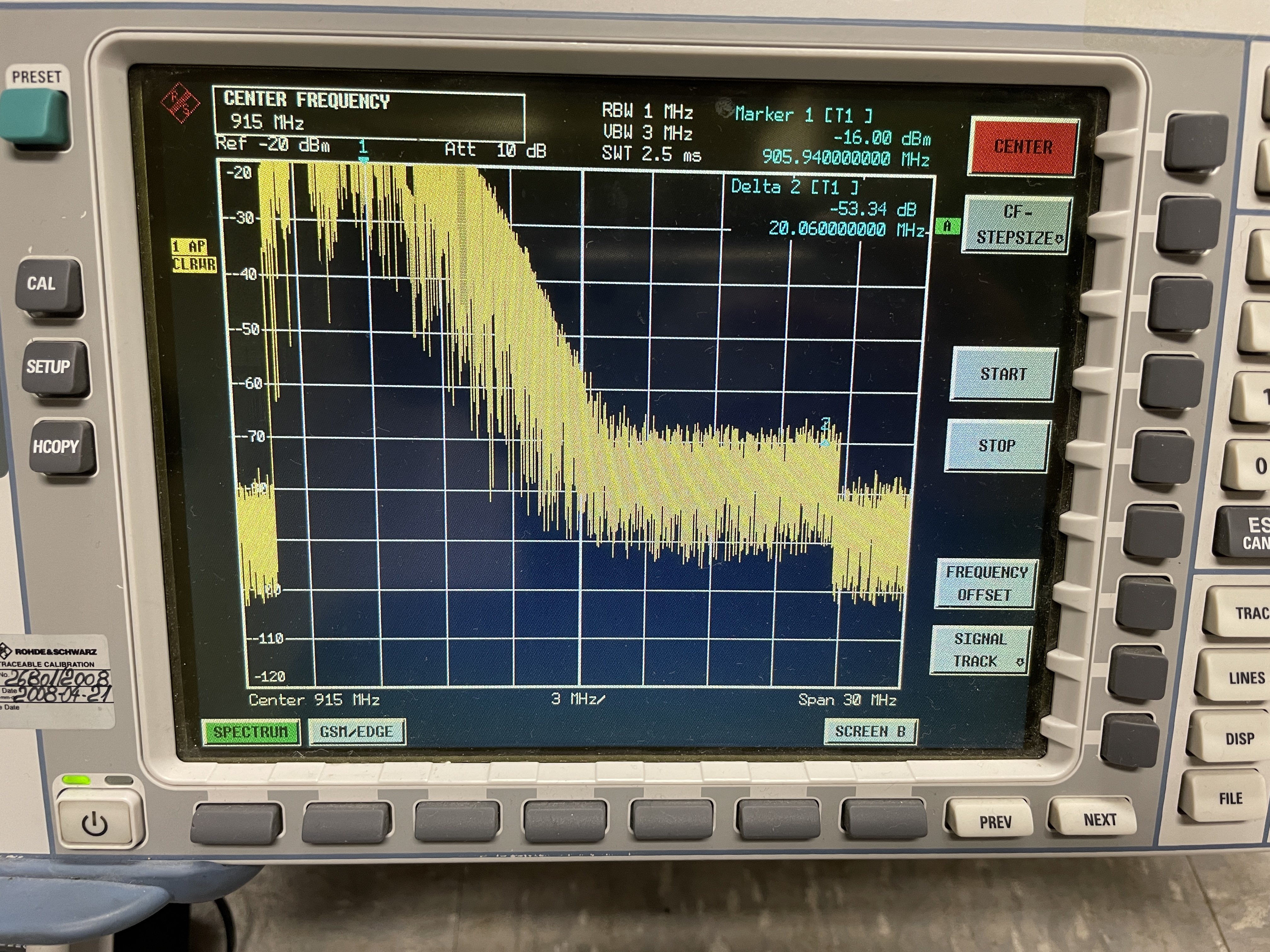
Fig. 3. Result of jamming using motorola canopy on spectrum analyzer
- Canopy has two types which are Access Point(AP) and subscriber. It can be connected with external antennas. Subscriber sent tremendous packets to AP. - The analyzer proved that there was a noise like a waterfall which can offset all signals near 900MHz. - Additionally, all join requests from node devices in range of 902.8 to 914Hz could not reach to the gateway as a join request did not show up on Chirpstack interface of the application server and network server. This points to Jamming comes to fruition. Since commercial LoRaWAN has more channels, jamming more channels can be done by using more canopy at once, or jamming different frequency of LoRaWAN in multiple region using under type of canopy.
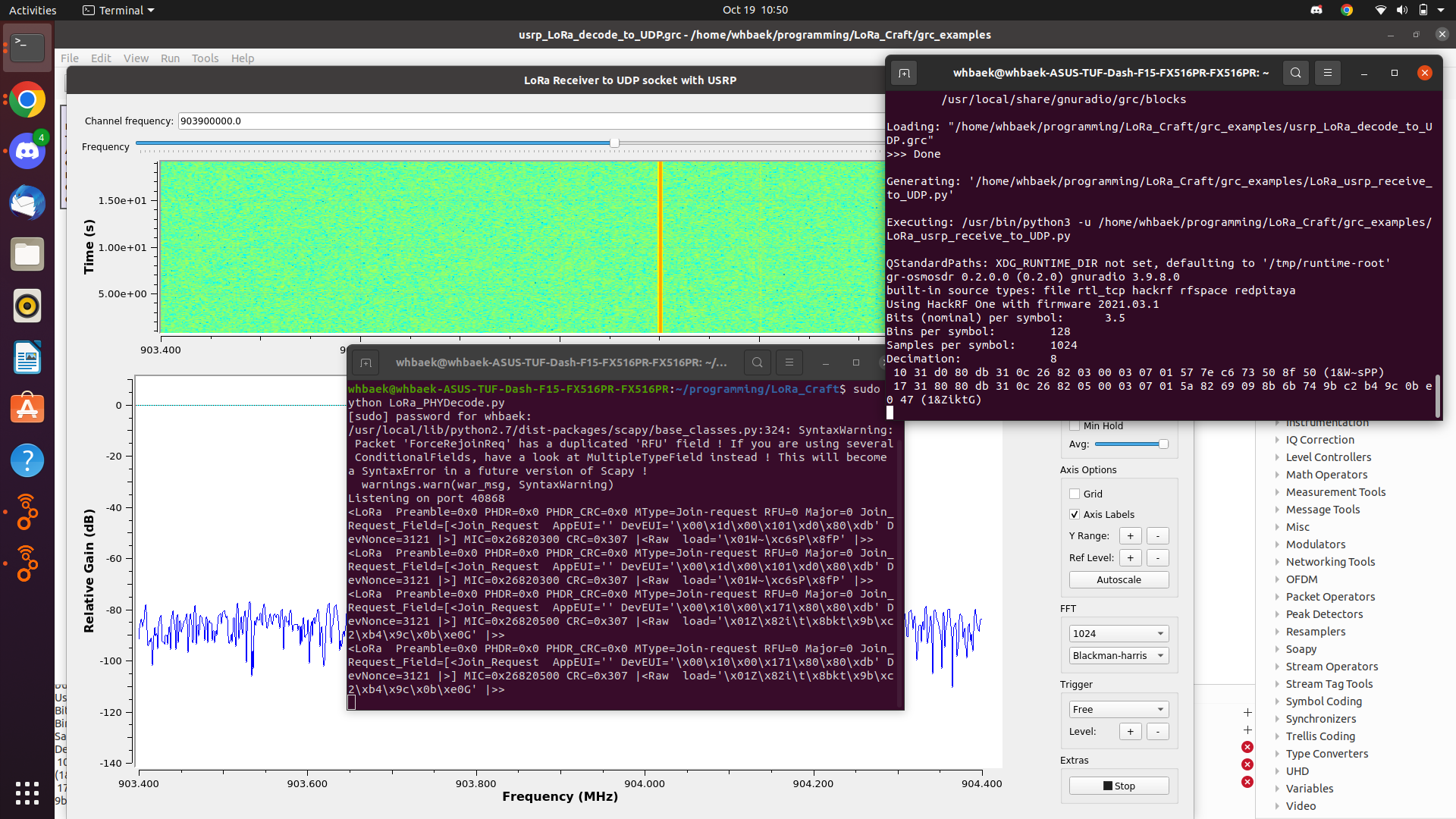
Fig. 4. Result of packet sniffing using gnu-radio and SDR
- Using GNU radio and HackRF, LoRaWAN packets which are sent by node devices were sniffed by HackRF one. Packets were shown on the laptop which was connected to HackRF.
- When a join request of LoRaWAN is sent, packets are not encrypted. Therefore Packet sniffing of LoRaWAN is successfully conducted using gr-lora and LoRa_Craft.
Using Chirpstack v3
- Chirpstack v3 gateway bridge@Latest
- Mosquitto @Latest
- Chirpstack v3 Network Server@Latest & Chirpstack v3 Application Server@Latest
- Mosquitto @Latest
- Redis 5.0.
- Postgresql 9.5.
Arduino code is located in 'arduino/volumes/Arduino/ESPCounter'
Dockerfile for compiling the code is located in /arduino
To compile the code, run the following command in /arduino
docker build -t arduino .To run the docker image
docker run -it --rm -v $PWD/volumes/Arduino:/Arduino arduino- To stop the container, type in
exit - inside the container
To compile the code, type in
arduino-cli compile --fqbn esp32:esp32:heltec_wifi_lora_32_V2 --verbose ESPCounter.inoInside the container, and the code in /volume/Arduino/ESPCounter will be compiled
To upload the code, the device must be connected to the computer, and device should be connected with docker
To connect the device with docker, for ubuntu, type in
docker run -it --rm -v $PWD/volumes/Arduino:/Arduino --device=/dev/ttyUSB0 arduino- Then, inside the container, type in
arduino-cli upload -p /dev/ttyUSB0 --fqbn esp32:esp32:heltec_wifi_lora_32_V2 --verbose ESPCounter.ino- For the other OS, please refer to this page
Jamming analysis is located in 'jammingAnalysis'
Dockerfile and docker compose file for running the code is located in /jammingAnalysis
To run the docker container, run the following command in /jammingAnalysis
docker compose up- Ctrl+C will stop the container
- To enter Jupyter Notebook, type in
localhost:10000
- in your browser, or click the link localhost:10000
   😿 Seokhyeon Bang
   - Chungang University
   - School of Computer Science and Engineering
   - kzrt0123@cau.ac.kr
   - https://github.com/KZRT

   🐤 Minju Ro
   - Chungang University
   - School of Computer Science and Engineering
   - romj98@cau.ac.kr
   - https://github.com/ori5r2

   🦂 Junyoung Jang
   - Chungang University
   - School of Computer Science and Engineering
   - junjang99@cau.ac.kr
   - https://github.com/Amuguna

   🎃 Yuseon Choi
   - Chonnam National University
   - Department of Software Engineering
   - 181133@jnu.ac.kr
   - https://github.com/YuseonChoi

   🐺 Doyong Kwon
   - Kyungpook National University
   - School of Computer Science and Engineering
   - doyong365@knu.ac.kr
   - https://github.com/doyong123

   🐁 Kangyeon Lee
   - Purdue University
   - Department of Computer and Information Technology
   - lee3245@purdue.edu
   - https://github.com/dkssud2496