This document describes Pollfish API Documentation. Pollfish API is an alternative to SDK and web plugin integration for publishers looking to monetize their apps or websites with Pollfish surveys.
Register as a Publisher at www.pollfish.com/publisher
Login at www.pollfish.com/publisher and click "Add a new app" on Pollfish Developer Dashboard in section "My Apps". Copy the given API key for this app in order to use later on, when initializing Pollfish within your code.
This call requests a new survey from Pollfish servers
Structure:
https://wss.pollfish.com/v2/device/register/true?json={}&dontencrypt=true-
This is a GET request
-
All register parameters shall be included in a JSON
-
Include
dontencrypt=truein every request -
sig=""is an optional parameter used to secure thereward_conversionandreward_nameparameters passed onjson(if you usereward_conversionin your URL, sig param is not optional)example:
https://wss.pollfish.com/v2/device/register/true?json={}&dontencrypt=true&sig="signature"
-
All JSON parameters must be of type String but able to be converted in the required type.
  // ie: "lat" property is expected to be of type "Long"
  {
    "lat":"30123123"  //valid
  }
  {
    "lat":"foo"  //invalid. Value "foo" cannot be converted to Long.
  }
  {
    "lat": 30123123  //invalid. Value is expected to be a string.
  }
-
Any param that is not marked as Static should not be filled with static content
-
The most params you can pass, the most exposure you might get to Pollfish survey inventory.
| Name | Type | Description | Value | Static | Required | |
|---|---|---|---|---|---|---|
| 1 | api_key | String | Pollfish API Key (step 2) | No | Yes | |
| 2 | debug | Boolean | Run Pollfish in Developer or Release mode | true / false ( defaults to false ) | No | Yes |
| 3 | ip | string | IP of user’s device | No | Yes | |
| 4 | device_id | String | Advertising Identifier (IDFA or Advertising ID) | No | Yes | |
| 5 | timestamp | Long | Timestamp of the request in milliseconds since January 1, 1970 00:00:00.0 UTC. | No | Yes | |
| 6 | encryption | String | Encrypt request | "NONE" | Yes | Yes |
| 7 | version | Int | Current version of API | 7 | Yes | Yes |
| 8 | device_descr | String | Product model name: Android: device_model(device_product) iOS: device_model |
Android: android.os.Build.MODEL (android.os.Build.PRODUCT) iOS: systemInfo.machine |
No | No |
| 9 | os | Int | Operating system | Enumeration. See below for the list of possible values | No | Yes |
| 10 | os_ver | String | Framework version | Android: android.os.Build.VERSION.SDK_INT iOS: systemVersion |
No | No |
| 11 | scr_h | Int | Screen height in pixels | No | No | |
| 12 | scr_w | Int | Screen width in pixels | No | No | |
| 13 | scr_size | Float | Screen size in inch | No | No | |
| 14 | con_type | String | Network connection type | A human-readable name describe the type of the network, * for example "WIFI" / on iOS (Unknown, None, 3G, Wifi) | No | No |
| 15 | lat | Long | Location latitude (8 or 9 digits in total) | String((int)bestLocation.getLatitude() * 1E6) *ONLY GPS/WIFI data. |
No | No |
| 16 | lon | Long | Location longitude (8 or 9 digits in total) | String((int)bestLocation.getLatitude() * 1E6) *ONLY GPS/WIFI data. |
No | No |
| 17 | accuracy | Int | Location accuracy in meters | No | No | |
| 18 | provider | String | Name of current registered network operator | No | No | |
| 19 | provider_mcc | String | MCC of current registered network operator | No | No | |
| 20 | provider_mnc | String | MNC of current registered network operator | No | No | |
| 21 | manufacturer | String | Device's manufacturer | Android: android.os.Build.MANUFACTURER iOS: "Apple" |
No | No |
| 22 | google_play | Boolean | API used for google play app (“true”) or other market “false” (Android) | true / false | No | No |
| 23 | imei | String | Device's IMEI (Android) | No | No | |
| 24 | nfc_exists | Boolean | If NFC exists (Android) | No | No | |
| 25 | nfc_enabled | Boolean | If NFC is enabled (Android) | No | No | |
| 26 | locale | String | Device language code | Required from version 7 | No | Yes |
| 27 | app_version | String | App's version | Android: packageInfo.versionName + packageInfo.versionCode iOS: "CFBundleShortVersionString"."CFBundleVersion" |
No | No |
| 28 | is_roaming | Boolean | If device is roaming on current network | true / false | No | No |
| 29 | hardware_accelerated | Boolean | If hardware acceleration is on | true | Yes | No |
| 30 | accessibility_enabled | Boolean | If accessibility is enabled | No | No | |
| 31 | developer_enabled | Boolean | If developer options enabled on device (Android) | true / false | No | No |
| 32 | install_non_market_apps | Boolean | Check if install non market apps is enabled (Android) | true / false | No | No |
| 33 | app_api_key | String | App’s API key as registered in third party provider’s system | No | No | |
| 34 | request_uuid | String | Param passed through s2s postback calls to dev server | No | No | |
| 35 | app_id | String | App's package name | Android: Package name iOS: Bundle ID |
No | No |
| 36 | app_name | String | App's name | No | No | |
| 37 | app_category | String | App's category | No | No | |
| 38 | app_subcategory | String | App's subcategory | No | No | |
| 39 | survey_id | Int | Explicitly request a survey based on its id (only for on demand surveys) | No | No | |
| 40 | opt_out | Bool | Opt out from Interest-based advertising | true / false (defaults to false) | No | No |
| 41 | usr_agent | String | User agent | Android: System.getProperty("http.agent") iOS: @"navigator.userAgent" |
No | No |
| 42 | target | Int | Target SDK (Android) | No | No | |
| 43 | board | String | The name of the underlying board | Android: like "goldfish" iOS: [[UIDevice currentDevice] model] |
No | No |
| 44 | serial | String | A hardware serial number, if available. Alphanumeric only, case-insensitive (Android) | No | No | |
| 45 | iap** | JSON Array | List of installed apps objects (Android) | See below | No | No |
| 46 • | gender | Int | The gender of the user | Enumeration. See below for the list of possible values | No | No |
| 47 • | year_of_birth | Int | The birth year of the user | A positive integer | No | No |
| 48 • | marital_status | Int | The marital status of the user | Enumeration. See below for the list of possible values | No | No |
| 49 • | parental | Int | How many kids the user has | Enumeration. See below for the list of possible values | No | No |
| 50 • | education | Int | The education level of the user | Enumeration. See below for the list of possible values | No | No |
| 51 • | employment | Int | The employment status of the user | Enumeration. See below for the list of possible values | No | No |
| 52 • | career | Int | The industry that the user is employed in | Enumeration. See below for the list of possible values | No | No |
| 53 • | race | Int | The race of the user | Enumeration. See below for the list of possible values | No | No |
| 54 • | income | Int | The level of the income of the user | Enumeration. See below for the list of possible values | No | No |
| 55 • | spoken_languages | Array[String] | The spoken languages of the user | Array of Enumeration. See below for the list of possible values | No | No |
| 56 • | organization_role | Int | The organization role of the user | Enumeration. See below for the list of possible values | No | No |
| 57 • | number_of_employees | Int | The number of employees in the organization of the user | Enumeration. See below for the list of possible values | No | No |
| 58 • | postal_code | String | (deprecated) - The postal code of the location where the user currently resides in | No | No | |
| 59 • | postal_data | String | The postal data of the location where the user currently resides in | Contains postal code and country 2 letter ISO code seperated by pipe. ie: "11527|GR", "10017|US" | No | No |
| 60 | String | The email of the user | A valid email address | No | No | |
| 61 | google_id | String | The Google id of the user | No | No | |
| 62 | linkedin_id | String | The Linkedin id of the user | No | No | |
| 63 | twitter_id | String | The Twitter id of the user | No | No | |
| 64 | facebook_id | String | The Facebook id of the user | No | No | |
| 65 | survey_format | String | The format of the survey to return (only available in debug mode, should be used for testing). | Enumeration. See below for the list of possible values | No | No |
| 66 | always_return_content | Boolean | Applies only to server register call and sets the type of the response if no survey is found. If it is true the response will be HTTP 200 with a readable HTML page. Otherwise it will be an HTTP 204 without any content | true / false | No | No |
| 67 | offerwall | Boolean | Returns offerwall response. If it is true the response will always be HTTP 200 with a readable HTML page that will contain the offerwall or a screen showing that no surveys were found | true / false | No | No |
| 68 | reward_name | String | Returns provided reward name on survey completion (success or otherwise), overriding the one specified in the publisher dashboard. | ie: Diamonds | No | No |
| 69 | reward_conversion | String | Expects a Float number as a string. Returns provided reward value on survey completion (success or otherwise) based on the conversion provided, overriding the one specified in the publisher dashboard. Conversion is expecting a number matching this function ( 1 USD = X Points) where X is a float number. | ie: 1.1 | No | No |
| 70 | reward_conversion_hash | String | Deprecated, see "Notes for sig query parameter".The Base64 HMAC-SHA1 generated by hashing and encoding reward_conversion with your secret key |
ie: C0tmcEk34otAlKcWdCiX2GC2sFg= | No | When reward_conversion exists |
| 71 | content_type | String | If it is set to "json", it returns offerwall response with HTTP 200 in json format. If no surveys are found, it returns 204 with an empty body. This param, requires offerwall parameter to be set to true. If is set to "html" or ommited, it defaults to Offerwall html behavior. |
"json" / "html" | No | No |
| 72 | click_id | String | A pass-through param that will be passed back through s2s callback | "aRandomClickId" | No | No |
The recommended value is the Advertising Identifier (IDFA or Advertising ID) which can be retrieved programmatically from the device. If this is not the case, as when integrating with the API or Webplugin then any unique identifiable string (UUID) for each user can be used instead subject to the following recommendations:
-
The same user has the same device_id most of the time. This ensures a user is uniquely identified and we do not repeat the demographic questions for every survey.
-
The device_id must identify a user across all apps/integrations. This ensures a user is unambiguously identified and is not confused for another user of another app/integration.
These rules help Pollfish provide good conversion rates for an application.
Below you can see the different enumeration values for operating system param
| Key | Name | Value | |
|---|---|---|---|
| 9 | os | Android | 0 |
| iOS | 1 | ||
| Windows Phone | 2 | ||
| Web | 3 |
Below you can see the different enumeration for requesting a survey of a specific survey format. It is strongly advised not to use this param and control which type of surveys you would like ot allow withing your account through Pollfish Mediation Settings area.
| Key | Name | Value | |
|---|---|---|---|
| 63 | survey_format | Basic | 0 |
| Short | 1 | ||
| Random | 2 | ||
| Third Party | 3 |
This parameter can be used optionally to prevent tampering around reward conversion parameter if passed within the register call (therefore if you are passing the reward conversion param you should sig parameter too in the URL). The platform supports url validation by requiring a hash of the reward_conversion, reward_name, and click_id values passed through the json parameter of the register device request. Failure to pass validation will return a status of Bad Request Response (http status: 400) with body "Hash check failed".
In order to generate the sig field you should sign the combination of reward_conversion+reward_name+click_id parameter using the HMAC-SHA1 algorithm and your account's secret_key that can be retrieved from the Account Information page on your Pollfish Dashboard.
The sig value should be encoded using Base64 and then URL encoded using Percent encoding and provided in the sig parameter.
Note that although reward_conversion is mandatory for the hashing to work, the reward_name and click_id parameters are optional and you should add them for
extra security.
Example generation of the sig value hash using the PHP programming language can be found below:
$sig = base64_encode(hash_hmac("sha1" , "$reward_conversion$reward_name$click_id", $secret_key, true));In order to get a list of surveys for the json offerwall integration you are required to set "offerwall" parameter to "true" and "content_type" parameter to "json". This way you can retrieve a longer list of surveys than the html version (limited to 60), along with an HTTP responce code of 200. If no matching surveys are found then the response body will be empty with an HTTP response code of 204.
When the necessary demographics are not know for a specific device id (a user) then the the response will contain one "Demographic Survey" and the flag "hasDemographics" will be set to false. This Demographic survey ("survey_class":"Pollfish/Demographics" ), is part of the onboarding process of the user and it does not deliver any revenue when it gets completed (CPA =0). When a Demographic survey is presented, the users has to answer all the demographic questions in order to unlock the list of Pollfish and Mediation surveys. New demographic questions might be added from time to time (or re-asked) and surveys might be locked again until those are answered in the relevant demographic survey.
If the "content_type" parameter is set to "html" or is ommited then the request will be served like an ordinary offerwall request, returning an html page with the surveys matched for each device_id (user).
reponse: HTTP 200
with body:
{
surveys: [
    {
        survey_id: 1878494,
        survey_cpa: 0,
        survey_class: "Pollfish/Demographics",
        survey_ir: 0,
        survey_loi: 5,
        survey_lang: "en",
        reward_name: "Diamonds",
        reward_value: 0,
        survey_link: "https://wss.pollfish.com/v2/device/survey/1878494?dontencrypt=true&json=%7B%22offerwall%22%3A%22true%22%2C%22api_key%22%3A%222ad6e857-2995-4668-ab95-39e068faa558%22%2C%22device_id%22%3A%22AB%22%2C%22timestamp%22%3A1551350478%2C%22debug%22%3Afalse%2C%22ip%22%3A%2272.229.28.185%22%2C%22encryption%22%3A%22NONE%22%2C%22version%22%3A7%2C%22os%22%3A3%2C%22locale%22%3A%22en%22%2C%22always_return_content%22%3Afalse%2C%22content_type%22%3A%22json%22%7D"
        remaining_completes: 600
    }
],
hasDemographics: false
}
b. JSON offerwall request for a user, with all the demographic info already known (when surveys are available)
reponse: HTTP 200
with body:
{
surveys: [
    {
        survey_id: 2503522,
        survey_cpa: 35,
        survey_class: "Toluna",
        survey_ir: 21,
        survey_loi: 8,
        survey_lang: "en",
        reward_name: "Diamonds",
        reward_value: 18,
        survey_link: "https://wss.pollfish.com/v2/device/survey/2503522?dontencrypt=true&json=%7B%22offerwall%22%3A%22true%22%2C%22api_key%22%3A%222ad6e857-2995-4668-ab95-39e068faa558%22%2C%22device_id%22%3A%22AA%22%2C%22timestamp%22%3A1551350478%2C%22debug%22%3Afalse%2C%22ip%22%3A%2272.229.28.185%22%2C%22encryption%22%3A%22NONE%22%2C%22version%22%3A7%2C%22os%22%3A3%2C%22locale%22%3A%22en%22%2C%22always_return_content%22%3Afalse%2C%22content_type%22%3A%22json%22%7D"
    },
    {
        survey_id: 4684225,
        survey_cpa: 30,
        survey_class: "Cint",
        survey_ir: 6,
        survey_loi: 8,
        survey_lang: "en",
        reward_name: "Diamonds",
        reward_value: 15,
        survey_link: "https://wss.pollfish.com/v2/device/survey/4684225?dontencrypt=true&json=%7B%22offerwall%22%3A%22true%22%2C%22api_key%22%3A%222ad6e857-2995-4668-ab95-39e068faa558%22%2C%22device_id%22%3A%22AA%22%2C%22timestamp%22%3A1551350478%2C%22debug%22%3Afalse%2C%22ip%22%3A%2272.229.28.185%22%2C%22encryption%22%3A%22NONE%22%2C%22version%22%3A7%2C%22os%22%3A3%2C%22locale%22%3A%22en%22%2C%22always_return_content%22%3Afalse%2C%22content_type%22%3A%22json%22%7D"
    }
],
hasDemographics: true
}
note: The remaining_completes field is returned only on Pollfish surveys for the moment.
c. JSON offerwall request for a user, with all the demographic info already known (no surveys are available)
reponse: HTTP 204
with body:
| • | Parameters from #48 to #60 are used in demographic surveys. If you already know this information you can provide them during register call and minimize or avoid demographic surveys. |
The appropriate enumeration values for Demographics can be found here
* Notice that you might need to change the timestamp to current values for the links above to operate properly.
The webservice will reply with an HTML response and a response code, as explained below.
| Code | Description | |
|---|---|---|
| 1 | 5xx | Internal Error |
| 2 | 4xx | Bad request |
| 3 | 204 | No survey available |
| 4 | 200 | Survey available |
You can also check if there is a survey available by getting the Response Code without the HTML response if you perform a HEAD request.
Server responses include http header parameters with additional information.
The header parameter called CPA shows the money to be earned from survey received in US dollar cents.
The header parameter called reward_name shows the reward name to be earned as specified from the publisher in the publisher dashboard (ie: Diamonds).
The header parameter called reward_value will return the value of the conversion between the survey CPA received and the conversion that was set up in the publisher dashboard.
The header parameter called remaining_completes will return the value of the remaining completes for the survey. This is an optional header and it is returned only for Pollfish surveys.
Example:
If you set "Diamonds" as the reward name and the variable amount 1 USD = 50 Diamonds then a survey that has a CPA of 30, will also return reward_name=Diamonds and reward_value=15 (100 cents = 50 diamonds, so 30 cents is 15 diamonds) on the response
The header parameter called survey_class is used to pass to the client information about the survey network and type. The syntax is
survey_class: provider["/"type]
provider: "Pollfish" | "Toluna" | "Cint" | "InnovateMR" | "SaySo" | "P2Sample"
type: "Basic" | "Playful" | "ThirdParty" | "Demographics" | "Internal"
that is a network name followed by an optional slash and survey type.
The provider is the network that provides the survey. The syntax rule has all the networks currently supported by Pollfish.
The type is that of the survey as described in the network's documentation. The exception is the type "Demographics" which is always used to identify surveys whose purpose is to collect demographic data for the users.
The whole set of values currently supported are:
| Value | Description |
|---|---|
| Pollfish | Pollfish Basic survey |
| Pollfish/Basic | Pollfish Basic survey (another name) |
| Pollfish/Playful | Pollfish Playful survey |
| Pollfish/ThirdParty | Pollfish 3rd party survey |
| Pollfish/Demographics | Pollfish Demographic survey |
| Pollfish/Internal | Pollfish internal survey created by the publisher |
| Toluna | Toluna survey |
| Cint | Cint survey |
| InnovateMR | InnovateMR survey |
| SaySo | SaySo survey |
| P2Sample | P2Sample survey |
When a new mediation network enters the Pollfish network the appropriate values will be added.
The header parameter called survey_ir shows the current estimation for the survey incidence rate as an integer number in the range 0-100. The header is optional and present only if the IR can be computed reliably.
The header parameter called survey_loi shows the expected time in minutes that it takes to complete the survey. The header is optional and present only if the LOI can be computed reliably.
A displayable HTML page
You can register and listen for two server-to-server callback events:
-
Survey Completion
-
User Not Eligible
In the following link you can find a step by step guide on how to register and receive these callbacks.
Note 1: If you want to pass a pram during intiialization and receive it back through s2s callback, you can use the "click_id" param.
Note 2: If you want to pass and receive your app's api key (param 35) through server-to-server callbacks you can easily do it by appending that param to the callback structure as explained in the link above.
| app_api_key | String | App's api key as registered on third party provider's system |
When the html file loads on the user side, there are several javascript events that can be fired through the lifetime of a Pollfish survey:
| Event | Description | |
|---|---|---|
| 1 | close | When a user clicks on close button |
| 2 | closeAndNoShow | When a user clicks on close button |
| 3 | setSurveyCompleted | When a user successfully completed a survey (NOTICE: Further investigation of the response will be done on the server side to detect e.g fraudulent activites, so make sure to use the server-to-server callbacks, as described in section 4 to track valid responses prior crediting users) |
| 4 | userNotEligible | When a user was not qualified to complete the survey (screened-out) |
| 5 | userRejectedSurvey | When a user selected the "No thanks" option on the homescreen, or when a user selected the "I will not participate in this survey" button when on the GDPR page |
Below you can find some examples of how to catch and handle the events described above:
window.onmessage = function(e){
    if(e.data === 'close' || e.data === 'closeAndNoShow'){
        // Handle the event of user clicking to close the survey
    }
}window.onmessage = function(e){
if(e.data === 'userNotEligible'){
// Handle the event when a user gets screened out
}
}window.onmessage = function(e){
if(e.data === 'setSurveyCompleted'){
// Handle the event when a user sucessfully completes the survey
}
}- Get revenue of a survey before rendering to the user
window.onmessage = function(e){
    if(e && e.data && e.data.indexOf && e.data.indexOf('surveyInfo') > -1){
        var data = JSON.parse(e.data);
        if(data.type === 'surveyInfo'){
            // Get revenue of survey
            console.log(data.revenue);
            // expected JSON
            // {
            //   revenue: data.revenue,
            //   playful: data.playful,
            //   survey_loi: data.survey_loi,
            //   survey_ir: data.survey_ir,
            //   survey_class: data.survey_class,
            //   reward_name: data.reward_name,
            //   reward_value: data.reward_value,
            //   remaining_completes: data.remaining_completes,
            // }

        }
   }
}window.onmessage = function(e){
if(e.data === 'userRejectedSurvey'){
// Handle the event when a user rejected a survey prompt
}
}You can check out our sample project on how to implement an API integration here : https://github.com/pollfish/api-pollfish
<style> .demographics { color: #95bde2; font-size: 22px; padding-top: 15px; vertical-align: top; } </style>When the html file loads on the user side, there are several javascript events that can be fired through the lifetime of a Pollfish offerwall page:
| Event | Description | |
|---|---|---|
| 1 | close | When a user clicks on close button |
| 2 | closeAndNoShow | When a user clicks on close button |
| 3 | noSurveyAvailable | When the offerwall contains no survey for the user |
| 4 | setSurveyCompleted | When a user successfully completed a survey containing information such as CPA etc. (NOTICE: Further investigation of the response will be done on the server side to detect e.g fraudulent activites, so make sure to use the server-to-server callbacks, as described in section 4 to track valid responses prior crediting users) |
| 5 | userNotEligible | When a user was not qualified to complete the survey (screened-out) |
| 6 | userRejectedSurvey | When a user selected the "I will not participate in this survey" button when on the GDPR page |
Below you can find some examples of how to catch and handle the events described above:
window.onmessage = function(e){
    if(e.data === 'close' || e.data === 'closeAndNoShow'){
        // Handle the event of user clicking to close the survey
    }
}window.onmessage = function(e){
if(e.data === 'userNotEligible'){
// Handle the event when a user gets screened out
}
}window.onmessage = function(e){
if(e.data.indexOf('setSurveyCompleted') > -1) {
var data = JSON.parse(e.data);
if(data.type === 'setSurveyCompleted'){
var survey = {
survey_price: data.survey_price,
reward_name: data.reward_name,
reward_value: data.reward_value,
survey_class: data.survey_class,
survey_loi: data.survey_loi,
survey_ir: data.survey_ir,
};
// you can use this survey object however you like
}
}
}window.onmessage = function(e){
if(e.data === 'userRejectedSurvey'){
// Handle the event when a user rejected a survey prompt
}
}You can check out our sample project on how to implement an API integration here : https://github.com/pollfish/api-offerwall-example
<style> .demographics { color: #95bde2; font-size: 22px; padding-top: 15px; vertical-align: top; } </style>After you take live the API in release mode (set "debug":false or remove debug param from the URL), you should request your account to get verified from your Pollfish Developer Dashboard.
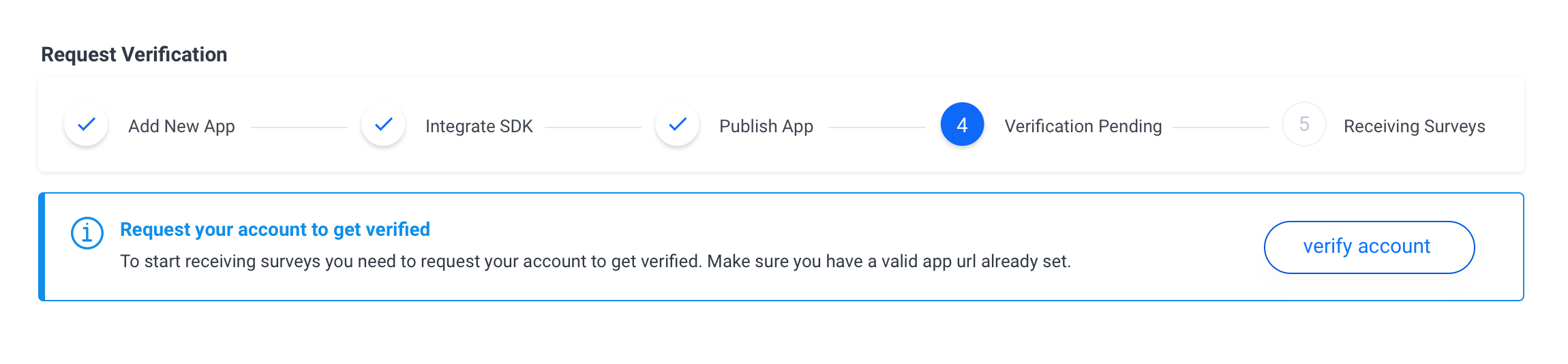
When your account is verified you will be able to start receiving paid surveys from Pollfish clients.