




Launching an AI Agent? Stop guessing, start simulating.
Many developers and data scientists struggle to test and validate AI agents effectively. Some deploy directly to production, testing on real customers! Others perform A/B testing, which also means testing on real customers. Many rely on predefined tests that cover main use cases but fail to capture real user intents.
Agentune Simulate creates a customer simulator (twin) based on a set of real conversations. It captures the essence of your customers' inquiries and the way they converse, allowing you to simulate conversations with your AI agent, ensuring it behaves as expected before deployment.
Ready to deploy your improved AI agent? Use Agentune Simulate to validate it first against real customer interactions!
Need help? Please contact us. We are committed to assist early adopters in making the most of it!
Running a simulation with Agentune Simulate generates realistic conversations between your AI agent and simulated customers. This lets you evaluate your agent's performance, identify edge cases, and validate behavior before real deployment.
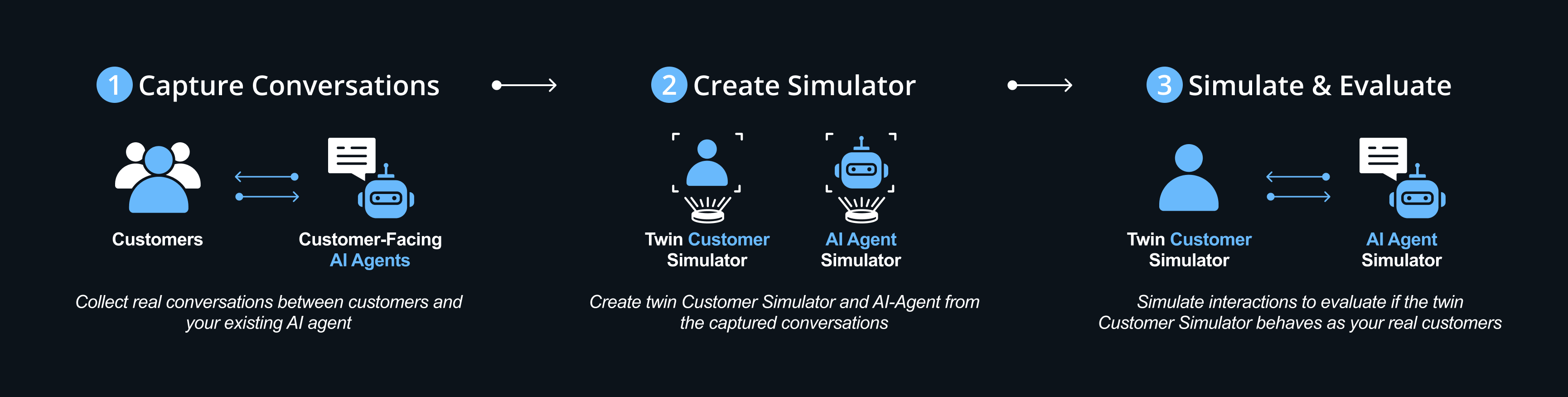
How do we validate the twin customer simulator? We create a twin AI-Agent and let them converse. we then evaluate the conversations to check that the customer simulator behaves as the real customer:
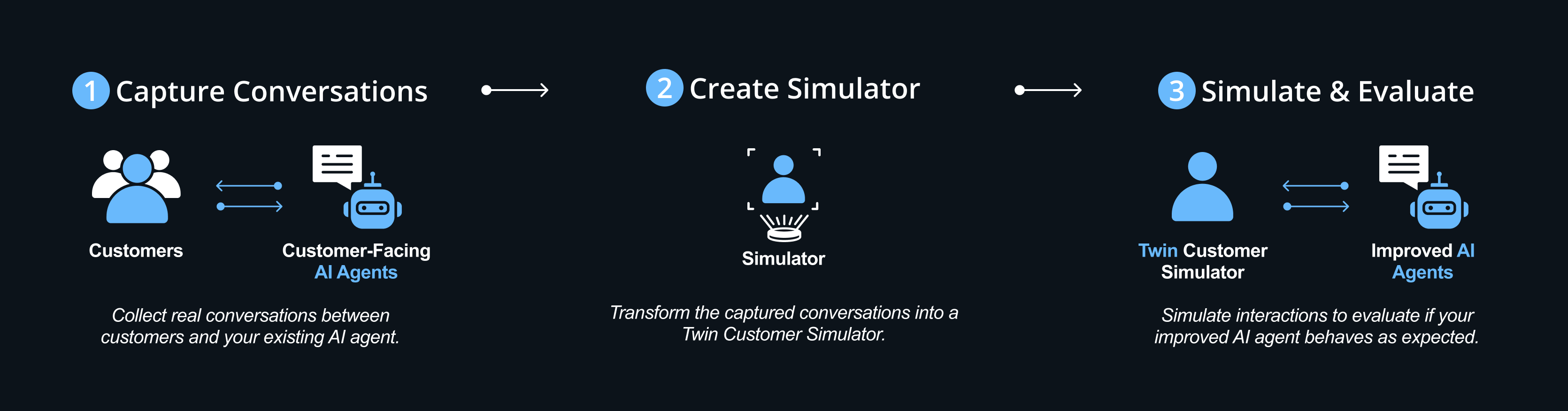
- Capture Conversations - Collect real conversations between customers and your existing AI-agent
- Create Simulator - Create twin Customer Simulator and AI-Agent from the captured conversations
- Simulate & Evaluate - Simulate interactions to evaluate if the twin Customer Simulator behaves as your real customers
We've tested Agentune Simulate with gpt-4o. In our tests, the cost per conversation was approximately 5-10 cents per conversation.
pip install agentune-simulatefrom agentune.simulate import SimulationSessionBuilder
from langchain_openai import ChatOpenAI
# Load your conversations and create outcomes
session = SimulationSessionBuilder(
default_chat_model=ChatOpenAI(model="gpt-4o"),
outcomes=outcomes,
vector_store=vector_store
).build()
# Run simulation
results = await session.run_simulation(real_conversations=conversations)- Quick Start -
getting_started.ipynbfor a quick getting started example - Production Setup -
persistent_storage_example.ipynbfor a closer to real life, scalable, persistent example - Validate Your Data - Adapt the 2nd example to load your conversations data and validate the simulation.
Here is an example of how to load conversations from tabular data:
loading_conversations.ipynb - Connect Real Agent -
real_agent_integration.ipynbfor integrating your existing agent systems
📧 Need help? Have feedback? Contact us at agentune-dev@sparkbeyond.com
- Environment Setup: Environment Setup Guide
- Coding Standards: Style Guide