Simple set of tests to verify that C65 mode is working correctly.
-
Power up the board: ensure that the host-PC is providing power through the USB cable, and that the POWER switch is ON. -> verify that the VGA screen shows the same as below:
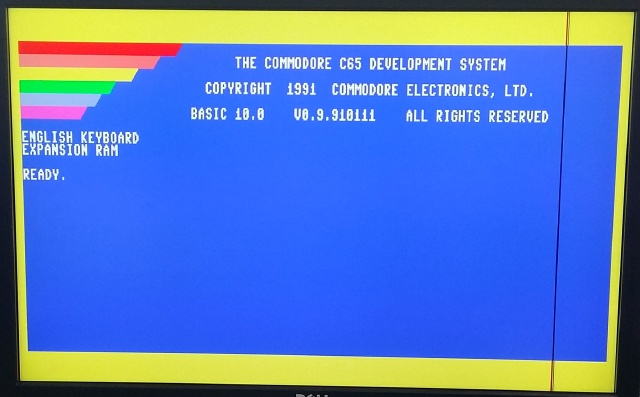
-
directory listing (F3): press F3 on the USB keyboard, -> a directory listing of the currently mounted "D81" image-file should be displayed. -> during disk access, a red square should be displayed in the upper-LHS od the display.
-
screen toggle (F1): press F3 on the USB keyboard, -> the screen should toggle between 40 and 80 char mode, -> each press of F1 should clear the display.
-
other F-keys: press F7 on the USB keyboard, -> the cursor should implement the "down" keystroke. (unsure if this is the expected behaviour, but this does what it does).
-
double-tap RESTORE: NOTE that on the USB-KB, the CBM/RESTORE key is mapped to the PG-UP key. double-tap the restore/PGUP key -> the border color should increase (or decrease) in value,
-
type "LIST": type "LIST" and press "ENTER" -> two blank lines should be displayed, followed by the "READY." prompt. IE: nothing should be in the BASIC memory.
-
type "DIR": type "DIR" and press "ENTER" -> a directory listing of the currently mounted "D81" image-file should be displayed. NOTE that the list displayed should be identical to when pressing "F3"
-
load and display the directory listing: type
load"$",8followed by "ENTER" -> the following should be displayed:
SEARCHING FOR $
LOADING
READY.
-> during disk access, the red square should be displayed in the upper-LHS of the screen, type "LIST" and press "ENTER" -> a directory listing of the currently mounted "D81" image-file should be displayed. NOTE that the list displayed should be identical to when pressing "F3"
-
slowing down the DIR-listing: NOTE that on the USB-KB, the CBM/COMMODORE key is mapped to the Left-CTRL key. change the display to 40-columns by pressing F1, hold CBM/COMMODORE KEY and press F3 numerous times, -> a directory listing of the currently mounted "D81" image-file should be displayed. -> the listing should fill the screen and continue to scroll-up. This scrolling-up should be slowed-down due to the holding of the CBM/COMMODORE key.
-
MONITOR mode: type "MONITOR" and press "ENTER" -> the following should be displayed (or similar):
MONITOR
    PC   SR AC XR YR ZR SP
; 000000 00 00 00 00 00 F8
type "D 2000" and press "ENTER" -> the following should be displayed (or similar):
. 002000  0
. 002001  1F 20 00   BBR1 $20,$2004
.    .
.    .
.    .
. 002014  32 2E      AND  ($2E),Z
type "X" and press "ENTER" -> the "READY." prompt should be displayed indicating that you have exited out of the MONITOR-mode.
-
go into c64 mode type "GO64" and press "ENTER" -> you will be presented with the following:
ARE YOU SURE?TYPEYand press "ENTER". -> you will be dropped into the c64 mode. -
boot into C64 mode in either c64 mode or c65 mode, press and hold the CBM/COMMODORE key (on USB-KB this is the Left-CTRL), -> nothing should happen. while holding Left-CTRL, press and release the CPU_RESET button -> the machine will reset, -> after the boot-screen, if the Left-CTRL is depressed, you will drop directly into the c64 mode. This mode is shown below. [image c64 mode]
The End.