Herald means a messanger.
It is a simple app to test pub/sub of backing emqx MQTT broker.
Herald is written with elio library.

- Docker Hub: cppis/herald
Covers Go settings on WSL.
⚙️ Setting up elio
Before start, set up elio project.
git clone https://github.com/cppis/elio && cd elio
go mod vendor
export ELIO_ROOT=$(pwd)
Now, $ELIO_ROOT is the project root path.
Covers Docker settings on WSL.
Covers Kind+Skaffold settings on WSL for continuous developing a Kubernetes-native app.
Covers the port settings for the Kubernetes Service.
You can easily run a Herald container on the host (without MQTT Broker):
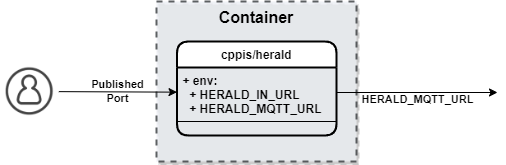
To run Herald service, run the following command:
HERALD_IN_URL="0.0.0.0:7003" go run ./app/heraldYou can change the listening url of service Herald by changing
environment variable HERALD_IN_URL.
To run Herald container, run the following command:
docker run -d -e HERALD_IN_URL="0.0.0.0:7003" -p 7003:7003 --name herald cppis/herald:latestTo kill Herald container, run the following command:
docker rm -f herald You can easily run a Herald + emqx(MQTT Broker) chart on the kubernetes cluster.
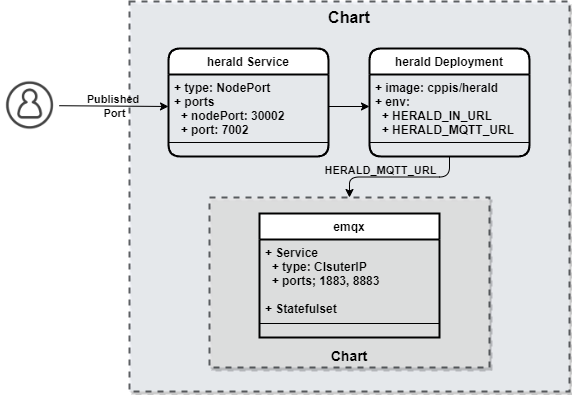
If the kubernetes cluster does not exist, Follow the next step Create a Kind cluster.
If you have, Follow the next step 'Using Helm' or 'Using Skaffold'.
To create a kind, run the following command:
kind create cluster --config app/assets.k8s/kind.cluster.yaml --name elioTo check if the kind cluster is up and running, run the following command:
kubectl config current-context
  kind-elio
To deploy using helm, run the following command:
helm upgrade --install herald app/herald/assets.k8s/helmhelm uninstall herald
To run herald using Skaffold,
run the following command in the Project root directory:
skaffold -f app/herald/assets.k8s/skaffold.yaml devTo debugging
Skaffold, use option-vdebug.
To change detection triggered to manual mode, use option
--trigger=manual.
Or, to run Herald in debugging mode using Skaffold, run the following command:
skaffold -f app/herald/assets.k8s/skaffold.yaml debugYou can test echo easily by using telnet.
app protocol is custom t2p like http.
procotol header is separated by newline(\n or \r\n).
And packet delimiter is double newline(\n\n or \r\n\r\n).
connect to echo using telnet
telnet localhost 7003echo message
echo<newline>
{message}<newline><newline>
subcribe to topic
sub<newline>
{topic}<newline><newline>
unsubcribe from topic
unsub<newline>
{topic}<newline><newline>
publish message to topic
pub<newline>
{topic}<newline>
{message}<newline><newline>
After running skaffold run or skaffold deploy and deploying your app to a cluster, running skaffold delete will remove all the resources you deployed. Cleanup is enabled by default, it can be turned off by --cleanup=false
🏁 Ctrl + C
When running skaffold dev or skaffold debug, pressing Ctrl+C (SIGINT signal) will kick off the cleanup process which will mimic the behavior of skaffold delete. If for some reason the Skaffold process was unable to catch the SIGINT signal, skaffold delete can always be run later to clean up the deployed Kubernetes resources.
To enable image pruning, you can run Skaffold with both --no-prune=false and --cache-artifacts=false:
skaffold dev --no-prune=false --cache-artifacts=false
To delete a Kind cluster, run the following command:
kind delete cluster --name elioShows some tips to solve the problem.