@diffusionstudio
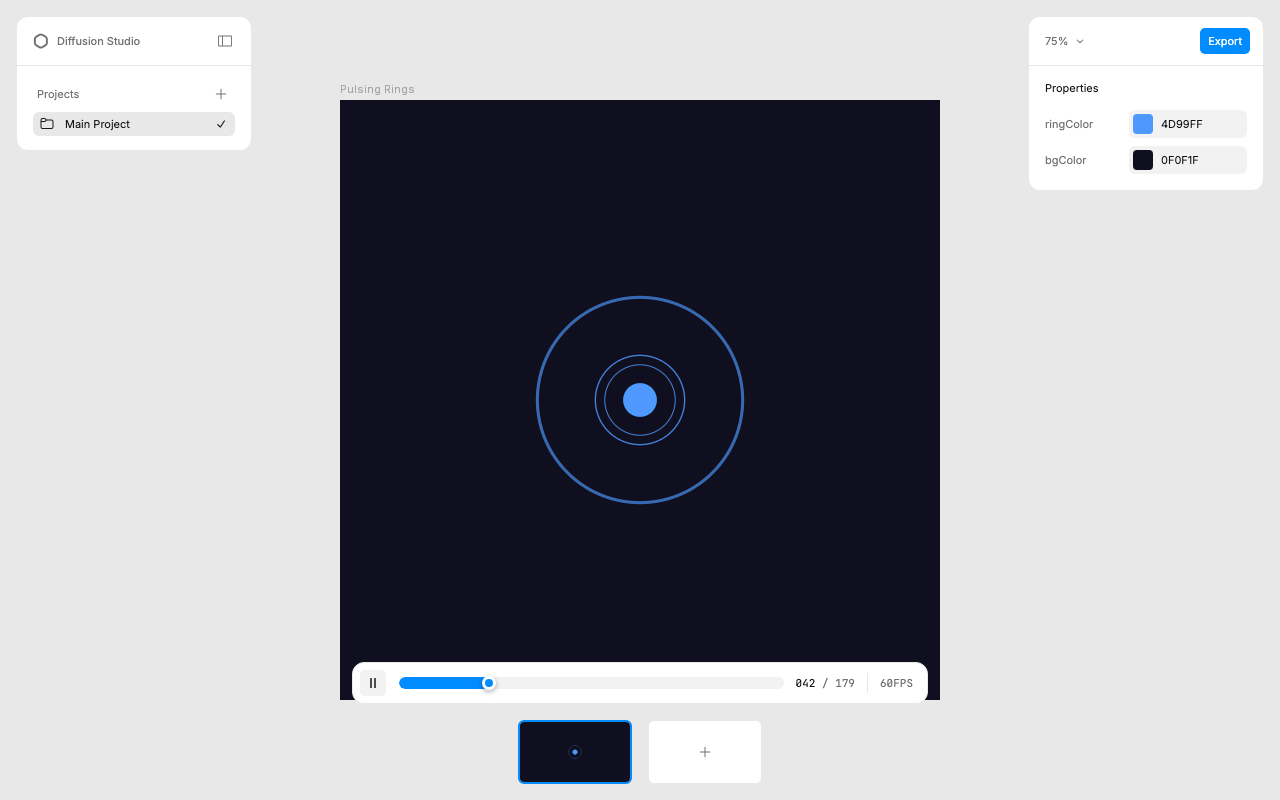
I cloned text-to-lottie, ran npx degit diffusionstudio/lottie, wrote a "pulsing rings" prompt, and had a playable Lottie with editable color/background slots in under a minute. The Skottie player's live properties panel is the part that makes this feel like a real authoring tool rather than a one-shot generator.
I set up an online entry point where anyone can describe a Lottie animation and get a rendered result directly — no clone, no local dev server:
Motion designers, frontend devs, anyone who needs a quick Lottie for a loading spinner or micro-interaction can try text-to-lottie here and get a downloadable JSON without touching a terminal.
Every run leaves a usage record on the platform — what prompts people actually type, which slot configurations they adjust, where they get stuck. That signal is hard to get from GitHub stars alone, and it feeds directly back into sharpening SKILL.md examples and the prompt guide.
The design choice to make slots the primary customization surface (instead of re-prompting the full animation) is interesting — it turns the generated output into something the user iterates on visually rather than verbally. The online entry point preserves that: users upload an SVG or type a description, get the Lottie, and the slot controls carry the same edit-in-place workflow.
Happy to send over the usage-record review link once sessions start coming in.
shesonglin@tinkerland.ai
Feel free to close if this isn't relevant.
@diffusionstudio
I cloned text-to-lottie, ran
npx degit diffusionstudio/lottie, wrote a "pulsing rings" prompt, and had a playable Lottie with editable color/background slots in under a minute. The Skottie player's live properties panel is the part that makes this feel like a real authoring tool rather than a one-shot generator.I set up an online entry point where anyone can describe a Lottie animation and get a rendered result directly — no clone, no local dev server:
Motion designers, frontend devs, anyone who needs a quick Lottie for a loading spinner or micro-interaction can try text-to-lottie here and get a downloadable JSON without touching a terminal.
Every run leaves a usage record on the platform — what prompts people actually type, which slot configurations they adjust, where they get stuck. That signal is hard to get from GitHub stars alone, and it feeds directly back into sharpening SKILL.md examples and the prompt guide.
The design choice to make slots the primary customization surface (instead of re-prompting the full animation) is interesting — it turns the generated output into something the user iterates on visually rather than verbally. The online entry point preserves that: users upload an SVG or type a description, get the Lottie, and the slot controls carry the same edit-in-place workflow.
Happy to send over the usage-record review link once sessions start coming in.
shesonglin@tinkerland.ai
Feel free to close if this isn't relevant.