| title | Azure Storage | |||
|---|---|---|---|---|
| tags |
|
|||
| aliases |
|
|||
| date | 2026-04-16 |
- [[Azure/0_Azure-VM-VMSS]]
- [[Azure/2_AKS-basics]]
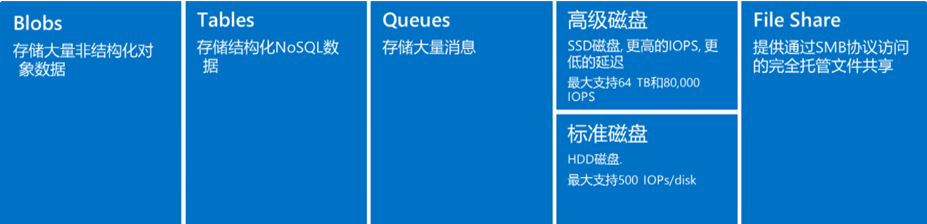
- Access to each storage type is through a ==storage account==
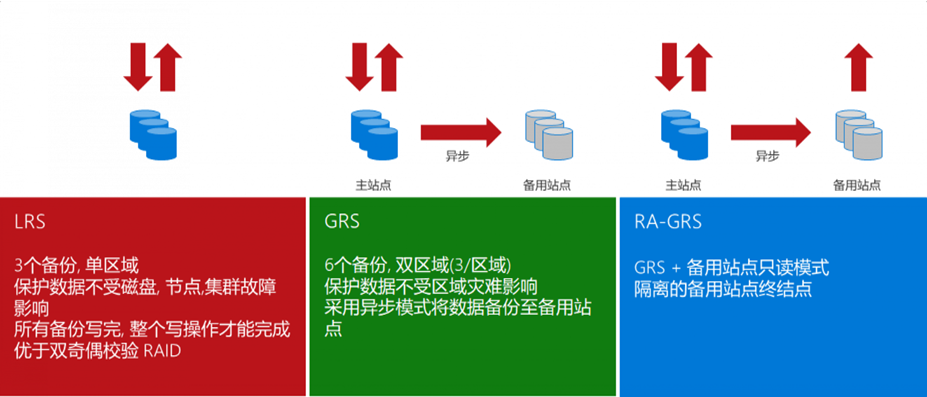
- ==LRS==: Local redundancy, 3 copies within a single datacenter, read/write balanced across the 3 copies. Datacenter failure poses risk.
- ==GRS==: Geo-redundant, different regions. Primary region has 3 copies; secondary region gets 3 async copies, but secondary is not readable/writable unless failover is initiated.
- ==RA-GRS==: Compared to GRS, secondary region's 3 copies are also readable.
- ==ZRS==: Data replicated across different Availability Zones within the same region, 3 copies across 3 AZs.
- ==GZRS==: ZRS + 3 backup copies in another region.
Storage accounts provide a unique namespace for data in Azure. Each object has an address that includes the unique account name. Combine the account name with the Azure Storage service endpoint to form the storage account endpoint. Construct the URL to access an object by appending the object's location to the endpoint. For example, a blob URL: http://mystorageaccount.blob.core.chinacloudapi.cn/mycontainer/myblob
==Binary Large Object== - Azure's object storage solution for the cloud, suitable for storing large amounts of binary objects. Use cases:
- Serve images and documents directly to browsers for distributed access
- Video and audio streaming
- Backup, restore, disaster recovery, archiving
- Azure managed service analytics
Blob has three types:
- ==Block Blob==: Stores text and binary data
- ==Append Blob==: Optimized for append operations, suitable for storing data from VMs
- ==Page Blob==: Stores large random-access files, suitable for storing VHD as VM disks
- ==Hot tier==: Frequently accessed data
- ==Cool tier==: Infrequently used but immediately accessible data (short-term backup and DR). Minimum ==30 days== storage.
- ==Archive access tier==: Offline tier, optimized for rarely accessed data. Must rehydrate to cool/hot tier for read/modify. Minimum ==180 days== storage, otherwise extra charges.
Azure managed, used with Azure VMs. Analogous to physical disks in on-premises servers but virtualized. Types: ==Premium SSD==, ==Standard SSD==, ==Standard HDD==.
-
OS Disk: Pre-installed OS, contains boot volume
-
Data Disk
-
Temporary Disk
- Most VMs include this; it is NOT a managed disk
- Used for page files (memory swap partition), uses host machine disk
- On Linux typically
/dev/sdb, default mount point/mnt/resource - On Windows typically
D:\
[!warning] Temporary Disk Data Loss During VM failure, temporary storage does NOT migrate. Never store important data on temporary disk.
- When creating a storage account, Azure generates two ==512-bit== storage account access keys
- These keys authorize access to data via shared key authorization
- Access Keys are essentially root passwords, providing all access to all services
- Use either key; typically use the first and reserve the second for key rotation
- ==SAS== (Shared Access Signature) grants limited access to containers and blobs in a storage account
- When creating SAS, specify constraints: which storage resources, what permissions, and the validity period
- SAS is signed using access keys, two methods:
- Signed with AAD-provided keys = ==User Delegation SAS==
- Signed with storage account keys = Service SAS / Account SAS
- Enable analytics logging for blob, queue, and table in Portal -> Diagnostics -> set Logging content and retention period
- Logs are stored in the ==
$logs== container, downloadable via azcopy/explorer - Log analysis:
[!example] Convert Storage Logs with PowerShell
$Columns =
     (   "version-number",
         "request-start-time",
         "operation-type",
         "request-status",
         "http-status-code",
         "end-to-end-latency-in-ms",
         "server-latency-in-ms",
         "authentication-type",
         "requester-account-name",
         "owner-account-name",
         "service-type",
         "request-url",
         "requested-object-key",
         "request-id-header",
         "operation-count",
         "requester-ip-address",
         "request-version-header",
         "request-header-size",
         "request-packet-size",
         "response-header-size",
         "response-packet-size",
         "request-content-length",
         "request-md5",
         "server-md5",
         "etag-identifier",
         "last-modified-time",
         "conditions-used",
         "user-agent-header",
         "referrer-header",
         "client-request-id"
     )

$logs = Import-Csv "C:\Users\v-hangx.FAREAST\Desktop\000000.log" -Delimiter ";" -Header $Columns

$logs | Out-GridView -Title "Storage Analytic Log Parser"-
Performance metrics:
- ==IOPS==: Input/Output per second. For OLTP applications (e.g., online retail), high concurrency demands with insert/update-intensive transactions.
- ==Throughput==: Data volume sent to disk in a given time interval. For data warehouse applications, single requests access large data volumes (scan-intensive).
- Relationship: ==IOPS * IO Size = Throughput==
-
IOPS analysis tools:
- Use PerfMon for Windows, iostat for Linux
-
Optimization:
- IO requests are the unit of input/output operations for applications
- OLTP: large amounts of random IO
- Data warehouse: large sequential IO
- Reduce IO size to improve IOPS (e.g., 8KB for OLTP); increase IO size for throughput (e.g., 1024KB for data warehouse)
- Cache has separate IOPS and throughput tied to VM size; as read time extends, cache warms up. Azure Premium Storage VMs use ==BlobCache== (host RAM + local SSD combination).
- IO requests are the unit of input/output operations for applications
Cache is stored on physical host machine disk, provided by Compute resources, with good performance.
-
==ReadOnly==:
- Reduces read latency, achieves higher IOPS and throughput
- Cached reads happen on local VM and local SSD, much faster than data disk reads (which happen on Blob)
-
==ReadWrite==:
- Default for OS disk
- Uses appropriate methods to write data from cache to permanent disk
-
==None==:
- Only data disks support this; OS disks do not
- Setting OS disk cache to None will internally override to ReadOnly
[!example] SQL Server on Premium Storage
- Configure ==ReadOnly== cache on premium storage disks hosting data files
- Fast cache reads shorten SQL Server query time
- Reading from cache provides more throughput for SQL Server for backup/restore, bulk load, index rebuild
- Configure ==None== cache on premium storage disks hosting log files
- Log files primarily have frequent write operations; ReadOnly cache is not beneficial
- Queue depth is closely related to multi-threading. Queue depth indicates the degree of parallelism an application can achieve.
- High queue depth allows more operations to queue on disk. The disk can plan ahead and process optimally.
- Too high queue depth can negatively impact application latency.
- Formula: ==IOPS * Latency = Queue Depth==
- Striped volumes should maintain enough queue depth so each disk has its own peak queue depth. For example, if queue depth is 2 with 4 striped disks, only 2 disks will be busy. Configure queue depth to keep all disks busy.
kubectl run curl-testing --image curl:latest  --image-pull-policy=IfNotPresent --restart=Never --rm -it curl-testing -- curl "https://<sa name>.blob.core.chinacloudapi.cn/<container name>/<file name>?<sas>"
curl: (7) Failed to connect to curl-testing port 80: Connection refused
curl: (6) Could not resolve host: curl
########################################
## Testing Connection Success
########################################- apt install azcopy: https://learn.microsoft.com/zh-cn/azure/storage/common/storage-use-azcopy-v10?tabs=apt#install-azcopy-on-linux-by-using-a-package-manager
#curl -sSL -O https://packages.microsoft.com/config/ubuntu/22.04/packages-microsoft-prod.deb
#dpkg -i packages-microsoft-prod.deb && rm packages-microsoft-prod.deb
#apt-get update && apt-get install azcopy
wget -O azcopy_v10.tar.gz https://aka.ms/downloadazcopy-v10-linux && tar -xf azcopy_v10.tar.gz --strip-components=1- Upload without SAS -- fails (needs authentication):
./azcopy copy 'test.log' 'https://<sa name>.blob.core.chinacloudapi.cn/<container name>/test.log'- Upload with container-level SAS -- success:
./azcopy copy 'test.log' 'https://<sa name>.blob.core.chinacloudapi.cn/<container name>?<sas>'- Upload with VM's ==system-assigned identity==:
-
Grant identity ==Storage Blob Contributor== on the storage account
-
Upload directly without SAS token:
./azcopy copy 'test.log' 'https://<sa name>.blob.core.chinacloudapi.cn/<container name>'
-
-
Get azcopy in pod -- busybox and alpine images cannot run azcopy after download:
kubectl run apline --image apline:latest --image-pull-policy=IfNotPresent --restart=Never --rm -it -- sh
-
Try ubuntu, container has root -- success:
kubectl run ubuntu --image ubuntu:22.04  --image-pull-policy=IfNotPresent --restart=Never --rm -it -- /bin/bash

./azcopy login --identity --identity-client-id <client id>
#这里用aks的kubelet identity,sa层面赋予Storage Blob Contributor角色
#测试上传
echo "tesetingfromakspod" >> test.log
./azcopy copy 'test.log' 'https://<sa name>.blob.core.chinacloudapi.cn/<container name>'
-
Full commands to run in pod:
apt-get update && apt-get install -y wget
wget -O azcopy_v10.tar.gz https://aka.ms/downloadazcopy-v10-linux && tar -xf azcopy_v10.tar.gz --strip-components=1
./azcopy login --identity --identity-client-id <client-id> #--aad-endpoint https://login.partner.microsoftonline.cn
./azcopy copy '<file name>' 'https://<sa name>.blob.core.chinacloudapi.cn/<container name>'Previously used kubelet identity. Now test with ==workload identity== (just mount the service account, no need to specify UAI ID).
azcopy 10.25+ supports login with workload identity:
- Azure/azure-storage-azcopy#2545 (comment)
- azcopy env vars: https://learn.microsoft.com/zh-cn/azure/storage/common/storage-ref-azcopy-configuration-settings
tee pod-wi-ubuntu.yaml <<'EOF'
---
apiVersion: v1
kind: Pod
metadata:
  name: pod-test-wi
  namespace: <ns name>
  labels:
    azure.workload.identity/use: "true"
spec:
  serviceAccountName: <sa name>
  containers:
    - name: ubuntu
      image: ubuntu:22.04
      command: ["/bin/sh"]
      args: ["-c", "while true; do echo hello; sleep 10;done"]
      env:
      - name: STORAGE_ACCOUNT_NAME
        value: <sa name>
      - name: STORAGE_CONTAINER_NAME
        value: <container name>
      - name: AZCOPY_AUTO_LOGIN_TYPE
        value: WORKLOAD
EOF

##job的yaml需要添加的字段##
#1. 加一个label
  labels:
    azure.workload.identity/use: "true"

#2. 加环境变量
env:
- name: STORAGE_ACCOUNT_NAME
  value: <sa name>
- name: STORAGE_CONTAINER_NAME
  value: <container name>
- name: AZCOPY_AUTO_LOGIN_TYPE
  value: WORKLOAD

#3. job的command改成下面:
apt-get update && apt-get install -y wget
wget -O azcopy_v10.tar.gz https://aka.ms/downloadazcopy-v10-linux && tar -xf azcopy_v10.tar.gz --strip-components=1
./azcopy copy '<file name>' 'https://<sa name>.blob.core.chinacloudapi.cn/<container name>' --put-md5
[!note] Blob MD5 for Large Files Azure Blob's MD5 for large file uploads needs to be manually specified:
-
Directly install az cli in main container (up to 700 MB will be installed, too big, the pod will crash during installation)
https://learn.microsoft.com/zh-cn/cli/azure/install-azure-cli-linux?pivots=apt
-
Sidecar container approach:
https://learn.microsoft.com/zh-cn/cli/azure/run-azure-cli-docker
tee pod-sidecar.yaml <<'EOF'
apiVersion: v1
kind: Pod
metadata:
  name: pod-test-wi
  namespace: mapapps
  labels:
    azure.workload.identity/use: "true"
spec:
  serviceAccountName: <sa name>
  containers:
    - name: ubuntu
      image: ubuntu:22.04
      imagePullPolicy: IfNotPresent
      command:
      - /bin/sh
      - -c
      - >
        while true; do echo hello >> /mnt/test.txt; sleep 10; done
      volumeMounts:
      - name: localstorage
        mountPath: /mnt
    - name: sidecar-azlogin
      image: azure-cli:cbl-mariner2.0
      command:
      - /bin/sh
      - -c
      - |
        az login --service-principal -u $AZURE_CLIENT_ID -t $AZURE_TENANT_ID --federated-token $AZURE_FEDERATED_TOKEN_FILE && \
        az storage blob upload --account-name <sa name> --container-name <container name> --name test.txt --file /mnt/test.txt
      volumeMounts:
      - name: localstorage
        mountPath: /mnt
  volumes:
  - name: localstorage
    emptyDir: {}
EOF
[!info] Workload Identity Environment Variables Every pod with WI has these environment variables:
Environment:
      AZURE_CLIENT_ID:             <client id>
      AZURE_TENANT_ID:             <tenant id>
      AZURE_FEDERATED_TOKEN_FILE:  /var/run/secrets/azure/tokens/azure-identity-token
      AZURE_AUTHORITY_HOST:        https://login.chinacloudapi.cn
Login command:
az cloud set --name AzureChinaCloud && az login --service-principal --username "${AZURE_CLIENT_ID}" --tenant "${AZURE_TENANT_ID}" --federated-token "$(cat $AZURE_FEDERATED_TOKEN_FILE)"Upload command:
az storage blob upload --account-name <sa name> --container-name <container name> --name test.txt --file /mnt/test.txt --auth-mode login
#azcli pod单独测试
tee pod-azcli.yaml <<'EOF'
apiVersion: v1
kind: Pod
metadata:
  name: pod-test-azcli
  namespace: <ns name>
  labels:
    azure.workload.identity/use: "true"
spec:
  serviceAccountName: <sa name>
  containers:
    - name: sidecar-azlogin
      image: azure-cli:cbl-mariner2.0
      command: ["/bin/sh"]
      args: ["-c", "while true; do echo hello; sleep 10;done"]
EOF
[!warning] AZ CLI Container Resource Requirements The MS-provided azcli container will crash when running az commands if CPU/memory is too low. Set request to at least ==200m CPU== and ==500Mi memory==.
- Create secret:
kubectl create secret generic <secret name> --from-literal sazurestorageaccountname=<sa name> --from-literal azurestorageaccountkey="<key value>" --type=Opaque- Create PV:
tee pv-download.yaml <<'EOF'
apiVersion: v1
kind: PersistentVolume
metadata:
  annotations:
    pv.kubernetes.io/provisioned-by: blob.csi.azure.com
  name: pv-blob-download
spec:
  capacity:
    storage: 10Gi
  accessModes:
    - ReadWriteMany
  persistentVolumeReclaimPolicy: Retain  # If set as "Delete" container would be removed after pvc deletion
  storageClassName: managed-blobfuse-premium-lrs
  mountOptions:
    - -o allow_other
    - --file-cache-timeout-in-seconds=120
  csi:
    driver: blob.csi.azure.com
    # volumeid has to be unique for every identical storage blob container in the cluster
    # character `#`and `/` are reserved for internal use and cannot be used in volumehandle
    volumeHandle: <handle name>
    volumeAttributes:
      containerName: <container name>
    nodeStageSecretRef:
      name: <secret name>
      namespace: default
EOF- Create PVC:
tee pvc-download.yaml <<'EOF'
apiVersion: v1
kind: PersistentVolumeClaim
metadata:
  name: pvc-blob-download
spec:
  accessModes:
    - ReadWriteMany
  resources:
    requests:
      storage: 10Gi
  volumeName: pv-blob-download
  storageClassName: managed-blobfuse-premium-lrs
EOF- Test simple pod mount:
tee pod-wi-ubuntu.yaml <<'EOF'
apiVersion: v1
kind: Pod
metadata:
  name: pod-test-wi
  namespace: <ns name>
  labels:
    azure.workload.identity/use: "true"
spec:
  serviceAccountName: <sa name>
  containers:
    - name: ubuntu
      image: ubuntu:22.04
      command: ["/bin/sh"]
      args: ["-c", "while true; do echo hello; sleep 10;done"]
EOF

k exec -it pod-test-wi -n <ns name> -- /bin/bash
#查看token
cat /run/secrets/azure/tokens/azure-identity-token- Test job mounting blob
PV:
tee pv-upload.yaml <<'EOF'
apiVersion: v1
kind: PersistentVolume
metadata:
  annotations:
    pv.kubernetes.io/provisioned-by: blob.csi.azure.com
  name: pv-blob-upload
  namespace: <ns name>
spec:
  capacity:
    storage: 10Gi
  accessModes:
    - ReadWriteMany
  persistentVolumeReclaimPolicy: Retain  # If set as "Delete" container would be removed after pvc deletion
  storageClassName: managed-blobfuse-premium-lrs
  mountOptions:
    - -o allow_other
    - --file-cache-timeout-in-seconds=120
  csi:
    driver: blob.csi.azure.com
    # volumeid has to be unique for every identical storage blob container in the cluster
    # character `#`and `/` are reserved for internal use and cannot be used in volumehandle
    volumeHandle: <handle name>
    volumeAttributes:
      storageAccount: <sa name>
      containerName: <container name>
      AzureStorageAuthType: MSI
      AzureStorageIdentityClientID: <client id>
      AzureStorageIdentityResourceID: <uai id>
      #MSIEndpoint:
EOF
PVC:
tee pvc-download.yaml <<'EOF'
apiVersion: v1
kind: PersistentVolumeClaim
metadata:
  name: pvc-blob-upload
  namespace: <ns name>
spec:
  accessModes:
    - ReadWriteMany
  resources:
    requests:
      storage: 10Gi
  volumeName: pv-blob-upload
  storageClassName: managed-blobfuse-premium-lrs
EOF
Dynamic PV provisioning test:
tee pod-wi-ubuntu.yaml <<'EOF'
---
apiVersion: v1
kind: Pod
metadata:
  name: pod-test-wi
  namespace: <ns name>
  labels:
    azure.workload.identity/use: "true"
spec:
  serviceAccountName: <sa name>
  containers:
    - name: ubuntu
      image: ubuntu:22.04
      command: ["/bin/sh"]
      args: ["-c", "while true; do echo hello; sleep 10;done"]
      volumeMounts:
        - name: storage
          mountPath: /mnt/storage
  volumes:
    - name: storage
      persistentVolumeClaim:
        claimName: pvc-blob-upload

---
apiVersion: v1
kind: PersistentVolumeClaim
metadata:
  name: pvc-blob-upload
  namespace: <ns name>
spec:
  accessModes:
    - ReadWriteMany
  resources:
    requests:
      storage: 10Gi
  storageClassName: managed-blobfuse-premium-lrs
EOF-
How to download files using container-level SAS token?
Simply append the filename to the URL. Both sides need to sync the filename.
-
How to get blob MD5 value?
The SAS URL response header contains ==Content-MD5== field. Use
curl -ito view it directly.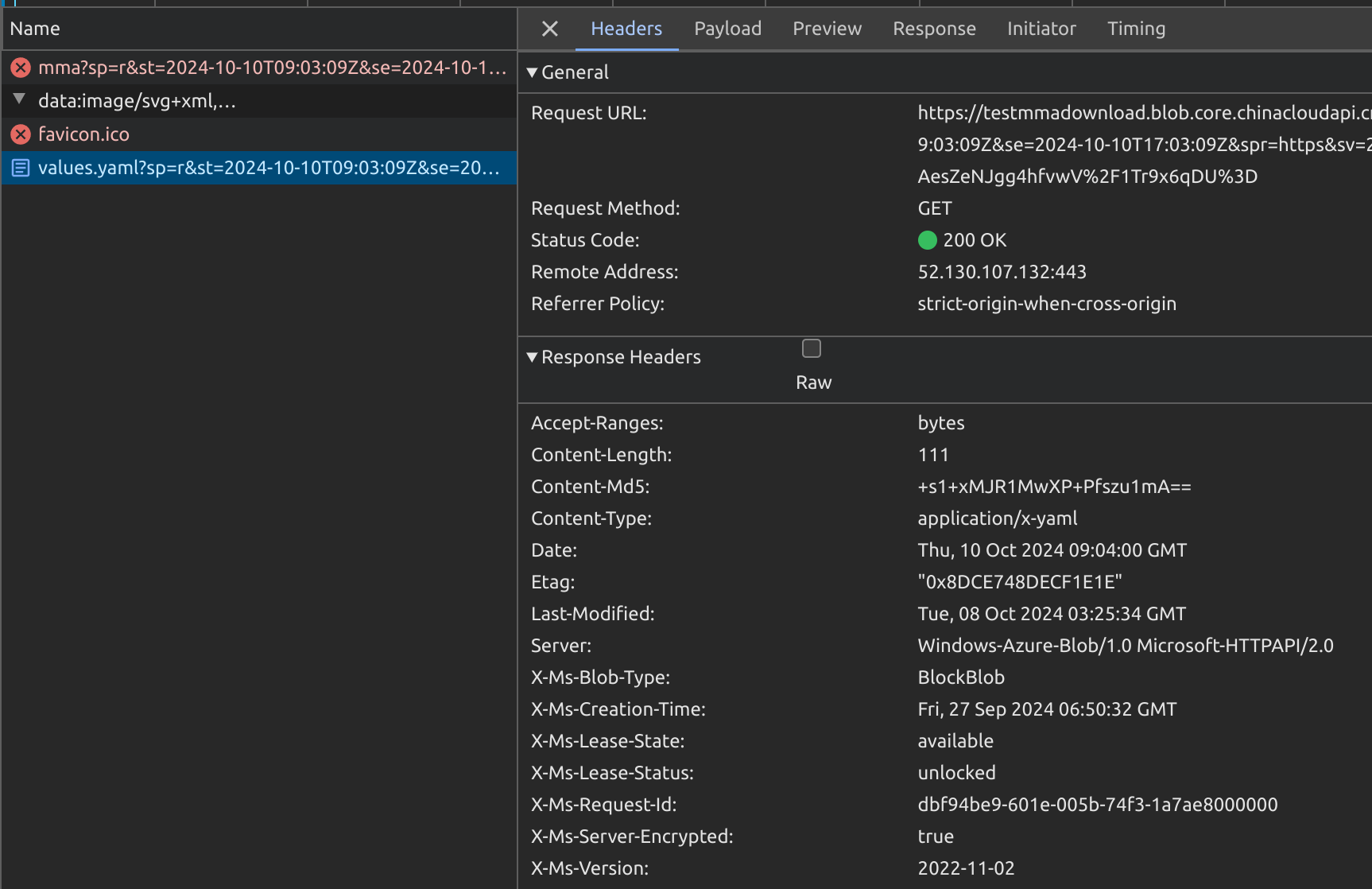
curl -i "https://<sa name>.blob.core.chinacloudapi.cn/<container name>/values.yaml?xxxxxxxxxx"
HTTP/1.1 200 OK
Content-Length: 111
Content-Type: application/x-yaml
Content-MD5: +s1+xxxxxxxxxxxxxxxxxx
Last-Modified: Tue, 08 Oct 2024 03:25:34 GMT
Accept-Ranges: bytes
ETag: "xxx"
Server: Windows-Azure-Blob/1.0 Microsoft-HTTPAPI/2.0
x-ms-request-id: xxxx
x-ms-version: 2022-11-02
x-ms-creation-time: Fri, 27 Sep 2024 06:50:32 GMT
x-ms-lease-status: unlocked
x-ms-lease-state: available
x-ms-blob-type: BlockBlob
x-ms-server-encrypted: trueBackground:
- Files are uploaded to Azure Storage Account. Each update creates a new blob file in the same directory for download.
- A long-lived directory-level SAS Token is provided. It can list all files in the directory along with creation time, MD5 checksums, etc.
- SAS URL format:
https://<sa name>.blob.core.chinacloudapi.cn/<container name>?sp=rl&st=2024-10-11T06:04:27Z&se=2024-10-11T14:04:27Z&sip=101.95.105.42&spr=https&sv=2022-11-02&sr=c&sig=xxxWhere:
https://<sa name>.blob.core.chinacloudapi.cn/<container>is the storage directory pathsp=rl&st=...&sig=xxxis the SAS Token value
-
Add ==
restype=container&comp=list&== between the directory path and SAS Token to list all files and info:-
Assembled URL:
https://<sa name>.blob.core.chinacloudapi.cn/<container name>?restype=container&comp=list&sp=rl&st=2024-10-11T06:04:27Z&se=2024-10-11T14:04:27Z&sip=101.95.105.42&spr=https&sv=2022-11-02&sr=c&sig=xxx -
Example command:
curl -X GET "https://<sa name>.blob.core.chinacloudapi.cn/<container name>?restype=container&comp=list&sp=rl&st=2024-10-11T06:04:27Z&se=2024-10-11T14:04:27Z&sip=101.95.105.42&spr=https&sv=2022-11-02&sr=c&sig=xxx" -
Returns XML format:
<?xml version="1.0" encoding="utf-8"?>
<EnumerationResults ServiceEndpoint="https://<sa name>.blob.core.chinacloudapi.cn/" ContainerName="<container name>">
    <Blobs>
        <Blob>
            <Name>test.log</Name>
            <Properties>
                <Creation-Time>Tue, 08 Oct 2024 08:33:51 GMT</Creation-Time>
                <Last-Modified>Thu, 10 Oct 2024 08:17:07 GMT</Last-Modified>
                <Etag>xxx</Etag>
                <Content-Length>19</Content-Length>
                <Content-Type>text/plain</Content-Type>
                <Content-Encoding />
                <Content-Language />
                <Content-CRC64 />
                <Content-MD5>xxx</Content-MD5>
                <Cache-Control />
                <Content-Disposition />
                <BlobType>BlockBlob</BlobType>
                <AccessTier>Hot</AccessTier>
                <AccessTierInferred>true</AccessTierInferred>
                <LeaseStatus>unlocked</LeaseStatus>
                <LeaseState>available</LeaseState>
                <ServerEncrypted>true</ServerEncrypted>
            </Properties>
            <OrMetadata />
        </Blob>
    <NextMarker />
</EnumerationResults>
-
- Append the blob filename (obtained from listing) to the SAS URL container path:
curl "https://<sa name>.blob.core.chinacloudapi.cn/<container name>/test.log?sp=rl&st=2024-10-11T06:04:27Z&se=2024-10-11T14:04:27Z&sip=101.95.105.42&spr=https&sv=2022-11-02&sr=c&sig=xxx"