Git Workflow is the way people use Git to accomplish work in a consistent and productive manner. It involves the procedures of committing new files, making edits, solving conflicts, and so on. An effective workflow can significantly enhance the productivity of a software team. While one can personalize their own unique workflow, there are still some common patterns to learn.

Like svn, people can implement Centralized Workflow in Git. Centralized Workflow uses a central repository to serve as the single point-of-entry for all changes to the project, and it only uses a single branch called master.
.svg?cdnVersion=ht)
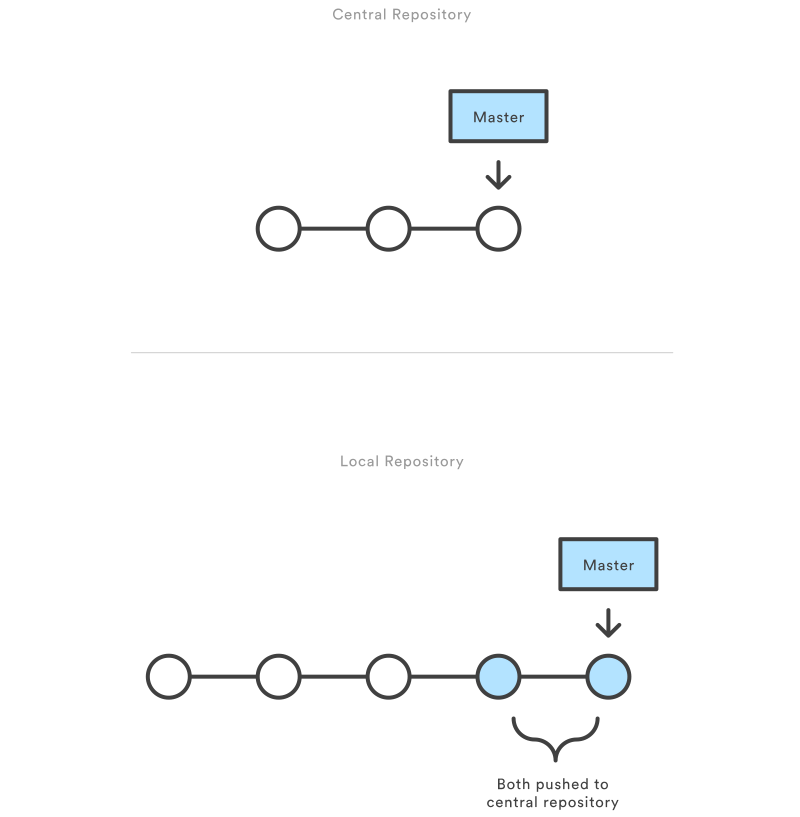
Firstly, developers clone the central repository. Then they can edit files and commit changes locally, which allow them modify their files as many times as they want without affecting the central repository. When they finished editing, they can push their local master branch to the central repository.
.svg?cdnVersion=ht)
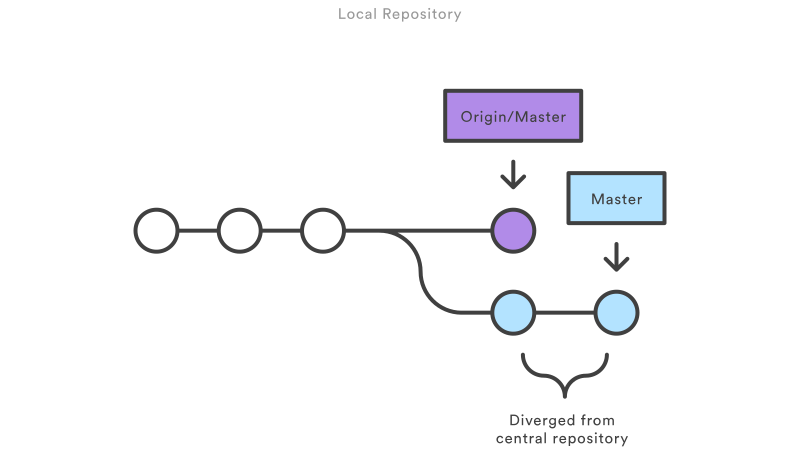
If a delevoper's local commit diverge from the central repository, Git will simple refuse to push this change. To solve this problem, developers need to clone the newest central repository then rebase their changes on top of them. If a merge conflict appears at this time, developer can solve it right away. In this way, they are changing what everyone else has done, making the workflow linear.

Centralized Workflow is easy to use and fits small groups. However, as the team's size expand, it will be very inconvenient to use only one branch. Some other kinds of workflows can help us solve this problem.
In Feature Branch Workflow, all feature development takes place in a dedicated branch rather than the master branch. That means developers can work on their own part(e.g. a brand new feature of the product) without overwriting files in master branch, and the master branch will never contain broken code. Also, developers can make use of pull request, so that their changes will be pushed only if all members agree.
The Feature Branch Workflow use a central repository to store all files, but only the master branch represents the official project. Developers in this case create their own feature branches to save their work rather than using local master branches. Feature branches are pushed to the central repository, and every time a developer finishes their work they can merge their branch to the master branch. The branches also help save different stages of the work of all members.
Feature Branch Workflow is branching model focused while other workflows are more repo focused, and in many cases this promotes collaboration within team members. Some other workflows make use of it to implement branching models.
##Gitflow Workflow##
Gitflow Workflow looks like Feature Branch Workflow, but it gives different roles to different branches, while those branches are equal in status in the latter workflow. It is very useful when it comes to the management of large scale projects or projects having a scheduled release cycle.
###How it works###
Gitflow workflow use git-flow toolset and mainly use five kinds of branches to work on a project: master, develop, feature, release and hotfix.
####Master Branch####
Unlike Feature Branch Workflow, the master branch in Gitflow Workflow is only in charge of the formal release of the product, so it will only be modified every time a new version, major or minor, needs to be released.
####Develop Branch####
.svg)
The develop branch is the one that integrate new features whenever it's finished instead of the master branch. This branch, like the master branch in previous workflows, holds all changes of every new features.
####Feature Branch####
.svg)
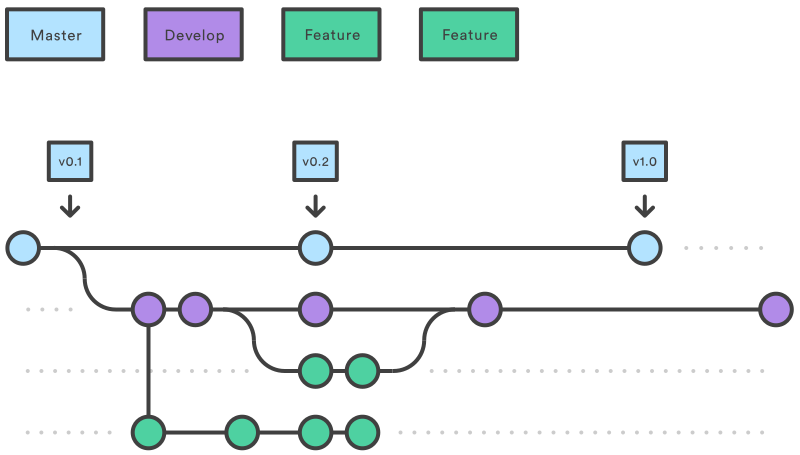
The feature branch should now be attach to the develop branch, not master, since develop branch is the one to modify. The feature branch and the develop branch actually form a complete feature branch workflow.
.svg)
Once the features in develop branch make up a new version, a release branch is forked off of the develop branch. At this time, only those release-oriented tasks can be added to the release branch, while new features still go to develop branch and wait for the next release. Then the release branch is merged into the master branch to officially release the new version, and meanwhile it should also be merged into develop branch to save both the new features and those release-oriented tasks accomplished during the release process. Using release branch help form well-defined phases of development and create perfect opportunity to review codes before they are finally released.
####Hotfix Branch####
.svg)
Hotfix branch is another kind of special branch diverging from the master branch to help developers respond to urgent situations quickly. Whenever anyone find some serious problems in the master branch, they can immediately folk a hotfix branch off the master branch and work on it. Once they finished their work, they can merge it into the master branch to release a temporarily updated version to solve the urgent problem, and then merge it to the develop branch to save their work. The whole process won't disturb any other part of the workflow.
###Summary###
Gitflow workflow is based on Feature Branch Workflow, but it is more sophisticated, more organized, and fits large release-based projects.
##Forking Workflow##
The basic logic of Forking Workflow is different from all other workflows above. In this workflow, developers forks the original repository and do all their work on their own server-side repository, and only the project maintainer can push to the official repository. That means developers need to integrate their work by committing to the original repository without modifying it. In fact they even do not have write access to the original repository, and their commit is pushed only if the project maintainer allows them to do so. All those features make Forking Workflow ideal for open source projects.
###How it works###
Firstly the project maintainer creates an official public repository.
When a developer wants to work on it, they have to fork the official repository instead of cloning it, which creates an online copy of the repository. This repository will serve as their own public repository, and they then clone it to their local machine. Then they do all their works privately.
After they finished, they push their commit to their own public repository, then file a pull request with the official repository. After the project maintainer agreed, their change will be pushed and the project is successfully updated.
###Summary###
In short, Forking Workflow make use of forking other than cloning or branches. Every developer edit their files on their local repositories, share them on their server-side repositories, and pull them to the project manager by pull request. However, they still need to use branches or cloning while doing their own work. Forking Workflow provides an effective way for open source projects.
##Conclusion##
Those are some basic workflows, and people can customize their own unique workflows. The principle of choosing or creating workflows, however, is just make it fit the size and the culture of the team and be able to enhance the productivity at the greatest extent.