In a recent project we wanted to do a fancy pull to refresh animation and I was faced with the problem of how to implement it. After coming up with a solution I thought it might be worth sharing this.
Most of the time there a pretty good and customisable solutions around, but this time it seemed like all the pull to refresh libraries out there were not sufficient for our needs. I had a look at a few libraries, for example https://github.com/chrisbanes/Android-PullToRefresh and https://github.com/johannilsson/android-pulltorefresh
It was important to use to navigate back and forth through they keyframes while pulling down and pushing back up the list.
Here is what we achieved:
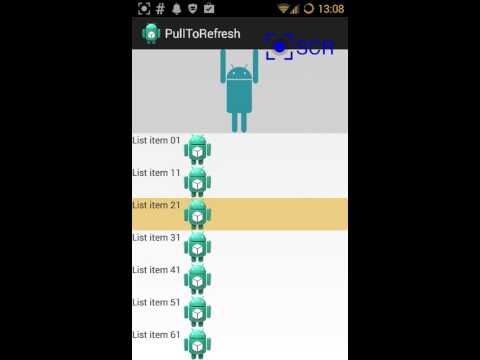
After having a look into the existing code base of the libraries mentioned above, I got a good understanding of how it works. I stated out by just using a simple onTouchListener and a header view on a list view. One big problem with that approach was that the list view did intercept certain events. For instance clickable views inside the list would not let the down event go through when starting the pull to refresh on them.
So the final approach was to extend the ListView and overwrite the onInterceptTouchEvent of the list view like this:
@Override
public boolean onInterceptTouchEvent(MotionEvent event) {
        if (this.mPullToRefreshAnimation != null) {
        switch (event.getAction()) {
            case MotionEvent.ACTION_DOWN:
                if (this.mPullToRefreshAnimation.onDownIntercept(event)) {
                    return true;
                }
                break;
            case MotionEvent.ACTION_MOVE:
                if(this.mPullToRefreshAnimation.onMoveIntercept(event)) {
                    return true;
                }
                break;
        }
    }
    return super.onInterceptTouchEvent(event);
}
On onInterceptTouchEvent we initiate the pull to refresh, but only if the first visible item position is 0. If so we want to intercept the ACTION_DOWN event. As we move the list up and down we want go through the keyframes without scrolling the list. This is achieved by the overwriting onTouch which will return true to intercept events when we are doing a pull to refresh.
To display the correct keyframe we need to calculate the range we want to animate in and divide it into equal parts for which we set a certain keyframe. ALl done in the PullToRefreshAnimation class, which should be fairly easy to extend and modify as you can see in the sample project.
int image_index = (int) ((mTotalDistance - getAnimationStart() - getMarginStart()) / range);
int chosen_index = image_index;
if (image_index >= 0 && image_index < getAnimationFrames()) {
	mCurrentIndex = chosen_index;
    setAnimationForFrame(mCurrentIndex);
}
I created a sample project which demonstrates a keyframe animation of the android figure below, the pull to refresh functionality is extracted into a library project. http://github.com:jtribe/AndroidPullToRefresh.git

I used sync studio to animate the android vector graphic image www.synfig.org. The user interface isn't very intuitive but its easy to get started. You can find my .sifz file in the sample project assets folder.
Check it out on github, feel free to fork it and send pull requests. http://github.com:jtribe/AndroidPullToRefresh.git
Or shoot me a email @ tobias@jtribe.com.au or follow me @tosa or on google plus https://plus.google.com/107803874078363531654/posts