This document could be used as a reference to setup a dual stack (Network support for both ipv4 & ipv6 addressing) Robin Platform on AWS
Click this link to refer to dual stack on AWS
Robin is a Kubernetes-based platform that automates the deployment, scaling and lifecycle management of Data and Network intensive applications. Robin ships pure open-source Kubernetes in a batteries included, but replaceable, packaging mode. Robin supports the open-source Kubernetes that is shipped with the product and provides automated installation, frequent upgrades, and monitoring. However, because Robin platform capabilities don't require any changes to open-source Kubernetes, one may choose to replace the built-in open-source Kubernetes with their own distribution of CNCF-certified Kubernetes (including on-premises or cloud-vendor distributions).
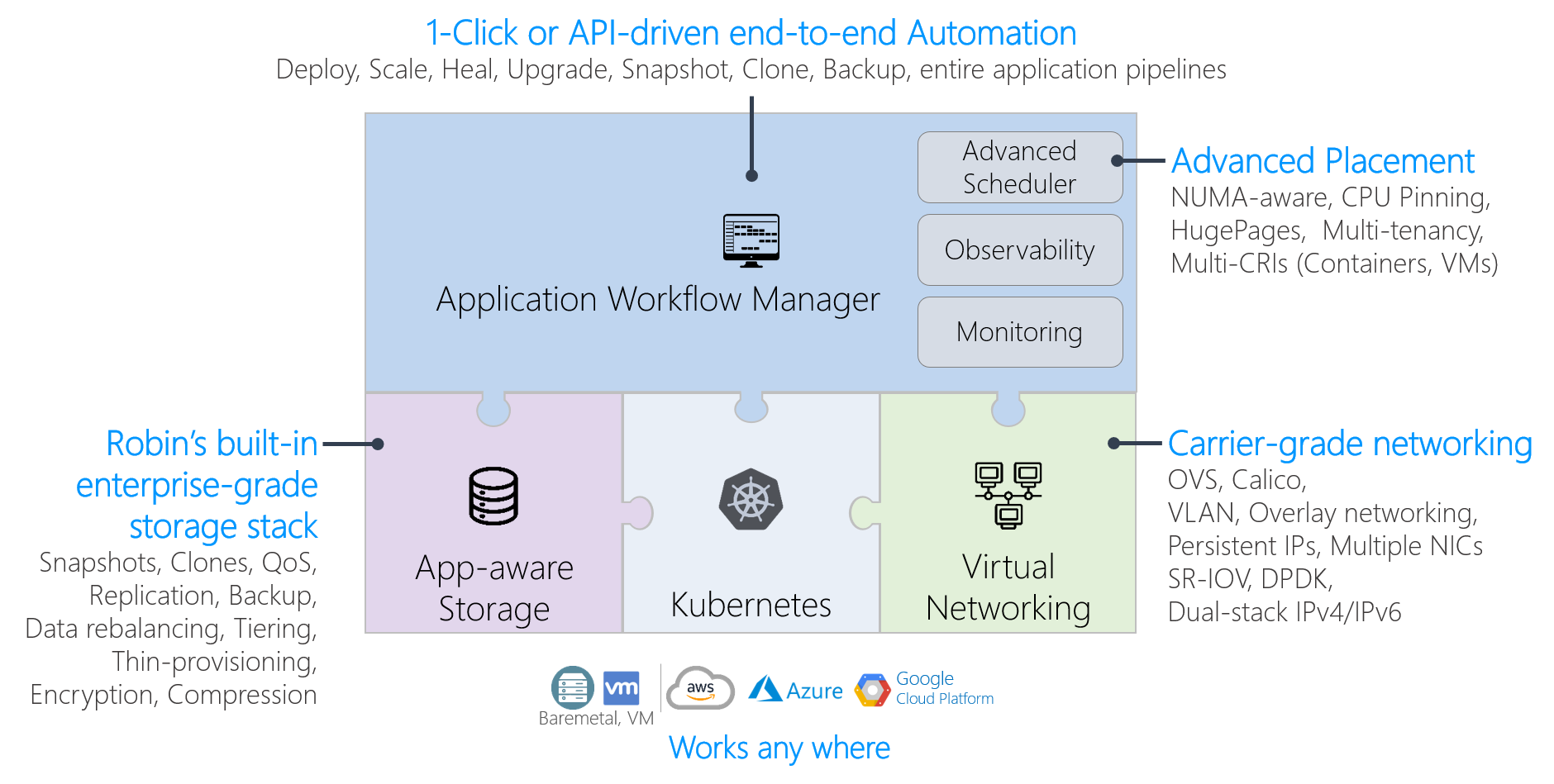
Click this link to learn further about Robin Platform
- All nodes should be DNS resolvable resulting in internet connectivity between them.
- All nodes should have a minimum of 4GB memory.
- All nodes should have a minimum of 8 cores.
- All storage requirements detailed below are met.
- The interconnect network between the host supports 10G network bandwidth.
-
The following operating systems are supported for Robin installation:
- CentOS 7 or CentOS 8
- Redhat Enterprise Linux (RHEL)
- Oracle Enterprise Linux (OEL)
-
The minimum supported kernel version is
3.10.0-1062. To confirm that you are running a supported kernel, run this command:
# uname -rIn order to upgrade to the latest available kernel run this command:
# yum update kernelAfter the above step is run the respective machine needs to be rebooted to ensure it has been updated to the correct kernel version.
- Highly available deployments of Robin require a minimum of three nodes (five nodes are recommended), or a minimum of one node for non highly available deployments.
Note: For HA installations a virtual IP address (VIP) is required. The IP address must be in the same subnet as that of the hosts on which Robin will be installed.
-
Check the status of the following services:
- Firewall: Disabled
- SELinux: Disabled (Only during installation)
- NTP: Enabled, Up and Running
-
Swap must be disabled.
-
If the directory
/var/lib/dockeris present, it must be on an XFS filesystem. -
The locations
/,/varand/var/crashshould be on separate partitions. -
The
rootuser needs to be present in the sudoers file located at/etc/sudoers -
Any conflicting packages must be removed before installation or when indicated by an installation failure. In particular, on machines using CentOS 8 the
podmanandbuildahpackages should be removed. Note there can be more conflicting packages then the ones previously mentioned. Once the conflicting packages are removed rerun the installer if needed. -
Currently Robin supports GPU allocations only via the NVIDIA GPU operator. This operator works only on CentOS Kernel version
3.10.0-1160and above. -
Automatic detection of isolated CPUs only occurs when the respective hosts have been configured to have isolated cores via tuned and/or tuna settings. The cores which are not part of this isolated set will be set as the reserved CPUs for Kubelet. If the isolated cores are configured in an alternative manner they will have to be passed to the installer explicitly.
For automatic storage configuration on the nodes, create /var and
/home folders which are at least 60GB and 240GB in size,
respectively. The Robin installer will create the folders underneath.
If you prefer to manually configure storage, separate volumes can be created following these requirements:
/var/lib/docker              Directory in which the Docker images and metadata will be stored.
                             Minimum 50GB in size, but can be sized according to the application spread.
/var/lib/robin               Directory in which the locally cached bundles and images will be stored.
                             Minimum 20GB in size. Should be at least 50GB if LXC images will be used.
/home/robinds                Directory in which Robin config and Consul data will be stored.
                             Minimum 20GB in size.
/home/robinds/var/log        Directory in which all the Robin log files will be stored.
                             Minimum 60GB in size. Robin log files are capped at ~55G on master nodes and 30G on worker nodes.
/home/robinds/var/crash      Directory in which Robin core dump files will be stored.
                             Minimum 100GB in size. This is sufficient to store data for at least 4 crashes.
/home/robinds/var/lib/pgsql  Directory in which the Robin database will be stored.
Minimum 80GB in size. Needs to have sufficient space to hold the contents of the database, as well as a backup to support failover.Note: Robin platform only discovers and initializes unpartitioned drives for pod deployments. These drives should not be tagged or labeled.
- Promiscuous Mode must be enabled
- The MAC Address Change Policy setting must be set to Accept
- The Forged Transmissions setting must be set to Accept
If you are installing Robin on any cloud platform, the following ports need to be accessible for the installation to succeed and for Robin to operate correctly:
+---------------+----------------+
| **Ports**     | **Description**|
+---------------+----------------+
| 22 *          | SSH            |
+---------------+----------------+
| 179           | BGP            |
+---------------+----------------+
| 443 *         | UI Access      |
+---------------+----------------+
| 2379 - 2380   | ETCD Ports     |
+---------------+----------------+
| 6443 **       | K8s API Server |
+---------------+----------------+
| 29442 *       | Robin Server   |
+---------------+----------------+
| 29443 *       | Robin UI       |
+---------------+----------------+
| 29444 - 29446 | Robin services |
+---------------+----------------+
| 29447 *       | NodeJS         |
+---------------+----------------+
| 29448 - 29467 | Robin services |
+---------------+----------------+
| 10250         | Kubelet        |
+---------------+----------------+Note: The above list of ports also apply to on-premises clusters.
The ports above which are highlighted with an asterisk need to be exposed to all sources or at least the relevant range of sources that plan to access the Robin Cluster including the machines within the cluster. Other ports which do not have this distinction only need to be exposed to machines within the Robin cluster. The K8s API server port has a special distinction as it only needs to be exposed to all external sources when installing Robin on Google Cloud Platform via GoRobin.
Note: When creating each rule to make the port accessible, ensure that the protocol is TCP. In addition, all cloud nodes within the cluster should be able to communicate with one another via the IP-in-IP (4) Protocol.
To manage ports:
- AWS: use security groups. See details here
-
A security group that conforms to the port requirements detailed here must be assigned to the instances where Robin will be installed or passed to the GoROBIN tool for AWS.
-
The smallest set of IAM permissions needed to install Robin are detailed below in JSON format. This can be pasted into the JSON tab when creating a Policy for the user:
    {
       "Version": "2012-10-17",
       "Statement": [
          {
               "Sid": "VisualEditor0",
               "Effect": "Allow",
               "Action": [
                       "iam:CreateServiceLinkedRole",
                       "iam:SimulatePrincipalPolicy",
                       "iam:GetUser"
               ],
               "Resource": [
                       "arn:aws:iam::*:user/*",
                       "arn:aws:iam::*:role/*"
               ]
           },
           {
               "Sid": "VisualEditor1",
               "Effect": "Allow",
               "Action": [
                       "ec2:AttachVolume",
                       "ec2:DescribeInstances",
                       "connect:DescribeInstance",
                       "ec2:RequestSpotInstances",
                       "connect:ModifyInstance",
                       "elasticloadbalancing:ConfigureHealthCheck",
                       "ec2:DescribeRegions",
                       "ec2:DescribeSpotInstanceRequests",
                       "connect:DestroyInstance",
                       "ec2:DescribeSpotPriceHistory",
                       "ec2:DeleteVolume",
                       "connect:CreateInstance",
                       "ec2:DescribeNetworkInterfaces",
                       "ec2:StartInstances",
                       "ec2:DescribeAvailabilityZones",
                       "connect:ListInstances",
                       "ec2:DescribeVolumes",
                       "ec2:ModifyInstanceAttribute",
                       "elasticloadbalancing:RegisterInstancesWithLoadBalancer",
                       "ec2:DetachVolume",
                       "ec2:RebootInstances",
                       "ec2:ModifyVolume",
                       "elasticloadbalancing:CreateLoadBalancer",
                       "ec2:TerminateInstances",
                       "ec2:CreateTags",
                       "ec2:ModifyNetworkInterfaceAttribute",
                       "ec2:RunInstances",
                       "ec2:StopInstances",
                       "ec2:DescribeSecurityGroups",
                       "ec2:CreateVolume",
                       "ec2:EnableVolumeIO",
                       "ec2:DescribeHosts",
                       "ec2:DescribeImages",
                       "ec2:CancelSpotInstanceRequests",
                       "ec2:DescribeSubnets",
                       "ec2:ModifyInstanceAttribute",
                       "elasticloadbalancing:DescribeLoadBalancers",
                       "elasticloadbalancing:DescribeTags",
                       "elasticloadbalancing:DeleteLoadBalancer"
               ],
               "Resource": "*"
           }
       ]
}Note: These permissions must be assigned to the user whose credentials are passed to Robin during installation.
- Robin requires both the access key and secret key of a user to be passed during both manual installation and automated installations via GoROBIN. Details on how to create/manage AWS credentials can be found here
Note: The user which is identified by the given keys cannot have Multi-Factor Authentication enabled.
- For the automated installation of Robin via the GoROBIN tool for AWS, a PEM key is required. Details on how to create/manage PEM keys via AWS can be found here