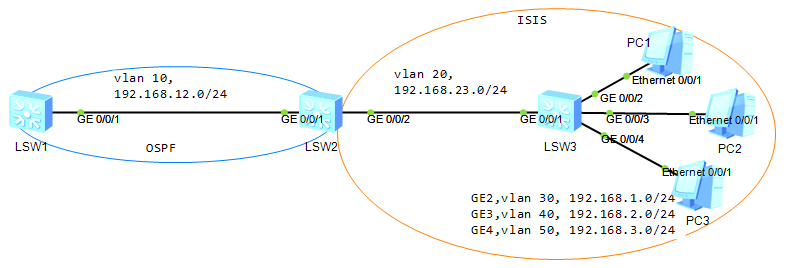
The configuration roadmap is as follows:
- Configure a routing policy on SW2, set the cost of the route to 192.168.1.0/24 to 100, and apply the routing policy when OSPF imports IS-IS routes. The routing policy allows the route to 192.168.1.0/24 have a low preference.
- Configure a routing policy on SW2, set the tag of the route to 192.168.2.0/24 is 20, and apply the routing policy when OSPF imports IS-IS routes. In this way, the tag of the route to 192.168.2.0/24 can take effect, which makes it easy to reference by a routing policy.
- SW1
sys
sysn LSW1
vlan batch 10

int gi0/0/1
 port link-type trunk
 port trunk allow-pass vlan 10

int vlan 10
 ip address 192.168.12.1 24
- SW2
sys
sysn LSW2
vlan batch 10 20

int gi0/0/1
 port link-type trunk
 port trunk allow-pass vlan 10

int gi0/0/2
 port link-type trunk
 port trunk allow-pass vlan 20

int vlan 10
 ip address 192.168.12.2 24

int vlan 20
 ip address 192.168.23.2 24
- SW3
sys
sysn LSW3
vlan batch 20 30 40 50

int gi0/0/1
 port link-type trunk
 port trunk allow-pass vlan 20
int gi0/0/2
 port link-type trunk
 port trunk allow-pass vlan 30

int gi0/0/3
 port link-type trunk
 port trunk allow-pass vlan 40
int gi0/0/4
 port link-type trunk
 port trunk allow-pass vlan 50

int vlan 20
 ip address 192.168.23.3 24
int vlan 30
 ip address 192.168.1.1 24
int vlan 40
 ip address 192.168.2.1 24
int vlan 50
 ip address 192.168.3.1 24
- SW2
isis 1
 network-entity 49.4101.0020.0200.2002.00
 is-name SW2

int vlanif20
 isis enable 1
- SW3
isis 1
 network-entity 49.4101.0030.0300.3003.00
 is-name SW3

int vlanif20
 isis enable 1
int vlanif30
 isis enable 1
int vlanif40
 isis enable 1
int vlanif50
 isis enable 1
- SW1
ospf 1 router-id 1.1.1.1
 area 0
  quit
 import-route isis 1 # import isis routes

int vlanif10
 ospf enable 1 area 0
 ospf network-type p2p
- SW2
ospf 1 router-id 2.2.2.2
 area 0

int vlanif10
 ospf enable 1 area 0
 ospf network-type p2p
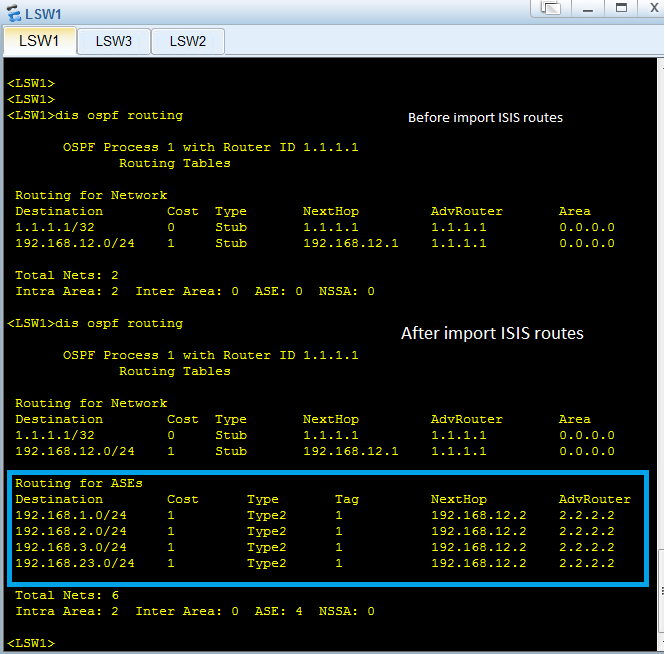
Check the OSPF routing table on SW1. You can find the imported routes.
acl 2002
 rule permit source 192.168.2.0 0.0.0.255
 quit
- Set an IP prefix-list name prefix-1 to match 192.168.1.0/24
ip ip-prefix prefix-a index 10 permit 192.168.1.0 24
route-policy isis2ospf permit node 10
if-match ip-prefix prefix-a
apply cost 100
quit

route-policy isis2ospf permit node 20
if-match acl 2002
apply tag 20
quit

route-policy isis2ospf deny node 100
quit
On switch SW2,
ospf 1
 import-route isis 1 route-policy isis2ospf
 quit
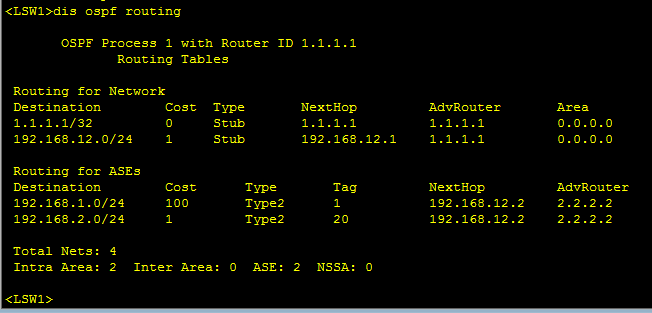
Check the OSPF routing table on SW1, you can find that the cost of the route to 192.168.1.0/24 is 100; the tag of the route to 192.168.2.0/24 is 20; (192.168.3.0/24, 192.168.23.0/24 were missed becasue of deny in routing policy node 100).
Done, thank ^_^!