Description
I have an input with autoFocus, a SafeAreaView, and a KeyboardAvoidingView. However the Button which should have his position exactly above the keyboard gets some margin when using SafeAreaView in combination with autoFocus.
It is to mention that if I add a delay to autoFocus of around 250ms it is working as expected.
I've build an expo snack here: https://snack.expo.io/@simbob/keyboardavoidingview-bug
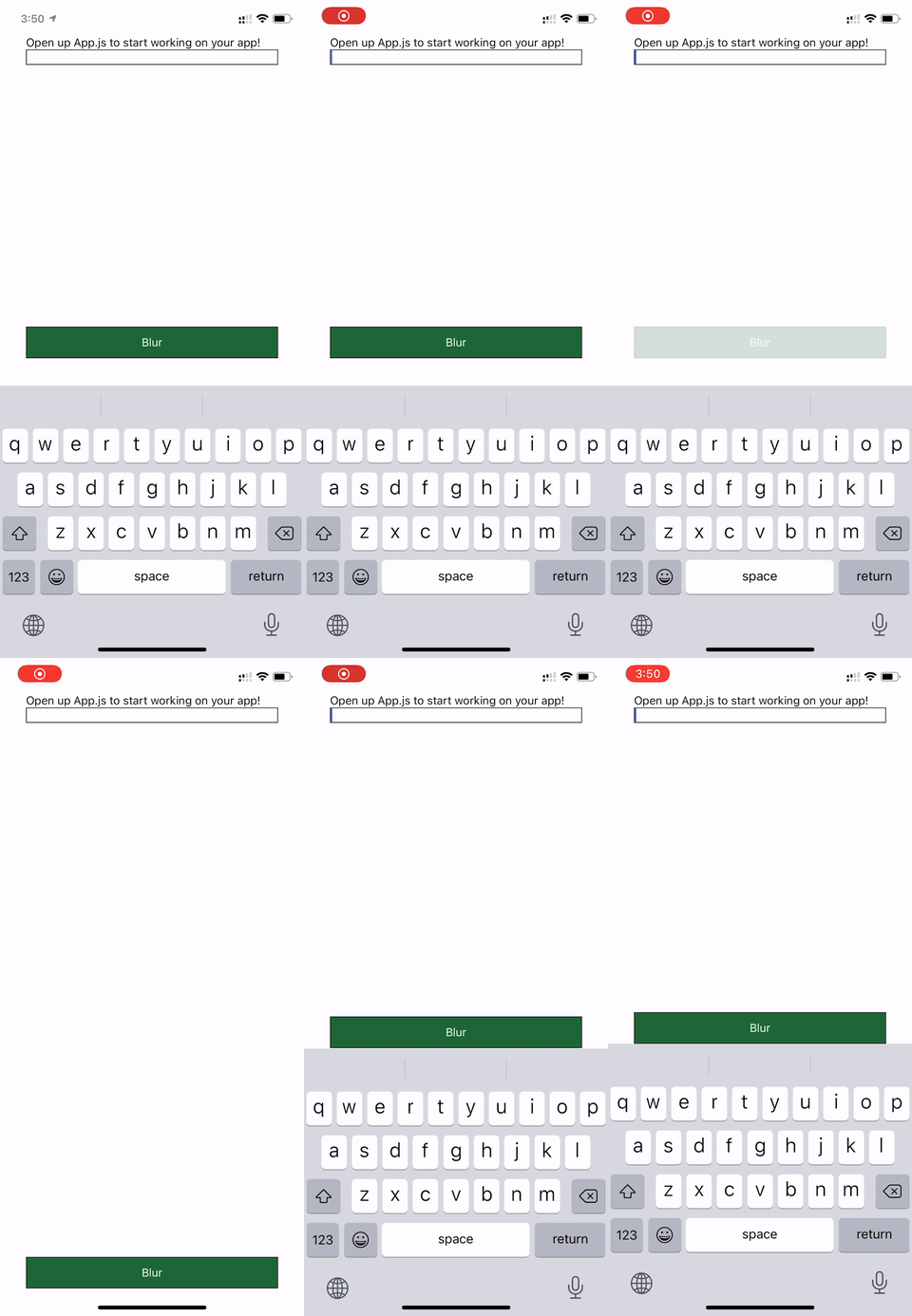
React Native version:
react: ~16.11.0 => 16.11.0
react-native: https://github.com/expo/react-native/archive/sdk-38.0.2.tar.gz => 0.62.2
Expected Results
Button should have the same position all time.
Steps To Reproduce
import React from "react";
import {
  StyleSheet,
  Text,
  View,
  TextInput,
  KeyboardAvoidingView,
  TouchableOpacity,
  Keyboard,
  SafeAreaView,
} from "react-native";

export default function App() {
  return (
    <SafeAreaView style={styles.container}>
      <KeyboardAvoidingView style={styles.container} behavior="padding">
        <View style={styles.top}>
          <Text>Open up App.js to start working on your app!</Text>
          <TextInput style={{ borderWidth: 1 }} autoFocus={true} />
        </View>
        <View style={styles.bottom}>
          <TouchableOpacity
            style={styles.loginScreenButton}
            onPress={Keyboard.dismiss}
          >
            <Text style={styles.loginText}>Blur</Text>
          </TouchableOpacity>
        </View>
      </KeyboardAvoidingView>
    </SafeAreaView>
  );
}

const styles = StyleSheet.create({
  container: {
    flex: 1,
    marginHorizontal: 16,
  },
  top: {
    flex: 0.7,
  },
  bottom: {
    flex: 0.3,
    justifyContent: "flex-end",
  },
  loginScreenButton: {
    paddingTop: 10,
    paddingBottom: 10,
    backgroundColor: "#1E6738",
    borderWidth: 1,
  },
  loginText: {
    color: "#fff",
    textAlign: "center",
  },
});
Description
I have an input with autoFocus, a SafeAreaView, and a KeyboardAvoidingView. However the Button which should have his position exactly above the keyboard gets some margin when using SafeAreaView in combination with autoFocus.
It is to mention that if I add a delay to autoFocus of around 250ms it is working as expected.
I've build an expo snack here: https://snack.expo.io/@simbob/keyboardavoidingview-bug
React Native version:
Expected Results
Button should have the same position all time.
Steps To Reproduce