The goal of this assignment is to extend the second version of the Wordle game, written in React Native, to use more advanced parts of the Expo API. In particular, we will focus on APIs that allow to interact with servers (to send or receive data), and APIs that use device sensors. Many of these APIs require the usage of async operations, which in React Native requires the usage of the useEffect hook. Some of the tasks may require the use of Permissions, which is also an Async operation. The assignment consists of several tasks, described below.
Note: since some of these tasks rely on device sensors, they may not work very well on the web client. You should try them on an actual device to test them properly.
This assignment requires an existing version of Wordle/Dordle as basis. As with the second assignment, you can either use the previous assignment, or the solutions to assignment 2, which are available:
- Wordle: https://snack.expo.dev/@rrobbes/wordle-solution
- Dordle: https://snack.expo.dev/@rrobbes/dordle-solution
The assignment can be done either alone, or in groups of two or three people, from the same degree (all Computer Science, or all Business Informatics). Importantly, the size of the assignment varies with the number of people involved. If the assignment is done in a team of two or three people, then more tasks need to be done than if the assignment is done by a single person.
Each task has a number of points assigned to it, roughly equivalent to difficulty or amount of work needed. To get full marks, you should implement at least the required number of points, less than that will reduce the grade.
For Business Informatics students:
- One student should implement 4 points
- Two students should implement 8 points
- Three students should implement 11 points (note: this includes extending Dordle, so it requires starting from the Dordle solution above)
For Computer Science students:
- One student should implement 5 points
- Two students should implement 10 points
- Three students should implement 14 points (note: this requires using the quite advanced Firebase API, so this is for ambitious teams)
The following is the list of tasks to choose from.
Use a dictionary API to get more data about the words of the game. With this API, implement the following:
- Show the definition of the word to guess after winning or losing.
- Add a "clue" button that displays the type of the word (noun, verb, adjective, etc)
- Add a "desperate clue" button, that displays the top example from the API (without the word in it, obviously!). This button is only available when there is one guess left.
Important note: There are several possible APIs that you can choose from. Here are some recommendations:
- Free Dictionary API. this API is the simplest one, and is sufficient if you do the Dictionary API integration, but not the advanced dictionary API integration task (described later in this document): https://dictionaryapi.dev
- WordsAPI. This API is appropriate for the two tasks (Dictionary API and Advanced Dictionary API). One only limitation is that it does not have a "Word of the day": https://www.wordsapi.com
- Wordnik. This API is appropriate for the two tasks (Dictionary API and Advanced Dictionary API). However, obtaining a key can take a long time (several days). The API is here, and can be used for free if you make less than 100 calls per hour: https://developer.wordnik.com/docs . A test API key is available here: https://developer.wordnik.com/changelog# .
Right now, the statistics of the game are reset every time the application is started. This defeats the purpose of statistics. Use the AsyncStorage API to make the statistics persistent (https://docs.expo.dev/versions/latest/sdk/async-storage/). Notes:
- If the statistics you had were too basic (just number of wins and losses), you should expand them to also record the number of attempts taken to win a game, and display this information.
- The UI should also provide an option to reset the statistics.
Use the Haptics API (https://docs.expo.dev/versions/latest/sdk/haptics/) to provide Haptic (vibration) feedback of some actions. Some events that require Haptic feedback are:
- Starting a game
- Winning the game
- Losing the game
- Entering an invalid guess
Feel free to add more haptics if you think it is necessary.
Wordle became famous because of the way it allowed people to share their game play. For instance, the following game:
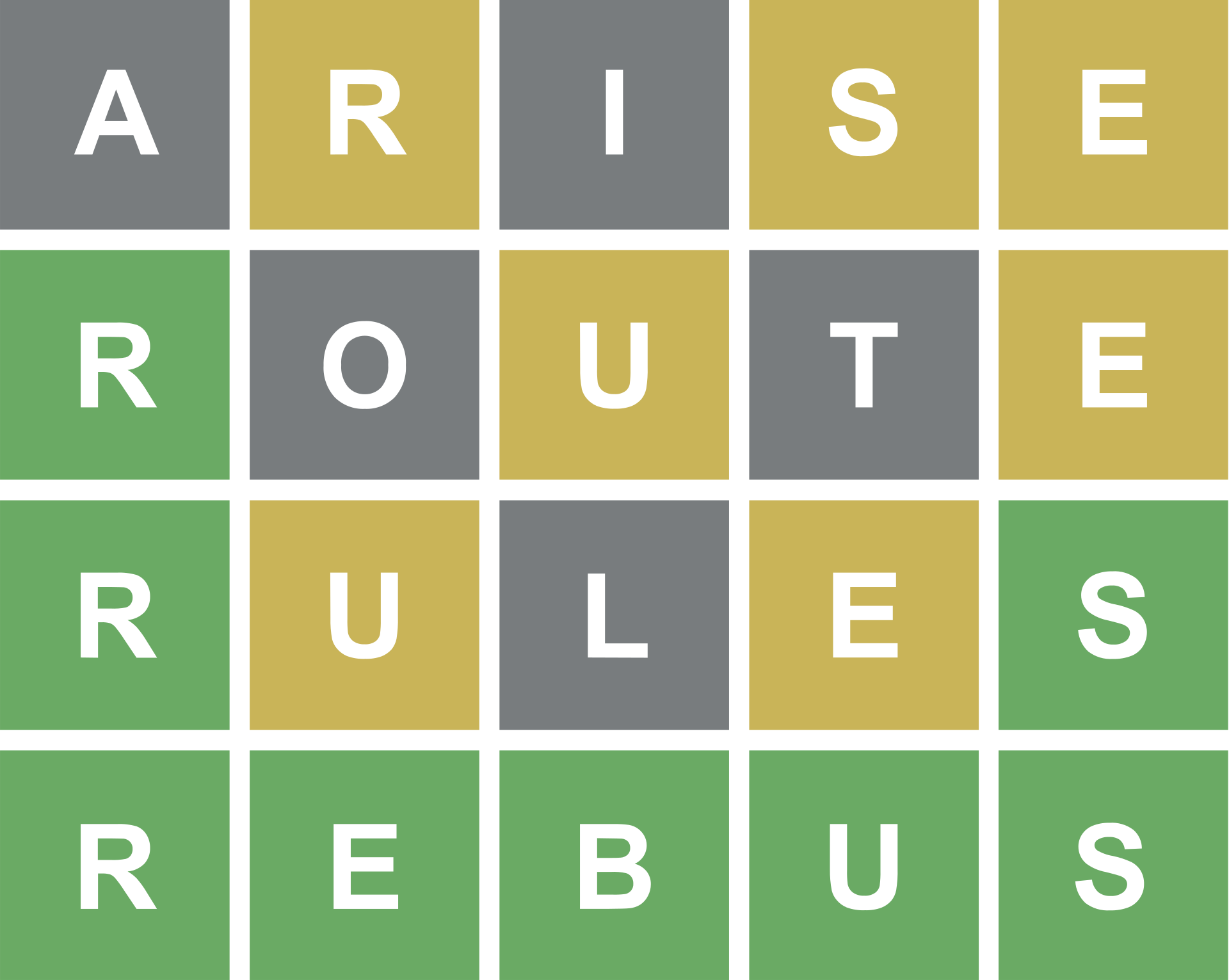
Would be shared as:

The sharing format is actually a text string, using Unicode Characters to display colored squares. For instance, this "yellow square" character (https://emojipedia.org/large-yellow-square/).
The goal of this task is thus to share your game, using the React Native Share API, to a variety of services of your choice (e.g. social media). If you implemented Dordle, then the sharing should also work with it.
Note: A previous version of the assignment recommended the Expo share API. However the React Native Share API is simpler to use, so it is recommended instead. In case you have already implemented this with the Expo share API, you don't need to redo it; both APIs are usable.
Note 2: The number "196" in the image here is specific to the original Wordle game, where everyone plays the same word on the same day. You don't need to have something similar. You can just share the grid with colors and the number of attempts.
Implement a UI to issue a challenge to your friends. The idea is the following:
- The user picks a word from the list of eligible words (or two, for Dordle).
- The application builds a Javascript object that represents the type of game to play and the word or words to guess (this depends on how your application works)
- This object is converted to a string url, and encoded as a QRCode, for instance using this package: https://www.npmjs.com/package/react-native-qrcode-svg
- The QR Code is displayed on screen, a second user can scan it with their phone camera
- This opens the application on the other phone, which receives the data, creates the game, and starts it
- If the game is won, the user gets the option to issue a challenge back
Notes regarding the QR code: The string URL that I refer to is not not the web url of the snack project, but rather a URL that points to the expo client. You can use the Linking API for that. https://github.com/rrobbes/EngineeringOfMobileSystemsV2/tree/main/16-Expo-1#linking
The other option (perhaps a bit simpler), is to embed a QR Code scanner in the application itself. In that case the application is already open, so that makes the problem a bit simpler. https://github.com/rrobbes/EngineeringOfMobileSystemsV2/tree/main/17-Expo-2#cameras-and-qr-codes
This extension deepens the Dictionary integration. The game does not use the pre-made lists of words to select words or to check if they are eligible. Instead:
- The word to guess is either the "Word of the day" or a random word of a minimum length of 5 (but can be longer).
- If a random word has characters that are not on the keyboard (e.g., dashes, accented characters), then it is discarded and a new word is selected.
- The game supports words that are longer than 5 character.
- Longer words are allowed more guesses: the number of guesses is equal to the number of letters plus 1, with a maximum of 10 for a single word. In case a player is playing a Dordle game, the words can be smaller (e.g., a maximum of 7 or 8 characters is possible).
- Guesses are checked by wordnik: any word that has a definition is allowed.
- Guesses that are shorter than the word are allowed, if they are valid.
Important note: For this task, using only the Free Dictionary API is not sufficient, as it allows only to look up a single word. WordAPIs or Wordnik should be used instead. WordsAPI does not have a "word of the day" functionality so if you use it, you don't have to implement the "word of the day" functionality.
This does not use additional APIs, but should be fun. This is a new game playing mode, that starts like Dordle. When a word in a dordle is completed, it is replaced by a new random word. The user picks three of the existing guesses of the replaced word to "keep". The game resumes with the two remaining words. The game continues in this fashion until it is lost. The goal is to play for as long as possible.
This is the same idea as the challenge, except that it does not require the users to be in physical presence. The application uses the Firebase APIs (https://docs.expo.dev/guides/using-firebase/) to:
- provide each user with an account
- a random user gets the opportunity to issue a challenge to the other users.
- If the user declines, another random user is picked, until a user accepts
- When a user accepts to issue a challenge, they choose the type of game, the starting word (or words), and the duration of the challenge.
- The challenge is sent to all the users in the platform (e.g., using the messaging API: https://firebase.google.com/docs/cloud-messaging)
- When the challenge ends, the user that guessed the words correctly in the least tries wins. In case of ties, the fastest user wins.
- The winner gets the option to issue the next challenge (if they decline, a random user is picked)
The assigment should be done using the Expo Snack platform (https://snack.expo.dev). If you have not done so yet, you should create an account. I am asking for an Expo Snack solution, not an independent application, because of the large number of assignments that I have to process (setting up multiple projects takes a lot of time).
For the assignment you need two submit at least two files:
- A zip file with the code that you submit (use the "download as zip" option of expo snack).
- A text file with a link to the snack, as well as a statement that lists the team members, says whether the team is made of Business Informatics or a Computer Science students, and specifies the tasks that were implemented.
The assignment should be handed in by Tuesday, June 14th.
See assignment 2.