- Extension not working in remote SSH session (#201). The extension now runs on the local host rather than the remote. This means that parsers are now installed only once, and
npmis required only on the local machine.
-
Multi-cursor support in Block Mode, thanks @CB2Moon!

-
tomlandxmlsupport, thanks @sanarise! -
sqlandlatexsupport using @derekstride/tree-sitter-sql and @pfoerster/tree-sitter-latex. -
ESM-based loading for parsers (#191).
-
'Remove' option to notification when parser fails to load (#180).
-
More languages are now tested in advance: TOML, XML, CSS, Zig, Swift, SQL, LaTeX.
-
Extension no longer in
previewmode! 🎉

-
Parsers failing to build (#193). The extension now uses
node-gypvianpm execinstead oftree-sitter-cli. -
Binary dependency caused extension to fail on non-Mac systems (#195).
- Support for
nodev18, it might still work, but the extension now requiresnodev20+.
codeBlocks.treeSitterCliPathconfiguration: The Extension now only requiresnpm.
Finally, switched to node-tree-sitter! 🎉
This means faster parsing, faster language installation, and no need for
docker, or emscripten.
-
c(#33) support, andsvelte(#170) using the excellent @tree-sitter-grammars project. -
Many more languages are now tested in advance: Rust, TypeScript, TSX, JavaScript, Java, Python, Svelte, C, C++, C#, Go, Ruby, HTML, CSS, YAML, JSON, Markdown, Bash, Kotlin, Zig.
-
Switched to
node-tree-sitterfromweb-tree-sitter(#125). This means that the extension no longer requiresemccordockerto be installed. -
tree-sitterCLI is now optional, and only required if the extension cannot find a pre-built parser.
- Support for
nodev16, it might still work, but the extension now requiresnodev18+.
codeBlocks.treeSitterCliPathconfiguration: Set path totree-sittercommand.
-
Block mode now supports all
tree-sittersupported languages by default: Queries are only required for the Code Blocks Editor. -
node+npmdependency: Extension new requiresnodev16+, andnpm. -
tree-sitter-clidependency: Extension now requirestree-sitter-cli, and so transitively requires eitheremscripten(preferred) ordocker. -
Tree viewer: View the syntax tree of the current file.

-
Block mode highlights can be toggled.

-
Rapidly toggling block mode breaks extension.
-
Rapidly moving blocks is slow.
-
Block mode blocks: Instead of only using blocks, block mode now has access to all nodes in the syntax tree. Blocks are now only used to automatically expand a selection.


-
Simplify language config:
- Parsers are now installed from NPM, instead of from GitHub.
- By default, the extension will try to use the
tree-sitter-<language>NPM package, so many languages will not need to be configured at all. - Queries are an optional config, required only for the Code Blocks Editor (not for Block Mode) to work.
- Configuration is by
[languageId]instead of a massivelanguageSupportconfig.
-
Change Block Mode colors config:
codeBlocks.colors.enabled: Whether Block Mode should color selections or not. Defaults tofalse.codeBlocks.colors.sibling: CSS string for sibling selection background color. Defaults tovar(--vscode-editor-selectionHighlightBackground).codeBlocks.colors.parent: CSS string for parent selection background color. Defaults tovar(--vscode-editor-linkedEditingBackground).
"codeBlocks.languageSupport": {
  "python": {
    "parserInstaller": {
      "downloadCmd": "git clone https://github.com/tree-sitter/tree-sitter-python",
      "libraryName": "tree_sitter_python",
      "languageFnSymbol": "language"
    },
    "queries": [
      "(class_definition) @item",
      "(function_definition) @item",
      "(decorated_definition) @item"
    ]
  },
  "typescriptreact": {
    "parserInstaller": {
        "downloadCmd": "git clone https://github.com/tree-sitter/tree-sitter-typescript",
        "symbol": "language_tsx",
        "name": "tree_sitter_typescript"
    },
    "queries": [
        "( (comment)* @header . (class_declaration) @item)",
        "( (comment)* @header . (method_definition) @item)",
        "( (comment)* @header . (function_declaration) @item)",
        "( (comment)* @header . (export_statement) @item)",
        "(jsx_element) @item",
        "(jsx_self_closing_element) @item"
    ]
  }
}
"[python]": {
  // single-node blocks are only for the Code Blocks Editor
  "codeBlocks.queries": [
    "(class_definition) @item",
    "(function_definition) @item",
    "(decorated_definition) @item"
  ]
},

// parser is configured inside each languageId's config
"[typescriptreact]": {
  "codeBlocks.npmPackageName": "tree-sitter-typescript",
  "codeBlocks.parserName": "tree-sitter-tsx",
  "codeBlocks.subdirectory": "tsx",
  // queries are now optional
  "codeBlocks.queries": [
    "( (comment)* @header . (class_declaration) @item)",
    "( (comment)* @header . (method_definition) @item)",
    "( (comment)* @header . (function_declaration) @item)",
    "( (comment)* @header . (export_statement) @item)",
    // single-node blocks are only for the Code Blocks Editor
    "(jsx_element) @item",
    "(jsx_self_closing_element) @item"
  ]
}


-
Rust dependencies:
cargo,code-blocks-server, no longer required. -
Force moves: Were inconsistent (especially in indent-based languages) and rarely useful.
If they are missed, please comment on this issue, preferably with your use case.
- Block Mode: Moving blocks rapidly is unstable.
- Python: Force move can cause syntax errors.
-
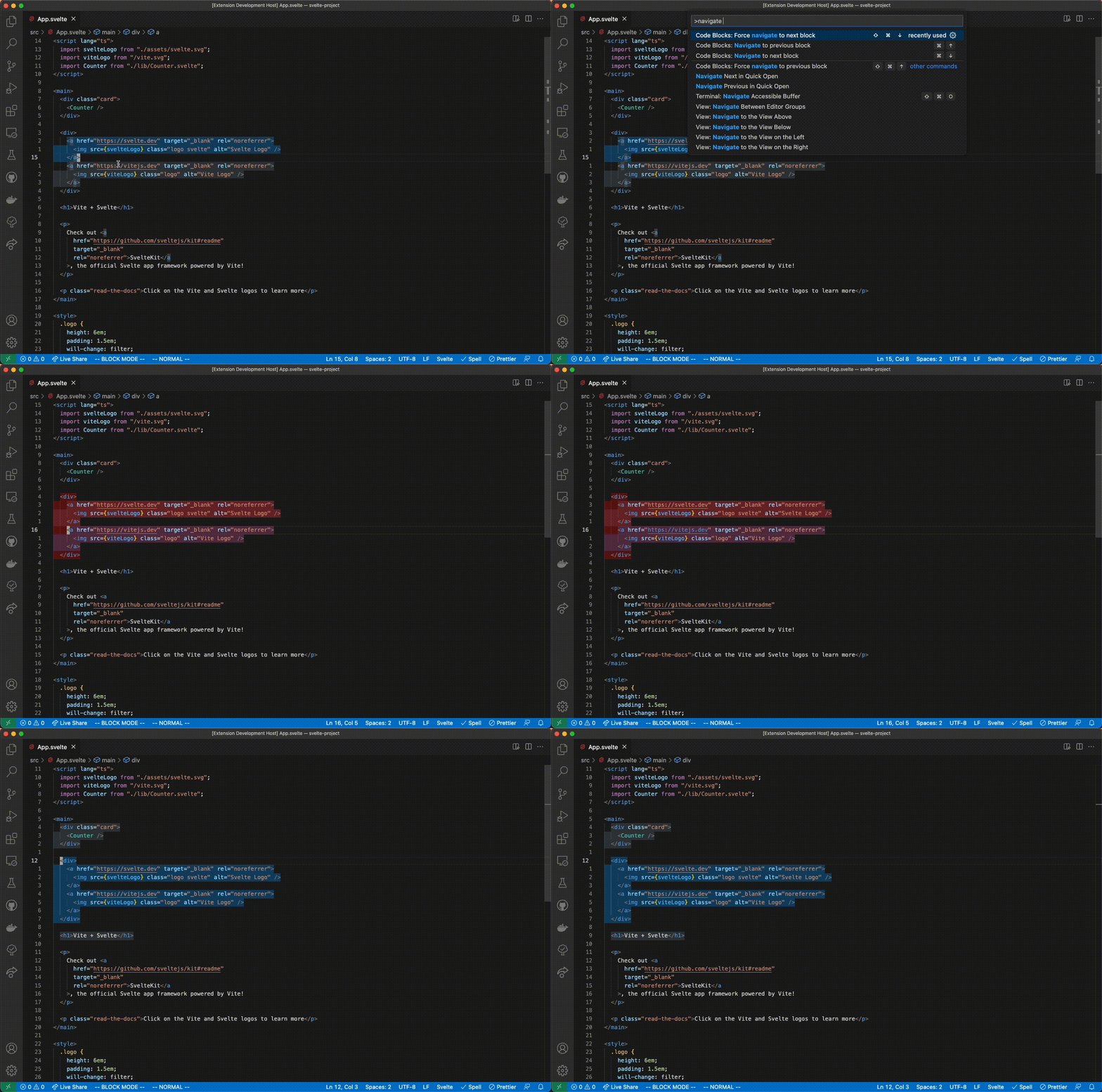
Add block navigation commands:
Regular "navigate" commands will not navigate to parent scope, for that there are the "force navigate" commands.
-
Make "block mode" a vscode context (useful for keybindings).
-
Add "block mode" status bar indicator.
-
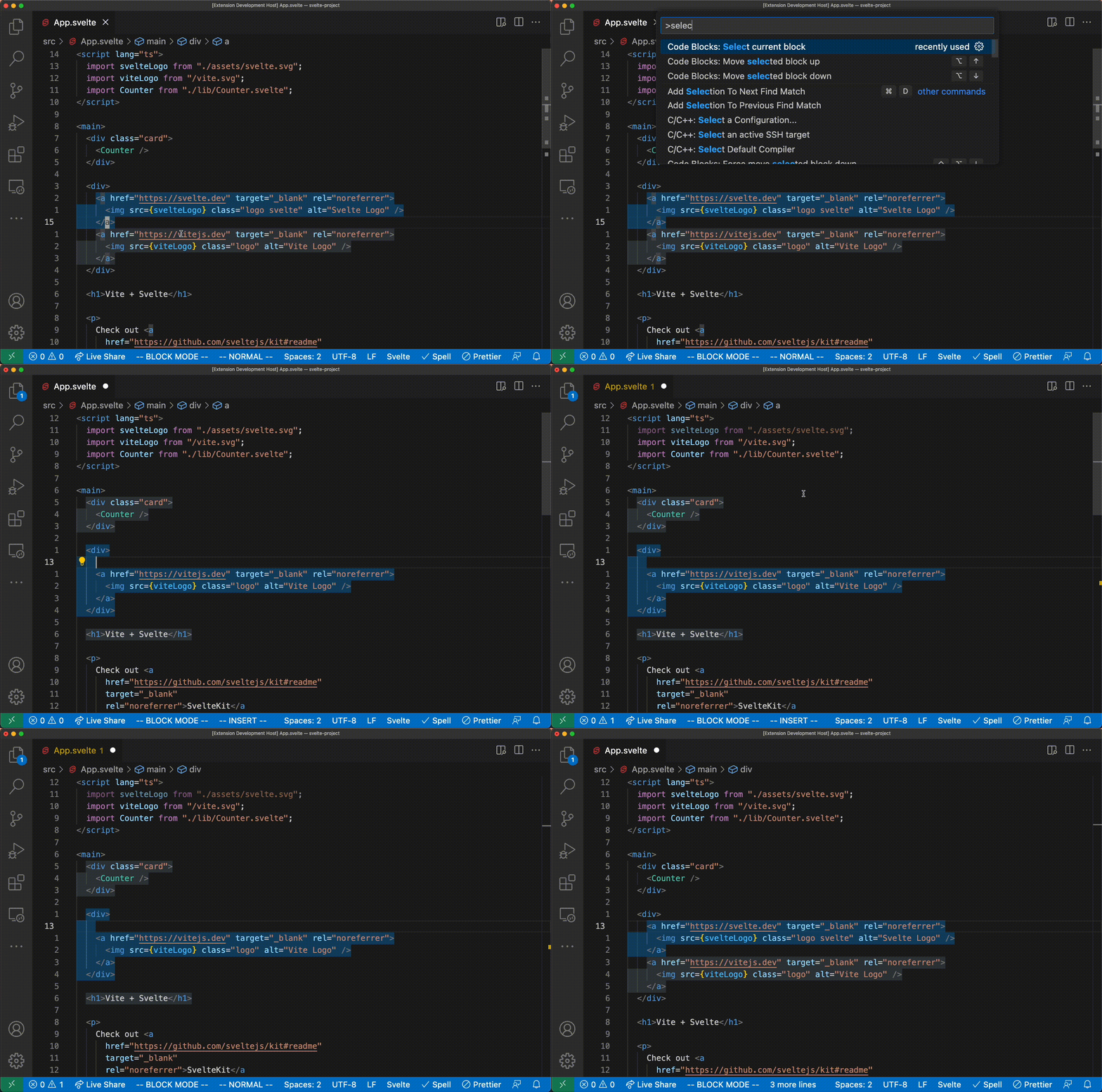
Add "select current block" command:
-
Add configurable colors:
Default values:
"codeBlocks.colors": {
  "selected": "var(--vscode-inputOption-activeBackground)",
  "target": "var(--vscode-editor-selectionHighlightBackground)",
  "forceTarget": "var(--vscode-editor-linkedEditingBackground)"
}
Each value is a css string that is passed to the
background-colorproperty of the respective block type. It can be any valid css value. -
Add default keybindings (only active when "block mode" is on):
Command Keybinding (cmd on mac) codeBlocks.moveUpalt+upcodeBlocks.moveDownalt+downcodeBlocks.moveUpForcealt+shift+upcodeBlocks.moveDownForcealt+shift+downcodeBlocks.navigateUpctrl/cmd+upcodeBlocks.navigateDownctrl/cmd+downcodeBlocks.navigateUpForcectrl/cmd+shift+upcodeBlocks.navigateDownForcectrl/cmd+shift+downNote that
codeBlocks.toggle, the old editor commands, andcodeBlocks.selectBlockare not bound by default.
- Blocks appearing in files with unsupported languages.
-
Change "force" semantics:
Blocks that require a force move/navigate are detected in advance, and trying to move/navigate to them will fail silently. Instead of the old error notification, the background of the blocks is now a different color.
-
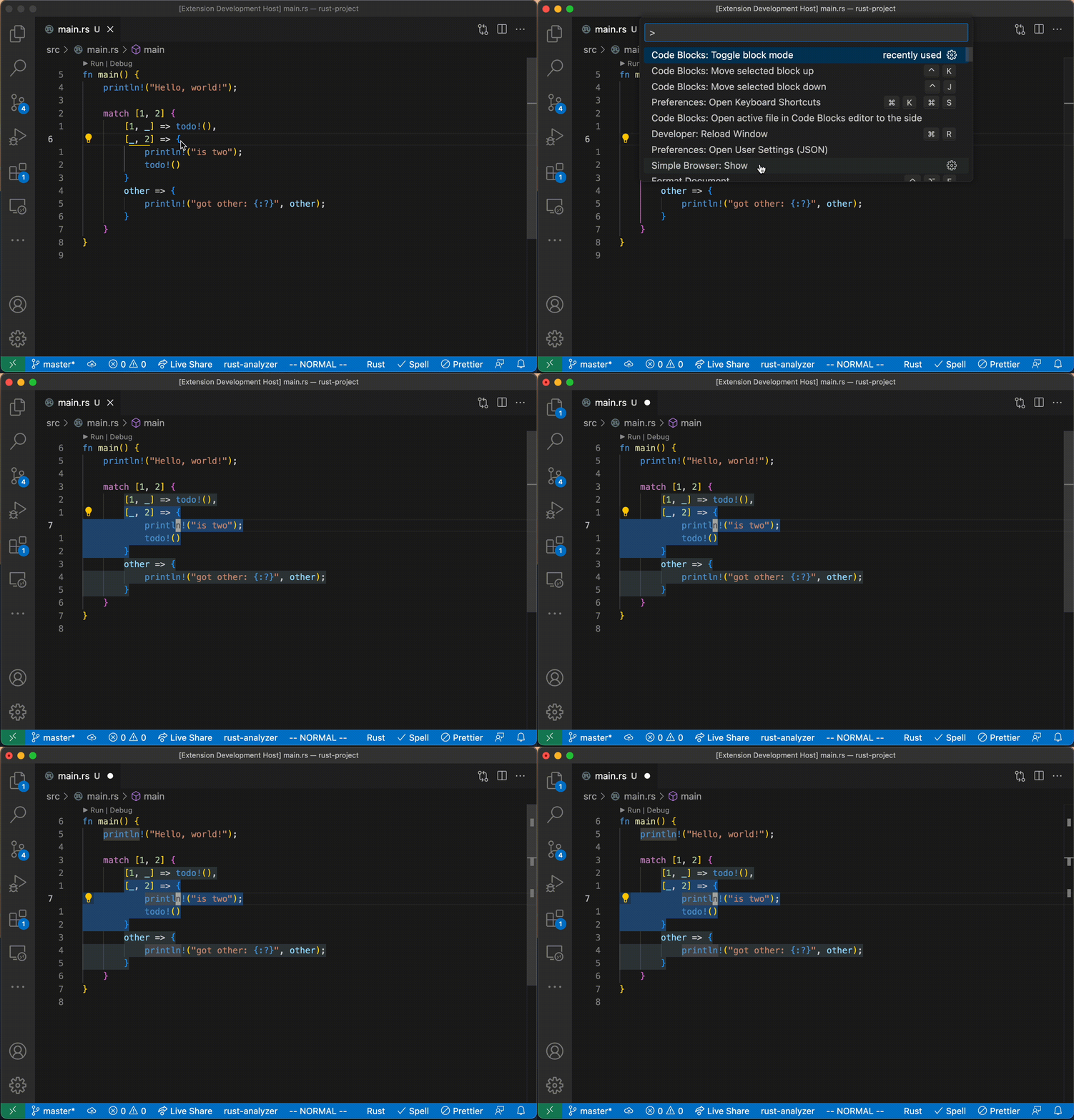
Add "block mode":
-
code-blocks-clinot updated between vscode extension versions. -
"Installing tree_sitter_XXX" notification on every command.
-
Spacing around blocks in the Editor view too small.