Installs a package or a list of packages (sometimes specified as a
packages.config). Some may prefer to use cinst as a shortcut for
[[choco install|Commandsinstall]].
NOTE: 100% compatible with older chocolatey client (0.9.8.32 and below)
with options and switches. Add -y for previous behavior with no
prompt. In most cases you can still pass options and switches with one
dash (-). For more details, see [[how to pass arguments|CommandsReference#how-to-pass-options--switches]] (choco -?).
choco install <pkg|packages.config> [<pkg2> <pkgN>] [<options/switches>]
cinst <pkg|packages.config> [<pkg2> <pkgN>] [<options/switches>]
NOTE: all is a special package keyword that will allow you to install
all packages from a custom feed. Will not work with Chocolatey default
feed. THIS IS NOT YET REIMPLEMENTED.
NOTE: Any package name ending with .config is considered a 'packages.config' file. Please see https://bit.ly/packages_config
choco install sysinternals
choco install notepadplusplus googlechrome atom 7zip
choco install notepadplusplus --force --force-dependencies
choco install notepadplusplus googlechrome atom 7zip -dvfy
choco install git --params="'/GitAndUnixToolsOnPath /NoAutoCrlf'" -y
choco install nodejs.install --version 0.10.35
choco install git -s "'https://somewhere/out/there'"
choco install git -s "'https://somewhere/protected'" -u user -p pass
Choco can also install directly from a nuspec/nupkg file. This aids in testing packages:
choco install <path/to/nuspec>
choco install <path/to/nupkg>
Install multiple versions of a package using -m (AllowMultiple versions)
choco install ruby --version 1.9.3.55100 -my
choco install ruby --version 2.0.0.59800 -my
choco install ruby --version 2.1.5 -my
What is -my? See option bundling in [[how to pass arguments|CommandsReference#how-to-pass-options--switches]]
(choco -?).
NOTE: All of these will add to PATH variable. We'll be adding a special option to not allow PATH changes. Until then you will need to manually go modify Path to just one Ruby and then use something like uru (https://bitbucket.org/jonforums/uru) or pik (https://chocolatey.org/packages/pik) to switch between versions.
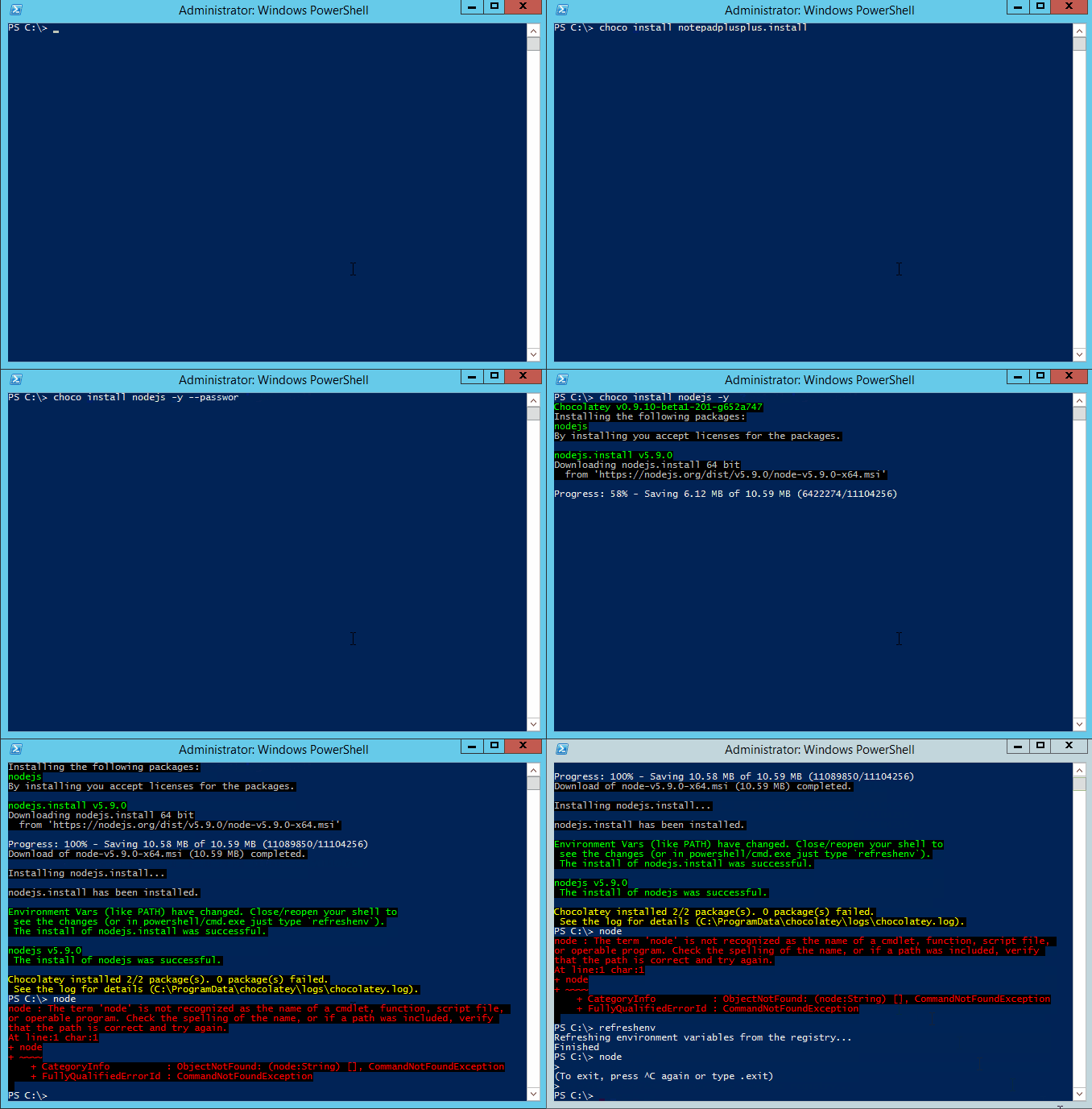
Chocolatey FOSS install showing tab completion and refreshenv (a way
to update environment variables without restarting the shell).
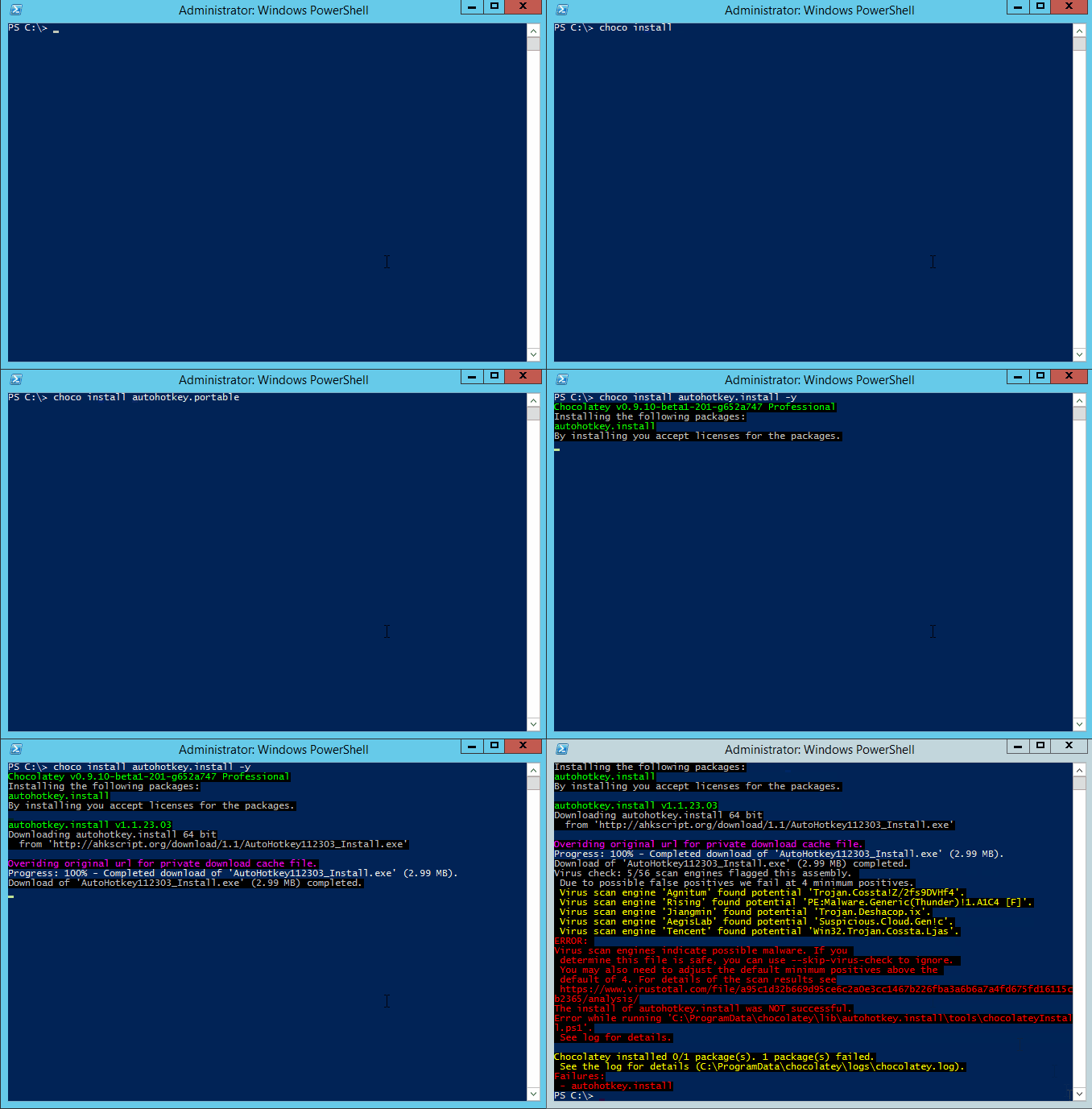
Chocolatey Professional showing private download cache and virus scan protection.
Alternative to PackageName. This is a list of packages in an xml manifest for Chocolatey to install. This is like the packages.config that NuGet uses except it also adds other options and switches. This can also be the path to the packages.config file if it is not in the current working directory.
NOTE: The filename is only required to end in .config, the name is not required to be packages.config.
    <?xml version="1.0" encoding="utf-8"?>
    <packages>
      <package id="apackage" />
      <package id="anotherPackage" version="1.1" />
      <package id="chocolateytestpackage" version="0.1" source="somelocation" />
      <package id="alloptions" version="0.1.1"
               source="https://somewhere/api/v2/" installArguments=""
               packageParameters="" forceX86="false" allowMultipleVersions="false"
               ignoreDependencies="false"
               />
</packages>Available in 0.9.10+.
This specifies the source is Ruby Gems and that we are installing a
gem. If you do not have ruby installed prior to running this command,
the command will install that first.
e.g. choco install compass -source ruby
This specifies the source is Web PI (Web Platform Installer) and that
we are installing a WebPI product, such as IISExpress. If you do not
have the Web PI command line installed, it will install that first and
then the product requested.
e.g. choco install IISExpress --source webpi
This specifies the source is Cygwin and that we are installing a cygwin
package, such as bash. If you do not have Cygwin installed, it will
install that first and then the product requested.
e.g. choco install bash --source cygwin
This specifies the source is Python and that we are installing a python
package, such as Sphinx. If you do not have easy_install and Python
installed, it will install those first and then the product requested.
e.g. choco install sphinx --source python
This specifies that the source is a Windows Feature and we should
install via the Deployment Image Servicing and Management tool (DISM)
on the local machine.
e.g. choco install IIS-WebServerRole --source windowsfeatures
- How-To: A complete example of how you can use the PackageParameters argument when creating a Chocolatey Package can be seen at https://github.com/chocolatey/choco/wiki/How-To-Parse-PackageParameters-Argument
- One may want to override the default installation directory of a piece of software. See https://github.com/chocolatey/choco/wiki/GettingStarted#overriding-default-install-directory-or-other-advanced-install-concepts.
NOTE: Options and switches apply to all items passed, so if you are
running a command like install that allows installing multiple
packages, and you use --version=1.0.0, it is going to look for and
try to install version 1.0.0 of every package passed. So please split
out multiple package calls when wanting to pass specific options.
Includes [[default options/switches|CommandsReference#default-options-and-switches]] (included below for completeness).
 -?, --help, -h
     Prints out the help menu.

 -d, --debug
     Debug - Run in Debug Mode.

 -v, --verbose
     Verbose - See verbose messaging.

     --acceptlicense, --accept-license
     AcceptLicense - Accept license dialogs automatically.

 -y, --yes, --confirm
     Confirm all prompts - Chooses affirmative answer instead of prompting.
       Implies --accept-license

 -f, --force
     Force - force the behavior

     --noop, --whatif, --what-if
     NoOp - Don't actually do anything.

 -r, --limitoutput, --limit-output
     LimitOutput - Limit the output to essential information

     --execution-timeout=VALUE
     CommandExecutionTimeoutSeconds - Override the default execution timeout
       in the configuration of 2700 seconds.

 -c, --cache, --cachelocation, --cache-location=VALUE
     CacheLocation - Location for download cache, defaults to %TEMP% or value
       in chocolatey.config file.

     --allowunofficial, --allow-unofficial, --allowunofficialbuild, --allow-unofficial-build
     AllowUnofficialBuild - When not using the official build you must set
       this flag for choco to continue.

     --failstderr, --failonstderr, --fail-on-stderr, --fail-on-standard-error, --fail-on-error-output
     FailOnStandardError - Fail on standard error output (stderr), typically
       received when running external commands during install providers. This
       overrides the feature failOnStandardError.

     --use-system-powershell
     UseSystemPowerShell - Execute PowerShell using an external process
       instead of the built-in PowerShell host. Available in 0.9.10+.

 -s, --source=VALUE
     Source - The source to find the package(s) to install. Special sources
       include: ruby, webpi, cygwin, windowsfeatures, and python. Defaults to
       default feeds.

     --version=VALUE
     Version - A specific version to install. Defaults to unspecified.

     --pre, --prerelease
     Prerelease - Include Prereleases? Defaults to false.

     --x86, --forcex86
     ForceX86 - Force x86 (32bit) installation on 64 bit systems. Defaults to
       false.

     --ia, --installargs, --installarguments, --install-arguments=VALUE
     InstallArguments - Install Arguments to pass to the native installer in
       the package. Defaults to unspecified.

 -o, --override, --overrideargs, --overridearguments, --override-arguments
     OverrideArguments - Should install arguments be used exclusively without
       appending to current package passed arguments? Defaults to false.

     --notsilent, --not-silent
     NotSilent - Do not install this silently. Defaults to false.

     --params, --parameters, --pkgparameters, --packageparameters, --package-parameters=VALUE
     PackageParameters - Parameters to pass to the package. Defaults to
       unspecified.

     --allowdowngrade, --allow-downgrade
     AllowDowngrade - Should an attempt at downgrading be allowed? Defaults
       to false.

 -m, --sxs, --sidebyside, --side-by-side, --allowmultiple, --allow-multiple, --allowmultipleversions, --allow-multiple-versions
     AllowMultipleVersions - Should multiple versions of a package be
       installed? Defaults to false.

 -i, --ignoredependencies, --ignore-dependencies
     IgnoreDependencies - Ignore dependencies when installing package(s).
       Defaults to false.

 -x, --forcedependencies, --force-dependencies
     ForceDependencies - Force dependencies to be reinstalled when force
       installing package(s). Must be used in conjunction with --force.
       Defaults to false.

 -n, --skippowershell, --skip-powershell, --skipscripts, --skip-scripts, --skip-automation-scripts
     Skip Powershell - Do not run chocolateyInstall.ps1. Defaults to false.

 -u, --user=VALUE
     User - used with authenticated feeds. Defaults to empty.

 -p, --password=VALUE
     Password - the user's password to the source. Defaults to empty.

     --ignorechecksum, --ignore-checksum, --ignorechecksums, --ignore-checksums
     IgnoreChecksums - Ignore checksums provided by the package. Available in
       0.9.9.9+.

     --ignorepackagecodes, --ignorepackageexitcodes, --ignore-package-codes, --ignore-package-exit-codes
     IgnorePackageExitCodes - Exit with a 0 for success and 1 for non-succes-
       s, no matter what package scripts provide for exit codes. Overrides the
       default feature 'usePackageExitCodes' set to 'True'. Available in 0.-
       9.10+.

     --usepackagecodes, --usepackageexitcodes, --use-package-codes, --use-package-exit-codes
     UsePackageExitCodes - Package scripts can provide exit codes. Use those
       for choco's exit code when non-zero (this value can come from a
       dependency package). Chocolatey defines valid exit codes as 0, 1605,
       1614, 1641, 3010.  Overrides the default feature 'usePackageExitCodes'
       set to 'True'. Available in 0.9.10+.

     --sdc, --skipdownloadcache, --skip-download-cache
     Skip Download Cache - Use the original download distribution even if a
       private distribution download cache is available for a package.
       Overrides the default feature 'downloadCache' set to 'True'.

     --dc, --downloadcache, --download-cache, --use-download-cache
     Use Download Cache - Use private distribution download cache if
       available for a package. Overrides the default feature 'downloadCache'
       set to 'True'.

     --svc, --skipvirus, --skip-virus, --skipviruscheck, --skip-virus-check
     Skip Virus Check - Skip the virus check for downloaded files on this ru-
       n. Overrides the default feature 'virusCheck' set to 'True'.

     --virus, --viruscheck, --virus-check
     Virus Check - check downloaded files for viruses. Override the default
       feature 'virusCheck' set to 'True'.

     --viruspositivesmin, --virus-positives-minimum=VALUE
     Virus Check Minimum Scan Result Positives - the minimum number of scan
       result positives required to flag a package. Overrides the default
       configuration value 'virusCheckMinimumPositives' set to '5'.
[[Command Reference|CommandsReference]]
NOTE: This documentation has been automatically generated from choco install -h.