- Introduction
- Creating the Contract
- Creating the Free Slice Coupons
- Creating the Loyalty Points
- First Customer
- Later in the evening
- The Mistake is Found
Dominic has spent the last 2 years planning for today. His restaurant fit out is complete, the mortar on his wood fired pizza ovens is dry, and his fridges are chilling a variety of bottled drinks. The last thing on his list is to configure a smart contract for his membership program and a loyalty point system. Dominic downloads the Tokenized Nexus wallet and installs it on his PC. He creates a new wallet and makes a safe backup of the master key, then begins configuring his Contract Offer. Dominic has decided to give his first 100 customers a free slice of pizza for their next visit, and to establish a frequent slice program that gives customers one free slice for every 7 slices they buy.
Dominic names his contract 'Dominic's Pizza Loyalty Program'. He has already prepared a set of terms and conditions for his contract, and has them saved in a PDF file. The PDF file and copies of the flier detailing his Frequent Slice program are stored in a 7Zip file ready to be attached to the contract. Using the Contract Creation tool, Dominic creates the following Contract Offer:
Now that Dominic has filled out all the details, he is ready to create his smart contract.
He does this by generating a Contract Offer transaction which it sends to the Tokenized Platform. For Tokenized to act as the contract operator, it is necessary for Tokenized to sign the Contract Offer, or it will be rejected by the smart contract. This process is handled between Dominic's app and the Tokenized server that runs the smart contract agent. When it receives the template Contract Offer, it creates a new address in a derivative of its own master address and gives the keys to an agent created to run Dominic's smart contract. It sends the Contract Offer to this address.
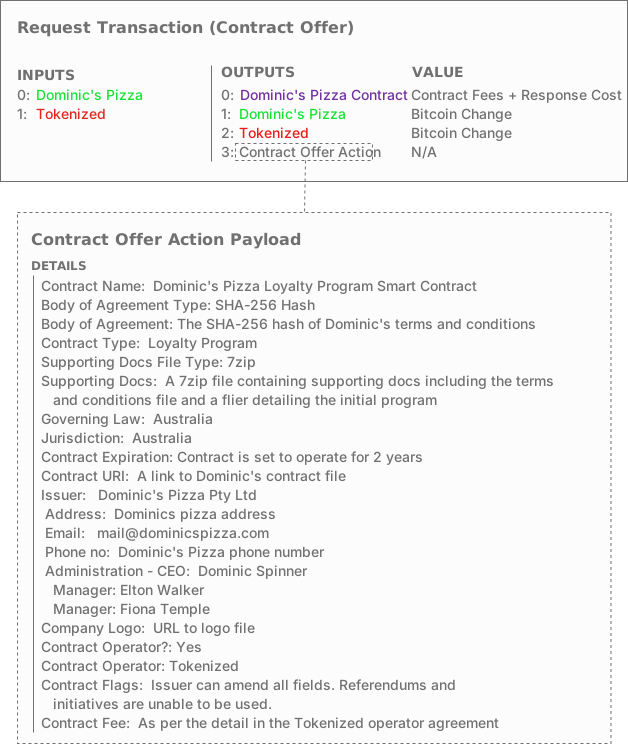 Dominic's Pizza Contract Offer
The Agent receives the Contract Offer and unpacks it, validating its contents before building a Contract Formation response. The contract formation contains all the same information received in the Contract Offer, plus a version indicator which is set to zero, and a Timestamp that is set to the time the transaction was created. It sends this onto the Bitcoin network where it is cleared to Dominic's wallet a few seconds later.
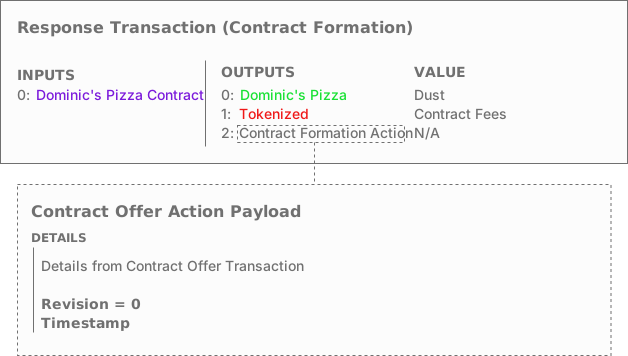 Dominic's Pizza Contract Formation
Now that Dominic's contract is live, he is able to use it to create the instruments that he will use in his loyalty program. Firstly, he has decided to create a 'Free Slice' coupon which he will give to the first 100 people who buy a whole pizza. He wants people to also have the option to send these coupons to other people so that they can come and try his food. Using the Instrument Creation tool, Dominic sets up an instrument definition which creates a set of 100 coupons using the following details:
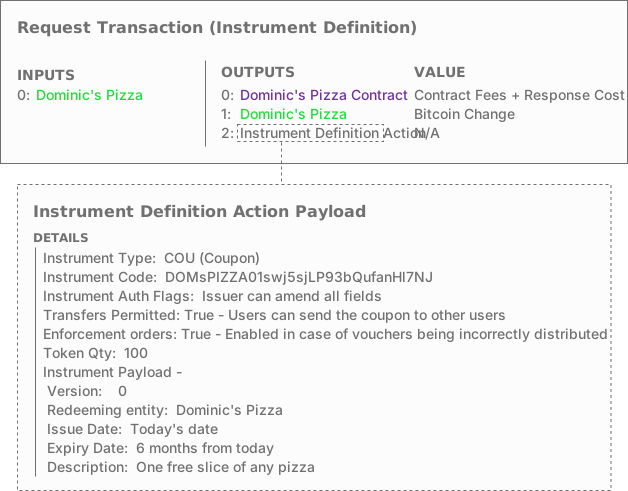 Dominic's Pizza slice coupons Instrument Definition
Once Dominic has finished entering the details he instructs his wallet to send the Instrument Definition to the smart contract.
The smart contract receives the transaction and unpacks the details. After making sure that the details are valid, the smart contract responds with an Instrument Creation action which generates the 100 coupons and gives them to Dominic's wallet. He now has 100 Free Slice coupons which he can hand out to customers as he sees fit.
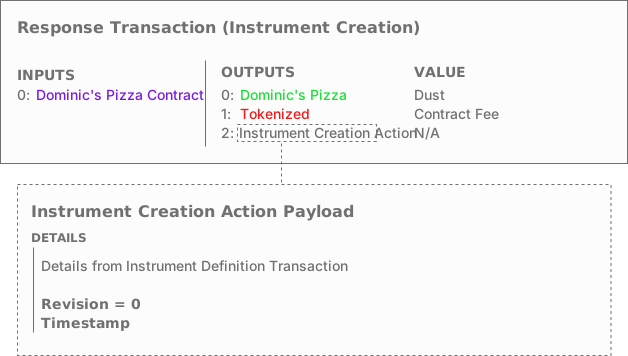 Dominic's Pizza slice coupons Instrument Creation
Next Dominic establishes a loyalty coupon which he will hand out with each slice. His plan is to give away a free slice of pizza to any customer who has bought 7 slices, making the 8th slice free.
He uses the following details:
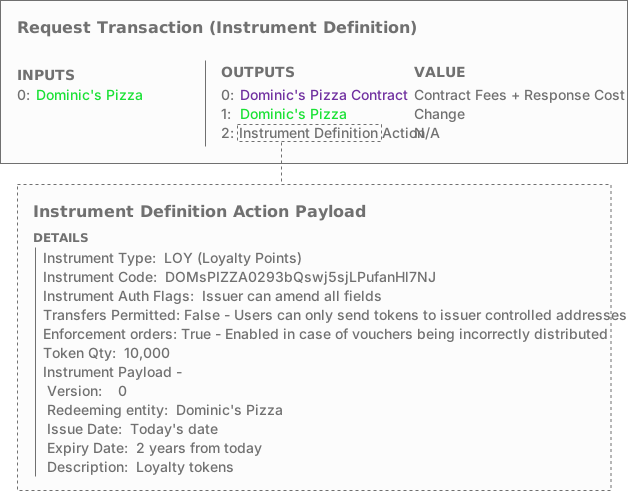 Dominic's Pizza loyalty points Instrument Definition
Once Dominic has finished entering the details he instructs his wallet to send the Instrument Definition to the smart contract.
The smart contract receives the transaction and unpacks the details. After making sure that the details are valid, the smart contract responds with an Instrument Creation action which generates the points and gives them to Dominic's wallet. He now has 10,000 loyalty points which he can hand out to customers. Because customers will give them back to him to redeem pizza, he only needs as many as might be outstanding at any time. The loyalty program is set to expire with the lease on his restaurant but Dominic plans to modify the instrument when he extends so that the program is always in place.
Dominic opens his store to great fanfare, and has people lined up for his first night in business.
His first customer (Harry) asks to purchase a hawaiian pizza with extra pineapple and two pints of Dominic's locally sourced craft beer, and asks to pay in eAUD. The process uses a point of sale protocol and an NFC enabled cashpoint. The image below details the order of operations:
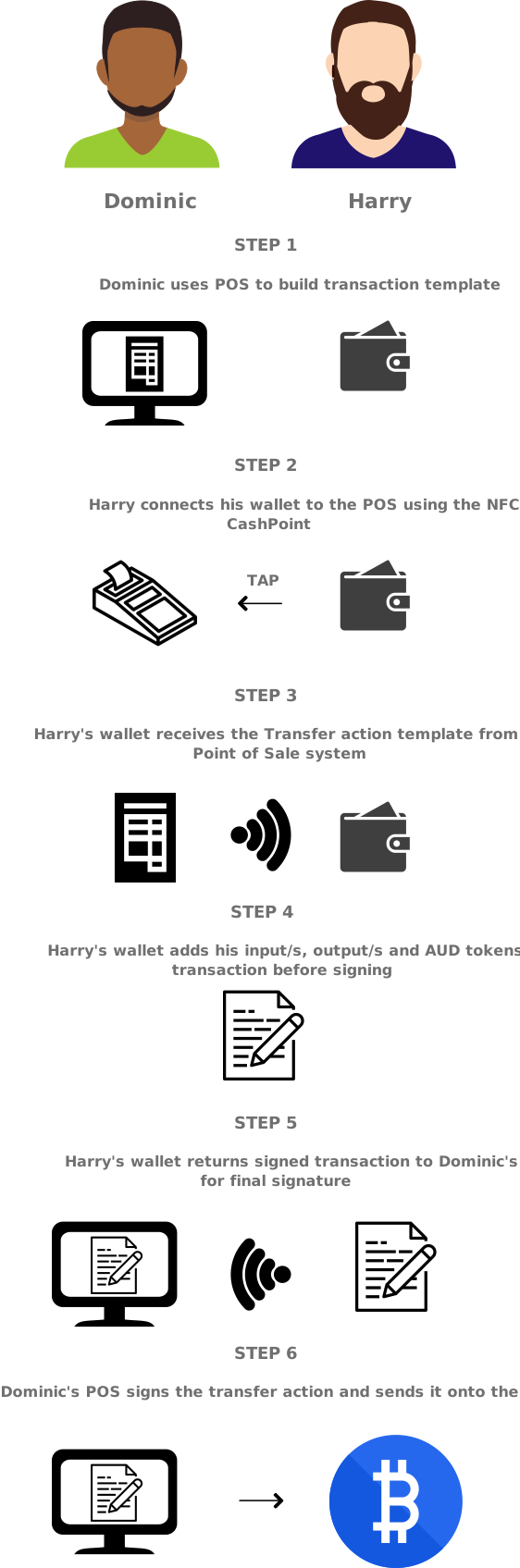 Dominic's Pizza - Harry's transfer, order of operations
This is the detail of the transfer operation which is sent to the network:
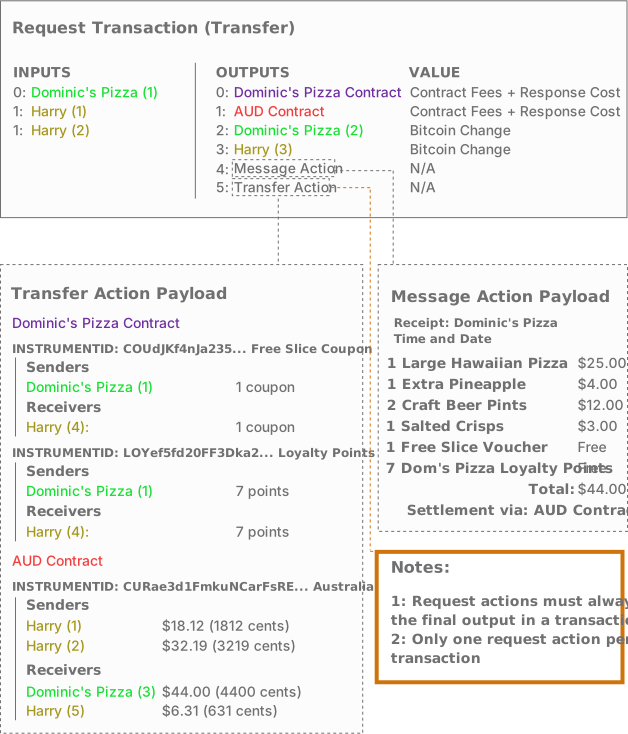 Dominic's Pizza - Harry's transfer
The Dominic's Pizza contract sees the transaction arrive and unpacks it to make sure that it's valid. Seeing no issue, it creates a Settlement Action and sends it to the eAUD smart contract using a Message action. The eAUD smart contract checks Harry's balance and creates a transaction using the inputs sent to each contract in the transfer action, and sends this back to the Dominic's Pizza contract in a Signature Request message.
The Dominics pizza contract signs the transaction and sends it on to the network. Harry and Dominic's Pizza's wallets each see that the transaction has been settled and Harry is served his pizza.
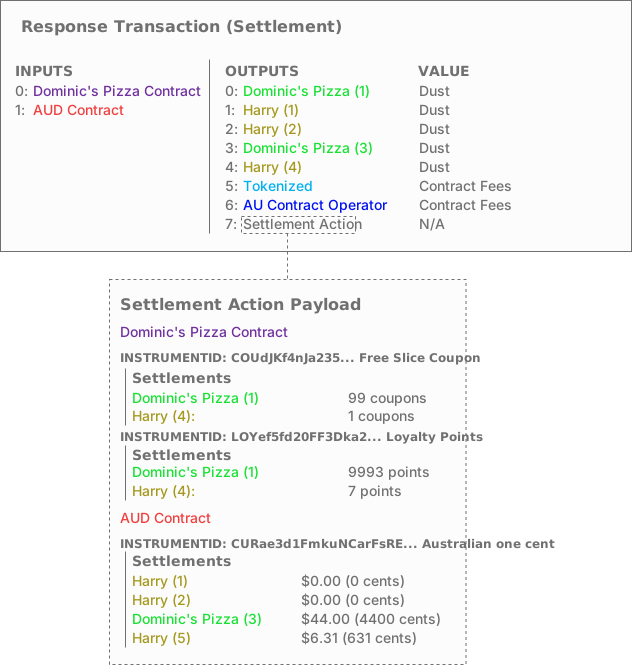 Dominic's Pizza - Harry's Settlement
Dominic has had a great evening. He has sold out of almost every pizza and done huge trade in drinks and snacks. He has already run out of the free slice coupons so is doing regular trade. It has quietened down and customers are no longer waiting in line and he is able to catch up on dishes. Jo-Anne enters and approaches the counter. Dominic quickly walks to the sales point and takes her order. Jo-Anne is after 2 slices, one Hawaiian and one Margarita, and a bottle of sparkling water. Dominic enters her order in the till but inadvertently types in a quantity of 22 for loyalty points instead of 2.
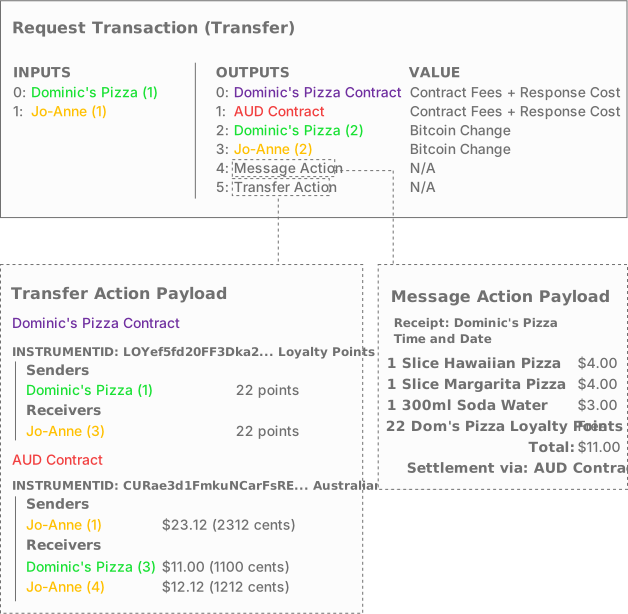 Dominic's Pizza - Jo-Anne's transfer
He asks Jo-Anne to tap her mobile wallet on the cashpoint and without paying too much attention, she signs for the transaction. and it settles.
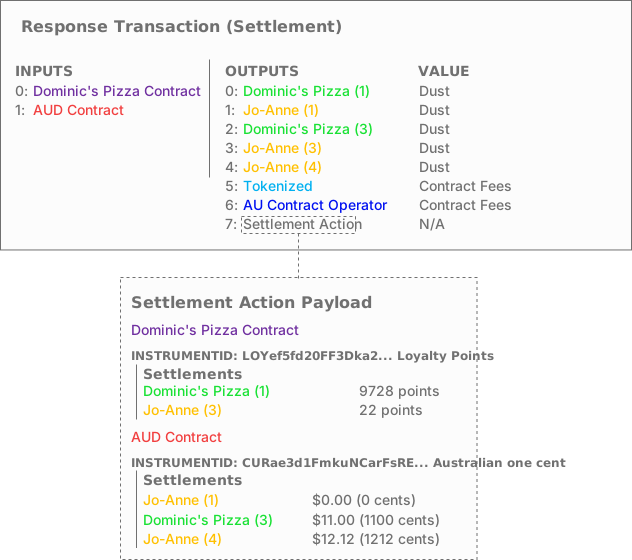 Dominic's Pizza - Jo-Anne's settlement
Joanne looks at her wallet while Dominic puts her slices through the oven and sees that she's received 22 loyalty points. She quickly scans the flier that is on the wall and sees that it clearly states that loyalty points are only handed out 1 per slice, and straight away recognises what's gone wrong.
She gets Dominic's attention and shows him the mistake. He thanks her profusely and tells her not to worry and that he will fix the issue. A queue has formed behind her so he quickly writes a note on a post-it, then serves her the pizza and drink. Jo-Anne leaves the restaurant and forgets about the whole thing.
At close, Dominic sees the note and remembers that he has to correct the accounting in his loyalty program. Using his desktop wallet, he goes into the 'Enforcement' menu and selects confiscate. He can see the address to which the 22 tokens were sent and uses it in the creation of an Order transaction.
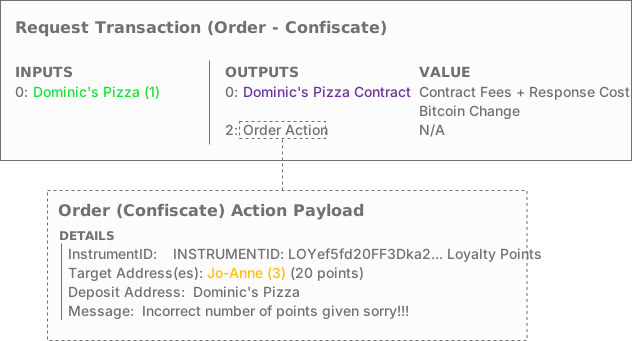 Dominic's Pizza Order action (confiscation)
The smart contract unpacks the order action and sees that Dominic wants to confiscate 20 of Jo-Annes points back, leaving Jo-Anne with the correct quantity of 2 points. It creates a Confiscation action that takes 20 tokens from Jo-Anne's balance and gives them back to Dominic's Pizza.
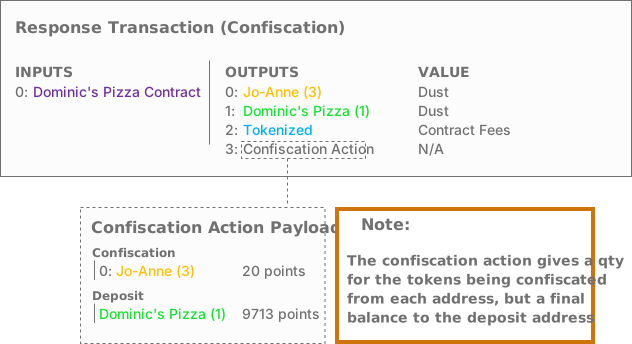 Dominic's Pizza Confiscation action
The confiscation takes effect immediately. Dominic sees the balance update in his wallet, and the next time Jo-Anne looks at her Dominic's Pizza loyalty point balance, the correct quantity of 2 points will be shown.
Dominic is very pleased with his new system...