1. Summary
I can't create any issue via StGitlab. Sublime Text hangs.
2. Expected behavior
Successful issues creating for any GitLab repository. For example, I want to create real issue for https://gitlab.com/gitlab-org/gitlab-ce repository.
It would be nice, if StGitlab will have similar behavior as GIssues Sublime Text package for creating GitHub issues, see my screencasts.
Example for issue creating via GIssues:

3. Steps to reproduce
I reproduce the problem in a version of Sublime Text without another plugins and user settings.
-
pip install transliterate dimensions terminaltables python-gitlab
-
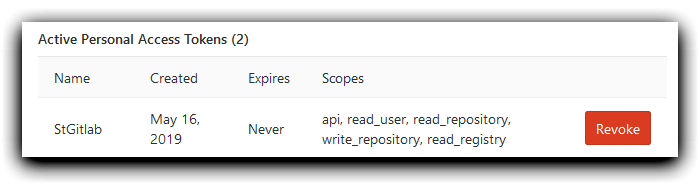
I log in in GitLab → https://gitlab.com/profile/personal_access_tokens → I create new personal token:
-
I install StGitlab via Package Control → Preferences → Package Settings → StGitlab → I create User/StGitlab.sublime-settings file:
{
    "api_token": "<My Real Token Here>",
    "gitlab_url": "https://gitlab.com"
}
-
I restart Sublime Text
-
Ctrl+Shift+P → Gitlab issue: Create
-
Sublime Text hangs; I need restart Sublime Text to continue to work.
4. Environment
- Windows 10 Enterprise LTSB 64-bit EN
- Sublime Text Version 3.2.1, Build 3207
- StGitlab 1.0.7
- Python 3.7.3
- dimensions 0.0.2
- python-gitlab 1.8.0
- terminaltables 3.1.0
- transliterate 1.10.2
Thanks.

1. Summary
I can't create any issue via StGitlab. Sublime Text hangs.
2. Expected behavior
Successful issues creating for any GitLab repository. For example, I want to create real issue for https://gitlab.com/gitlab-org/gitlab-ce repository.
It would be nice, if StGitlab will have similar behavior as GIssues Sublime Text package for creating GitHub issues, see my screencasts.
Example for issue creating via GIssues:
3. Steps to reproduce
I reproduce the problem in a version of Sublime Text without another plugins and user settings.
pip install transliterate dimensions terminaltables python-gitlabI log in in GitLab → https://gitlab.com/profile/personal_access_tokens → I create new personal token:
I install StGitlab via Package Control →
Preferences→Package Settings→StGitlab→ I createUser/StGitlab.sublime-settingsfile:{ "api_token": "<My Real Token Here>", "gitlab_url": "https://gitlab.com" }I restart Sublime Text
Ctrl+Shift+P →
Gitlab issue: CreateSublime Text hangs; I need restart Sublime Text to continue to work.
4. Environment
Thanks.