显示提交日志 ,reflog
git log [<options>] [<revision-range>] [[--] <path>...]| 选项 | 说明 | 示例 |
|---|---|---|
| -<number>,-n <number> | 显示最近的<number>提交 | git log -2 #显示第 2 条 log(倒数) |
| --since,before,util=<date> | 显示日志日期范围 | git log --since=1week # 一周内的提交 |
| --grep=<pattern> | 使用 grep 查找提交记录 | git log --grep=fix # 查找提交存在 fix 的记录 |
| -p,--patch <path> | 生成补丁查看更改,<path>默认为 all | git log -1 -p ./a.py # 查看最近一条提交中 a.py 的变化 |
| --pretty=formart:<string> | 记录日志的显示格式,其中<string>在下面表 | git log --pretty=format:"%h %s" # 日志显示 hash 和提交说明 |
| --graph | 画出图例 | git log --graph --pretty=format:"%h %s" # 画出 log 的 graph 并显示 hash 和 提交说明 |
git log #查看最近的提交日志
git log --pretty=oneline #单行显示提交日志
git log --graph --pretty=oneline --abbrev-commit
git reflog #查看所有分支的所有操作记录
git log --pretty="%h - %s" --author=自己的名字 #查看自己的日志
# git log --stat #要快速浏览其他协作者提交的更新都作了哪些改动
git log --pretty=format:"%h - %an, %ar : %s"#定制要显示的记录格式
git log --pretty=format:'%h : %s' --date-order --graph # 拓扑顺序展示
git log --pretty=format:'%h : %s - %ad' --date=short #日期YYYY-MM-DD显示
git log <last tag> HEAD --pretty=format:%s # 只显示commit | 选项 | 说明 | 选项 | 说明 |
|---|---|---|---|
| %H | 提交对象(commit)的完整哈希字串 | %h | 提交对象的简短哈希字串 |
| %T | 树对象(tree)的完整哈希字串 | %t | 树对象的简短哈希字串 |
| %P | 父对象(parent)的完整哈希字串 | %p | 父对象的简短哈希字串 |
| %an | 作者(author)的名字 | %ae | 作者的电子邮件地址 |
| %ar | 作者修订日期,按多久以前的方式显示 | %ad | 作者修订日期(可以用 -date= 选项定制格式) |
| %cn | 提交者 (committer) 的名字 | %ce | 提交者的电子邮件地址 |
| %cd | 提交日期 | %cr | 提交日期,按多久以前的方式显示 |
| %s | 提交说明 |
# 进行log的格式配置(config)

git config format.pretty oneline  #显示历史记录时,每个提交的信息只显示一行
git config color.ui true #彩色的 git 输出
git config --global format.pretty '%h : %s - %ad' --date=short #日期YYYY-MM-DD显示 写入全局配置
一个非常好看的 git log配置
来源于: https://coolshell.cn/articles/7755.html
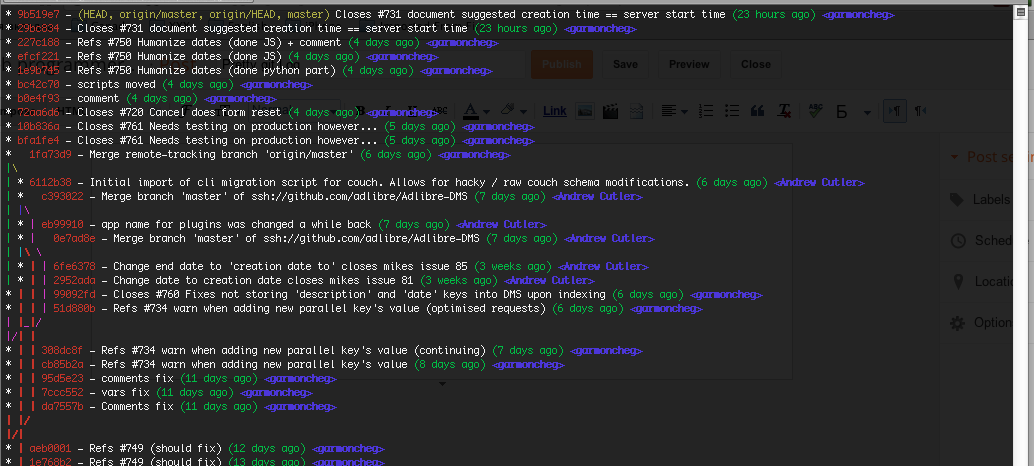
git log --graph --pretty=format:'%Cred%h%Creset -%C(yellow)%d%Creset %s %Cgreen(%cr) %C(bold blue)<%an>%Creset' --abbrev-commit --

# set git alias
# git config --global alias.lg "log --color --graph --pretty=format:'%Cred%h%Creset -%C(yellow)%d%Creset %s %Cgreen(%cr) %C(bold blue)<%an>%Creset' --abbrev-commit --"
# usage: git lgv2.39.0+
总结
git-log命令的内容,适当总结release的声明。每一个提交将以作者和标题分组。
git shortlog [<options>] [<revision-range>] [[--] <path>…]| 选项 | 说明 | 示例 |
|---|---|---|
| -n/--numbered | 以提交数量排列总结内容,而不是字母顺序【A-Z a - z】 | git shortlog -n # 按照提交数量排列 |
| -e/--email | 在总结里显示每一个提交者的email |
git shortlog -e # 显示总结提交的email |
| -s/--summary | 只描述提交者的提交数量 | git shortlog -s # 只显示提交者的提交数 |
| --format=<format> | 格式化显示总结内容【格式参考log】 |
git shortlog --format="%cd" # 显示修改时间 |
| --group=<type> | 分组类型:author、committer、trailer和format |
git shortlog --group=committer # 以提交者分类总结(会多出GitHub的提交点) |
git shortlog -n # 按照提交数量排列总结信息

git shortlog -e # 在总结信息中显示提交者的 email

git shortlog -c # git shortlog --group=commiterrequire: git-branchless and installed rust
图形化显示表现你的提交 (
commit),不像git log --graph将所有的提交 (commit) 显示,而关注于你的commit.
$ git sl
⋮
◆ 86bdeac0 48d (master) Revert "Update foo"
┃
✕ 8d4738cd 2d (manually hidden) new message
┣━┓
┃ ◯ 814b2b05 2d temp: another commit
┃
◯ 67687b48 2d temp: update foo- 公开的
commit将标记为◇ - 草稿的
commit标记为◯ - 隐藏的
commit标记为x