Wasabi has a great feature with testing the password of a wallet. However, the UX is cluttered, and I think it can be streamlined.
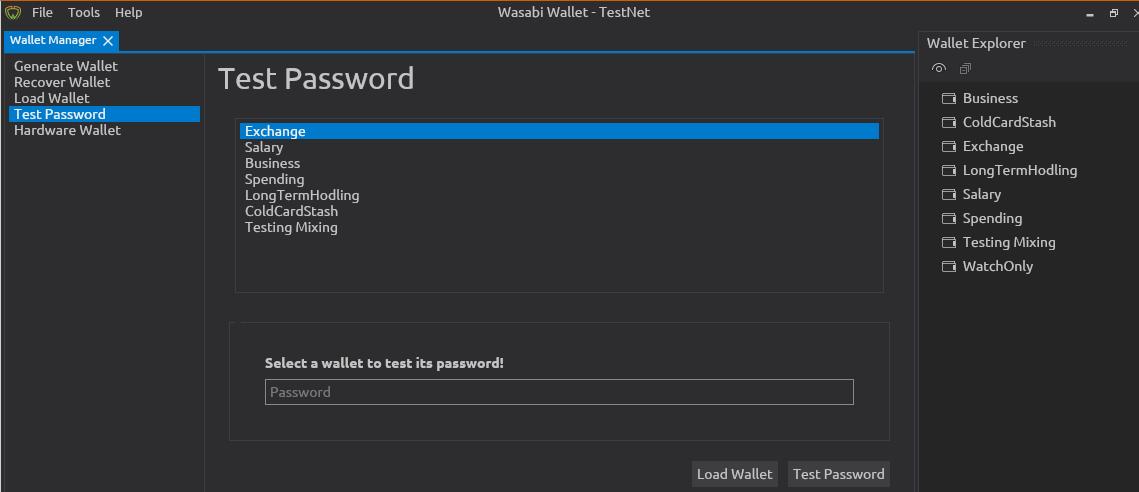
The main issue I see with this tab, is that there is a duplication of the list of all the wallets. Right now it's especially a mess, because they are in a different order.
This could be solved by relying on the Wallet Explorer.
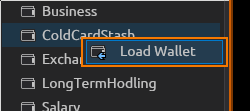
The right click context menu can have a button with Test Password. Currently it only has Load Wallet, so the context menu can be used more.
It could open a new tab, that only has the password input box for this wallet, with the Test Password button and the Load Wallet button. The same as it is now.
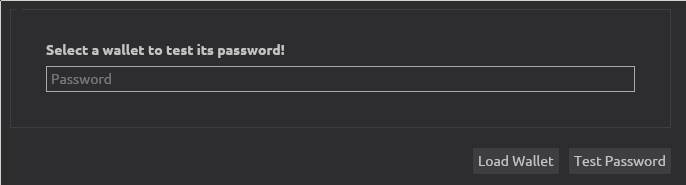
I don't like this much... For one, the Load Wallet button is again clutter, where I think the Wallet Explorer should be the main way to load a wallet.
Further, it might be "too much" to have a whole tab just for one password entry box.
So, instead, after clicking the Test Password button in the context menu of the Wallet Explorer, throw a popup notification [bottom right of the corner] that has a textbox where the password is entered, and a button to Test Password and Cancel. This notification box is only removed when it's canceled, or when the password is successful, then it shows a green box with Password Correct!, or a red box with Password Incorrect!.
Advantages
- gets rid of the whole tab
Test Password in the wallet manager
- removes the clutter with the two lists of wallets
- leverages the nice notification feature [with textbox] that is already in the new Wasabi design
- has nice color coding with success / failure message
Alternatives
- keep it as is in a dedicated tab
- fix the order of the list of wallets
- move it from the
Wallet Manager to Tools menu.

Wasabi has a great feature with testing the password of a wallet. However, the UX is cluttered, and I think it can be streamlined.
The main issue I see with this tab, is that there is a duplication of the list of all the wallets. Right now it's especially a mess, because they are in a different order.
This could be solved by relying on the
Wallet Explorer.The right click context menu can have a button with
Test Password. Currently it only hasLoad Wallet, so the context menu can be used more.It could open a new tab, that only has the password input box for this wallet, with the
Test Passwordbutton and theLoad Walletbutton. The same as it is now.I don't like this much... For one, the
Load Walletbutton is again clutter, where I think theWallet Explorershould be the main way to load a wallet.Further, it might be "too much" to have a whole tab just for one password entry box.
So, instead, after clicking the
Test Passwordbutton in the context menu of theWallet Explorer, throw a popup notification [bottom right of the corner] that has a textbox where the password is entered, and a button toTest PasswordandCancel. This notification box is only removed when it's canceled, or when the password is successful, then it shows a green box withPassword Correct!, or a red box withPassword Incorrect!.Advantages
Test Passwordin the wallet managerAlternatives
Wallet ManagertoToolsmenu.