A terminal-first network reversing and traffic forensics workbench for researchers, red teamers, and embedded/IoT analysts.
Crates.io package:
packrat-tui
Installed binary:packrat
                     __                   __
___________    ____ |  | ______________ _/  |_
\____ \__  \ _/ ___\|  |/ /\_  __ \__  \\   __\
|  |_> > __ \\  \___|    <  |  | \// __ \|  |
|   __(____  /\___  >__|_ \ |__|  (____  /__|
|__|       \/     \/     \/            \/
# Demo / simulated traffic (no libpcap required)
cargo install packrat-tui
packrat

# Real interface capture + real traceroute
cargo install packrat-tui --features real-capture
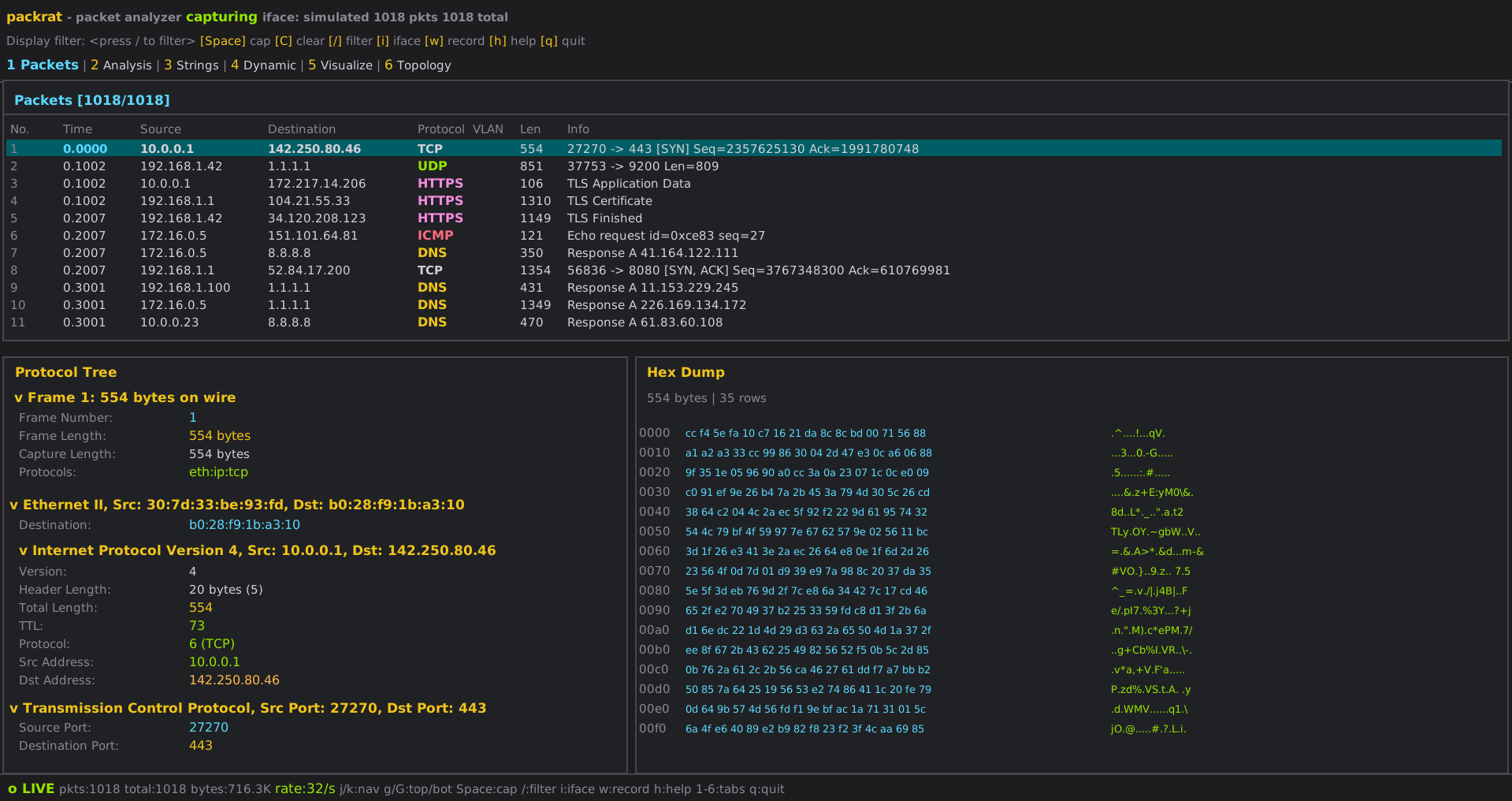
packrat| Tab | Key | Description |
|---|---|---|
| Packets | 1 |
Live packet list, protocol detail tree, hex dump, follow-stream overlay |
| Analysis | 2 |
Protocol stats, top talkers, conversations, port summary, magic bytes, XOR, anomalies, host/TLS/flow/IOC/rules/YARA counts |
| Strings | 3 |
Extracted ASCII strings with entropy scoring, RE dictionary, live search |
| Dynamic | 4 |
Live syscall / signal / network event log |
| Visualize | 5 |
Protocol sparkline, traffic bars, top IPs, geo endpoints |
| Flows | 6 |
Bidirectional flow tracker — beacon/scan/encrypted/large detection, follow stream |
| Craft | 7 |
Form-based packet builder with hex preview, inject, and flood mode |
| Traceroute | 8 |
Hop-by-hop path tracer (real traceroute/tracert under --features real-capture) |
| Security | 9 |
Passive IDS, credentials, OS fingerprint, ARP watch, DNS tunnel, HTTP analytics, TLS weakness, brute-force, vuln patterns, IOC hits, VLAN intelligence, PCAP replay |
| Scanner | 0 |
Port scanner — TCP Connect, SYN, UDP modes with service fingerprinting |
| Hosts | H |
Host inventory: IP/MAC/OS/hostname tracking, per-host protocol breakdown, free-form tagging |
| Notebook | N |
Analyst notes — timestamped, tag-attached, searchable with live filtering |
| TLS | T |
TLS session table: SNI, cipher suite, JA3/JA3S fingerprints, cert CN/issuer/SANs/expiry, alert detection |
| Objects | O |
Carved file objects extracted from traffic — MIME type, SHA-256, size, YARA hits |
| Rules | R |
User-defined detection rules (field conditions → alert/tag/log actions), live hit counter, description column |
| Workbench | W |
Hex-level protocol workbench — load any packet, cursor navigation, byte selection |
| Graph | G |
Operator Graph — live engagement map linking all artifacts into a navigable correlation graph |
| Diff | D |
Differential PCAP analysis — baseline snapshot vs. current traffic: protocol Δ, host Δ, port Δ |
The Operator Graph is the flagship analysis engine. It builds a live, time-aware engagement graph by connecting all analysis artifacts — hosts, flows, credentials, certificates, tokens, files, IOCs, alerts — into a navigable operational picture.
Node kinds (15): Host · Service · Flow · Stream · Identity · Credential · Token · Certificate · FileObject · Alert · IOC · RuleHit · ProtocolArtifact · FirmwareArtifact · CampaignCluster
Edge kinds (20): CommunicatesWith · UsesService · BelongsToHost · AuthenticatedWith · PresentsCertificate · ExtractedFrom · MatchesIoc · TriggersAlert · ResolvesTo · IsAssociatedWith · CorrelatedWith · SameIdentity · LateralMovement · ExfiltratedTo · CommandAndControl · Tunnels · Encapsulates · ReusedIn · SignedBy · LinkedBy
Every node and edge carries provenance (evidence refs back to packets, flows, alerts, IOC hits, YARA hits, notes), timestamps (first seen / last seen), and hit counts.
Navigate with Tab to cycle, or jump directly:
| Mode | Key | Description |
|---|---|---|
| Neighborhood | (default) | Selected node + all outgoing and incoming edges, rendered as an ASCII tree |
| Adjacency | A |
Sortable table of all edges connected to the selected node |
| Paths | P |
Heuristic attack paths — credential reuse, cert reuse, IOC clusters, beacon chains, alert chains |
| Clusters | C |
Auto-discovered node clusters — cert reuse groups, IOC groups, alerted hosts, beacon pairs |
| Evidence | E |
Raw evidence refs for the selected node (packet numbers, alert IDs, IOC hits, YARA hits) |
Every node receives an explainable risk score (0–1) computed from observable signals:
| Kind | Signals |
|---|---|
| Host | IOC hits (+0.35), alert count (+0.25), high-severity alert (+0.15), credentials seen (+0.15), beacon-like repetition (+0.10) |
| Credential | Cleartext (+0.40), seen from multiple sources (+0.30) |
| Certificate | Self-signed (+0.25), reused across flows (+0.20) |
| IOC | Base 0.50 + 0.10 per matching host |
| Alert | CRITICAL=0.95, HIGH=0.80, MEDIUM=0.55, LOW=0.30 |
| FileObject | YARA hits (+0.40), executable MIME (+0.25) |
Scores are shown as star ratings (★★★☆☆) with a color-coded risk label (Critical / High / Medium / Low / Minimal) and a human-readable explanation in the detail panel.
Packrat automatically finds suspicious multi-hop patterns:
| Pattern | Description |
|---|---|
| Credential reuse | Same credential authenticated from 2+ distinct hosts |
| Certificate reuse | Same TLS certificate presented across 2+ flows |
| IOC cluster | Host(s) matching a known-bad indicator |
| Alert chain | Host with risk >0.5 that has overlapping alert + IOC, alert + credential, or IOC + credential signals |
| Beacon | CommunicatesWith edge with ≥20 hits, duration ≥60 s, rate 0.05–20 pkt/s |
Select any node and press p to compute ranked pivot suggestions — neighbors, reuse targets, kind-specific correlation pivots — scored and displayed in the pivot bar.
Press x to export the current graph:
packrat_graph_<timestamp>.json # full graph — nodes, edges, evidence refs
Export functions also available programmatically:
export_json(engine, path)           # full structured export
export_csv_nodes(engine, path)      # node table for spreadsheets
export_csv_edges(engine, path)      # edge table
export_markdown(engine, paths, clusters, path)  # human-readable report
| Key | Action |
|---|---|
Tab |
Cycle through modes |
A |
Jump to Adjacency mode |
P |
Jump to Paths mode |
C |
Jump to Clusters mode |
E |
Jump to Evidence mode |
j / k |
Navigate node list / scroll paths / scroll clusters |
Enter |
Select node / jump to first node of path or cluster |
Backspace |
Navigate back (pivot history) |
p |
Compute pivot suggestions for selected node |
/ |
Search node list |
x |
Export graph to JSON |
G |
Open Graph tab from anywhere |
A hex-level byte inspector for a single packet. Load any packet from the Packets tab by pressing Enter on it.
| Key | Action |
|---|---|
Enter (on Packets tab) |
Load selected packet into Workbench |
h / j / k / l ← ↑ ↓ → |
Move cursor byte by byte |
Space |
Toggle byte selection / extend range |
Esc |
Clear selection |
p |
Return to Packets tab |
The hex and ASCII panes scroll in sync with the cursor. Selected bytes are highlighted for copy-out or comparison.
Passively builds a host inventory from all observed traffic. Supports free-form tagging for analyst annotations.
| Column | Description |
|---|---|
| IP | IPv4/IPv6 address |
| MAC | Hardware address (Ethernet only) |
| OS guess | Passive TTL + window-size fingerprint |
| Hostname | Reverse-DNS or NBNS name if seen |
| Packets / Bytes | Traffic volume |
| Protocols | Protocol set seen from this host |
| Tags | Free-form analyst tags (shown in orange) |
| First / Last seen | Session timestamps |
| Key | Action |
|---|---|
j / k |
Scroll |
/ or s |
Search by IP or hostname |
t |
Add tag to selected host (opens inline tag editor) |
T |
Remove oldest tag from selected host |
g |
Jump to top |
c |
Clear host table |
C |
Clear search |
A plain-text analyst notebook for timestamped observations. Notes are stored in-session and support tag attachment and live search.
| Key | Action |
|---|---|
n |
New note (opens inline editor) |
Enter |
Save note |
Esc |
Cancel edit or clear search |
j / k |
Scroll notes |
g / G |
Jump to top / bottom |
/ |
Open search bar — live-filters notes as you type |
d |
Delete note at cursor (works within search results) |
When search is active the title shows N / total notes and navigating with j/k moves within the filtered subset.
Real-time TLS session tracking built from passive handshake analysis.
| Column | Description |
|---|---|
| Flow | Source → destination endpoint pair |
| SNI | Server Name Indication (target hostname) |
| Version | Negotiated TLS version |
| Cipher | Selected cipher suite name |
| JA3 | Client fingerprint hash |
| JA3S | Server fingerprint hash |
| Issues | Self-signed cert, expired cert, weak cipher, TLS alert |
Detail panel — select a row with j/k to open a two-column detail view showing:
- Left column: Flow, SNI, TLS version, cipher suite, JA3 hash, JA3S hash, status (WEAK flagged in red)
- Right column: Cert CN, cert issuer, cert expiry, SANs (Subject Alternative Names), TLS alert
Weak cipher suites (RC4, NULL, 3DES, CBC-SHA1) are flagged in red. TLS alerts (fatal/warning) are shown with level and description codes.
| Key | Action |
|---|---|
j / k |
Select session and scroll detail panel |
g / G |
Jump to top / bottom |
Carved file objects extracted from reassembled TCP streams.
| Column | Description |
|---|---|
| ID | Sequential carve ID |
| Kind | Detected MIME type (e.g., image/png, application/pdf, application/elf) |
| Name | Auto-generated label with source flow |
| Size | Byte count |
| SHA-256 | Hex hash (computed on carve) |
| Source | Flow or stream identifier |
| YARA | Matching YARA rule names (if any) |
Object bytes are visible in the detail view. Large objects are truncated for display.
User-defined detection rules evaluated per-packet. Rules use a simple condition language over packet fields.
Rules are loaded from ~/.config/packrat/rules/ (.toml files). The status bar shows the rules directory path.
| Condition | Example |
|---|---|
| Protocol exists | tcp |
| Field contains | ip.src contains "192.168" |
| Field equals | tcp.dstport == 22 |
| Numeric compare | frame.len > 1400 |
| Boolean AND/OR/NOT | tcp and ip.dst == 10.0.0.1 |
- Alert — emit a named alert with severity (INFO / LOW / MEDIUM / HIGH / CRITICAL)
- Tag — attach a tag string to matching packets
- Log — write a message to the rules hit log
| Key | Action |
|---|---|
j / k |
Scroll rule list |
t |
Toggle rule enabled / disabled |
r |
Reload rules from disk |
C |
Clear all hit counters |
When a rule fires, the title bar shows a ⚡ N rules badge (yellow).
Build arbitrary packets from a field form, preview the raw bytes live, then inject or flood.
| Field | Example | Notes |
|---|---|---|
| Protocol | TCP UDP ICMP DNS HTTP ARP |
Sets IP protocol byte and L4 parsing |
| Src IP | 192.168.1.100 |
IPv4 dotted-decimal |
| Dst IP | 10.0.0.1 |
IPv4 dotted-decimal |
| Src Port | 4444 |
TCP/UDP only; leave blank for ICMP |
| Dst Port | 80 |
TCP/UDP only |
| TTL | 64 |
1–255 |
| IP Flags | DF MF DF+MF 0x40 |
IPv4 Don't Fragment / More Fragments |
| L4 Flags | SYN ACK SYN+ACK PSH+ACK FIN+ACK RST |
TCP — any combination with + |
8:0 echo-request ping echo-reply 3:3 |
ICMP — type:code or named | |
0x1234 |
UDP — hex checksum override | |
0x02 or decimal 18 |
Raw hex / decimal for any protocol | |
| Info | ping test |
Human-readable label (auto-generated if blank) |
| Payload | deadbeef 48656c6c6f |
Hex bytes appended after transport header |
| Key | Action |
|---|---|
Tab / j / k |
Move between fields |
Enter / e |
Start editing focused field |
Esc / Enter |
Confirm edit |
Space / x |
Inject one packet |
f |
Toggle flood mode |
< / > |
Decrease / increase flood rate |
C |
Clear result / stop flood |
h |
Help |
Press f to start sending packets continuously at the configured rate. Adjust with < and >:
1 pps → 10 pps → 100 pps → 1000 pps → 10 000 pps
Compare two states of traffic to find what changed. Workflow:
- Press
B(anywhere) to snapshot the current packet list as the baseline. - Continue capturing or load more traffic.
- Press
Dto compute the diff and jump to the Diff tab.
The Diff tab shows three side-by-side delta columns:
| Column | What changed |
|---|---|
| Protocol Δ | Protocols that appeared or disappeared; packet count change (+green / -red) |
| Host Δ | New or missing IP endpoints; traffic volume change |
| Port Δ | Ports that opened or closed; hit count change |
| Key | Action |
|---|---|
B |
Set baseline snapshot (global, works from any tab) |
D |
Compute diff and open Diff tab (global) |
j / k |
Scroll delta lists |
X |
Clear baseline |
Passive real-time security analysis across 12 sub-panels. Navigate with [ / ] or the letter shortcuts below.
| Key | Panel | What it detects |
|---|---|---|
a |
IDS Alerts | EternalBlue (MS17-010), BlueKeep (CVE-2019-0708), Log4Shell (CVE-2021-44228), Heartbleed, PrintNightmare, NOP sleds, directory traversal (../), SQL injection, XSS, LLMNR/NBNS poisoning, Pass-the-Hash, SMB null sessions |
c |
Credentials | Cleartext usernames and passwords from HTTP Basic Auth, FTP, Telnet, SMTP AUTH, LDAP bind |
o |
OS Fingerprint | Passive TTL + TCP window size matching — identifies Windows, Linux, macOS, iOS, Android, Cisco, FreeBSD |
w |
ARP Watch | IP→MAC mapping table; fires alert on any MAC change (ARP spoofing / MITM) |
d |
DNS Tunnel | Per-apex-domain scoring: query frequency + subdomain entropy + label length → flags iodine/dnscat2-style tunneling |
u |
HTTP Analytics | Method, path, response code, User-Agent for all HTTP sessions |
t |
TLS Weakness | TLS 1.0, SSL 3.0, RC4 cipher suites (0x0005/0x000a), SHA-1 OID in certificates |
b |
Brute Force | 30-second sliding window per (src, dst, port); threshold 5 attempts — covers SSH/FTP/HTTP 401/SMB |
v |
Vuln Patterns | Cleartext sensitive HTTP paths (/admin, /passwd), weak Telnet, anonymous FTP, WMI over network |
i |
IOC Hits | Matches against loaded IOC lists (IPs, domains, hashes, keywords); shows hit kind, matched value, context |
| — | VLAN Intel | Per-VLAN stats + attack detection: double-tagging, DTP, MAC-VLAN crossing, PCP abuse, native VLAN 1 |
p |
PCAP Replay | Load and replay any .pcap file at variable speed |
When IOC hits exist, the title bar shows a ☢ N IOC badge (orange).
| Severity | Color | Examples |
|---|---|---|
| CRITICAL | red | EternalBlue, Log4Shell, BlueKeep |
| HIGH | orange | Heartbleed, PrintNightmare, Pass-the-Hash |
| MEDIUM | yellow | SQL injection, XSS, NOP sled |
| LOW | green | LLMNR/NBNS probe, directory traversal |
Load a .pcap file and replay it at adjustable speed into the live packet stream:
| Key | Action |
|---|---|
e |
Edit file path |
Enter |
Load file |
Space |
Play / stop |
< / > |
Halve / double speed (0.125x → 64x) |
Speed steps: 0.125x → 0.25x → 0.5x → 1x → 2x → 4x → 8x → 16x → 32x → 64x
Passive 802.1Q/802.1ad analysis built entirely from raw Ethernet frames — no SPAN configuration or VLAN-aware switch management required.
| Metric | Description |
|---|---|
| Per-VLAN packet / byte counts | Running totals per VLAN ID |
| Host inventory per VLAN | Unique IP+MAC pairs seen on each VLAN |
| MAC→VLAN mapping | Every MAC address and the set of VLANs it has appeared on |
| QinQ tag metadata | Outer S-TAG (0x88a8) and inner C-TAG (0x8100) IDs both recorded |
| PCP / DEI fields | 802.1p Priority Code Point (0–7) and Drop Eligible Indicator extracted per frame |
| Alert | Severity | Trigger |
|---|---|---|
| QinQ double-tagging | CRITICAL | Frame carries both an outer S-TAG and an inner C-TAG — classic VLAN-hopping attack that exploits access-port native VLAN handling |
| DTP negotiation | CRITICAL | Ethernet frame destined to 01:00:0c:cc:cc:cc — Cisco DTP frame that can trigger trunk negotiation (switch-spoofing precursor) |
| MAC on multiple VLANs | WARNING | Same source MAC address observed on two or more distinct VLAN IDs — indicates VLAN hopping or a misconfigured trunk |
| PCP=7 abuse | WARNING | A frame marked with 802.1p priority 7 (Network Control) from a non-router source — priority manipulation that can starve lower-priority traffic |
| Native VLAN 1 | WARNING | Any tagged traffic on VLAN 1 — violates CIS/NSA network hardening guidelines (VLAN 1 should carry no user traffic) |
Alerts are deduplicated: after the first fire, the same condition must advance by ≥ 1 000 packets before it fires again to prevent alert flooding in high-rate environments.
- 802.1Q C-TAG section shows real PCP (with priority name: Best Effort, Voice, Network Control, …) and DEI bit read directly from the raw frame
- 802.1ad S-TAG section added for QinQ frames (outer provider tag shown above inner customer tag)
- Correct IP header offset is computed for both single-tagged (4-byte extra) and double-tagged (8-byte extra) frames throughout the dissector, stream reassembler, and flow tracker
The flow tracker keys flows by (src IP, dst IP, src port, dst port, protocol, VLAN ID). Two hosts communicating on VLAN 10 and VLAN 20 are tracked as separate flows even if their IP addresses overlap — correct behaviour for routed or multi-tenant network captures.
The VLAN Intel sub-panel is split into two panes:
- Top 40% — per-VLAN stats table: VLAN ID (red if VLAN 1), packet count, byte volume, unique host count, first / last seen timestamps
- Bottom 60% — alert table: packet number, severity (color-coded), category, and full detail string, sorted newest-first
| Mode | Description |
|---|---|
| TCP Connect | Full TCP handshake — works as any user, cross-platform |
| SYN | Half-open SYN scan (simulated in demo mode; real with --features real-capture + root) |
| UDP | UDP probe with service fingerprinting |
| Key | Action |
|---|---|
Tab / j / k |
Move between fields |
Enter / e |
Edit field |
m |
Cycle scan mode |
Space / x |
Start / stop scan |
Esc |
Cancel scan |
PgDn / PgUp |
Scroll results |
C |
Clear results |
Type a hostname or IP, press Enter to trace:
Hop  IP               RTT        Hostname
  1  192.168.1.1      1.2 ms     router.local
  2  10.0.0.1         4.8 ms     -
  3  72.14.215.165    8.1 ms     -
  4  *                timeout
  5  8.8.8.8          11.3 ms    dns.google
Under --features real-capture the system traceroute (Linux/macOS) or tracert (Windows) is used. Falls back to simulation automatically if unavailable.
| Badge | Meaning |
|---|---|
[BEACON] |
Periodic inter-arrival CV < 0.15, mean interval > 0.5s — possible C2 heartbeat |
[LARGE] |
Flow exceeds 1 MB — bulk transfer or exfiltration candidate |
[ENCRYPTED] |
Payload entropy > 7.2 bits/byte — likely encrypted or compressed |
[SCAN] |
Source IP seen on 5+ distinct destinations — port/host scan |
Flows are keyed by (src, dst, src port, dst port, protocol, VLAN ID) — same IP/port pairs on different VLANs are tracked as separate flows.
Pressing f on a TCP flow opens the Follow Stream overlay, which shows the bidirectional byte stream for any TCP-carried protocol (HTTP, HTTPS, TLS, SSH, SMB, MySQL, Redis, Kerberos, and 30+ others). The reassembler handles:
- Correct payload offset — IP IHL and TCP data-offset fields are read from raw bytes; IP options and TCP options are both accounted for; VLAN and QinQ tags add 4 or 8 bytes correctly
- Retransmit suppression — per-direction sequence number tracking skips already-seen bytes using wrapping i32 arithmetic; only new data is appended
- Gap tolerance — out-of-order segments are appended immediately so the stream view remains useful even when segments arrive out of sequence
- Up to 500 concurrent streams, 1 MB per direction
| Key | Action |
|---|---|
b / p / t / s |
Sort by bytes / packets / time / beacon score |
f |
Follow Stream overlay (TCP payload, both directions) |
Enter |
Jump to filtered Packets view for this flow |
Ethernet II IEEE 802.3 VLAN 802.1Q (C-TAG) QinQ 802.1ad (S-TAG + C-TAG) 802.1p PCP/DEI MPLS PPPoE VXLAN GRE WireGuard
IPv4 IPv6 ARP ICMP ICMPv6 IGMP GRE VRRP IPSec ESP IPSec AH
TCP UDP GTP v1
| Protocol | Port | Notes |
|---|---|---|
| DNS / mDNS | 53 / 5353 | A/AAAA/MX/CNAME records |
| DHCP / DHCPv6 | 67–68 / 546–547 | Discover/Offer/Request/ACK, Solicit/Advertise |
| NTP | 123 | v3/v4, stratum, reference timestamps |
| PTP (IEEE 1588) | 319/320 | Sync, Delay_Req, Follow_Up, Announce |
| HTTP | 80/8080 | GET/POST/PUT/DELETE, URI, Host, response code |
| HTTPS/TLS | 443 | TLS 1.3, handshake, cipher suite |
| SSH | 22 | Key exchange |
| FTP | 20/21 | USER, PASS, RETR, STOR, PASV |
| Telnet | 23 | IAC option negotiation |
| SMTP | 25/587 | AUTH, MAIL FROM, RCPT TO |
| IMAP / POP3 | 143 / 110 | Mail retrieval |
| SIP | 5060/5061 | INVITE, BYE, ACK, REGISTER, Call-ID |
| BGP | 179 | OPEN, UPDATE, KEEPALIVE, AS path, NLRI |
| LDAP | 389 | Bind, Search, Modify |
| RADIUS | 1812/1813 | Access-Request/Accept/Reject, Accounting |
| QUIC | 443 | RFC 9000, Connection ID |
| SNMP | 161/162 | Trap / query |
| VXLAN | 4789 | VNI, inner Ethernet/IP |
| GTP | 2152 | v1/v2, G-PDU, TEID |
| MySQL / PostgreSQL / Redis / MongoDB | 3306/5432/6379/27017 | |
| Kafka | 9092 | Produce, Fetch, Metadata |
| AMQP / NATS | 5672 / 4222 | Messaging protocols |
| Docker / etcd | 2375 / 2379 | Container/cluster APIs |
| RTSP | 554 | Media streaming |
| RTP / STUN | 5004 / 3478 | Real-time media and NAT traversal |
| SSDP / NBNS | 1900 / 137 | Discovery and NetBIOS |
| OSPF / EIGRP / RIP | 89 / 88 / 520 | Routing protocols |
| PIM / IGMP | — | Multicast |
| TFTP | 69 | Trivial file transfer |
| Protocol | Port | Notes |
|---|---|---|
| Modbus/TCP | 502 | FC1–FC16, unit ID, register address |
| MQTT | 1883/8883 | CONNECT, PUBLISH, SUBSCRIBE, topics, QoS |
| OPC-UA | 4840 | Read/Write/Browse, node IDs |
| DNP3 | 20000 | Outstation addressing, function codes |
| CoAP | 5683/5684 | CON/NON/ACK/RST, URI paths |
| BACnet/IP | 47808 | BVLC, object/property |
| S7comm | 102 | Siemens S7 PLC, DB reads/writes |
| EtherNet/IP | 44818 | CIP encapsulation, RegisterSession |
| IEC-104 | 2404 | IEC 60870-5-104 SCADA |
| SOME/IP | 30490 | Automotive service-oriented |
| DoIP | 13400 | Automotive diagnostics over IP |
packrat supports three levels of protocol dissection.
Drop a .lua file in ~/.config/packrat/plugins/ and press r to load or hot-reload without restarting.
Supported Wireshark API:
| Object | Description |
|---|---|
Proto(name, desc) |
Declare a new protocol |
ProtoField.uint8/16/32/64(abbr, label, base) |
Typed field descriptors |
ProtoField.bytes/string/bool/ipv4/ether(...) |
Additional field types |
base.HEX, base.DEC, base.OCT, base.ASCII |
Display bases |
DissectorTable.get("tcp.port"):add(port, proto) |
Register by TCP/UDP port |
buf(offset, length) → TvbRange |
Slice packet payload |
range:uint() :uint8() :uint16() :uint32() |
Integer extraction |
range:int() :string() :bytes_hex() :tohex() |
String / hex extraction |
pinfo.src_port, pinfo.dst_port |
Port access |
pinfo.cols.protocol = "NAME" |
Override protocol column |
tree:add(field, range) |
Add typed field to detail tree |
tree:add(proto, buf(), "Label") |
Add subtree section |
tree:add("Label", value) |
Add plain string field |
Minimal example — custom protocol on TCP 9999:
local myproto = Proto("MyProto", "My Custom Protocol")

local f_magic = ProtoField.uint16("myproto.magic", "Magic", base.HEX)
local f_cmd   = ProtoField.uint8 ("myproto.cmd",   "Command", base.DEC)
local f_data  = ProtoField.bytes ("myproto.data",  "Payload")

myproto.fields = { f_magic, f_cmd, f_data }

function myproto.dissector(buf, pinfo, tree)
    if buf:len() < 3 then return end
    pinfo.cols.protocol = "MyProto"
    local subtree = tree:add(myproto, buf(0, buf:len()), "My Protocol")
    subtree:add(f_magic, buf(0, 2))
    subtree:add(f_cmd,   buf(2, 1))
    if buf:len() > 3 then
        subtree:add(f_data, buf(3, buf:len() - 3))
    end
end

DissectorTable.get("tcp.port"):add(9999, myproto)
Industrial protocol example — Modbus/TCP with register parsing:
local modbus = Proto("Modbus", "Modbus/TCP")

local f_tid  = ProtoField.uint16("modbus.tid",  "Transaction ID", base.HEX)
local f_pid  = ProtoField.uint16("modbus.pid",  "Protocol ID",    base.HEX)
local f_len  = ProtoField.uint16("modbus.len",  "Length",         base.DEC)
local f_uid  = ProtoField.uint8 ("modbus.uid",  "Unit ID",        base.DEC)
local f_fc   = ProtoField.uint8 ("modbus.fc",   "Function Code",  base.DEC)
local f_reg  = ProtoField.uint16("modbus.reg",  "Register",       base.DEC)
local f_cnt  = ProtoField.uint16("modbus.cnt",  "Count",          base.DEC)

modbus.fields = { f_tid, f_pid, f_len, f_uid, f_fc, f_reg, f_cnt }

local FC_NAMES = {
    [1]="Read Coils", [2]="Read Discrete Inputs",
    [3]="Read Holding Registers", [4]="Read Input Registers",
    [5]="Write Single Coil", [6]="Write Single Register",
    [15]="Write Multiple Coils", [16]="Write Multiple Registers",
}

function modbus.dissector(buf, pinfo, tree)
    if buf:len() < 8 then return end
    pinfo.cols.protocol = "Modbus/TCP"
    local fc = buf(7, 1):uint()
    local fc_name = FC_NAMES[fc] or ("FC " .. fc)
    local sub = tree:add(modbus, buf(0, buf:len()), "Modbus/TCP  " .. fc_name)
    sub:add(f_tid, buf(0, 2))
    sub:add(f_pid, buf(2, 2))
    sub:add(f_len, buf(4, 2))
    sub:add(f_uid, buf(6, 1))
    sub:add(f_fc,  buf(7, 1))
    if buf:len() >= 12 then
        sub:add(f_reg, buf(8,  2))
        sub:add(f_cnt, buf(10, 2))
    end
end

DissectorTable.get("tcp.port"):add(502, modbus)
Install plugins:
mkdir -p ~/.config/packrat/plugins
cp plugins/example_myproto.lua ~/.config/packrat/plugins/
# In packrat, press r — status bar shows: Lua: 1 files, 1 dissectors loaded
Bundled examples:
| File | Protocol | Port |
|---|---|---|
plugins/example_myproto.lua |
MyProto | TCP 9999 |
plugins/example_modbus.lua |
Modbus/TCP | TCP 502 |
plugins/example_mqtt.lua |
MQTT 3.1.1 | TCP 1883/8883 |
For fixed-format protocols without conditional logic. Drop a .toml file in ~/.config/packrat/dissectors/:
name      = "MyProto"
transport = "tcp"
port      = 9999

[[fields]]
offset  = 0
length  = 2
name    = "Magic"
display = "hex"

[[fields]]
offset  = 2
length  = 1
name    = "Command"
display = "dec"

[[fields]]
offset  = 3
length  = 4
name    = "Payload Length"
display = "dec"Extracts printable ASCII runs from packet payloads and classifies them using a built-in RE/security dictionary.
Entropy column:
- Low
0–3— human-readable, good RE target - Medium
3–5— mixed content - High
5–8— likely encrypted or compressed
Categories:
| Category | Examples |
|---|---|
sensitive |
password=, secret, private_key, token= |
key |
BEGIN RSA, api_key=, ssh-rsa, Authorization: Bearer |
shell |
/bin/sh, cmd.exe, system(, exec( |
ot-proto |
modbus, bacnet, opc-ua, dnp3 |
http / http-hdr |
GET /api, Cookie:, X-Forwarded-For: |
sql |
SELECT, INSERT, DROP TABLE, UNION SELECT |
jwt |
eyJ… base64 JWT tokens |
path |
/etc/passwd, C:\Windows\, ../../ |
domain / ip |
api.example.com, 192.168.1.1 |
Press / to search, Enter to keep filter, Esc to clear.
| Section | Description |
|---|---|
| Protocol distribution | Packet and byte counts per protocol |
| Top talkers | Busiest source IPs by byte volume |
| Conversations | Unique src→dst pairs with packet counts |
| Port summary | Top destination ports with protocol guess |
| Magic Bytes | Detects ELF, PE/EXE, PNG, JPEG, ZIP, PDF, gzip, OGG, SQLite, SSH key, PEM, and more |
| XOR Analysis | Brute-forces single-byte XOR (keys 1–255), reports candidates with >70% printable result |
| Anomaly Report | Non-standard ports, SSH/HTTP on unexpected ports, high-entropy cleartext, beacons, scans |
Record: Press w at any time to start writing a .pcap file (named packrat_<timestamp>.pcap in the current directory). Press w again to flush and close.
Instant import: Press L from anywhere to open a path dialog. Enter a .pcap file path and press Enter — all packets are loaded immediately into the live packet list and all analysis engines without replacing the active session.
Replay: Go to Security tab → Replay sub-panel (9 then p). Replayed packets flow into the live packet list, trigger all analysis engines (including the Operator Graph), and can be recorded to a new pcap.
| Key | Action |
|---|---|
1–0 |
Switch to tabs 1–10 |
H N T O R W G D |
Switch to Hosts / Notebook / TLS / Objects / Rules / Workbench / Graph / Diff |
Space |
Start/stop capture |
j / k ↑ ↓ |
Navigate |
g / G |
Top / bottom |
/ |
Filter bar (Wireshark-style AST filter) |
? |
Command palette (search across all tabs/actions) |
B |
Snapshot baseline for differential analysis |
L |
Load PCAP file instantly (overlay path dialog) |
i |
Pick capture interface |
w |
Toggle PCAP recording |
r |
Hot-reload Lua plugins |
h |
Help overlay |
a |
Autopsy overlay (deep analysis of selected packet) |
X |
Export case bundle |
C |
Clear |
q |
Quit |
| Key | Action |
|---|---|
Tab |
Cycle modes |
A P C E |
Jump to Adjacency / Paths / Clusters / Evidence |
j / k |
Navigate list / scroll |
Enter |
Select node / follow path or cluster |
Backspace |
Navigate back (pivot history) |
p |
Compute pivots for selected node |
/ |
Search node list |
x |
Export graph to JSON |
| Key | Action |
|---|---|
Tab / j / k |
Move field focus |
Enter / e |
Edit field |
Space / x |
Inject one packet |
f |
Toggle flood mode |
< / > |
Decrease / increase flood rate |
C |
Stop flood, clear result |
| Key | Action |
|---|---|
[ / ] |
Previous / next sub-panel |
a c o w d u t b v i p |
Jump to sub-panel by letter |
j / k |
Scroll |
g / G |
Top / bottom |
C |
Clear all |
Sub-panel letter map: a=IDS · c=Credentials · o=OS Fingerprint · w=ARP Watch · d=DNS Tunnel · u=HTTP · t=TLS · b=Brute Force · v=Vulns · i=IOC Hits · (VLAN Intel via [/]) · p=Replay
| Key | Action |
|---|---|
b / p / t / s |
Sort by bytes / packets / time / beacon score |
f |
Follow Stream overlay |
Enter |
Jump to Packets view for this flow |
Press / to open the filter bar. Filters are evaluated by a Wireshark-compatible AST engine and update the packet list live.
tcp                         # protocol name (bare)
udp
dns

ip.src == 192.168.1.1       # field comparison (==, !=, <, <=, >, >=)
ip.dst == 8.8.8.8
tcp.port == 443             # matches src OR dst port
udp.port == 53
frame.len > 1400

ip.src contains "192.168"   # substring match
dns contains "evil"

tcp and ip.dst == 10.0.0.1  # boolean AND
tcp or udp                  # boolean OR
not tcp                     # boolean NOT
The filter bar shows:
✓ N matchedin green — filter is valid and matched N packets✗ <error>in red — parse error (falls back to simple text match so nothing disappears)
ip.src ip.dst tcp.port tcp.srcport tcp.dstport udp.port udp.srcport udp.dstport frame.len frame.number plus any protocol name as a bare keyword (tcp, udp, dns, http, tls, arp, icmp, etc.).
The test suite uses rstest for parametrized cases and insta for snapshot assertions.
# Run the full suite
cargo test

# Run a single test file
cargo test --test filter_tests
cargo test --test event_tests
cargo test --test notebook_tests
cargo test --test ioc_tests
cargo test --test scenario_tests

# Run tests matching a pattern
cargo test notebook_search
cargo test security_subtab

# Show stdout for failing tests
cargo test -- --nocapture| Test file | Tests | What it covers |
|---|---|---|
tests/filter_tests.rs |
32 | Display filter parser and evaluator — all operators, fields, compound expressions |
tests/event_tests.rs |
107 | Key-event handler — every tab-switch key, per-tab actions, overlays, text-mode quit guard |
tests/notebook_tests.rs |
19 | Notebook CRUD, search (text + tag, case-insensitive), evidence linking, index cleanup on delete |
tests/ioc_tests.rs |
11 | IOC engine — IP/domain load, packet checking, suffix matching, hit metadata |
tests/scenario_tests.rs |
25 | "Operation Quiet Beacon" scenario — packet volume, protocol presence, IOC seeds, host tags |
| Platform | Status |
|---|---|
| Linux | ✅ Full support including real capture and real traceroute |
| macOS | ✅ Full support |
| Windows | ✅ Simulated mode; real capture requires Npcap |
| WSL2 | ✅ |
For cross-compilation targets (x86, ARM, PPC, GCC, Clang, MSVC, QEMU) see BUILD.md.
MIT — see LICENSE