



Experimental rendering framework written in C/C++ with a shared core (xtcore) and multiple frontends (CLI, Web, WASM runtime).
xtracer is a physically-based ray/path tracing engine built for exploration and experimentation. The core library (xtcore) handles scene parsing, ray-geometry intersection, shading, and tone mapping — and is consumed by three independent frontends:
- CLI (
xtracer_cli) — offline renderer that writes images to disk; supports PNG output with full control over integrator, resolution, samples, and anti-aliasing. - Web server (
xtracer_web) — HTTP API server with a job queue, progressive preview streaming, and a browser-based SPA for scene selection, rendering, log inspection, and image export in multiple formats. - WASM runtime (
xtracer_wasm) — WebAssembly build for in-browser rendering without a server.
The engine supports a range of integrators from simple Whitted-style ray tracing to MIS path tracing with area-light and environment sampling, plus photon mapping, ambient occlusion, and several debug views. Scenes are described in a custom .scn format covering procedural and mesh geometry, analytic cameras (thin-lens with polygonal bokeh, ODS, ERP, cubemap), and environment types including Rayleigh sky.
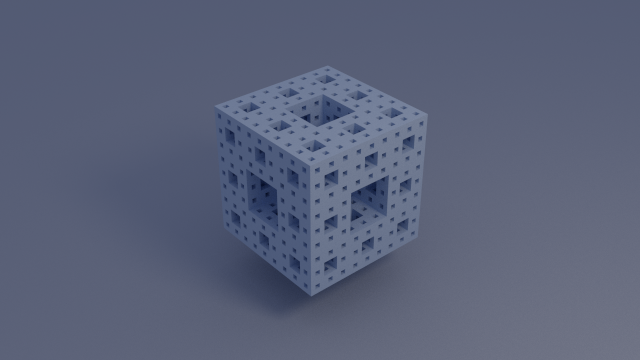
Install dependencies (Debian/Ubuntu):
sudo apt update
sudo apt install -y build-essential cmake pkg-config libomp-dev zlib1g-dev
Configure + build:
cmake -S . -B build/intermediate/build -DXTRACER_ENABLE_WEB=ON
cmake --build build/intermediate/build -j
Run web server:
./build/intermediate/build/xtracer_web --host 127.0.0.1 --port 8080 --scene-dir scene --web-root src/frontend/web-client --max-concurrent-renders 1 --render-reserve-threads 1 --verboseOpen: http://127.0.0.1:8080
UI showcase: http://127.0.0.1:8080/showcase.html
Run CLI:
./build/intermediate/build/xtracer_cli scene/lab-camera-modes-showcase.scn -renderer pathtracer_mis -res 1280x720 -samples 4 -aa 2With scene variant:
./build/intermediate/build/xtracer_cli scene/lab-camera-modes-showcase.scn -variant night -renderer pathtracer_mis -res 1280x720 -samples 4 -aa 2| Area | Path | Purpose |
|---|---|---|
| Core renderer | src/xtcore/ |
Scene parsing, render context, integrators, tone mapping |
| CLI frontend | src/frontend/cli/ |
Command-line scene rendering |
| Web frontend backend | src/frontend/web-server/ |
HTTP API, job manager, log stream |
| Frontend shared code | src/frontend/common/ |
Shared render service + integrator metadata |
| Web static app | src/frontend/web-client/ |
SPA for Scene / Render / Editor / Workspaces / Gallery / Settings / Logs / About, including runtime JSON config in app/data/ |
| Scenes | scene/ |
Example scene files (.scn) |
| Supporting libs | lib/ |
Internal libraries (nimg, nmesh, nmath, etc.) |
| Third-party deps | ext/ |
Vendored external dependencies (registry: docs/DEPENDENCIES.md) |
| Capability | CLI (xtracer_cli) |
Web (xtracer_web) |
WASM (xtracer_wasm) |
|---|---|---|---|
Load .scn scenes |
Yes | Yes | Yes |
| Select camera | Yes (-cam) |
Yes | Yes |
| Select scene variant | Yes (-variant) |
Yes (variant API param) |
Via backend API |
| Integrator selection | Yes (-renderer) |
Yes (/api/integrators) |
Yes (through web app adapter) |
| Progressive updates | Terminal progress | Job progress + preview API | Progressive snapshots |
| Image export | PNG | PNG/JPG/BMP/TGA/HDR/EXR + Raygraph PLY (/api/jobs/{id}/export) |
PNG snapshots (adapter flow) |
| HTTP API | No | Yes | No |
| Integrator ID | Type | Exposed In /api/integrators |
|---|---|---|
raytracer |
Whitted-style | Yes |
pathtracer |
Brute-force path tracing | Yes |
pathtracer_mis |
MIS diffuse path tracing | Yes |
pathtracer_mis_full |
MIS path tracing with emissive-area and environment sampling | Yes |
pathtracer_bdpt |
Experimental bidirectional path tracing with MIS path connection | Yes |
photon_mapping |
Photon mapping | Yes |
ao |
Ambient occlusion | Yes |
debug_views |
Multi-mode debug integrator | Yes |
depth |
Debug depth alias | No (alias accepted in /api/render) |
stencil |
Debug stencil alias | No (alias accepted in /api/render) |
normal |
Debug normal alias | No (alias accepted in /api/render) |
uv |
Debug UV alias | No (alias accepted in /api/render) |
emission |
Debug emission alias | No (alias accepted in /api/render) |
| Type | Notes |
|---|---|
gradient |
Uses config.a, config.b colors |
color |
Uses config.value |
cubemap |
Uses face sources: posx/posy/posz/negx/negy/negz |
erp |
Uses panoramic source texture |
rayleigh_sky |
Procedural sky using sun_direction, sun_intensity, beta_rayleigh, ground_color, density, horizon_falloff, sun_disk_radius, sun_disk_intensity, sun_glow_radius, sun_glow_intensity, sun_glow_falloff |
| Type | Notes |
|---|---|
thin-lens |
Position/target/up/fov/flength/aperture (+ optional aperture shape controls) |
ods |
Omni-directional stereo camera |
erp |
Equirectangular camera |
cubemap |
Cubemap camera |
thin-lens optional aperture-shape fields:
aperture_blades(integer):0or<3keeps circular aperture;>=3uses an N-gon aperture for polygonal bokeh.aperture_rotation(float, degrees): rotates the polygonal aperture whenaperture_blades >= 3.
| Type | Notes |
|---|---|
plane |
Analytic plane |
sphere |
Analytic sphere |
point |
Parsed as epsilon-radius sphere |
triangle |
Triangle via vecdata.v0/v1/v2 |
menger_sponge |
Implicit fractal surface (position, radius, resolution) |
sierpinski_tetrahedron |
Implicit fractal surface (position, radius, resolution) |
mandelbulb |
Implicit fractal surface (position, radius, resolution, power, bailout) |
julia |
Implicit fractal surface (position, radius, resolution, power, bailout, julia_c) |
csg |
Constructive solid geometry tree (op, left, right) |
mesh |
External OBJ/FBX/glTF or procedural generator |
CSG geometry uses binary tree nodes:
op:union,soft_union(smooth_unionalias),intersection, ordifferenceleft: nested noderight: nested nodesmoothness(optional): soft union blend width (> 0, default0.15), used only withsoft_union
left/right can be:
- another CSG node (contains
op,left,right), or - a supported leaf geometry definition (v1):
sphere,point,plane,menger_sponge,sierpinski_tetrahedron,mandelbulb,julia.
Example:
geometry = {
  shape = {
    type = csg
    op = difference
    left = { type = sphere, position = vec3(0,0,0), radius = 1.0 }
    right = { type = sphere, position = vec3(0.4,0,0), radius = 0.6 }
  }
}
| Generator | Generator | Generator | Generator |
|---|---|---|---|
plane |
icosahedron |
tetrahedron |
cube |
hexahedron |
octahedron |
dodecahedron |
capsule |
cylinder |
capped_cylinder |
cone |
truncated_cone |
ring |
rounded_ring |
torus_knot |
icosphere |
geodesic_dome |
icosa_cage |
hemisphere |
disc |
menger_sponge |
sierpinski_tetrahedron |
menger_sponge_implicit |
sierpinski_tetrahedron_implicit |
mobius_strip |
klein_bottle |
superellipsoid |
hairball |
shell_spiral |
rock |
chain_link |
lathe |
snowflake |
pyramid |
gear |
spring |
star |
crystal |
tree |
coral |
terrain |
draped_cloth_strip |
city |
Note: menger_sponge and sierpinski_tetrahedron can be used either as:
geometry.typevalues (native implicit xtcore surfaces), orgen(...)mesh generators (triangulated geometry).
Sizing note:
gen(menger_sponge)andgen(menger_sponge_implicit)are normalized to unit canonical bounds ([-0.5, 0.5]per axis) before scene modifiers.
gen(pyramid) supports:
base_size(float,> 0, default1.0)height(float,> 0, default1.0)
gen(mobius_strip) supports:
resolution(integer,>= 24, default64): strip tessellation around the loop and across the bandradius(float,> 0, default1.0): major loop radius from the strip centerlinewidth(float,> 0, default0.64): full strip width across the band
gen(ring) supports:
radius(float,> 0): outer radiusheight(float,> 0): ring heightthickness(float,> 0): wall thickness asouter_radius - inner_radiusheight_resolution(integer,>= 1): vertical side tessellation
gen(rounded_ring) supports:
radius(float,> 0): outer radiusheight(float,> 0): rounded profile heightthickness(float,> 0): ring thickness asouter_radius - inner_radiusprofile_resolution(integer,>= 8): cross-section tessellation for the rounded profile
gen(terrain) supports:
resolution(integer,>= 2): grid resolutiondimensions(vec3): terrain width, height amplitude, and depthheight_sampler(group): sampler used to drive terrain displacement; defaults totype = scenery_heightfield
gen(draped_cloth_strip) supports:
resolution(integer,>= 8): strip tessellationdimensions(vec3): strip width, sag amplitude, and lengthfolds(float): longitudinal fold countedge_lift(float): raises or lowers the strip edges relative to the centercurl(float): adds a gentle twist/curl along the striptaper(float): narrows or widens the strip toward the free endsway(float): shifts the hanging strip laterally for a wind/pull feelasymmetry(float): biases the drape so one side hangs differently from the otherpinned(float[0,1]): blends between freer hanging and more pinned-end draping
scenery_heightfield sampler supports:
seed(integer)scale(float)octaves(integer,>= 1)lacunarity(float,> 1)gain(float,(0,1))ridge_strength(float)mountain_strength(float)valley_strength(float)
Scenes may define a top-level random group to synthesize deterministic, repeatable scene content.
Each random entry must provide an explicit seed.
Supported generator types:
sphere_grid: creates many sphere objects with seeded random placement/material assignment.
sphere_grid properties:
seed(integer, required)prefix(string, optional): name prefix for generated geometry/material/object idsx_min,x_max,z_min,z_max(integers): loop bounds ([min, max))y(float): sphere center Yradius(float,> 0)jitter(float): per-cell random XY jitter magnitudeavoid_center(vec3) andavoid_radius(float): exclusion spherelambert_ratio(float[0,1]): diffuse probability thresholdmetal_ratio(float[lambert_ratio,1]): metal threshold (> metal_ratiobecomes glass)metal_fuzz_min,metal_fuzz_max(float[0,1]): seeded fuzz range for generated metalsior(float>= 1): generated glass index of refractionglass_reflectance(float[0,1]): generated glass reflection probability
| Type |
|---|
lambert |
phong |
blinn_phong |
emissive |
dielectric |
principled |
rough_dielectric |
thin_dielectric |
subsurface |
sheen |
thin_translucent |
boundary |
boundary is an interface-only material. It does not add surface shading and forwards rays through the hit point unchanged (useful for object-local medium boundaries).
Modern PBR-oriented material notes:
principled: GGX metal/roughness material. Common inputs aresamplers.base_color, optional grayscalesamplers.roughness/samplers.metallic, and scalarsmetallic,roughness,anisotropy,anisotropy_rotation,ior,clearcoat,clearcoat_roughness.clearcoatacts as a visible dielectric top layer over the base lobe, whileclearcoat_roughnesscontrols the sharpness of that coat highlight. Falls back todiffuseifbase_coloris omitted.rough_dielectric: rough transmissive dielectric for frosted glass/acrylic style surfaces. Common inputs aresamplers.transmission, optional grayscalesamplers.roughness, optionalsamplers.normal, optionalsamplers.absorption_color, and scalarsroughness,ior,transparency,absorption_distance. Absorption is applied as a slab-style Beer-Lambert approximation along transmissive events.thin_dielectric: thin-sheet transmissive dielectric for windows, visors, and packaging films. Common inputs aresamplers.transmission, optionalsamplers.normal, and scalarsroughness,ior,transparency. It keeps the path in the current medium instead of treating the surface as a solid volume boundary, and rough sheets participate in the BSDF/MIS path while near-ideal sheets stay on the delta path.subsurface: pragmatic diffuse-plus-transmission material for wax, jade, soap, and resin-style surfaces. Common inputs aresamplers.base_colororsamplers.diffuse, optionalsamplers.subsurface_color, optionalsamplers.subsurface_radius, optionalsamplers.normal, and scalarssubsurfaceplusthickness.subsurface_radiusandthicknessdrive a thickness-aware exit tint on the transmitted lobe.sheen: cloth-like diffuse material with a bounded retroreflective edge tint. Common inputs aresamplers.base_colororsamplers.diffuse, optionalsamplers.sheen_color, optionalsamplers.normal, and scalarsheen.thin_translucent: thin-sheet diffuse transmission material for leaves, paper, curtains, and lampshades. Common inputs aresamplers.base_colororsamplers.diffuse, optionalsamplers.translucency_color(ortransmission), optionalsamplers.normal, and scalarstranslucencyplusthickness.
Participating media are defined in a top-level medium group and referenced by object.
If an object has no medium reference, the renderer uses vacuum behavior.
Current v1 constraints:
- medium types:
homogeneous,heterogeneous_noise - intended boundary material:
boundary - currently applied in path tracers (
pathtracer,pathtracer_mis,pathtracer_mis_full) - inline
object.medium = { ... }blocks are not supported
Example:
medium = {
  fog_main = {
    type = homogeneous
    sigma_a = col3(0.06,0.04,0.03)
    sigma_s = col3(0.24,0.20,0.14)
    g = 0.15
    emission = col3(0.00,0.00,0.00)
  }
}

object = {
  fog_shell = {
    geometry = fog_volume
    material = boundary_shell
    medium = fog_main
  }
}
heterogeneous_noise supports these extra parameters (all optional):
density(default1.0)noise_scale(default1.0)noise_min(default0.25)noise_max(default1.0)octaves(default4)lacunarity(default2.0)gain(default0.5)seed(default1337)
object.source can import external mesh assets directly and auto-create runtime objects and materials from the file contents.
Supported formats:
.obj.fbx.gltf.glb
Behavior:
object.source = ...creates one or more runtime objects from the external asset- material assignments are taken from the imported file
- the generated materials do not need explicit
material = ...entries in the.scn prefixis used when generating runtime geometry/material/object ids
Example:
object = {
  imported = {
    source = assets/fbx/blender_272_cube_7400_binary.fbx
    prefix = imported_
  }
}
Notes for FBX:
- current support is for static mesh import
- node transforms are flattened during import
- importer reads base color, emissive, normal, roughness, and metallic data when available
- both referenced texture files and embedded texture blobs are supported
- animation, skinning, and advanced material graphs are not imported yet
Notes for glTF:
- current support is for static mesh import from
.gltfand.glb - node transforms are flattened during import
- importer maps glTF PBR materials into xtracer
principledmaterials where possible - external texture files and GLB-embedded images are supported
- animation, skinning, morph targets, and advanced extensions are not imported yet
| Type | Notes |
|---|---|
color |
Solid color |
texture |
2D texture |
cubemap |
Cubemap texture |
erp |
Equirectangular texture |
gradient |
Gradient sampler |
graphpaper |
Procedural graph paper |
checker |
Procedural checker |
weave |
Procedural weave |
fbm_marble |
Procedural marble |
voronoi_normal |
Procedural Voronoi tangent-space normal map |
Lambert, principled, rough_dielectric, thin_dielectric, subsurface, sheen, and thin_translucent support an optional sampler named normal for tangent-space normal mapping.
Supported normal sampler types:
texture(normal-map texture)voronoi_normal(procedural normal generator)
voronoi_normal parameters:
cells(integer,>= 1): Number of Voronoi cells.max_deviation(float, degrees, clamped to[0, 89]): Maximum angular deviation from tangent-space +Z.seed(integer): Deterministic random seed.
| Modifier |
|---|
rotation |
scale |
translation |
flip_normals |
extrude |
Scenes can define optional overlays under variants:
variants = {
  hide_base = true

  base = {
    name        = Baseline
    description = Uses the unmodified scene definition.
  }

  night = {
    name        = Night Lighting
    description = Dims emissive and swaps to night camera.
    remove = {
      object = {
        light_fill = {}
      }
    }
    set = {
      default_camera = cam_night
      material = {
        lamp = {
          properties = {
            samplers = {
              emissive = { type = color, value = col3(0.03,0.03,0.06) }
            }
          }
        }
      }
    }
  }
}
Rules:
remove: presence-based nested groups (name = {}) remove matching properties/groups in the base scene.set: deep-merge overlay; properties overwrite and groups merge recursively.hide_base(optional bool): whentrue, hides the(base)option in the web variant picker.name/description: optional metadata for frontend variant pickers.variants.base: optional metadata for the base (no variant) selection.- Apply order:
remove->set-> CLI-modoverrides. - Requesting a missing variant returns a scene-load error.
| Tab | Key Capabilities |
|---|---|
| Scene | File-manager-style scene browser plus fixed-size camera/variant cards (with variant name + description metadata), active selection panels, single-click selection, double-click activation, and scene file right-click actions (Set Active, Delete) |
| Render | Scene/camera/integrator selection, render settings, a square preview container that fills the render pane as the largest square that fits, tile-size presets (8, 32, 64, Auto where auto derives a square tile from frame size and effective thread count), a preview-toolbar export format dropdown + live format-aware save button, preview sampling toggle, in-flight abort support (render action toggles Render/Abort), render modes (Direct, Progressive, Incremental, Interactive) with Progressive as the default frontend mode, interactive camera controls/ramping, plus post-filter stack controls (enable/disable + chain) applied to preview/export |
| Editor | Switchable 3D View / Graph / Text Editor modes, scene source editor, create geometry, mesh translate/rotate/scale controls, 3D scene scale multiplier, click-select + Ctrl-drag move, F focus shortcut, visual viewport integration, scene save |
| Gallery | Cached render browser with card grid, detail view, pass thumbnails for progressive/incremental renders, refresh, and delete |
| Settings | Theme mode + light/dark palette selection, frontend behavior toggles, render polling controls, and first-time tutorial reset/start controls |
| Logs | Backend log stream with wait-based incremental updates and level filters |
| About | Build/backend metadata, project license text, and third-party dependency notices including usage/location |
Shared sidebar jobs card:
- Shows a live 1 minute thread-usage graph plus current active/queued jobs, queue ordering controls, and abort actions wherever the card is enabled.
First-time use tutorial (FTUE):
- On first launch, the web app opens a guided tutorial for scene selection, rendering, and scene editing flow.
- In
Settings, enableShow tutorial on next launchto reset onboarding state for the next app start. - In
Settings, useStart Tutorial Nowto reopen the tutorial immediately. - Tutorial steps are config-driven via
src/frontend/web-client/app/data/ftue_steps.json(steps[]entries supporttitle,body,target_selector,placement,tab,editor_view,open_cards, and optionalfocus_selector).
Post-filter stack:
- Current filters:
desaturate;chromatic_aberration(amount,center_x,center_y,falloff);vignette(strength,radius,softness,center_x,center_y);film_grain(amount,size,seed,luma_weighted);denoise(bilateral:strength,radius,sigma);fxaa(subpix,edge_threshold,edge_threshold_min);sharpen(amount,radius,threshold);brightness(amount);contrast(amount,pivot);raindrops_lens(density,size,distortion,seed).
Render preview interactions:
- Mouse wheel zooms the preview image.
- Drag pans the preview while zoomed.
- Double-click or
Reset Viewresets preview pan/zoom. - Clicking or dragging on the preview minimap recenters the current zoom on that region.
- The preview toolbar includes export format + save controls and a two-icon sampling switch (
Smooth,Nearest).
Interactive preview controls (Render tab, with Render Mode = Interactive):
Left drag: look aroundMiddle/Right dragorShift + Left drag: panWheelor touch pinch: zoomW/A/S/D: move forward/left/back/rightQ/E: move down/upShift: speed boostInteractive Speedslider: scales fly movement speedSave Interactive Camera: appends a newcameraentry to the active scene from the current interactive pose and saves it- Preview HUD: shows mode, speed, and current interactive quality stage
- Moving quality auto-adapts toward a low-latency frame-time target before settle refinement
- During active movement, interactive mode temporarily uses a low-cost navigation profile (raytracer + lightweight settings), then restores settle refinement
| Method | Endpoint | Purpose |
|---|---|---|
| GET | /api/health |
Health probe |
| GET | /api/about |
Backend/app metadata, runtime capacity stats, and license/third-party notice fields including dependency usage/location |
| GET | /api/scenes |
List available scenes |
| GET | /api/scenes/{scene}/cameras |
List cameras in scene (optional variant=<name>; includes camera_entries with name + type; returns 202 while async scene load is in progress) |
| GET | /api/scenes/{scene}/source |
Fetch scene source |
| GET | /api/scenes/{scene}/geometry |
Extract mesh geometry payload (optional variant=<name>; returns 202 while async scene load is in progress) |
| GET | /api/scenes/{scene}/runtime_graph |
Fetch runtime-resolved scene graph (objects/surfaces/materials/media/cameras; object entries may include medium) (optional variant=<name>; returns 202 while async scene load is in progress) |
| GET | /api/scenes/{scene}/runtime_texture?material=...&sampler=... |
Fetch a runtime material texture preview PNG, including embedded imported textures (optional variant=<name>; returns 202 while async scene load is in progress) |
| GET | /api/scenes/{scene}/camera_resolve |
Resolve active camera metadata (optional variant=<name>; returns 202 while async scene load is in progress) |
| GET | /api/scenes/load_jobs/{id} |
Poll async scene load job status |
| GET | /api/scenes/{scene}/asset?path=... |
Fetch referenced scene asset |
| GET | /api/scenes/template/empty |
Empty scene template |
| POST | /api/scenes/save |
Save scene source |
| POST | /api/scenes/delete |
Delete a scene file by name |
| GET | /api/workspaces?client_id={id} |
List workspaces + active workspace + workspace-scoped settings snapshot |
| POST | /api/workspaces |
Create workspace for client context (returns 409 when the retained workspace cap is saturated by active workspaces) |
| POST | /api/workspaces/active |
Switch active workspace for client |
| POST | /api/workspaces/delete |
Delete workspace |
| POST | /api/workspaces/scene_draft |
Save workspace-local scene draft (returns 413 when the draft payload exceeds the backend limit; the backend retains up to 16 drafts per workspace) |
| POST | /api/workspaces/settings |
Save workspace UI settings (quality/frame/integrator/tone mapping/preview/post-filters; returns 413 when settings_json exceeds the backend limit) |
| GET | /api/integrators |
List backend integrator metadata + controls |
| GET | /api/post_filters |
List backend post-filter metadata, stage support, and parameter schema |
| GET | /api/resolutions |
Resolution presets |
| POST | /api/render |
Create render job (optional variant=<name>, optional render_mode={direct,progressive,incremental,interactive}; legacy normal is also accepted, optional interactive camera override: cam_px/cam_py/cam_pz, cam_tx/cam_ty/cam_tz, cam_upx/cam_upy/cam_upz, cam_hfov; returns 503 when the bounded server queue is full) |
| GET | /api/jobs/active |
Server-authoritative list of active jobs (jobs[], running first then queued) |
| POST | /api/jobs/abort/{id} |
Abort explicit job id |
| GET | /api/jobs/{id} |
Job status snapshot |
| GET | /api/jobs/{id}/image |
PNG preview/final image (supports tone mapping + optional post-filter query params) |
| GET | /api/jobs/{id}/image_delta?since={n}&limit={m} |
Incremental preview tiles since tile index n (binary packet, supports tone mapping + optional post-filter query params) |
| GET | /api/jobs/{id}/export?format={png,jpg,bmp,tga,exr,hdr} |
Download final export (supports optional post-filter query params) |
| GET | /api/jobs/{id}/photons |
Photon debug points |
| GET | /api/gallery |
List cached gallery entries (newest first) |
| GET | /api/gallery/{id}/image |
Fetch the latest cached render image |
| GET | /api/gallery/{id}/pass/{n}/image |
Fetch a cached pass image for progressive/incremental renders |
| DELETE | /api/gallery/{id} |
Delete a cached gallery entry |
| GET | /api/logs?since={id} |
Incremental backend logs |
| GET | /api/logs/wait?since={id}&timeout_ms={n} |
Wait for new backend logs (long-poll) |
sudo apt update
sudo apt install -y build-essential cmake pkg-config libomp-dev zlib1g-dev
WASM toolchain (XTRACER_ENABLE_WASM=ON):
sudo apt install -y emscriptencmake -S . -B build/intermediate/build -DXTRACER_ENABLE_WEB=ON
cmake --build build/intermediate/build -jNote: native binaries are configured to output under the chosen CMake build directory (for example
build/intermediate/build/).
| Option | Default | Description |
|---|---|---|
XTRACER_ENABLE_WEB |
ON |
Build HTTP web frontend |
XTRACER_ENABLE_WASM |
OFF |
Build standalone WASM runtime |
XTRACER_ENABLE_WASM_DIST |
OFF |
Build/package standalone WASM dist during native build |
XTRACER_ENABLE_VIZ |
OFF |
Build OpenGL sampling visualization tool (xtracer_viz_sampling) |
XTRACER_ENABLE_NMATH_SIMD |
ON |
Enable x86 SSE2 SIMD fast-paths for nmath double-precision vector and matrix operations |
XTRACER_ENABLE_NMATH_SIMD_AVX |
ON |
Use AVX path for nmath SIMD (XTRACER_ENABLE_NMATH_SIMD must be ON) |
Notes:
XTRACER_ENABLE_NMATH_SIMDcurrently targets native x86/x86_64 builds and is ignored for Emscripten.- SIMD paths are used only when
nmathis built in double precision (default configuration); scalar fallback remains available. XTRACER_ENABLE_NMATH_SIMD_AVXenables AVX codegen and runtime AVX instructions for supported hosts.
./build/intermediate/build/xtracer_cli scene/lab-camera-modes-showcase.scn -renderer pathtracer_mis -res 1280x720 -samples 4 -aa 2./build/intermediate/build/xtracer_web --host 127.0.0.1 --port 8080 --scene-dir scene --web-root src/frontend/web-client --max-concurrent-renders 1 --render-reserve-threads 1 --verboseOpen: http://127.0.0.1:8080
--gallery-dir controls where cached gallery renders and per-pass previews are stored (default: gallery).
--max-concurrent-renders controls how many render jobs execute simultaneously (default: 1).
--render-reserve-threads controls how many threads auto-render mode keeps free for server responsiveness (default: 1).
When /api/render uses threads=0, backend auto mode resolves to max(1, runtime_threads - reserve_threads) (single-core hosts still render with 1 thread).
The web backend also bounds pending render backlog to 32 queued jobs; extra /api/render requests return 503 instead of accumulating unbounded queued state.
Workspace state is also bounded: the backend retains at most 32 workspaces, evicts orphaned idle workspaces after 60 minutes, and returns 409 from /api/workspaces if all retained slots are still active.
Startup prints an ASCII banner with runtime info (host/port, paths, concurrency, and detected core/thread limits).
Build and start on a host machine:
cp .env.example .env
docker compose up --build -d
Check container status:
docker compose ps
docker compose logs -f xtracer-web
Open: http://127.0.0.1:${XTRACER_PORT:-8080}
Notes:
- Scene files are mounted from
./sceneinto the container at/app/scene. - Set
XTRACER_OMP_NUM_THREADSin.envto control OpenMP worker count.
Stop:
docker compose down./build/intermediate/build/bench_nmath./build/intermediate/build/bench_mesh_intersectionOptional tuning:
./build/intermediate/build/bench_mesh_intersection --resolution 128 --width 512 --height 512 --passes 8Build with visualization enabled:
cmake -S . -B build/intermediate/build-viz -DXTRACER_ENABLE_VIZ=ON
cmake --build build/intermediate/build-viz -j --target xtracer_viz_sampling
Run:
./build/intermediate/build-viz/xtracer_viz_samplingemcmake cmake -S . -B build/intermediate/build-wasm \
-DXTRACER_ENABLE_WEB=OFF \
-DXTRACER_ENABLE_WASM=ON
cmake --build build/intermediate/build-wasm -j --target xtracer_wasmExpected output:
src/frontend/web-client/xtracer_wasm.jssrc/frontend/web-client/xtracer_wasm.wasm- copied self-contained scenes from
scene/into build output<build-dir>/scenes/(for examplebuild/intermediate/build-wasm/scenes/)
Optional static packaging:
./util/package_wasm_standalone.sh| Test Name (CTest) | Binary |
|---|---|
colorspace::roundtrip |
<build-dir>/test/test_nimg_colorspace |
colorspace::vectors |
<build-dir>/test/test_nimg_colorspace_vectors |
xtcore::tile |
<build-dir>/test/test_xtcore_tile |
xtcore::context |
<build-dir>/test/test_xtcore_context |
xtcore::sphere |
<build-dir>/test/test_xtcore_sphere |
xtcore::triangle |
<build-dir>/test/test_xtcore_triangle |
xtcore::csg |
<build-dir>/test/test_xtcore_csg |
xtcore::fbx_import |
<build-dir>/test/test_xtcore_fbx_import |
xtcore::gltf_import |
<build-dir>/test/test_xtcore_gltf_import |
xtcore::boundary_material |
<build-dir>/test/test_xtcore_boundary_material |
xtcore::white_furnace |
<build-dir>/test/test_xtcore_white_furnace |
xtcore::raytracer_emissive |
<build-dir>/test/test_xtcore_raytracer_emissive |
xtcore::object_medium_parse |
<build-dir>/test/test_xtcore_object_medium_parse |
cli::setup_parse |
<build-dir>/test/test_xtracer_cli_setup |
ncf::inline_and_utf8 |
<build-dir>/test/test_ncf_parser |
scene::validate_all |
<build-dir>/test/test_xtcore_scene_validator |
nmath::sampling |
<build-dir>/test/test_nmath_sampling |
nmath::simd |
<build-dir>/test/test_nmath_simd |
nmath::simd_perf_compare |
<build-dir>/test/test_nmath_simd_perf_compare |
cli::stencil_smoke |
<build-dir>/xtracer_cli smoke render |
Run all tests:
ctest --test-dir build/intermediate/build --output-on-failureConvenience one-liners:
make check
make perf
make check: configures/buildsbuild/intermediate/buildand runs all tests.make perf: configures/buildsbuild/perf-releaseand runsnmath::simd_perf_comparevianmath_perf_check.
| Name | License | URL |
|---|---|---|
| cgltf | MIT | https://github.com/jkuhlmann/cgltf |
| cpp-httplib | MIT | https://github.com/yhirose/cpp-httplib |
| STB | Public Domain / MIT | https://github.com/nothings/stb |
| strpool | Public Domain / MIT | https://github.com/mattiasgustavsson/libs |
| Three.js | MIT | https://github.com/mrdoob/three.js |
| TinyEXR | BSD-3-Clause | https://github.com/syoyo/tinyexr |
| TinyObjLoader | MIT | https://github.com/tinyobjloader/tinyobjloader |
| ufbx | MIT | https://github.com/ufbx/ufbx |
BSD 3-Clause. See LICENSE.
Copyright (c) 2010-present Nikolaos Papadopoulos.