Simple optical character recognition based on GLM-OCR with fewer dependencies.
from simpleglmocr import SimpleGlmOcr

model = SimpleGlmOcr()

text = model.run("Text Recognition:", "testimage.jpg")

print(text)
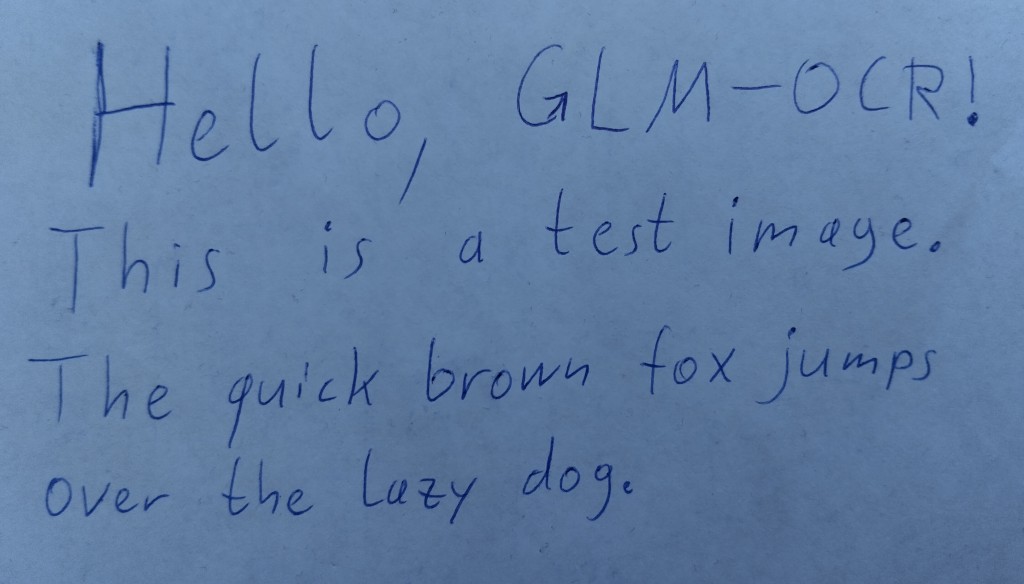
This will print the following text for the image shown below:
Hello, GLM-OCR!
This is a test image.
The quick brown fox jumps
over the lazy dog.
- Prerequisites: A Python environment with
python,pipandgit. - First, install PyTorch according to the instructions on their website.
- Next, install the following Python libraries with pip:
pip install regex numpy pillow safetensors
- Now you can clone the repository and run the example.
git clone https://github.com/99991/Simple-GLM-OCR.git
cd Simple-GLM-OCR
python example.pyYou can start a server for a web-based OCR experience by running the following command in the Simple-GLM-OCR directory:
python server.py
You can then visit the website at http://127.0.0.1:8000 to upload images for text recognition, or you can use the API (see below).

After you have started the server, you can use the API (requires pip install requests):
import requests

url = "http://127.0.0.1:8000/api/ocr"

# We thank Obama for providing his photo for testing purposes
filename = "obama.jpg"

prompt = """
{
    "last_name": "",
    "first_name": "",
    "tie color": "",
    "facial expression": "",
    "age": "",
    "body posture": "",
    "background": "",
}
"""

with open(filename, "rb") as f:
    image_bytes = f.read()

files = {'image': (filename, image_bytes, 'image/jpeg')}

response = requests.post(url, files=files, data={'prompt': prompt})
response.raise_for_status()

print(response.text)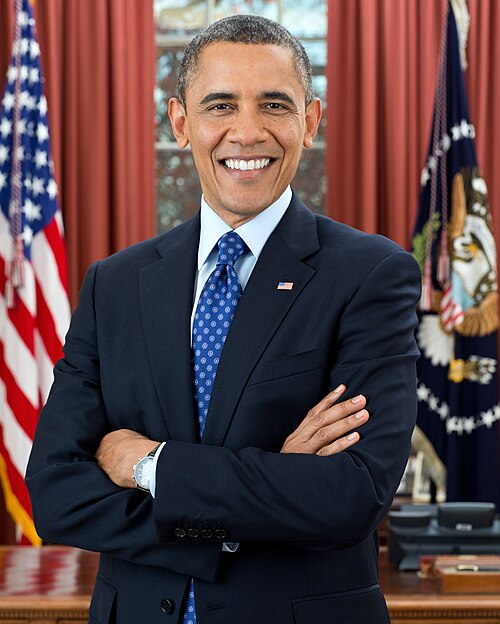
```json
{
    "last_name": "OBAMA",
    "first_name": "BARACK",
    "tie color": "blue",
    "facial expression": "smiling",
    "age": "47",
    "body posture": "crossed arms",
    "background": "American flag and presidential seal"
}
```
You can also use cURL to send a text recognition request to the server:
curl -X POST \
    -F 'prompt=Text Recognition:' \
    -F 'image=@testimage.jpg' \
    http://127.0.0.1:8000/api/ocr
This makes it very easy to build a screen text recognition tool using the scrot program.
#!/usr/bin/env bash
scrot -s -o /tmp/capture.png
curl -X POST \
    -F 'prompt=Text Recognition:' \
    -F 'image=@/tmp/capture.png' \
    http://127.0.0.1:8000/api/ocr > /tmp/text.txt
xdg-open /tmp/text.txt
Put the code in a file, mark it as executable and bind it to a shortcut for convenient access!
GLM-OCR supports multiple prompt formats:
Text Recognition:(for general text recognition)Table Recognition:(for tables as HTML)Formula Recognition:(for equations in LaTeX)- Schema-based JSON extraction
- How to run without GPU?
- Load the model in CPU-mode:
model = SimpleGlmOcr(device="cpu")
- Load the model in CPU-mode:


