


Flutter wrappers for the Android Google Mobile Ads Next-Gen SDK.
admob_nextgen provides a Dart-first API for Google Mobile Ads Next-Gen
initialization, UMP consent, banners (with reload support), interstitial ads,
rewarded ads, rewarded interstitial ads, app open ads, preloaders, request
targeting, and customizable native ad templates.
Android
Unofficial package. Not published, endorsed, or maintained by Google.
| Banner placement | Native ad templates |
|---|---|
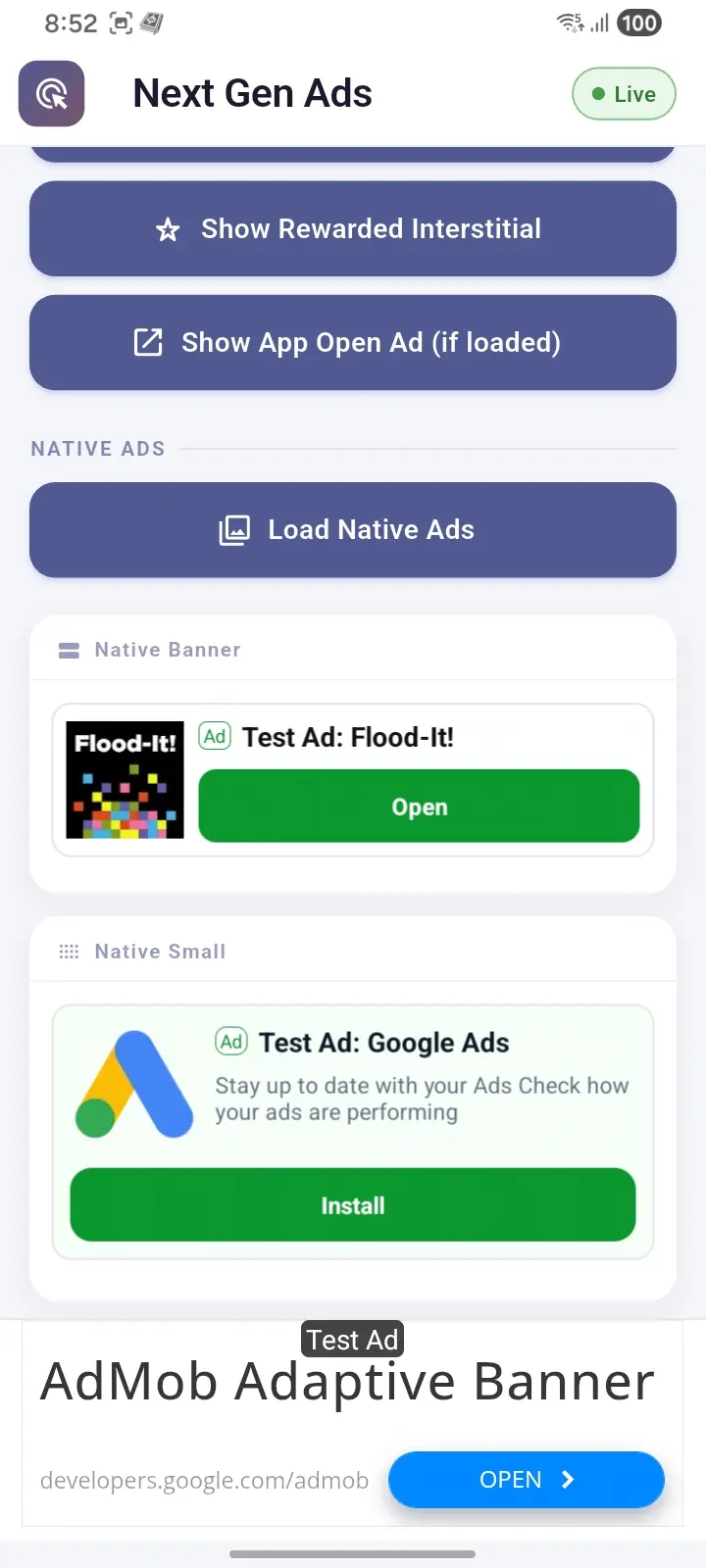 |
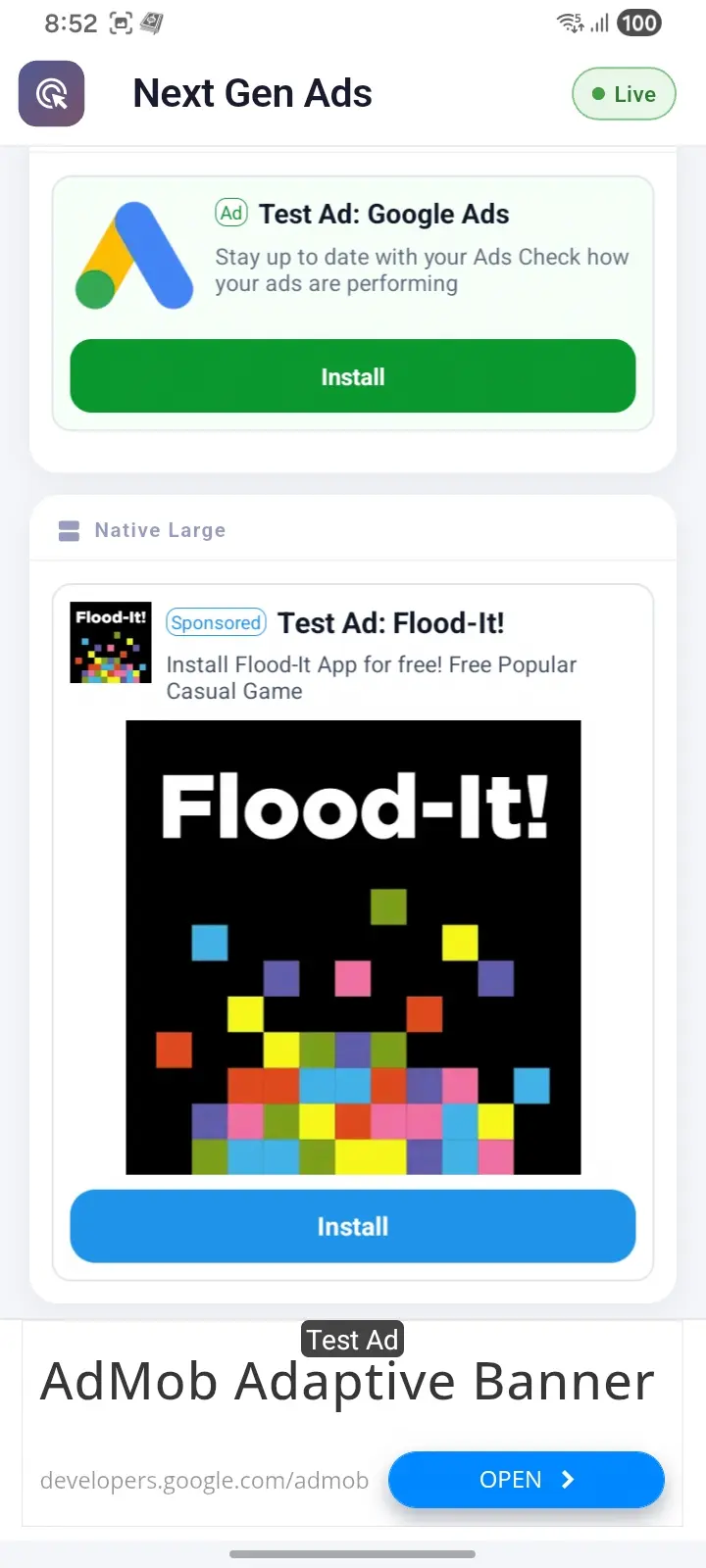 |
- Google Mobile Ads Next-Gen SDK initialization.
- UMP consent helpers.
- Banner ads with anchored, large anchored, inline adaptive, and IAB fixed sizes.
- Collapsible banners via
AdRequest(extras: {'collapsible': 'bottom'}). - Manual banner reload via
BannerAdController. - Interstitial, rewarded, rewarded interstitial, and app open ads.
- Interstitial and rewarded interstitial preloaders.
- Three prebuilt native ad templates.
- Custom native ad styling.
- Future-first ad loading with instance listeners.
dependencies:
  admob_nextgen: ^0.1.3
Then run:
flutter pub getAdd your AdMob app ID inside the <application> tag in
android/app/src/main/AndroidManifest.xml:
<meta-data
    android:name="com.google.android.gms.ads.APPLICATION_ID"
    android:value="ca-app-pub-xxxxxxxxxxxxxxxx~yyyyyyyyyy" />
Google test app ID:
ca-app-pub-3940256099942544~3347511713Use test ad unit IDs while developing. Do not use live ad units for local testing.
Wrap the startup consent flow in try/catch.
If the device is offline and requestConsentInfoUpdate() or
loadAndShowConsentFormIfRequired() fails during a splash screen, an uncaught
exception can prevent runApp() from being called and leave the app stuck.
Do not use this package together with Google Mobile Ads mediation adapters such as Meta/Facebook Audience Network mediation.
The Google Mobile Ads Next-Gen SDK is not currently compatible with existing mediation adapters. Adding mediation dependencies can cause duplicate Google Play services / GMS class errors during Android builds.
Remove mediation adapter dependencies and use direct Next-Gen SDK ad units with this package.
import 'package:admob_nextgen/admob_nextgen.dart';
import 'package:flutter/widgets.dart';

Future<void> main() async {
  WidgetsFlutterBinding.ensureInitialized();

  try {
    await ConsentInformation.instance.requestConsentInfoUpdate(
      const ConsentRequestParameters(),
    );

    final formError = await ConsentForm.loadAndShowConsentFormIfRequired();
    if (formError != null) {
      print('Consent form failed: $formError');
    }

    if (await ConsentInformation.instance.canRequestAds()) {
      await MobileAds.initialize();
    }
  } on ConsentFormException catch (error) {
    print('Consent flow failed: ${error.error}');
  } catch (error) {
    print('Consent startup failed: $error');
  }

  runApp(const MyApp());
}
Optionally configure test devices in code:
await MobileAds.setRequestConfiguration(
  const RequestConfiguration(
    testDeviceIds: ['YOUR_TEST_DEVICE_ID'],
  ),
);
You can also register test devices in the AdMob console (Settings → Test devices). Devices registered there are recognized by the SDK without passing IDs in Dart — including for [MobileAds.openAdInspector].
Open the in-app ad inspector to debug ad requests, adapter status, and privacy settings. Register your device as a test device in AdMob first, then call:
try {
  await MobileAds.openAdInspector();
} on AdInspectorException catch (error) {
  print('Ad inspector failed: ${error.error}');
}
Shake-to-open still works if you configure an Ad Inspector gesture for the test device in AdMob. [MobileAds.openAdInspector] is an alternative when gestures are unreliable.
BannerAdView(
  adUnitId: 'ca-app-pub-3940256099942544/9214589741',
  size: const AdSize.largeAnchored(),
  height: 120,
)
Available sizes:
Adaptive (recommended for phones):
AdSize.anchored()— bottom/top bar; SDK picks heightAdSize.largeAnchored()— taller bottom/top barAdSize.inline()— inside scrollable content
Fixed IAB standard sizes:
| API | Size (dp) | Typical use |
|---|---|---|
AdSize.banner() |
320×50 | Standard small banner |
AdSize.largeBanner() |
320×100 | Larger banner |
AdSize.mediumRectangle() |
300×250 | In-content MREC slot |
AdSize.fullBanner() |
468×60 | Tablets |
AdSize.leaderboard() |
728×90 | Tablet top bar |
Custom fixed (use sparingly — non-standard sizes may reduce fill):
AdSize.fixed(width: 320, height: 200)
For fixed sizes, pass [BannerAdView.height] using [AdSize.suggestedHeightDp]
(only for banner, largeBanner, mediumRectangle, fullBanner,
leaderboard, and fixed):
const size = AdSize.mediumRectangle();

BannerAdView(
  adUnitId: 'ca-app-pub-3940256099942544/9214589741',
  size: size,
  height: size.suggestedHeightDp,
)

// Custom non-standard fixed size:
const customSize = AdSize.fixed(width: 320, height: 200);

BannerAdView(
  adUnitId: 'ca-app-pub-3940256099942544/9214589741',
  size: customSize,
  height: customSize.suggestedHeightDp,
)
Google recommends adaptive banners (anchored, largeAnchored, inline)
over fixed sizes on phones for better fill rates. Use fixed IAB sizes when your
layout requires an exact slot (e.g. a 300×250 card in a feed).
Official AdMob pattern: use a normal anchored size and pass extras on
[AdRequest]. Keep [BannerAdView.height] at the collapsed size (~100
recommended). Values like 60 often clip the adaptive collapsed bar. Expanded
overlay size is controlled by the SDK, not Flutter.
BannerAdView(
  adUnitId: 'ca-app-pub-3940256099942544/9214589741',
  size: const AdSize.anchored(),
  height: 100, // collapsed slot — recommend ~100, avoid 60
  request: const AdRequest(
    extras: {'collapsible': 'bottom'}, // or 'top'
  ),
  listener: BannerAdListener(
    onAdLoaded: () => print('Banner loaded'),
    onIsCollapsible: (isCollapsible) {
      // Requesting collapsible does not guarantee a collapsible creative.
      print('Collapsible creative: $isCollapsible');
    },
  ),
)
Use cases
| Placement | Request extras |
|---|---|
| Bottom sticky bar | AdRequest(extras: {'collapsible': 'bottom'}) |
| Top under app bar | AdRequest(extras: {'collapsible': 'top'}) |
| Reload after auto-refresh | Same request + controller.reload() |
Notes:
- Google demand only; mediation may return a normal banner.
- After AdMob auto-refresh, subsequent refreshes are non-collapsible. Call [BannerAdController.reload] with the same extras to request collapsible again.
- Prefer static screens (Google guideline); avoid mid-gameplay overlays.
Attach a BannerAdController to reload a banner without recreating the widget.
The controller never retries automatically. Without a controller, failed banners
collapse to placeholder as before.
final adController = BannerAdController();

BannerAdView(
  controller: adController,
  adUnitId: 'ca-app-pub-3940256099942544/9214589741',
  size: const AdSize.largeAnchored(),
  height: 120,
  listener: BannerAdListener(
    onAdLoaded: () => print('Banner loaded'),
    onAdFailedToLoad: (error) => print('Banner failed: $error'),
  ),
)

// Manual reload:
await adController.reload();

// Dispose when the placement is removed:
adController.dispose();
Without a controller, BannerAdView keeps the previous behavior: on load
failure it collapses to placeholder (or SizedBox.shrink()). With a
controller, the banner stays mounted so you can call reload() manually from
onAdFailedToLoad.
try {
  final ad = await InterstitialAd.load(
    adUnitId: 'ca-app-pub-3940256099942544/1033173712',
  );

  ad.listener = InterstitialAdListener(
    onAdDismissedFullScreenContent: () {
      print('Interstitial dismissed');
    },
    onAdFailedToShowFullScreenContent: (error) {
      print('Interstitial failed to show: $error');
    },
  );

  await ad.show();
} on AdLoadException catch (error) {
  print('Interstitial failed to load: ${error.error}');
}final ad = await RewardedAd.load(
adUnitId: 'ca-app-pub-3940256099942544/5224354917',
);
await ad.show(
onUserEarnedReward: (reward) {
print('Reward: ${reward.amount} ${reward.type}');
},
);final ad = await RewardedInterstitialAd.load(
adUnitId: 'ca-app-pub-3940256099942544/5354046379',
);
await ad.show(
onUserEarnedReward: (reward) {
print('Reward: ${reward.amount} ${reward.type}');
},
);AppOpenAd? appOpenAd;
StreamSubscription<AppState>? appStateSubscription;
Future<void> startAppOpenAds() async {
await AppStateEventNotifier.startListening();
appStateSubscription = AppStateEventNotifier.appStateStream.listen((state) {
if (state == AppState.foreground) {
showAppOpenAdIfAvailable();
}
});
}
Future<void> loadAppOpenAd() async {
appOpenAd = await AppOpenAd.load(
adUnitId: 'ca-app-pub-3940256099942544/9257395921',
);
}
Future<void> showAppOpenAdIfAvailable() async {
final ad = appOpenAd;
if (ad == null || !await ad.isAvailable()) return;
appOpenAd = null;
await ad.show();
}
Future<void> stopAppOpenAds() async {
await appStateSubscription?.cancel();
await AppStateEventNotifier.stopListening();
}AppStateEventNotifier uses Android process lifecycle events, so opening and
closing a full-screen ad is not treated as leaving and returning to the app.
Load one NativeAd, then render it with one of the included templates.
final nativeAd = NativeAd(
  adUnitId: 'ca-app-pub-3940256099942544/2247696110',
);

await nativeAd.load();NativeBannerAdView(
nativeAd: nativeAd,
)NativeSmallAdView(
nativeAd: nativeAd,
)NativeLargeAdView(
nativeAd: nativeAd,
height: 380,
)NativeLargeAdView(
nativeAd: nativeAd,
height: 430,
style: const NativeAdViewStyle(
cardColor: Colors.white,
titleColor: Color(0xFF101828),
descriptionColor: Color(0xFF475467),
callToActionText: 'Install',
callToActionColor: Color(0xFF1E93E8),
callToActionTextColor: Colors.white,
callToActionHeight: 50,
callToActionCornerRadius: 14,
adBadgeText: 'Sponsored',
adBadgeTextColor: Color(0xFF1E93E8),
adBadgeColor: Colors.white,
adBadgeBorderColor: Color(0xFF1E93E8),
adBadgeBorderWidth: 1,
adBadgeCornerRadius: 6,
),
)await InterstitialAdPreloader.start(
adUnitId: 'ca-app-pub-3940256099942544/1033173712',
bufferSize: 2,
);
final ad = await InterstitialAdPreloader.poll(
adUnitId: 'ca-app-pub-3940256099942544/1033173712',
);
await ad?.show();const request = AdRequest(
keywords: ['games', 'flutter'],
contentUrl: 'https://example.com/article',
customTargeting: {
'placement': ['home'],
},
);
final ad = await InterstitialAd.load(
adUnitId: 'ca-app-pub-3940256099942544/1033173712',
request: request,
);Replace the import:
import 'package:admob_nextgen/admob_nextgen.dart';App open and interstitial loading is Future-first. Replace load callbacks with
await and try/catch.
Use listener instead of fullScreenContentCallback.
Dismissed and failed-to-show full-screen ads are consumed and released
automatically, so do not call dispose() from terminal full-screen callbacks.
Explicitly call dispose() only when abandoning a loaded ad before showing it.
Native ads and banners use this package's template/widget APIs and are not
drop-in replacements for the old AdWidget, custom native factories, or
BannerAd constructor. Use BannerAdController for banner reload instead of
manually disposing and recreating a BannerAd instance.
Wrap the consent startup flow in try/catch and always continue to runApp().
Remove mediation adapters from the app. Next-Gen SDK mediation compatibility is not currently supported.
Check that:
- the Android AdMob app ID is present in
AndroidManifest.xml; MobileAds.initialize()completed before loading ads;- consent allows ad requests;
- test ad unit IDs are used during development;
- the app has internet access.
Google's GMA Next-Gen SDK release notes say version 1.1.1 fixes an issue
where rewarded ad pods could freeze during transitions and prevent users from
closing the ad:
https://developers.google.com/admob/android/next-gen/rel-notes
There is also a public AdMob Community thread with a reported Next-Gen SDK
NullPointerException crash and stack trace:
Until that native SDK crash situation is clear, this package is not bumping the
bundled ads-mobile-sdk dependency to 1.1.1.
MIT