PoseAnimeFlow is a sophisticated, interactive project designed to empower anime enthusiasts and creators with the ability to generate dynamic, high-quality anime-style characters in specific poses using advanced AI technologies. Inspired by the innovative techniques showcased in the X post by @kei31 (https://x.com/kei31/status/1896822779191918790), this project leverages Stable Diffusion—an open-source AI model for image generation—and ControlNet, a pose-control extension, to produce vibrant, detailed anime art. Hosted on Google Colab with an intuitive Gradio interface, PoseAnimeFlow allows users to craft custom characters—such as a girl jogging in a park, a ninja leaping with a Rasengan, or a sorcerer casting a cursed technique—by combining descriptive text prompts with optional pose reference images. This project is ideal for exploring AI-driven creativity, offering a fun, accessible platform to experiment with anime aesthetics, particularly those rooted in Japan’s manga and anime culture.
The name "PoseAnimeFlow" reflects the project’s focus on precise pose control, the fluid motion of anime characters, and the seamless flow of AI-generated art, directly building on the pose-control innovation demonstrated in @kei31’s post.
The foundation of PoseAnimeFlow lies in the X post by @kei31, which highlights the use of Stable Diffusion and ControlNet to transform a 3D model in a running pose into a detailed anime character. Posted on or before March 5, 2025, this demonstration showcases a powerful application of AI in anime art creation, aligning with Japan’s growing trend of integrating artificial intelligence into manga and anime production. The post features a side-by-side comparison of a 3D model and its anime counterpart, emphasizing ControlNet’s ability to replicate precise poses while preserving the stylistic nuances of anime, such as vibrant colors and dynamic movement. PoseAnimeFlow builds on this breakthrough by providing an interactive, user-friendly platform for anyone to explore and expand upon these techniques, making it a natural evolution of the creativity and precision shared in the post.
The image provided below was generated using the following prompt in PoseAnimeFlow, demonstrating the project’s capability to produce detailed, pose-specific anime art:
Prompt:"A young anime girl with long brown hair tied in a high ponytail, jogging on a sunny park pathway, wearing a fully covered light blue sports outfit with white sneakers, in the style of Kyoto Animation, highly detailed, vibrant colors, sharp outlines, soft sunlight filtering through trees, lush green park background with a clear sky, dynamic and energetic atmosphere"
Image:
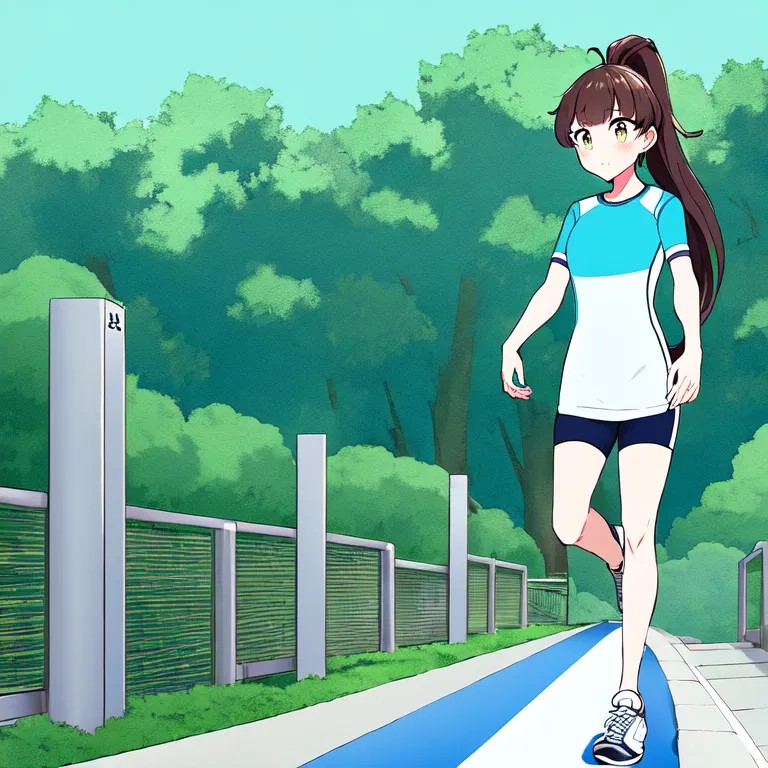
This image depicts a young anime girl with long brown hair styled in a high ponytail, jogging gracefully on a sunny park pathway. She wears a light blue sports outfit (shirt and shorts) paired with white sneakers, set against a lush, vibrant green park with soft sunlight filtering through trees and a clear sky. The visual reflects Kyoto Animation’s signature style—clean, sharp outlines, rich colors, and a dynamic, energetic atmosphere—perfectly aligning with the prompt’s specifications. This example illustrates how PoseAnimeFlow can generate cohesive, pose-driven anime art, inspired by the pose-control techniques from @kei31’s post.
PoseAnimeFlow combines cutting-edge AI tools to deliver a seamless creative experience:
-
Tools Used:
- Stable Diffusion: An open-source text-to-image model (e.g.,
runwayml/stable-diffusion-v1-5or anime-specific variants likehakurei/waifu-diffusion) that generates images from textual descriptions. - ControlNet: An extension for Stable Diffusion that enables precise control over poses, shapes, and structures using reference images, such as stick figures or 3D models, mirroring @kei31’s approach.
- Google Colab: Provides free GPU access for running the models, making the project accessible without local hardware requirements.
- Gradio: Offers a user-friendly web interface for inputting prompts, uploading pose images, and adjusting generation parameters.
- Stable Diffusion: An open-source text-to-image model (e.g.,
-
Key Features:
- Prompt Input: Users describe their desired character, pose, style, and background (e.g., “anime girl jogging in a park, Kyoto Animation style”) in a text box.
- Pose Control (Optional): Upload a pose reference image (e.g., a stick figure or 3D model in a jogging pose) to guide the character’s position using ControlNet.
- Adjustable Settings: Fine-tune outputs with sliders for Inference Steps (20–50), Guidance Scale (7.5–12), and ControlNet Strength (0–1) to balance quality, creativity, and pose accuracy.
- Output: Generate high-quality anime-style images that combine the prompt’s description with the pose’s structure, creating dynamic, stylized art.
-
Project Goal: Provide a creative, user-centric tool for generating anime art, directly inspired by @kei31’s pose-control innovation, while fostering experimentation with anime styles, poses, and narratives.
While PoseAnimeFlow delivers impressive results, the Stable Diffusion model and its Colab implementation face several challenges:
-
GPU and Memory Constraints:
- Google Colab’s free tier (e.g., T4 GPU) has limited memory and processing power, often leading to slow generation times, crashes, or reduced image quality when using high settings (e.g., >30 Inference Steps, high resolutions, or ControlNet).
- Large models or complex prompts can strain resources, causing memory errors or incomplete outputs.
-
Pose Accuracy with ControlNet:
- ControlNet’s OpenPose model may struggle with unclear, complex, or low-contrast pose reference images, resulting in distorted or inaccurate poses, particularly for fine details like hand positions, facial expressions, or limb alignment.
- Over-reliance on a poorly formatted pose image (e.g., detailed 3D models with backgrounds) can introduce artifacts or fail to detect key joints accurately.
-
Style Consistency:
- The default
runwayml/stable-diffusion-v1-5model isn’t optimized for anime styles, sometimes producing semi-realistic or inconsistent results that don’t fully match styles like Kyoto Animation, Studio Ghibli, or Shonen Jump. - Even anime-specific models (e.g.,
hakurei/waifu-diffusion) may require precise prompting to achieve the desired aesthetic, occasionally mixing realistic and cartoonish elements.
- The default
-
Prompt Sensitivity and Complexity:
- The model can be highly sensitive to prompt wording, requiring iterative adjustments to achieve the intended character, pose, or style. Vague, overly complex, or conflicting prompts may lead to unexpected outputs, such as extra limbs, distorted proportions, or mismatched backgrounds.
- Negative prompts (e.g., “low quality, blurry, distorted”) are not always fully effective at eliminating unwanted elements.
-
Generation Time and Stability:
- Image generation can take several minutes on Colab’s free tier, especially with ControlNet or high Inference Steps, impacting user experience.
- Colab sessions may disconnect after approximately 12 hours or if idle, requiring manual restarts and potentially losing progress.
- Artifacts, noise, or inconsistencies (e.g., blurry backgrounds, jagged edges) can appear, particularly with low Inference Steps or suboptimal settings.
To elevate PoseAnimeFlow and address its current limitations, we envision the following enhancements:
-
Improved Hardware Support:
- Transition to local GPU setups or upgrade to Google Colab Pro ($10/month) for access to more powerful GPUs (e.g., A100 or V100), enabling faster generation, higher-quality outputs, and stable ControlNet usage without memory constraints.
-
Advanced Anime-Specific Models:
- Integrate or fine-tune more specialized anime models, such as
Anything V5,NovelAI Anime, or custom-trained datasets, to improve style consistency and detail for specific anime aesthetics (e.g., Kyoto Animation, Shonen Jump). - Explore model merging or LoRA (Low-Rank Adaptation) techniques to tailor Stable Diffusion for precise anime styles and poses.
- Integrate or fine-tune more specialized anime models, such as
-
Enhanced ControlNet Capabilities:
- Adopt newer or more robust ControlNet models, such as
control_v11p_sd15_canny(for edge detection),control_v11p_sd15_seg(for segmentation), or multi-ControlNet setups, to enhance pose accuracy and handle complex reference images more effectively. - Improve pose detection algorithms to better process detailed or low-contrast images, ensuring precise replication of dynamic poses like jogging, running, or fighting.
- Adopt newer or more robust ControlNet models, such as
-
Optimized Prompt Engineering:
- Develop a prompt library or integrate a prompt assistant (e.g., using NLP models like GPT) to guide users in crafting precise, effective prompts, reducing trial-and-error and improving output consistency.
- Enhance negative prompt handling to more reliably eliminate distortions, artifacts, and unwanted elements, providing cleaner, more professional results.
-
UI and Performance Optimizations:
- Add real-time progress indicators, preview options, or batch processing in the Gradio interface to improve user experience and feedback.
- Optimize code for lower memory usage, faster generation times, and prevention of Colab timeouts through automatic session management or caching.
-
Higher Resolution and Detail:
- Support higher resolutions (e.g., 768x768, 1024x1024) with upscaling techniques like ESRGAN or Real-ESRGAN for sharper, more detailed images, particularly for backgrounds, fine details (e.g., hair, clothing), and dynamic poses.
To dive into PoseAnimeFlow and start creating your own anime art, follow these steps:
-
Setup:
- Visit Google Colab (https://colab.research.google.com) and create a new notebook.
- Copy and run the provided code cells from our earlier conversation to install Stable Diffusion, ControlNet, Gradio, and set up the interface. These cells handle library installations, model loading, and Gradio deployment.
-
Usage:
- In the Gradio interface, enter a descriptive prompt (e.g., the example above) in the “Describe your anime character and pose” textbox.
- Optionally, upload a pose reference image (e.g., a stick figure or 3D model in a jogging pose) using the “Optional: Upload a pose reference image” component for ControlNet.
- Adjust the sliders for Inference Steps (20–50, controlling generation quality and speed), Guidance Scale (7.5–12, balancing prompt adherence and creativity), and ControlNet Strength (0–1, determining pose influence) to refine your output.
- Click “Generate Image” to produce your anime character, then download or share the result.
-
Requirements:
- A Google account to access Colab.
- A basic understanding of text prompts and, optionally, tools for creating pose images (e.g., OpenPose Editor at https://openpose-editor.web.app/ or simple drawing apps).
- Inspiration from @kei31’s Post: PoseAnimeFlow directly builds on the pose-control technique demonstrated in @kei31’s post, where a 3D model guides an anime character’s running pose using Stable Diffusion and ControlNet. This innovation highlights AI’s transformative potential in anime art, particularly for dynamic, pose-driven creations, and serves as the cornerstone of this project.
- Creative Exploration: We encourage users to experiment with a wide range of anime styles (e.g., Kyoto Animation, Studio Ghibli, P.A. Works, Shonen Jump), poses (e.g., dancing, fighting, leaping), and characters (e.g., from Naruto, Jujutsu Kaisen, or Dragon Ball). Share your generated art on social media, AI art communities, or with friends to gather feedback and inspire others.
- Future Directions: Consider expanding PoseAnimeFlow into a larger creative toolset, such as a manga panel generator, an anime character database, or a mobile application for AI art creation. These extensions could leverage the project’s foundation to explore new applications in storytelling, animation, and digital art, further building on @kei31’s vision.
This project is open-source and licensed under the MIT License. You’re welcome to fork, modify, and contribute to improve PoseAnimeFlow. We value community input and collaboration to enhance this creative platform!