This repository contains the core files for the Arduino IDE supporting Artekit boards based on the STmicroelectronics STM32F401.
The currently supported boards are the Artekit PropBoard and the Artekit WaveTooEasy boards

-
Download and install the standard Arduino IDE version that suits your operating system from the this link.
-
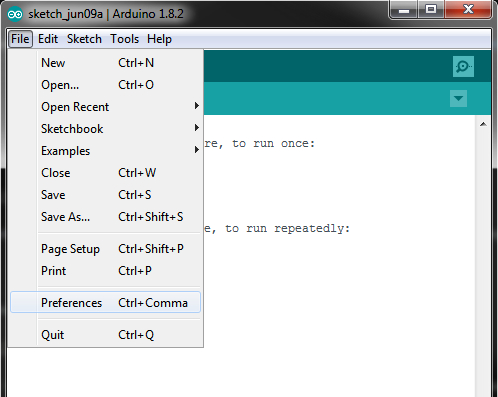
After installing the IDE, open it up and navigate to File -> Preferences.
-
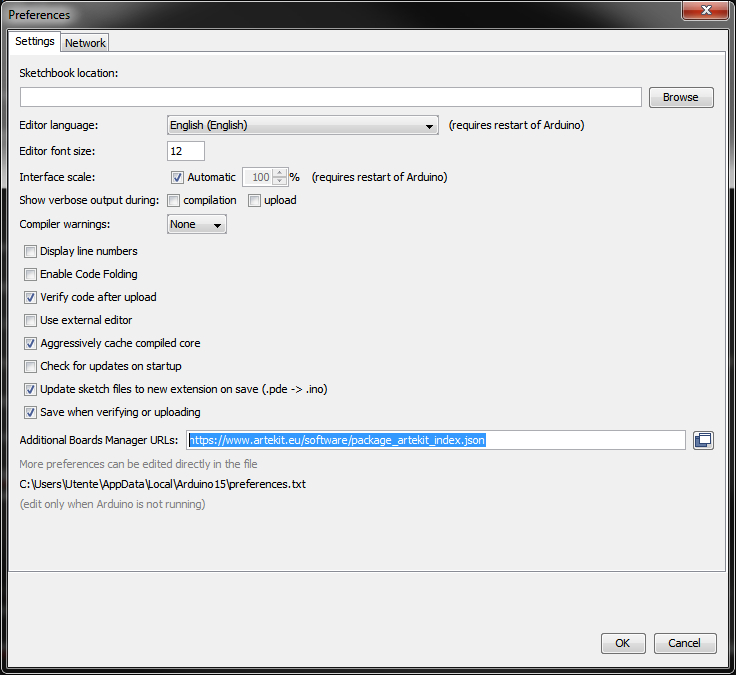
Copy the following URL:
https://www.artekit.eu/software/package_artekit_index.jsonAnd paste the URL into the Additional Board Manager URLs box, like in the picture here below. If you already have another URL in that box, you can add a comma at the end and paste the Artekit URL right after. Then click "OK".
-
Use the Boards Manager from the Tools menu and search for "Artekit". Select "Artekit Labs STM32F401 boards" and install the latest version.

- PropBoard product page
- PropBoard manual & APIs
- WaveTooEasy product page
- WaveTooEasy manual
- WaveTooEasy - Library for Arduino
- WaveTooEasy - Generic C library
You can report bugs here by creating a new issue or in the Artekit forum.
Core files and Bootloader are released under the GNU GPLv3 license.
Copyright (c) 2021 Artekit Labs.