Frontend app for the Candidate portal
Bugs:
- track button in arabic should on left
- test onesignal implementation in android/ios
- deeplinking in android/ios
#app for first time
-- update super class to androidx.core.content.FileProvider in FileProvider file (io.github.pwlin.cordova.plugins.fileopener2 package)
-- add below in info.plist
<key>NSLocationAlwaysAndWhenInUseUsageDescription</key>
    <string>Required to clock in and clock out time</string>
    <key>NSLocationWhenInUseUsageDescription</key>
    <string>Required to clock in and clock out time</string>
    <key>NSCameraUsageDescription</key>
    <string>Candidate App needs permission to Upload/Record introduction video to build profile for job purpose</string>
    <key>NSPhotoLibraryUsageDescription</key>
    <string>Candidate App needs permission to access photos on your device to show on profile for job purpose</string>
    <key>NSPhotoLibraryAddUsageDescription</key>
    <string>Candidate App needs permission to access photos on your device to show on profile for job purpose</string>
    <key>NSMicrophoneUsageDescription</key>
    <string>Candidate App needs permission to access mic to record voice for introduction video</string>
    <key>NSUserTrackingUsageDescription</key>
    <string>App would like to access IDFA for tracking purpose</string>
-- sync app then open in xcode
- change assets folder for splash screen and icons
- App
- General Tab
- change Display Name
- change App category
- change build version if already has any (build version for development and version is for live)
- in framework/libraries Section: add OneSignal xcframework
- Signing & capabilities Tab
- select team in all debug and release tab
- add capabilities: push notification and sign in with apple -Info Tab
- add privacy - Location always and when in use usage... : with detail
- General Tab
- Clear all issue and clear all build from product folder then run app on simulator or on live mobile for testing
keytool -genkey -v -keystore android-release.keystore -alias release -keyalg RSA -keysize 2048 -validity 10000
Bawes@231!
keytool -list -v -keystore D:\xampp\htdocs\plugn-dashboard-ionic\android-release.keystore
65:61:CD:01:87:BB:88:54:19:73:4B:F7:8A:55:38:92:D5:01:33:E1:C3:E9:96:18:27:58:D8:8D:20:5A:F0:F6 ionic integrations enable cordova : in case to add config.xml file
cmd : ionic capacitor sync --configuration=production-mobile https://ionicframework.com/docs/v5/react/your-first-app/deploying-mobile
./node_modules/.bin/ngsw-config ./www/<project-name> ./src/ngsw-config.json [/base/href]
./node_modules/.bin/ngsw-config ./www ./src/ngsw-config.json http://localhost/studenthub-candidate/www/
** Docker
To run in container
docker compose up
** Build and Deploy using Dockerfile
To build a Docker Image, we have to run the following command in our terminal:
docker build -t <image-name>:<tag-name> .
To run the built docker image, use the following command:
docker run -d --publish 3000:80 --name <image-name> --network <your local ip> <image-name>:<tag-name>
To run container
docker run -d --publish 3000:80 <image-name>
To access in browser
http://localhost:3000
For ionic serve command, replace port 3000 with 8100
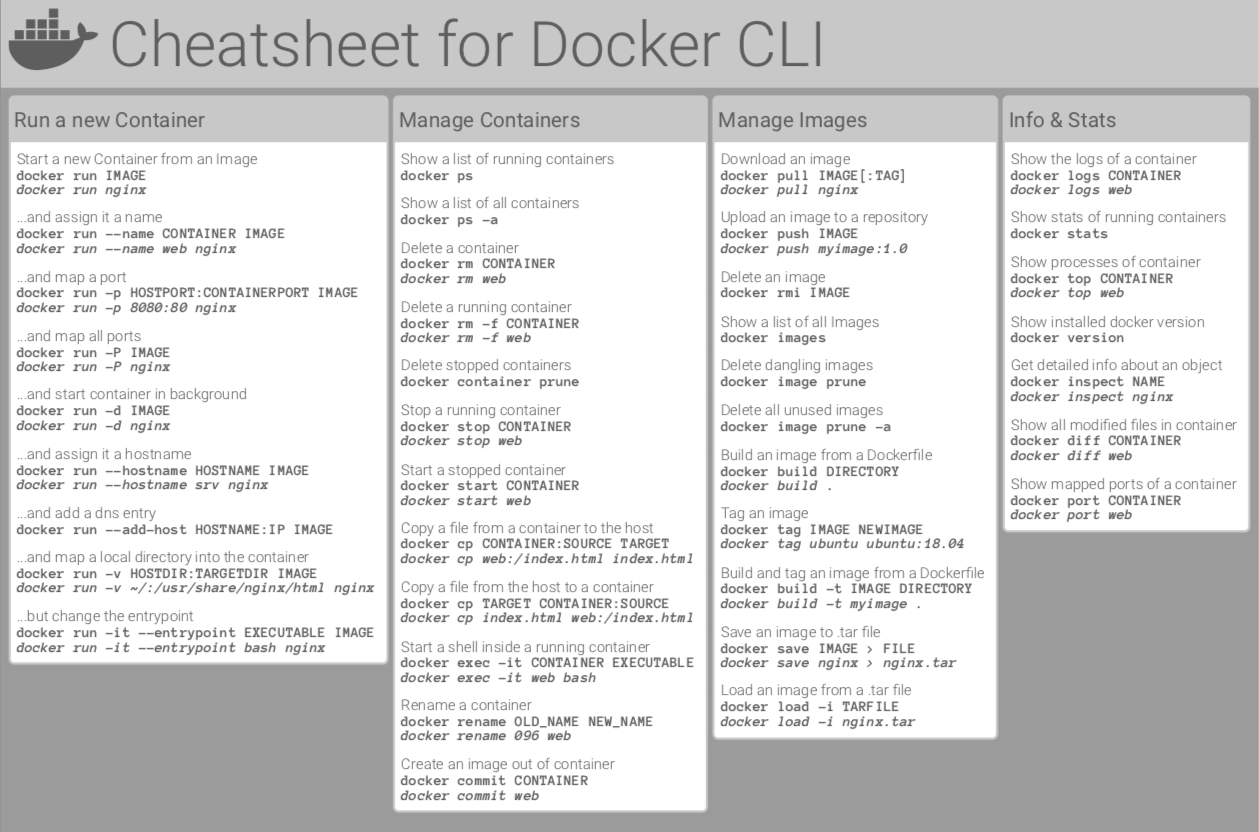
For more commands follow the link
https://raw.githubusercontent.com/sangam14/dockercheatsheets/master/dockercheatsheet8.png
- replace university_id with candidate_education
todo
- new notifications / transfer notification
- transfer initiated
- trasfer paid
- marked as unpaid/ reverted
- devide notifications by "this week" "older" "Pending"
- auto update notification
- arabic
- ui testing in all devices (engish + arabic)