In this exercise you will use Weights & Biases (W&B) to systematically search for good hyperparameters for a simple image classifier. The task is designed to be simple so you should be able to run everything on your Laptops CPU with training times of 1-3 minutes.
We train on CIFAR-10, a classic benchmark dataset for image classification. It contains 60 000 colour images (32 × 32 pixels) split across 10 classes:
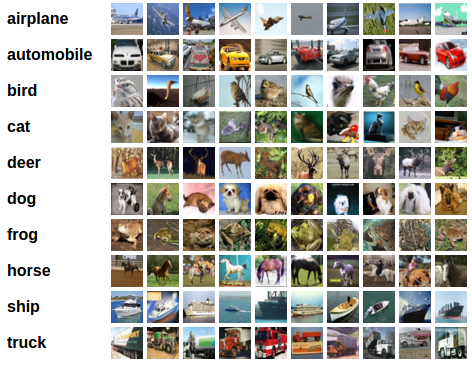
The images are tiny and low-resolution, which makes the task non-trivial — even for humans individual images can be hard to classify. In this exercise we intentionally use only 25 % of the training set (~12 500 images) to make overfitting easier to observe.
When training a neural network the final performance depends heavily on choices like learning rate, batch size, model size, and regularisation strength. Trying these out by hand is tedious and error-prone. Hyperparameter sweeps automate this process: you define a search space, and a sweep controller (here W&B) suggests configurations, runs them, and tracks the results so you can compare everything in one dashboard.
W&B supports three search strategies (docs):
| Method | Description |
|---|---|
grid |
Tries every combination — exhaustive but expensive. |
random |
Samples randomly — simple and surprisingly effective. |
bayes |
Uses a Gaussian-process model to focus on promising regions — usually the best choice when runs are expensive. |
pip install torch torchvision wandb- Go to https://wandb.ai/site and click Sign Up (a free account is enough).
- After signing in, create a new Project (e.g.
param-tuning-demo).
wandb loginThis will prompt you for an API key. You can find it at https://wandb.ai/authorize. Paste it into the terminal and press Enter.
Tip: The key is stored in
~/.netrcso you only need to do this once per machine.
Open train.py and change the entity and project arguments in the wandb.init(...) call to match your W&B username and project name.
python train.pyThis trains an intentionally overparameterized MLP (3 hidden layers × 512 units, no dropout, no weight decay) on a small subset of CIFAR-10. You should see the training accuracy climb towards ~100 % while the validation accuracy stalls or even drops — a textbook case of overfitting.
Open the W&B link printed in the terminal to inspect the training curves.
A sweep configuration defines which hyperparameters to search and what ranges to try. Have a look at sweep.yaml:
method: bayes
metric:
  goal: minimize
  name: val_loss
parameters:
  batch_size:
    distribution: int_uniform
    max: 128
    min: 32
  num_hidden_layers:
    values: [1, 2, 3, 4]
  hidden_dim:
    values: [32, 64, 128, 256, 512, 1024]
  dropout:
    distribution: uniform
    max: 0.75
    min: 0
  learning_rate:
    distribution: log_uniform_values
    max: 0.02
    min: 5e-05
  weight_decay:
    distribution: log_uniform_values
    max: 0.01
    min: 1e-06
program: train.py
The search space includes both the large overfitting configuration (high hidden_dim, many layers, low dropout/weight_decay) and smaller, regularised configurations that should generalise better.
wandb sweep sweep.yaml -p <insert-name-of-your-wandb-project-name>This prints a sweep ID like your-entity/param-tuning-demo/abc123.
An agent picks up configurations from the sweep controller and runs them:
wandb agent your-entity/param-tuning-demo/<SWEEP_ID> # the command is printed when you register the sweepYou can launch multiple agents in parallel to speed things up. See launch_agents.sh for an example and insert your run command. (You might have to run chmod +x launch_agents.sh). You can kill all agents from the Controls panel in your sweep page on W&B.
Open the sweep URL printed in the terminal. The W&B dashboard lets you:
- Compare training curves across all runs.
- Sort runs by validation loss or accuracy.
- Inspect which hyperparameter combinations work best via the parallel coordinates plot.
For more details on creating and configuring sweeps see the W&B Sweeps documentation.
Look at the sweep results and try to answer:
- Which hyperparameters have the biggest impact on the gap between training and validation accuracy?
- Does a smaller model (fewer layers / smaller
hidden_dim) generalise better? - What is the effect of dropout and weight decay?
If you are unsure if you results are plausible you can compare them with my W&B Project to see if you get similar results.
You will notice that even the best MLP configuration tops out at a modest validation accuracy. This is expected — a simple MLP flattens the image and ignores all spatial structure. To push further:
- Data augmentation — Random crops, horizontal flips, and colour jitter can significantly improve generalisation even without changing the model. See the torchvision transforms documentation.
- Convolutional Neural Networks (CNNs) — Architectures like ResNet or simple custom CNNs exploit spatial locality in images and will dramatically outperform an MLP on CIFAR-10. See the PyTorch CNN tutorial.