Paste a GitHub URL, get a 3D graph of who depends on who, where the choke points are, and what breaks if you touch a file.
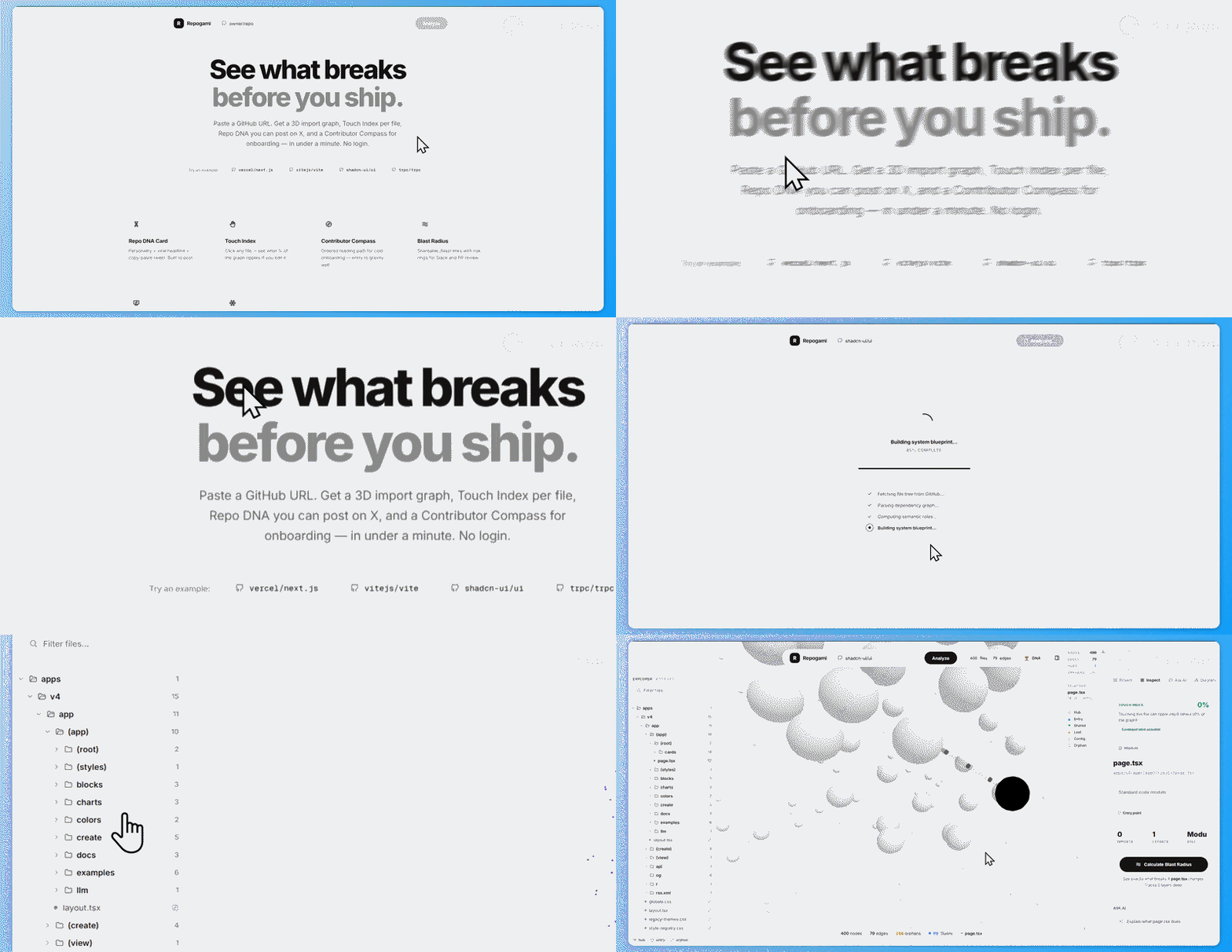
Open a repo → see it as a force-directed graph. Every file is a node, every import is an edge. Files are colored by role: entry points, hubs (imported by everyone), orphans (imported by no one), config, and leaf files.
Click any file. You get:
- Touch Index — if I change this file, what % of the graph ripples?
- Blast Radius — concentric rings of affected files, shareable as a link
- Ask AI — "what does this file do?" scoped to the file + its neighbors
There is also a Repo DNA page — a personality type for your codebase (Fortress, Gravity Well, Spaghetti Junction, etc.) with a health score and viral share card.
| Path | What |
|---|---|
/ |
Paste a URL, explore the graph |
/dna?repo=owner/repo |
Shareable repo personality card |
/blast?repo=owner/repo&file=path |
Shareable blast radius snapshot |
pip install -r backend/requirements.txt
npm install --prefix frontend

# terminal 1
cd backend && uvicorn main:app --reload

# terminal 2
cd frontend && npm run dev
Options in .env:
GITHUB_TOKEN— higher rate limit for file fetchingGROQ_API_KEY— enables AI features (summaries, chat, README gen, arch diagrams)NEXT_PUBLIC_API_URL— defaults to localhost:8000
GitHub Trees API → file tree
  → regex import parsers (TS/JS, Python, Go, Rust, Ruby, PHP, Java)
  → graph metrics (indegree, outdegree, roles, BFS blast radius)
  → Groq (only for summaries, chat, readme, arch diagrams)
  → Next.js renders the 3D graph + side panels
All graph analysis is deterministic — no LLM. AI is only used for generated text.
User pastes owner/repo
  → POST /analyze
    → GitHub Trees API fetches the full file tree (recursive)
    → filters: skip node_modules, .git, binaries; keep source + config
    → fetches file contents from raw.githubusercontent.com (batched, 80 at a time)
    → extract_deps() runs regex parsers per language:
        - TS/JS: import/export/require() statements
        - Python: from/import with relative paths
        - Go: quoted import paths mapped to files
        - Rust: mod declarations
        - Ruby: require_relative
        - PHP: require/include
        - Java: import statements
    → build edge list: [{source: "a.ts", target: "b.ts"}, ...]
    → compute_metrics() calculates indegree/outdegree per file
    → get_role() classifies each file:
        - entry:  indegree=0, outdegree>0  (nothing imports it, it imports others)
        - hub:    indegree>=4              (imported by many — change ripples wide)
        - shared: indegree>=2              (imported by a few)
        - orphan: indegree=0, outdegree=0  (disconnected — likely dead)
        - leaf:   everything else
        - config: .json, .yaml, .env, etc.
    → compute_codebase_vitals() runs pure graph math:
        - health score 0-100 (penalizes orphans, hub concentration, coupling, cycles)
        - smell radar (orphan swarms, hub monopolies, god files, mutual imports)
        - refactor playbook (prioritized actions)
    → compute_contributor_compass() traces entry → spine → hub
    → compute_repo_dna() picks a personality type + headline
    → caches result under owner/repo (1 hour TTL)
  → returns everything to frontend
    → ForceGraph3D renders nodes colored by role
    → Sidebar shows vitals, compass, smells, playbook
User clicks a file node in the 3D graph
  → handleNodeClick() runs in the browser:
    → highlights the node and its immediate neighbors
    → flies camera to the node position
    → calls /ask if AI panel is open (see below)
  → Sidebar shows TouchIndex component:
    → compute_touch_index() runs reverse BFS:
        start at clicked file
        follow incoming edges (who imports this file?)
        repeat up to 6 hops
        count total affected files
        return risk label: Nuclear (>=35%) / High / Moderate / Contained
    → displayed as: "Touching this file ripples into N others (X% of graph)"
User clicks "Blast Radius" in sidebar
  → blast_radius_bfs() runs forward BFS:
    start at selected file
    follow outgoing edges (who does this file import?)
    repeat up to configurable depth (default 5)
    collect all reachable files → "affected set"
  → frontend shows:
    - risk score with color
    - concentric rings (hop 0, 1, 2, 3...)
    - share button → POST /blast-share → saves to cache → returns /blast link
  → /blast?repo=owner/repo&file=path page:
    - loads cached data
    - renders same risk visual + list of affected files
    - no account needed, link works forever (until cache eviction)
User opens Project tab → Share Pack
  → POST /repo-dna-share → caches the DNA snapshot
  → returns share URL: /dna?repo=owner/repo
  → DNA page renders:
    - personality type + emoji (Fortress 🏰, Gravity Well 🕳️, etc.)
    - health score with color bar
    - viral headline (e.g. "X is imported by Y files (Z% of graph)")
    - share tweet (pre-formatted, one-click copy)
    - stats line: files, hubs, orphans, mutual imports
    - contributor compass preview (first 3 files to read)
  → one-click copy for Twitter/social posts
User clicks "Generate Architecture" in sidebar
  → POST /generate-architecture
  → Pass 1 (model: llama-3.1-8b-instant):
    - LLM receives: file tree, description, tech stack, entry points, hubs
    - prompt: "Explain this repo's architecture in plain English"
    - returns: multi-paragraph explanation (8-14 sections)
  → Pass 2 (model: llama-3.3-70b-versatile):
    - LLM receives: the explanation + file tree
    - prompt: "Convert this into a JSON graph with nodes, edges, groups"
    - returns: structured JSON matching a schema
  → validates: removes edges referencing nonexistent nodes, deduplicates
  → caches result
  → frontend renders ArchitectureDiagram component:
    - layered layout with horizontal bands (API / Services / Data / etc.)
    - nodes styled as rounded pills with shadows
    - edges colored by style (solid=dependency, dashed=async, thick=critical)
    - groups rendered as labeled horizontal layers
    - minimap for navigation
User selects a file, types a question
  → POST /ask
  → backend sends to Groq (llama-3.1-8b-instant):
    context:
      - file path + full content (up to 8000 chars)
      - subgraph: all immediate neighbors (who imports it, who it imports)
      - question
    system prompt: "You are reviewing a specific file. Answer concisely."
  → returns answer text
  → frontend displays in sidebar chat panel
  → no caching — every question hits the API
User clicks "Generate README"
  → POST /generate-readme
  → backend assembles context:
    - project name, tagline, description
    - tech stack list
    - architecture pattern
    - entry points, key modules
    - file tree summary (first 100 paths)
    - top hubs (most-imported files)
    - language breakdown
    - total file/edge counts
  → sends to Groq (llama-3.1-8b-instant) with README system prompt
  → returns markdown with shields.io badges, ASCII arch diagram, tables
  → frontend shows preview; user can copy or download
backend/main.py          — FastAPI server, all routes (~1800 lines)
frontend/app/            — Next.js pages (home, dna, blast)
frontend/components/     — GraphCanvas, Sidebar, SharePack, ArchitectureDiagram
frontend/lib/            — touchIndex.ts (browser-side BFS for instant ripple %)
MIT