


A production-grade, microservices-based event ticketing platform engineered to solve the "flash sale" problem with high-concurrency ticket purchasing, real-time seat availability, and zero double-booking.
Watch Ticketly in Action:

Comprehensive demonstration of the platform features, architecture decisions, and live system walkthrough
In-depth technical explanation of the CQRS pattern, CDC implementation, and Kubernetes deployment on AWS
Event ticketing platforms face a critical dual-workload problem:
- Transactional Integrity: Guaranteeing that a ticket is never sold twice (double-booked) during high-velocity "write" loads when thousands of users compete for limited seats
- Read Performance: Simultaneously serving tens of thousands of users browsing events and viewing real-time seat availability without performance degradation
Ticketly implements a strict Command Query Responsibility Segregation (CQRS) pattern coupled with an Event-Driven Architecture (EDA) to create a system that is:
- ✅ Transactionally Secure: Zero double-bookings guaranteed through distributed locking
- ⚡ Blazingly Fast: 87x faster read performance with HPA-enabled auto-scaling
- 🔄 Real-Time: Zero-polling UI updates via Server-Sent Events (SSE)
- 🚀 Infinitely Scalable: Kubernetes HPA responds to load within seconds
- 🛡️ Enterprise-Grade Security: OAuth2/OIDC with Keycloak IAM
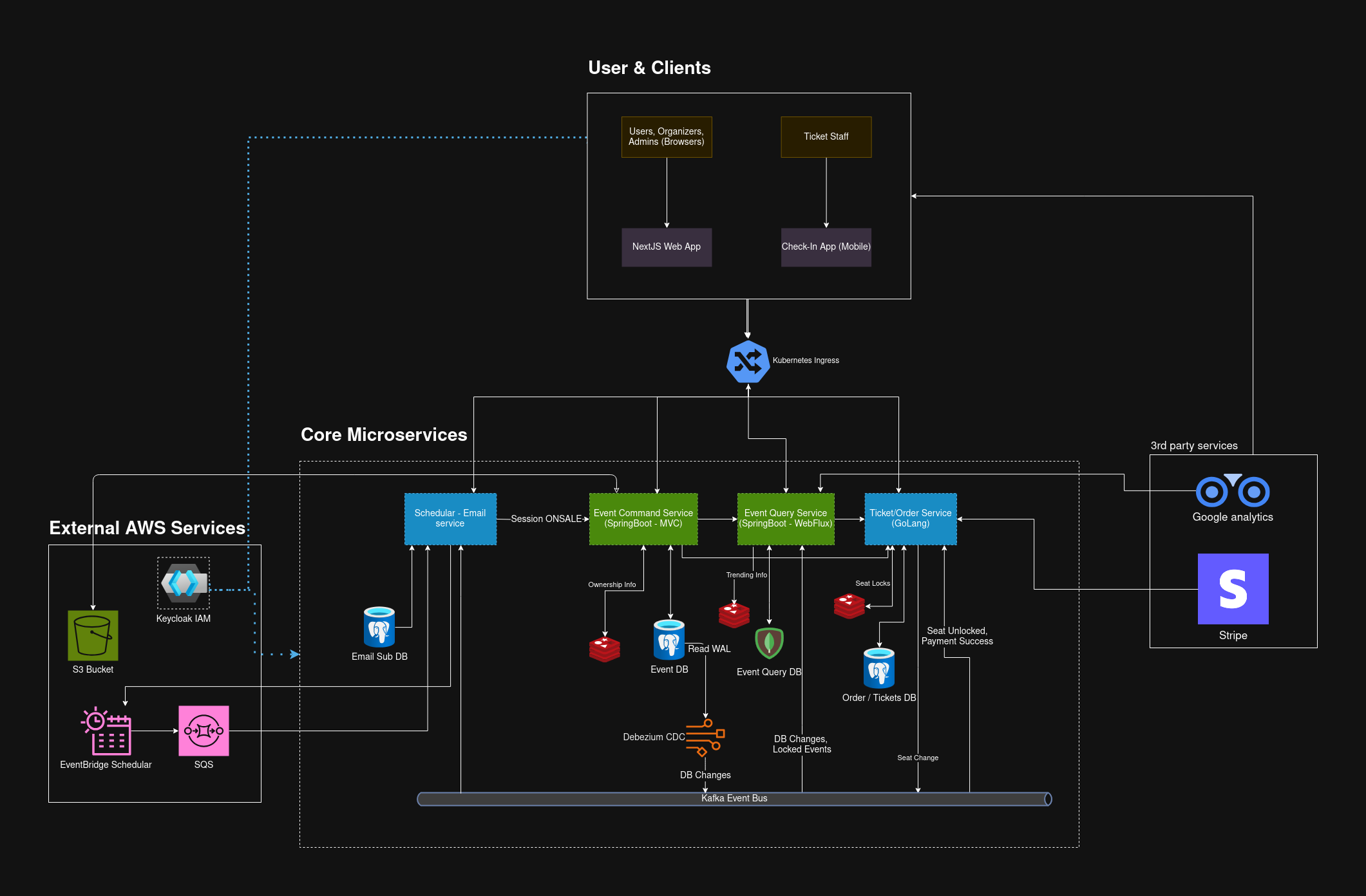
The complete system showing user clients, core microservices, external AWS services, and third-party integrations
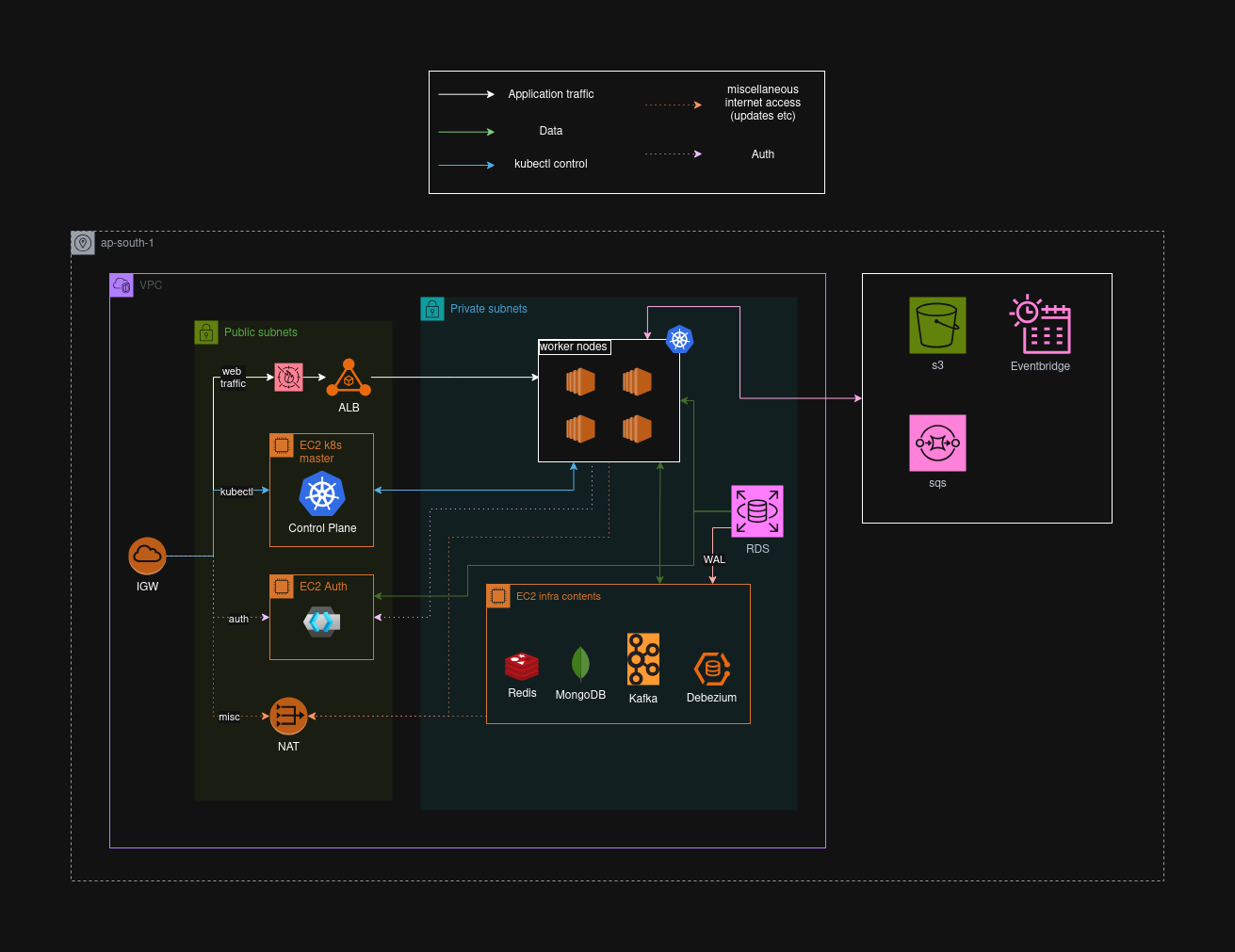
AWS infrastructure showing VPC layout, K3s cluster topology, load balancing, and data flow between components
- 📅 Event Management: Multi-step wizard for creating complex events with flexible seating charts stored as JSONB in PostgreSQL
- 💺 Interactive Seating Designer: Visual seat map builder with multiple section types (General Admission, Reserved Seating, VIP)
- 📊 Real-Time Analytics: Live dashboard showing ticket sales, revenue, and attendee demographics
- 👥 Attendee Management: Built-in check-in system with QR code validation via mobile app
- 🔍 Event Discovery: Advanced search with geospatial queries, filtering, and sorting
- ⚡ Real-Time Availability: Zero-polling seat updates pushed via SSE - see seats lock/unlock in real-time
- 🎫 Instant Booking: Race-condition-proof ticket purchasing during flash sales
- 📱 Digital Tickets: Immutable ticket receipts with QR codes for easy check-in
- 💳 Secure Payments: Stripe integration with PCI-compliant payment processing
- 🔐 Role-Based Access Control: Fine-grained permissions managed through Keycloak
- 📧 Automated Notifications: Event-driven emails for confirmations, reminders, and cancellations
- 🎟️ Discount Campaigns: Promotional code system with backend validation
- 📈 System Monitoring: Kubernetes dashboard, application metrics, and log aggregation
The architecture is fundamentally split into two distinct models:
- Purpose: Single source of truth for all state changes
- Optimized For: Transactional integrity (ACID compliance)
- Database: PostgreSQL with JSONB support
- Responsibilities:
- Event creation and management
- Order processing and validation
- Business logic enforcement
- State mutations
- Purpose: Highly optimized read-only projections
- Optimized For: Extreme read speed and complex queries
- Database: MongoDB (denormalized documents)
- Responsibilities:
- Public-facing APIs
- Real-time seat availability
- Event search and discovery
- Analytics and reporting
PostgreSQL (Write) → Debezium (CDC) → Kafka → Projectors → MongoDB (Read)
- Write Operation: Command service commits change to PostgreSQL
- CDC Capture: Debezium reads from PostgreSQL Write-Ahead Log (WAL)
- Event Publishing: Change published as event to Kafka topic
- Projection: Query service consumes event and updates MongoDB
Benefits:
- Zero coupling between read and write models
- Eventual consistency with sub-second latency
- Complete audit trail via Kafka event log
- Ability to rebuild read models from event stream
The cornerstone of our race-condition prevention:
// Pseudo-code for seat locking
func LockSeat(seatID string, userID string, ttl time.Duration) bool {
    key := fmt.Sprintf("seat:lock:%s", seatID)
    success := redis.SetNX(key, userID, ttl)
    return success  // true = lock acquired, false = already locked
}
How It Works:
- User selects a seat → System attempts
SETNXon Redis - If successful → Seat locked for 5 minutes (configurable TTL)
- If failed → Seat already locked by another user
- On order completion → Lock removed, seat marked as booked in DB
- On timeout → Redis expires key, seat becomes available again
Zero-Polling Cleanup: Redis Keyspace Notifications trigger automatic cleanup when locks expire, pushing updates to all connected clients via SSE.
Client Browser ←─(SSE Connection)─→ Spring WebFlux Query Service
                                            ↓
                                    Redis Pub/Sub (seat updates)
                                            ↓
                                    Kafka Events (seat locks/bookings)
Why SSE Over WebSockets?
- Simpler protocol (HTTP-based, no upgrade needed)
- Automatic reconnection built into EventSource API
- Better compatibility with proxies and load balancers
- Lower overhead for uni-directional updates
- Perfect for our read-heavy, push-based model
Scalability: Spring WebFlux's reactive, non-blocking architecture handles 10,000+ concurrent SSE connections per pod with minimal memory overhead.
| Service | Language | Framework | Purpose |
|---|---|---|---|
| Event Command | Java 21 | Spring Boot 3.2 | Write operations, business logic |
| Event Query | Java 21 | Spring WebFlux | Read operations, SSE streaming |
| Order Service | Go 1.21 | Gin, GORM | High-concurrency ticket purchasing |
| Scheduler & Email Service | Go 1.21 | Gin | Event scheduling, reminders, Async email notifications |
| Technology | Purpose | Why We Chose It |
|---|---|---|
| PostgreSQL 15 | Command DB (Write) | ACID compliance, JSONB support, CDC via WAL |
| MongoDB 7 | Query DB (Read) | Flexible schema, geospatial queries, high read throughput |
| Redis 7 | Distributed Locks, Cache | Sub-millisecond performance, SETNX atomic operations |
| Apache Kafka | Event Bus | Durable message log, replay capability, horizontal scaling |
| Debezium | CDC Connector | Low-latency CDC from PostgreSQL to Kafka |
| Technology | Purpose |
|---|---|
| Kubernetes (k3s) | Container orchestration, auto-scaling, self-healing |
| Terraform | Infrastructure as Code for AWS resources |
| Docker | Application containerization |
| Traefik | Kubernetes ingress controller |
| AWS ALB | Load balancing with WAF protection |
| AWS RDS | Managed PostgreSQL with automated backups |
| AWS S3 | Static asset storage (images, documents) |
| AWS SQS | Durable job queues for scheduler |
| AWS EventBridge | Cron-based event triggering |
| Technology | Purpose |
|---|---|
| Keycloak | Identity and Access Management (IAM) |
| OAuth 2.0 / OIDC | Authentication protocol |
| PKCE | Secure browser-based auth flow |
| Client Credentials | Service-to-service authentication |
| AWS WAF | Web application firewall with managed rule sets |
| Technology | Purpose |
|---|---|
| Next.js 14 | Server-side rendered React framework |
| TypeScript | Type-safe JavaScript |
| Tailwind CSS | Utility-first CSS framework |
| React Query | Server state management |
| React Native | Mobile check-in app for event staff |
We used k6 to validate our architecture under extreme load scenarios, simulating real-world flash sale conditions.
- k3s Cluster: 5 EC2 nodes (1 control plane + 4 workers)
- Database: AWS RDS PostgreSQL (db.t3.medium)
- Cache: AWS ElastiCache Redis (cache.t3.micro)
- Load Generator: k6 running from separate EC2 instance
Scenario: 100 concurrent users competing for 16 seats (1,600 simultaneous requests)
| Metric | Result | Analysis |
|---|---|---|
| Double Bookings | 0 | ✅ Perfect transactional integrity |
| Successful Bookings | 16 | ✅ Exactly 16 seats booked (100% accuracy) |
| Request Fail Rate | 98.9% | ✅ Correctly rejected duplicate attempts |
| Avg Response Time | 127ms | ✅ Fast failure responses |
Conclusion: Redis SETNX-based distributed locking provides bulletproof race-condition prevention even under extreme contention.
Scenario: 2,000 virtual users continuously fetching event listings
| Metric | Without HPA | With HPA (Auto-scaled) | Improvement |
|---|---|---|---|
| Avg Response | 4,000ms | 46ms | 87x faster |
| p95 Response | 10,000ms | 163ms | 61x faster |
| p99 Response | 15,000ms | 305ms | 49x faster |
| Failed Requests | 4.6% | 0.0% | 100% reliability |
| Pods Scaled | 1 (fixed) | 1 → 8 (dynamic) | 8x capacity |
HPA Configuration:
minReplicas: 1
maxReplicas: 10
targetCPUUtilization: 70%
scaleUpStabilization: 0s     # Instant scale-up
scaleDownStabilization: 300s # 5-min cooldownScenario: 2,000 virtual users placing orders simultaneously
| Metric | Without HPA | With HPA (Auto-scaled) | Improvement |
|---|---|---|---|
| Server Errors (5xx) | 76,400 | 0 | 100% elimination |
| Failed Requests | 38.0% | 0.0% | 100% success rate |
| p95 Response | 6,000ms | 1,000ms | 6x faster |
| Throughput | 520 req/s | 1,840 req/s | 3.5x increase |
Why Go for Order Service?
- Lightweight binaries (~20MB vs 200MB+ for Java)
- Fast startup time (~200ms vs 10s+ for Java)
- Low memory footprint (~50MB vs 300MB+ for Java)
- Critical for HPA: New pods become healthy and start serving traffic within 3 seconds
Region: ap-south-1 (Mumbai)
├── VPC (10.0.0.0/16)
│   ├── Public Subnets (3 AZs)
│   │   ├── 10.0.0.0/24  → Control Plane + Auth Server
│   │   ├── 10.0.16.0/24 → NAT Gateway
│   │   └── 10.0.32.0/24 → ALB
│   └── Private Subnets (3 AZs)
│       ├── 10.0.48.0/24  → Worker Nodes 0-1
│       ├── 10.0.64.0/24  → Worker Node 2
│       └── 10.0.80.0/24  → Worker Node 3 + Infrastructure Node
│
├── EC2 Instances
│   ├── Control Plane (t3.small)    → K3s Server
│   ├── Worker Nodes (4x t3.small)  → Application Pods
│   ├── Infra Node (c7i-flex.large) → Kafka, MongoDB, Redis
│   └── Auth Server (t3.micro)      → Keycloak
│
├── RDS PostgreSQL (Multi-AZ)
│   └── Logical Replication Enabled (for Debezium CDC)
│
├── S3 Bucket
│   └── Public Read Access (for event images/logos)
│
├── Application Load Balancer
│   ├── HTTPS (443) → Traefik Ingress
│   ├── HTTP (80)   → Redirect to HTTPS
│   └── AWS WAF (Managed Rule Sets)
│
├── SQS Queues
│   ├── session-scheduling-queue
│   ├── session-reminders-queue
│   └── trending-job-queue
│
└── EventBridge Scheduler
    └── Daily trending events calculation
┌─────────────────────────────────────────────────────────────┐
│                     Control Plane Node                       │
│  ┌────────────┐  ┌──────────┐  ┌────────────┐              │
│  │ K3s Server │  │ Traefik  │  │ CoreDNS    │              │
│  │  (Master)  │  │ Ingress  │  │            │              │
│  └────────────┘  └──────────┘  └────────────┘              │
└─────────────────────────────────────────────────────────────┘
                            │
        ┌───────────────────┼───────────────────┐
        ↓                   ↓                   ↓
┌──────────────┐   ┌──────────────┐   ┌──────────────┐
│  Worker 0-1  │   │  Worker 2    │   │  Worker 3    │
│──────────────│   │──────────────│   │──────────────│
│ Event Cmd    │   │ Order Svc    │   │ Scheduler    │
│ Event Query  │   │ Email Svc    │   │ Monitoring   │
└──────────────┘   └──────────────┘   └──────────────┘

┌─────────────────────────────────────────────────────────────┐
│                  Infrastructure Node                         │
│  ┌─────────┐  ┌─────────┐  ┌───────┐  ┌──────────┐        │
│  │  Kafka  │  │ MongoDB │  │ Redis │  │ Debezium │        │
│  │  (9092) │  │ (27017) │  │ (6379)│  │  (8083)  │        │
│  └─────────┘  └─────────┘  └───────┘  └──────────┘        │
└─────────────────────────────────────────────────────────────┘
User Request
    ↓
Internet Gateway
    ↓
AWS ALB (SSL Termination + WAF)
    ↓
Traefik Ingress Controller (K3s)
    ↓
Kubernetes Service (ClusterIP)
    ↓
Pod (Microservice Container)
    ↓
Backend Database (RDS/MongoDB) or Cache (Redis)
Inter-Service Communication:
- Internal: Kubernetes DNS (service-name.namespace.svc.cluster.local)
- External: AWS services via IAM instance profiles
- Authentication: OAuth2 Client Credentials via Keycloak
Message Flow:
Command Service → PostgreSQL → Debezium → Kafka → Query Service → MongoDB
                                            ↓
                                    Order Service (Consumer)
                                    Email Service (Consumer)
                                    Scheduler Service (Consumer)
-
Network Layer
- VPC with public/private subnet isolation
- Security groups with least-privilege rules
- Worker nodes in private subnets (no direct internet access)
- NAT Gateway for outbound traffic
-
Application Layer
- AWS WAF with managed rule sets:
- Common Rule Set (OWASP Top 10)
- Known Bad Inputs Rule Set
- SQL Injection Rule Set
- Custom WAF rules for large multipart uploads (up to 100MB)
- Rate limiting on Traefik ingress
- AWS WAF with managed rule sets:
-
Authentication & Authorization
- Centralized IAM with Keycloak
- OAuth2 Authorization Code + PKCE for browser clients
- OAuth2 Client Credentials for M2M
- Role-Based Access Control (RBAC)
- Group-based permissions (subscription tiers)
-
Data Layer
- RDS encryption at rest
- SSL/TLS for all database connections
- Redis AUTH password protection
- Secrets managed via Kubernetes Secrets
- Terraform remote state encryption
-
API Security
- All endpoints require valid JWT tokens
- Token validation via Keycloak JWK Set
- CORS configuration for approved origins
- Request size limits (100MB max for uploads)
Event Query Service:
minReplicas: 1
maxReplicas: 10
targetCPUUtilization: 70%
scaleUpBehavior:
  stabilizationWindowSeconds: 0      # Instant scale-up
  policies:
  - type: Percent
    value: 100
    periodSeconds: 15
scaleDownBehavior:
  stabilizationWindowSeconds: 300    # 5-min cooldown
Order Service:
minReplicas: 2
maxReplicas: 15
targetCPUUtilization: 70%
targetMemoryUtilization: 80%Current: Single-region deployment (ap-south-1) Future: Multi-region with Route53 GeoDNS routing
- Kubernetes Dashboard & OpenLense: Pod health, resource usage, deployment status
- Dozzle: Real-time container log aggregation
- Kafka UI: Topic lag, consumer group status, message inspection
- CloudWatch: ALB metrics, RDS performance insights, EC2 utilization
- WAF Dashboard: Blocked requests, rule triggering, bot traffic
kubectl logs -n ticketly -l app=event-command-service -f
kubectl logs -n ticketly -l app=order-service -f --tail=100All services expose standard endpoints:
/actuator/health(Spring Boot services)/health(Go services)
- infra-ticketly: Infrastructure as Code, Kubernetes manifests, deployment scripts
- infra-api-gateway: API Gateway service (Not used in deployment, replaces by k8s traefik ingress)
- ms-event-seating: Event and seating management service (Command Model - Write)
- ms-event-seating-projection: Event seating projection and query service (Query Model - Read)
- ms-ticketing: Order and ticketing service with Stripe integration
- ms-scheduling: Scheduling and reminders service
- ticketly-shared-dto: Shared data transfer objects across services
- fe-web: Next.js frontend web application
- Docker & Docker Compose v2
- kubectl CLI
- Terraform CLI
- AWS CLI
- Personal AWS account with admin IAM user
- Access to Terraform Cloud organization
# Clone the infrastructure repository
git clone https://github.com/Evently-Event-Management/infra-ticketly.git
cd infra-ticketly

# Configure local hosts
echo "127.0.0.1 auth.ticketly.com" | sudo tee -a /etc/hosts

# Place GCP credentials
cp /path/to/gcp-credentials.json ./credentials/

# Provision AWS resources
cd aws/dev
terraform login
terraform init
terraform workspace new dev-yourname
terraform apply

# Configure Keycloak
docker compose up -d keycloak ticketly-db
cd keycloak/terraform
terraform init -backend-config=backend.dev.hcl
terraform apply
cd ../..

# Extract secrets and start services
./scripts/extract-secrets.sh
docker compose down
docker compose up -d

# Access services
open http://localhost:8088           # API Gateway
open http://auth.ticketly.com:8080   # Keycloak Admin
open http://localhost:9000           # Kafka UI
open http://localhost:9999 # Dozzle LogsSee the comprehensive Deployment Guide for:
- AWS infrastructure provisioning
- Kubernetes cluster setup
- Microservices deployment
- SSL/TLS configuration
- Monitoring and observability
- Troubleshooting and maintenance
cd load-testing

# Run race condition test (double-booking prevention)
./run-order-race-test.sh

# Run read performance stress test
./run-query-tests.sh

# Run write performance stress test
./run-order-stress-test.shcd integration-tests
# Seed test data
./scripts/seed-events.sh
# Run full integration test suite
npm test
# Run specific test category
npm test -- tests/event/
npm test -- tests/order/- Infrastructure Guide: Complete infrastructure setup and deployment
- K3s Deployment: Kubernetes-specific deployment guide
- Load Testing Results: Detailed performance benchmarks
- API Documentation: Complete API reference
- Architecture Decision Records: Coming soon
We welcome contributions! Please see our Contributing Guide for details.
- Fork the repository
- Create a feature branch (
git checkout -b feature/amazing-feature) - Commit your changes (
git commit -m 'Add amazing feature') - Push to the branch (
git push origin feature/amazing-feature) - Open a Pull Request
- Go:
gofmt,golangci-lint - Java: Google Java Style Guide
- TypeScript: ESLint + Prettier
- Commit messages: Conventional Commits
Ticketly is built and maintained by the Ticketly Event Management team.
This project is licensed under the MIT License - see the LICENSE file for details.
- AWS: For reliable cloud infrastructure
- CNCF: For Kubernetes and cloud-native ecosystem
- Spring Team: For excellent reactive framework (WebFlux)
- Confluent: For Kafka documentation and best practices
- Debezium Team: For robust CDC capabilities
- Documentation: GitHub Wiki
- Issues: GitHub Issues
- Discussions: GitHub Discussions
⭐ Star us on GitHub — it helps!
Made with ❤️ by the Ticketly Team