
This is a beta release. Bugs are to be expected. If you notice any issues, please submit bug reports to help us improve the software.
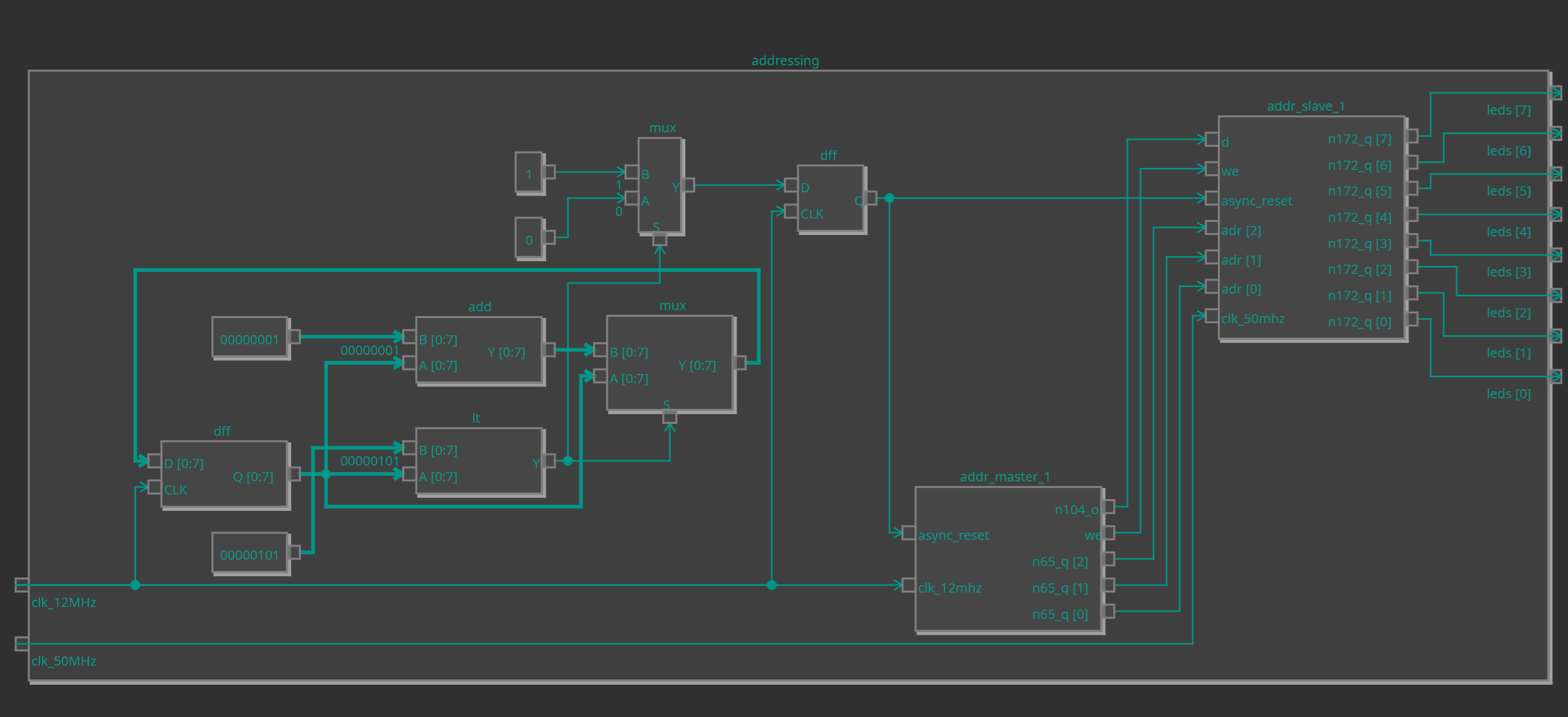
Currently, only Windows and Linux are supported, but the plugin should work on all platforms OneWare Studio runs on, except browsers.
The FEntwumS Netlist Viewer depends on the following OneWare Studio plugins. Please install them before you install the Netlist Viewer.
| Category | Dependency | Minimum version |
|---|---|---|
| Plugins > Simulators | GHDL Extension | 0.10.7 |
| Binaries | GHDL | 5.0.1 |
| Binaries | OSS CAD Suite | 2025.01.22 |
Alternatively, you can enable Automatically download binaries from the Experimental Settings Category in OneWare
Studio. If this setting is enabled, the netlist viewer will automatically download all dependencies.
The viewer currently only supports designs written either exclusively in VHDL or exclusively in Verilog. While mixed Verilog/SystemVerilog designs can likely be displayed, this is not guaranteed.
This repository contains the source code for two plugins for OneWare Studio. They are developed by TH Köln (University of Applied Sciences Cologne) as part of the FEntwumS research project.
This plugin and all its dependencies are available in the package manager. Just follow these steps to install it:
- Open the package manager
- Install the
FEntwumS.NetlistViewer Extensionplugin - Install the
GHDL Extensionplugin - Install the
FEntwumS NetlistViewer Backend,GHDLandEclipse Adoptiom OpenJDKbinaries using the package manager - And that's it. You have successfully installed the FEntwumS Netlist Viewer. For usage instructions, see the following sections
The FEntwumS Netlist Viewer plugin allows users to automatically generate and interactively view netlists for their HDL designs inside OneWare Studio. It is a frontend building on the FEntwumS Netlist Reader Backend. You can run the backend, which does all the layouting, either on your local machine or on a remote server in your local network. The default (and recommended) configuration is to run the backend locally. If this is all you need, you just need to install the plugin. It will install and start the backend automatically. You may be prompted to allow network access for the OpenJDK binary by your operating system. Please grant this access, otherwise the netlist viewer will not work.
If you plan on using a local backend install (the default and recommended case), you can skip this section.
If you want to use a remote backend, you will need to deploy it yourself. Instructions on how to do so can be found here. Since the traffic between the backend and the viewer is neither encrypted nor authenticated, you should only use a remote backend within local and trusted networks.
When you have your backend up and running, you will need to enter the backends IP address and port (the default port is 8080) in the settings. You also need to uncheck the box for "Use local backend server".
Now that you have installed the plugin, you can start viewing and interacting with your HDL designs. By simply right-clicking your top level entity and choosing the "View netlist for [insert your entity here]", the plugin will automatically generate a netlist using yosys and then display it in a new tab. You can zoom using your mouse wheel, clicking and dragging with the left mouse button pans the view and left-clicking on an entity will either expand or collapse it (depending on whether the entity is collapsed or not).
Left-clicking on a cell will open the corresponding HDL file.
⚠IMPORTANT⚠: The backend only supports netlists generated by Yosys 0.49 and newer, as it uses the
flatten separator, which needs to be set using scratchpad -set flatten.separator \";\".
There are certain requirements that a netlist needs to fulfill to be viewable by the netlist viewer. At a minimum, it
needs to be flattened (preferably using the -scopename option), the toplevel entity needs to be specified using the
hierarchy command and all blackbox cells such as device specific primitives need to have port direction information.
The netlist file needs to be of the .json filetype. To ensure that device specific primitives contain information on
port directions, load the appropriate libraries. For example, to add this information for the device primitives of the
Cologne Chip Gatemate series of FPGAs you need to run
read_verilog -lib -specify +/gatemate/cells_sim.v +/gatemate/cells_bb.v. The appropriate command can be found on the
synthesis page for the FPGA you are
using.
The recommended command to generate a netlist is
scratchpad -set flatten.separator \";\"; hierarchy -check -top <top>; proc; memory -nomap; flatten -scopename; write_json -compat-int <top>.json.
This sequence
expects the HDL files to be fully loaded (e.g. using the read_verilog command).
While the viewing of post-synthesis netlists is currently not well-supported, you should be able to view most post-synthesis netlists.
Since OneWare Studio does not show json files in the Project Explorer, you will need to add the .json filetype
manually. To do this, please right click on the project containing the netlist, choose the Edit option and add an
entry *.json to the list Files to Include.
The FEntwumS Netlist Viewer adds several global and project-specific settings to OneWare Studio.
| Category | Name | Description | Intended Use |
|---|---|---|---|
| Backend | Path to folder containing server jar | Points the plugin to the location of the backend executable | Plugin development |
| Backend | Path to folder containing java binary | Points the plugin to the location of the java executable | Plugin development |
| Backend | Extra arguments for the Java Virtual Machine | Settings that will be passed to the JVM during its creation | Plugin development, memory size adjustment |
| Backend | Server address | The address under which the backend is reachable | Specifying the location of a remote backend |
| Backend | Port | The port on which the backend listens | Specifies the port of a remote backend |
| Backend | Request timeout | Time in seconds after which requests to the backend time out | Large designs can take quite a while to be read, this sets a hard cutoff |
| Backend | Use local backend server | Whether to use the local backend | Untick if you want to use a remote backend |
| FPGA | FPGA manufacturer | Global FPGA manufacturer | Default value, can be overridden in the settings of each project |
| FPGA | Device Family | Global device family | Default value, can be overridden in the settings of each project |
| Font sizes | Entity Label Font Size | Font size to be used in the netlist view for entities | Self explanatory |
| Font sizes | Cell Label Font Size | Font size to be used in the netlist view for cells | Self explanatory |
| Font sizes | Edge Label Font Size | Font size to be used in the netlist view for connections | Self explanatory |
| Font sizes | Port Font Size | Font size to be used in the netlist view for ports | Self explanatory |
| Experimental | Continue if errors occur during dependency installation | Disables the dependency version checker | Plugin development |
| Experimental | Use hierarchical backend | Uses the backend for hierarchical netlists | Beta-testing the hierarchical backend |
| Experimental | Performance Target | Sets the way the hierarchical backend loads enitities from the netlist | Testing the different modes |
| Experimental | Always regenerate netlists | By unticking this checkbox, netlists are only generated for the netlist viewer if the underlying HDL files changed | Beta-testing performance improvements |
| Experimental | Enable hierarchy view | Enables two views that allow for the easy exploration of the design's hierarchy | Beta-testing the hierarchy view |
| Experimental | Automatic netlist generation | Allows enabling and setting the mode for automatic netlist generation following changes to the underlying HDL source files | Beta-testing automatic netlist generation |
| Experimental | Automatic netlist generation interval (s) | The interval in which netlists shall be regenerated, if Automatic netlist generation is set to interval. Measured in seconds |
Beta-testing automatic netlist generation |
| Name | Description | Availability |
|---|---|---|
| FPGA Manufacturer | Overrides the global FPGA manufacturer setting | All projects |
| Device family | Overrides the global FPGA device family setting | All projects |
Please make sure your version of OneWare Studio has all updates installed. An appropriate version of the OSS Cad Suite Integration plugin is available in OneWare Studio 0.21.1.0 and later.
Currently, it is not possible to store the netlist when OneWare Studio is closed. Please close the tab and regenerate the netlist.
Please edit your project settings to include the used VHDL-Standard.
Please make sure that you have specified the correct device manufacturer and device family in the project settings. The available options are listed on the synth_<...> pages in the Yosys documentation.
If you have recently updated any plugins, e.g. the OSS Cad Suite integration plugin, please restart OneWare Studio. If this issue persists after a restart, please file a bug report.
The builtin Json Netlist generation does not output a flattened netlist. If you want to be able to expand your entities, you need to right-click your toplevel entity and use the "View netlist for [...]" option.
By default, OneWare Studio does not display .json files in the project explorer. To fix this, you will need to add the
.json filetype manually. To do this, please right-click on the project containing the netlist, choose the Edit
option and add an entry *.json to the list Files to Include.
First, please make sure that you have selected the correct device manufacturer and device family in the settings. If the design you are trying to view is written in VHDL, make sure that you have set the correct VHDL standard level in the project settings (the default is 93c). You can find a detailed explanation of the VHDL standard levels in the GHDL documentation.
Please file a bug report including the netlist that you wanted to view. If you used our plugin to generate the netlist,
you can find the file under build/netlist/<top>-hier.json in your project directory. This folder is hidden inside
OneWare Studio by default, so you may need to use your system's file explorer to retrieve the file.
If you are using a remote backend installation, please make sure that you have entered the correct backend address and port and that the provided address is reachable.
If you are using a local backend installation, please file a bug report.
I get an error telling me to update one of my OneWare Studio plugins, but I am unable to do so because I depend on the specific version that is installed
To ensure that all the OneWare Studio plugins the netlist viewer depends on are installed, a check is run. If this check
fails for you, for example due to using an older version of a certain plugin, you can tick the Continue if errors occur during dependency installation checkbox in the experimental section of the Netlist Viewer's settings. By enabling this
setting, the result of the check is ignored. This means that you are on your own! While it may look as if everything
is working as intended, this configuration is not supported and can stop working at any moment without notice.