Just playing around building a simple dependency cruiser.
Features:
- Find import violations specified from a configuration file
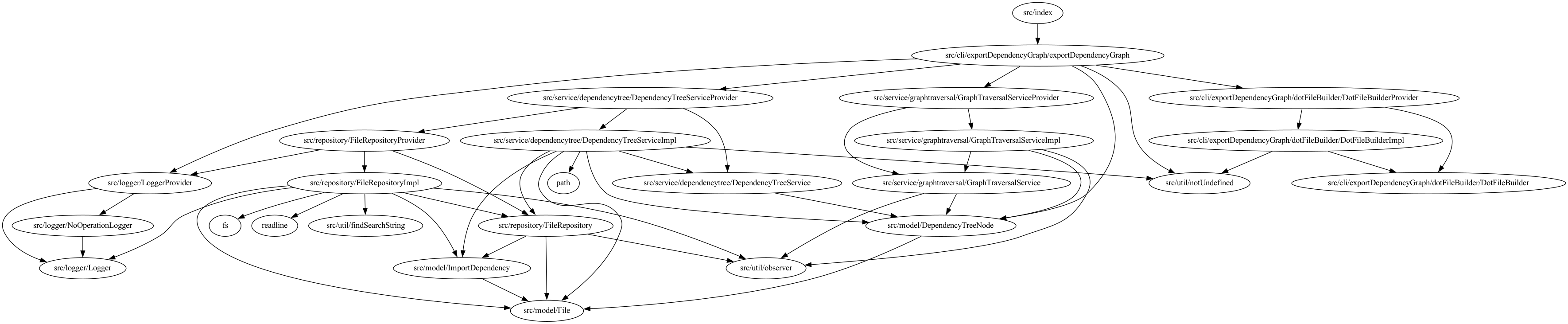
- Create a graph of dependencies in .dot format
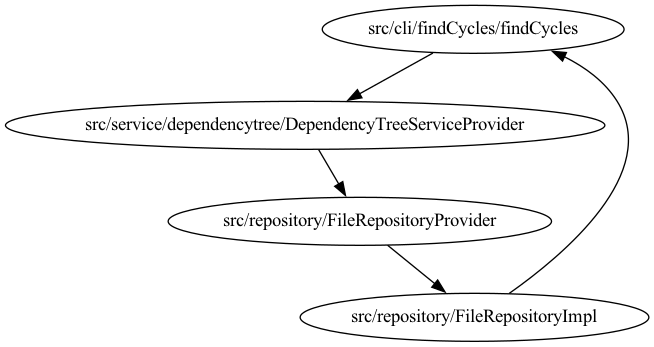
- Find cycles
Those rules represent imports that are forbidden. For configuring them create a rules-config.json file in the root directory.
The file schema should be like the following:
{
    "rules": [
        {
            "name": "{{Unique name for the rule}}",
            "fromPattern": "{{regex that matches the dependent module}}",
            "toPattern": "{{regex that matches the dependency module}}"
        },
        ...
    ]
}
For running the program just do:
yarn installyarn run violationsFromRuleFile -- {{rootFile}} {{rulesFilePath}}
Where:
- {{rootFile}} is the path of the source file to start cruising from. The .ts extension should be excluded.
- {{rulesFilePath}} is the path of the file that defines the rules
For running the program just do:
yarn installyarn run exportDependencyGraph -- {{rootFile}}
Where:
- {{rootFile}} is the path of the source file to start cruising from. The .ts extension should be excluded.
The program will print into the standard output the content of a .dot file. This .dot file can be converted into an image using graphviz.
For running the program just do:
yarn installyarn run findCycles -- {{rootFile}}
Where:
- {{rootFile}} is the path of the source file to start cruising from. The .ts extension should be excluded.
The program will print into the standard output the content of a .dot file. This .dot file can be converted into an image using graphviz.
Example graph that I generated after adding a dependency from FileRepositoryImpl.ts to findCycles.ts
- This is a very naive implementation and it is not optimized at all
- Only works with files that have a
.tsextension - The program takes the base path as the current working directory. This is used for mapping imports relative to the project to the absolute path in the computer.