Home
Welcome to the Sortarr wiki!

0.8.6 is the release focused on resolving the current GitHub CSRF and auth issue set.
- Fixes setup/save CSRF failures across direct HTTP, LAN proxy, and trusted HTTPS proxy deployments by making cookie security request-aware and by preserving trusted
X-Forwarded-*headers through Waitress. - Adds a simple Sonarr-style authentication choice:
BasicorExternal. Direct installs and transparent reverse proxies keepBasic; reverse proxies that already handle login can now opt intoExternal. - Preserves submitted setup values after failed save/test attempts and adds clearer diagnostics when cookie transport or proxy trust would break the next POST.
- If you are on
0.8.5.1and seeingtoken-missing-cookieorCSRF origin mismatch on every Save, upgrade to0.8.6first before changing proxy settings further.
- Sonarr series size stats (total includes specials; averages exclude specials)
- Expand Sonarr series rows to view season rollups and episode lists
- Radarr movie size stats (file size and GiB per hour)
- Bitrate metric with estimated fallback indicator
- Filter builder dropdowns with active filter bubbles (quick chips optional)
- Filter builder Category dropdown is alphabetized and searchable (desktop custom dropdown)
- Optional Arr metadata columns (status, monitored, quality profile, tags, custom formats, release group, many more)
- Sonarr/Radarr health badges to surface instance warnings
- Sonarr series metadata and wanted columns (series type, original language, genres, last aired, missing/cutoff counts)
- Sonarr chips for missing, cutoff unmet, recently grabbed, scene numbering, and airing
- Fixed-width Title column with CSS ellipsis to keep large tables stable
- Reset UI now clears in-memory and persisted filter/chip/view state in one action
- Header/layout and table-wrap sizing work is batched and memoized to reduce first-paint layout thrash
- Startup non-critical UI bindings and status polling are deferred/coalesced to reduce cold-load churn
- Fullscreen Data Table button to focus the table on small screens
- CSV export for Sonarr and Radarr (playback columns appear only when a playback provider is configured)
- Date added column for Sonarr and Radarr views
- Compressed CSV API responses for large payloads
- Multiple Sonarr/Radarr instances with optional friendly names
- Path mapping support for Docker volume paths (map container paths to host paths)
- Simple authentication boundary choice:
BasicorExternal - Request-aware CSRF diagnostics and reverse-proxy troubleshooting
- Optional playback stats from Tautulli, Jellystat, and/or Plex with a selectable preferred history source
- Playback match status orbs beside titles to flag potential mismatches (only with a playback provider configured)
- Shows/Movies top-level tabs with optional per-tab Plex library scoping (multi-select)
- Plex Insights drawer with hubs (section filter), match health summary, activities, and butler tasks (when Plex is configured)
- Audio/subtitle language columns with filters and quick chips
- Exact
FPSandBPPFfor Radarr movie rows, plus exactFPS/BPPFin Sonarr episode expansions when Arr file metadata reports frame rate
Deploy Sortarr using Docker Compose for the easiest setup.
-
Prepare
docker-compose.yaml: Clone the repository or download thedocker-compose.yamlfile. -
Start the container:
docker compose up -d
Image Sources:
-
Default (GHCR):
ghcr.io/jaredharper1/sortarr:latest(Recommended for release builds). -
Docker Hub:
docker.io/jaredharper1/sortarr:latest. -
Architectures: Supported for
linux/amd64andlinux/arm64/v8(Apple Silicon compatible).
-
URL: Open
http://<host>:9595in your browser. -
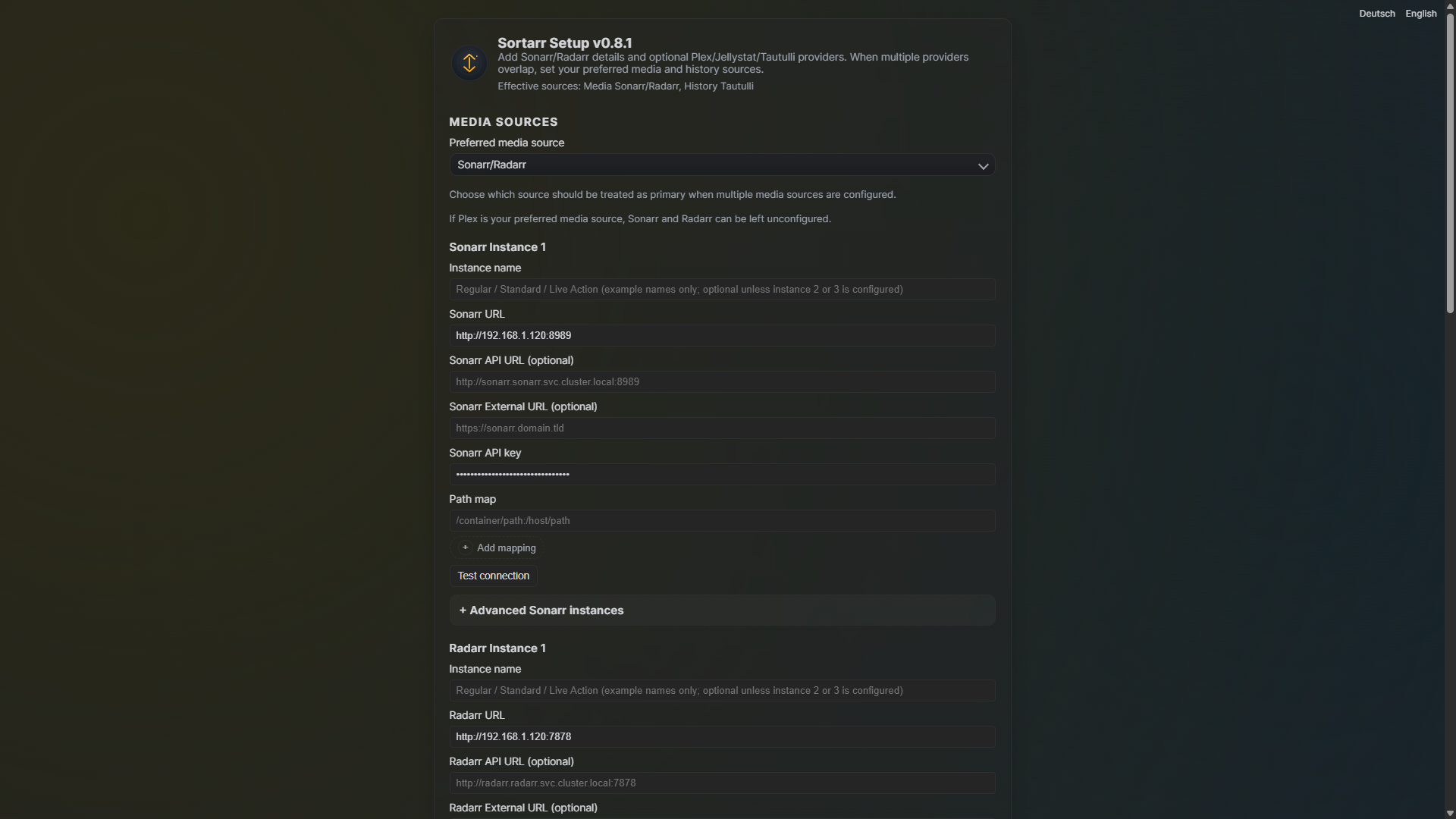
Initialization: The first visit automatically redirects to
/setup, where you can configure your Sonarr/Radarr instances and choose who handles login:BasicorExternal.
-
Configuration Persistence: Ensure the
./datadirectory is mounted as a persistent volume (e.g.,- ./data:/data). Sortarr writes configuration to/data/Sortarr.envby default (controlled bySORTARR_CONFIG_PATH).
Note: Initial library loading may take several minutes depending on library size and playback provider configuration; subsequent loads utilize the persistent cache.
An Unraid template is provided at docs/unraid-template.xml to simplify deployment.
-
Copy Template: Place the template file into Unraid’s user templates directory:
-
Source:
docs/unraid-template.xml -
Destination:
/boot/config/plugins/dockerMan/templates-user/sortarr.xml
-
Source:
- Add Container: In the Unraid WebUI, go to Docker → Add Container.
-
Select Template: Choose
sortarrfrom the Template dropdown. -
Configure Fields:
-
WebUI Port: Default is
9595(maps to internal8787). -
Appdata Path: Recommended
/mnt/user/appdata/sortarr(mapped to/config).
-
WebUI Port: Default is
-
Advanced Settings (Optional):
-
PUID/PGID: Defaults to
99and100. Adjust if your appdata requires specific permissions. -
ENV_FILE_PATH: Defaults to
/config/Sortarr.env. -
Network & CSRF: Set
SORTARR_PROXY_MODE(Direct,Single proxy,Two proxies,Custom) to match your reverse-proxy chain. -
Waitress trusted proxy: Set
SORTARR_WAITRESS_TRUSTED_PROXYto the immediate upstream proxy IP/host for Waitress trusted-proxy handling. -
Path-prefix proxy hops: Use
SORTARR_PROXY_MODE=customwithSORTARR_PROXY_HOPS_PREFIX=1only if you actually publish Sortarr under a path prefix. - Session secret key: Use Setup to generate/persist a permanent key for stable sessions and CSRF across restarts/replicas.
-
PUID/PGID: Defaults to
- Apply: Start the container and open the WebUI.
Support: Use GitHub Issues for Unraid-specific support until a community thread is established.
The first load after startup can take a while for large libraries (especially with a playback provider configured); later loads are cached and faster.
Sortarr can be run as a standalone Windows executable. This is ideal for users who prefer not to use Docker.
-
Download: Obtain the
Sortarr.exe(PyInstaller--onefilebuild). - Run: Double-click the EXE to start the application. A terminal window will open, and the web server will start on the default port (8787).
-
Setup: Open
http://localhost:8787in your browser.
Since single-file executables extract their contents to a temporary directory on each launch, Sortarr uses an external .env file to persist your settings:
-
Automatic Initialization: On the first launch, Sortarr creates a blank
.envfile in the same directory as the EXE. -
Setup Page: When you save settings on the
/setuppage, they are written to this.envfile. - UI Hint: The exact path to the active configuration file is displayed at the bottom of the Setup page for easy reference.
If you need to store the configuration elsewhere, you can set the following environment variables before running the EXE:
-
SORTARR_CONFIG_PATH(Preferred): The absolute path to your configuration file (e.g.,C:\Sortarr\myconfig.env). -
ENV_FILE_PATH: An alternative variable for the configuration path.
Note: Relative paths are resolved against the directory containing the EXE.
For developers or users who prefer running directly from the source code.
- Python 3.10+
-
pip(Python package installer)
-
Install Dependencies:
pip install -r requirements.txt
-
Run Application:
python app.py
-
Access: Open
http://localhost:8787in your browser.
-
Environment: You can set variables like
PORT(default8787) orHOST(default0.0.0.0) in your shell before running. -
Persistence: On first launch, Sortarr creates a
.envfile in the project root. You can also useSORTARR_CONFIG_PATHto point to a specific file. -
Production Server: By default, Sortarr uses
waitressto serve the application. SetSORTARR_USE_WAITRESS=0only for local development/debugging with the Flask built-in server.
Sortarr supports multiple languages (currently English and German).
You can switch the interface language using the links in the top-right corner of the Setup page:
- Deutsch: Switches the UI to German.
- English: Switches the UI to English (default).
Sortarr remembers your language choice using a combination of methods:
-
URL Parameter: Adding
?lang=deor?lang=ento any URL will force that language for the current request. - Session: Your choice is saved in your browser's session cookie, persisting as long as your session is active.
- Browser Preference: If no manual choice is made, Sortarr will attempt to match your browser's preferred language settings.
Note: Translation files are located in the translations/ directory.
Sortarr automatically manages configuration transitions and cache integrity during version upgrades.
On the first run after an update, Sortarr performs the following:
-
Version Detection: It compares the current version against the last recorded version in
Sortarr.startup.json. -
Environment Cleanup: If a version change is detected, legacy default values for variables like
TAUTULLI_TIMEOUT_SECONDSorTAUTULLI_METADATA_LOOKUP_LIMITare automatically removed from your.envfile. This allows Sortarr to apply updated defaults optimized for the new version. - Mandatory Overrides: Certain settings, such as Tautulli lookup limits, are enforced to ensure accuracy (e.g., unlimited lookups by default).
-
Identifier Generation: If Plex is configured but missing a
PLEX_CLIENT_ID, a unique identifier is automatically generated and saved. -
0.8.3 security gate: Upgrades from
0.8.2.1and earlier are routed through a one-time Setup completion flow so new secret/session defaults are persisted safely.
- Persistent session-secret references are the required steady-state model after setup completes.
- First bootstrap may use a temporary ephemeral session secret before the first successful Setup save.
- If the Session secret key field is blank, Setup auto-generates and persists a session-secret reference before save.
- Configured startup aborts if the persistent session secret cannot be resolved and unsafe recovery is not enabled.
- The one-time upgrade gate clears after successful Setup save.
- Advanced recovery override:
SORTARR_ALLOW_UNSAFE_EPHEMERAL_RECOVERY=1(recovery only; it is bounded and should be disabled after use).
When an upgrade is detected, Sortarr triggers a mandatory cache wipe. This includes:
- Sonarr and Radarr library caches.
- Tautulli, Jellystat, and Plex metadata/history caches.
- Background refresh locks and markers.
This ensures that any data format changes or new metrics in the update are correctly populated from your media providers without interference from stale data.
Sortarr supports connecting to multiple Sonarr and Radarr instances simultaneously. While the Setup UI provides fields for up to three instances of each, the backend can support more if configured manually in your .env file.
At minimum, one Sonarr or Radarr instance must be configured.
-
SONARR_URL/RADARR_URL: The base URL of your instance. -
SONARR_API_KEY/RADARR_API_KEY: The API key (read-only is recommended).
-
NAME: A friendly name (e.g., "4K", "Anime"). If multiple instances are configured, names are required to distinguish them in the UI. -
PATH_MAP: Maps container paths to host paths for UI display. Format:src:dst. Multiple entries can be separated by|,,, or;.- Example:
/downloads:/mnt/media/downloads | /movies:/mnt/user/movies
- Example:
For setups where Sortarr and your browser access Arr instances via different routes (e.g., Kubernetes or VPNs), you can separate the internal API URL from the external UI URL.
-
*_URL_API: Internal URL used by Sortarr for HTTP requests. Falls back to*_URL. -
*_URL_EXTERNAL: External URL used for clickable links in the Sortarr UI. Falls back to*_URL_API.
Example:
SONARR_URL_API=http://sonarr.local:8989
SONARR_URL_EXTERNAL=https://sonarr.mydomain.comConfigure additional instances using a numbered suffix (starting from _2).
-
Sonarr:
SONARR_URL_2,SONARR_API_KEY_2,SONARR_NAME_2, etc. -
Radarr:
RADARR_URL_2,RADARR_API_KEY_2,RADARR_NAME_2, etc.
Playback stats from Tautulli can be integrated to show watch history and bitrate metrics.
-
TAUTULLI_URL: The base URL of your Tautulli instance. -
TAUTULLI_API_KEY: Your Tautulli API key.
Playback stats from Jellystat can be integrated as an alternative or additional history source.
-
JELLYSTAT_URL: The base URL of your Jellystat instance. -
JELLYSTAT_API_KEY: Your Jellystat API key. -
JELLYSTAT_LIBRARY_IDS_SONARR: Optional. Comma-separated list of Jellystat library IDs to include for Sonarr matching. If blank, all libraries containing series are used. -
JELLYSTAT_LIBRARY_IDS_RADARR: Optional. Comma-separated list of Jellystat library IDs to include for Radarr matching. If blank, all libraries containing movies are used.
Plex can be used as a media source, a history source, or for provider insights.
-
PLEX_URL: The base URL of your Plex server. -
PLEX_TOKEN: Your Plex authentication token. -
PLEX_SECTION_FILTERS: Comma-separated list of section IDs to include.
Global settings that control the server behavior, performance, and security. These can be set as environment variables or in your .env file.
This is the canonical startup reference for Sortarr runtime configuration.
Use Sortarr.minimal.env.example first, then add advanced/compatibility variables only when required.
-
SORTARR_SECRET_KEY_FILEorSORTARR_SECRET_KEY_CRED_TARGET - One media path:
- Arr:
SONARR_URL+SONARR_API_KEY*and/orRADARR_URL+RADARR_API_KEY* - Plex:
PLEX_URL+PLEX_TOKEN* -
SORTARR_PROXY_MODE(direct|single|double|custom) -
SORTARR_WAITRESS_TRUSTED_PROXY(recommended for proxied deployments; required forSORTARR_AUTH_METHOD=external) - Authentication boundary
Basic:SORTARR_AUTH_METHOD=basicplusBASIC_AUTH_USER+ (BASIC_AUTH_PASS_FILEorBASIC_AUTH_PASS_CRED_TARGET) - Authentication boundary
External:SORTARR_AUTH_METHOD=externalplusSORTARR_UPSTREAM_AUTH_HEADER - Optional CSRF escape hatch:
SORTARR_CSRF_TRUSTED_ORIGINS(exact origins only)
Everything outside this set is advanced, legacy compatibility, or internal/enforced.
| Variable/arg name | Allowed values | Default | Scope (Docker/EXE/local) | Effect | Security notes |
|---|---|---|---|---|---|
startup command |
python app.py (local), container entrypoint (Docker), Sortarr.exe (Windows EXE) |
n/a | Docker, EXE, local | Starts web app process | none |
CLI args |
none (Sortarr runtime is env-driven) | n/a | Docker, EXE, local | Runtime behavior is configured via env vars / .env
|
none |
Classification labels: core, advanced, legacy, internal/enforced.
| Variable/arg name |
|---|
BASIC_AUTH_PASS |
BASIC_AUTH_USER |
ENV_FILE_PATH |
HISTORY_SOURCE_PREFERENCE |
HOST |
MEDIA_SOURCE_PREFERENCE |
PLEX_TOKEN |
PLEX_URL |
PORT |
RADARR_API_KEY |
RADARR_API_KEY_2 |
RADARR_API_KEY_2_CRED_TARGET |
RADARR_API_KEY_2_FILE |
RADARR_API_KEY_3 |
RADARR_API_KEY_3_CRED_TARGET |
RADARR_API_KEY_3_FILE |
RADARR_API_KEY_CRED_TARGET |
RADARR_API_KEY_FILE |
RADARR_URL |
RADARR_URL_2 |
RADARR_URL_3 |
RADARR_URL_API |
RADARR_URL_API_2 |
RADARR_URL_API_3 |
RADARR_URL_EXTERNAL |
RADARR_URL_EXTERNAL_2 |
RADARR_URL_EXTERNAL_3 |
SORTARR_AUTH_METHOD |
SONARR_API_KEY |
SONARR_API_KEY_2 |
SONARR_API_KEY_2_CRED_TARGET |
SONARR_API_KEY_2_FILE |
SONARR_API_KEY_3 |
SONARR_API_KEY_3_CRED_TARGET |
SONARR_API_KEY_3_FILE |
SONARR_API_KEY_CRED_TARGET |
SONARR_API_KEY_FILE |
SONARR_URL |
SONARR_URL_2 |
SONARR_URL_3 |
SONARR_URL_API |
SONARR_URL_API_2 |
SONARR_URL_API_3 |
SONARR_URL_EXTERNAL |
SONARR_URL_EXTERNAL_2 |
SONARR_URL_EXTERNAL_3 |
SORTARR_CONFIG_PATH |
SORTARR_CSRF_TOKEN_TTL_SECONDS |
SORTARR_CSRF_TRUSTED_ORIGINS |
SORTARR_LOG_LEVEL |
SORTARR_PROXY_HOPS |
SORTARR_PROXY_MODE |
SORTARR_SECRET_KEY |
SORTARR_SECRET_KEY_CRED_TARGET |
SORTARR_SECRET_KEY_FILE |
SORTARR_SESSION_COOKIE_SAMESITE |
SORTARR_SESSION_COOKIE_SECURE |
SORTARR_UPSTREAM_AUTH_HEADER |
SORTARR_USE_WAITRESS |
SORTARR_WAITRESS_TRUSTED_PROXY |
WAITRESS_THREADS |
| Variable/arg name |
|---|
ARR_BACKOFF_BASE_SECONDS |
ARR_BACKOFF_MAX_RETRIES |
ARR_CIRCUIT_FAIL_THRESHOLD |
ARR_CIRCUIT_OPEN_SECONDS |
ARR_FILENAME_CACHE_MAX_ENTRIES |
ARR_FILENAME_CACHE_TTL_SECONDS |
ARR_HISTORY_CACHE_TTL_SECONDS |
BASIC_AUTH_PASS_CRED_TARGET |
BASIC_AUTH_PASS_FILE |
CACHE_SECONDS |
JELLYSTAT_API_KEY |
JELLYSTAT_API_KEY_CRED_TARGET |
JELLYSTAT_API_KEY_FILE |
JELLYSTAT_CACHE_PATH |
JELLYSTAT_HISTORY_PAGE_SIZE |
JELLYSTAT_LIBRARY_IDS_RADARR |
JELLYSTAT_LIBRARY_IDS_SONARR |
JELLYSTAT_REFRESH_STALE_SECONDS |
JELLYSTAT_STATS_PAGE_SIZE |
JELLYSTAT_TIMEOUT_SECONDS |
JELLYSTAT_URL |
PLEX_CACHE_PATH |
PLEX_CLIENT_ID |
PLEX_HISTORY_LAST_VIEWED_AT |
PLEX_HISTORY_PAGE_SIZE |
PLEX_REFRESH_STALE_SECONDS |
PLEX_SECTION_FILTERS |
PLEX_TOKEN_CRED_TARGET |
PLEX_TOKEN_FILE |
RADARR_CACHE_PATH |
RADARR_INSTANCE_WORKERS |
RADARR_NAME |
RADARR_NAME_2 |
RADARR_NAME_3 |
RADARR_PATH_MAP |
RADARR_PATH_MAP_2 |
RADARR_PATH_MAP_3 |
RADARR_TIMEOUT_SECONDS |
RADARR_WANTED_WORKERS |
SONARR_CACHE_PATH |
SONARR_EPISODEFILE_CACHE_SECONDS |
SONARR_EPISODEFILE_DELAY_SECONDS |
SONARR_EPISODEFILE_MODE |
SONARR_EPISODEFILE_WORKERS |
SONARR_NAME |
SONARR_NAME_2 |
SONARR_NAME_3 |
SONARR_PATH_MAP |
SONARR_PATH_MAP_2 |
SONARR_PATH_MAP_3 |
SONARR_TIMEOUT_SECONDS |
SORTARR_ALLOW_PLAINTEXT_SECRETS |
SORTARR_ALLOW_UNSAFE_EPHEMERAL_RECOVERY |
SORTARR_DEFER_WANTED |
SORTARR_PROXY_HOPS_FOR |
SORTARR_PROXY_HOPS_HOST |
SORTARR_PROXY_HOPS_PORT |
SORTARR_PROXY_HOPS_PREFIX |
SORTARR_PROXY_HOPS_PROTO |
SORTARR_PUBLIC_HOST |
SORTARR_PUBLIC_ORIGIN |
SORTARR_PUBLIC_URL |
SORTARR_RADARR_LITE_FIRST |
SORTARR_STRICT_INSTANCE_ERRORS |
SORTARR_WINDOWS_CREDSTORE |
TAUTULLI_API_KEY |
TAUTULLI_API_KEY_CRED_TARGET |
TAUTULLI_API_KEY_FILE |
TAUTULLI_FETCH_SECONDS |
TAUTULLI_METADATA_CACHE |
TAUTULLI_METADATA_SAVE_EVERY |
TAUTULLI_METADATA_WORKERS |
TAUTULLI_REFRESH_STALE_SECONDS |
TAUTULLI_TIMEOUT_SECONDS |
TAUTULLI_URL |
| Variable/arg name |
|---|
SECRET_KEY |
SECRET_KEY_FILE |
| Variable/arg name |
|---|
TAUTULLI_METADATA_LOOKUP_LIMIT |
TAUTULLI_METADATA_LOOKUP_SECONDS |
| Variable/arg name | Allowed values | Default | Scope (Docker/EXE/local) | Effect | Security notes |
|---|---|---|---|---|---|
PORT |
integer 1..65535
|
8787 |
Docker, EXE, local | Bind port for HTTP server | Do not expose directly to internet unless intended |
HOST |
host/interface string | 0.0.0.0 |
Docker, EXE, local | Bind interface | Use restricted bind in hardened environments |
SORTARR_USE_WAITRESS |
0/1, true/false, yes/no, on/off
|
1 |
Docker, EXE, local |
1 uses Waitress; 0 uses Flask dev server |
Flask dev server is not production-safe |
WAITRESS_THREADS |
integer >=1
|
4 |
Docker, EXE, local | Waitress worker thread count | none |
SORTARR_LOG_LEVEL |
DEBUG, INFO, WARNING, ERROR, CRITICAL
|
INFO |
Docker, EXE, local | Logging verbosity | Avoid DEBUG in shared logs (more metadata exposure risk) |
ENV_FILE_PATH |
filesystem path | app default path | Docker, EXE, local | Path to env file (load/save) | Treat as sensitive config |
SORTARR_CONFIG_PATH |
filesystem path | unset | Docker, EXE, local | Overrides active env file path | Treat as sensitive config |
SORTARR_WINDOWS_CREDSTORE |
0/1, bool-like |
platform dependent | EXE/local Windows | Enables Windows Credential Manager resolution path | Prefer enabled for secret hygiene |
| Variable/arg name | Allowed values | Default | Scope (Docker/EXE/local) | Effect | Security notes |
|---|---|---|---|---|---|
SORTARR_PROXY_MODE |
direct, single, double, custom
|
auto-derived from hops (0->direct, 1->single, 2->double) |
Docker, EXE, local | Primary proxy trust mode selection | Prefer this as the primary proxy setting |
SORTARR_PROXY_HOPS |
integer >=0
|
0 |
Docker, EXE, local | Base trust count for X-Forwarded-For
|
Enable only when app is actually behind trusted proxy |
SORTARR_PROXY_HOPS_FOR |
integer >=0
|
SORTARR_PROXY_HOPS |
Docker, EXE, local | Explicit trust for X-Forwarded-For
|
Same as above |
SORTARR_PROXY_HOPS_HOST |
integer >=0
|
1 when proxied else 0
|
Docker, EXE, local | Trust count for X-Forwarded-Host
|
Misconfiguration can cause origin mismatch |
SORTARR_PROXY_HOPS_PROTO |
integer >=0
|
1 when proxied else 0
|
Docker, EXE, local | Trust count for X-Forwarded-Proto
|
Misconfiguration can cause scheme drift |
SORTARR_PROXY_HOPS_PORT |
integer >=0
|
1 when proxied else 0
|
Docker, EXE, local | Trust count for X-Forwarded-Port
|
none |
SORTARR_PROXY_HOPS_PREFIX |
integer >=0
|
0 |
Docker, EXE, local | Trust count for X-Forwarded-Prefix
|
Enable only for explicit path-prefix proxy setups |
SORTARR_WAITRESS_TRUSTED_PROXY |
IP, hostname, or *
|
empty (* fallback when proxied) |
Docker, EXE, local | Immediate upstream proxy trusted by Waitress for forwarded-header preservation | Prefer a specific immediate proxy over wildcard trust |
SORTARR_CSRF_TOKEN_TTL_SECONDS |
integer >=60
|
7200 |
Docker, EXE, local | Session-bound CSRF token TTL | Short TTL can cause frequent token expiry |
SORTARR_CSRF_TRUSTED_ORIGINS |
comma-separated exact origins (scheme://host[:port]) |
empty | Docker, EXE, local | Optional token-gated origin/referer fallback allow-list | Exact match only; keep minimal |
SORTARR_SESSION_COOKIE_SAMESITE |
Lax, Strict, None
|
Lax |
Docker, EXE, local | Session cookie SameSite policy |
None typically requires secure cookie |
SORTARR_SESSION_COOKIE_SECURE |
0/1, bool-like, or unset |
request-aware auto | Docker, EXE, local | Overrides request-aware cookie security when explicitly set; unset follows effective scheme/HTTPS hints | Use 0 for plain HTTP deployments; use 1 only when you are sure browsers always reach Sortarr over HTTPS |
SORTARR_PUBLIC_HOST / SORTARR_PUBLIC_URL / SORTARR_PUBLIC_ORIGIN
|
exact public URL/origin value | empty | Docker, EXE, local | Optional HTTPS hint for cookie security when the public deployment is HTTPS but proxy trust is incomplete | Only use https://... values that match your real public deployment; remove stale HTTPS values on plain HTTP installs |
| Variable/arg name | Allowed values | Default | Scope (Docker/EXE/local) | Effect | Security notes |
|---|---|---|---|---|---|
SORTARR_AUTH_METHOD |
basic, external
|
basic |
Docker, EXE, local | Selects whether Sortarr handles login itself or trusts a verified upstream identity header |
external is opt-in and should only be used behind a trusted reverse proxy |
SORTARR_UPSTREAM_AUTH_HEADER |
HTTP header name | X-Forwarded-User |
Docker, EXE, local | Header used for authenticated identity in external mode |
Only trusted from the configured immediate proxy; direct spoofed headers are rejected |
BASIC_AUTH_USER |
string | empty | Docker, EXE, local | Enables Sortarr-managed Basic Auth when SORTARR_AUTH_METHOD=basic and a password is configured |
Use with TLS only |
BASIC_AUTH_PASS |
string/secret ref | empty | Docker, EXE, local | Basic auth password | Prefer _FILE / _CRED_TARGET / wincred:
|
SORTARR_SECRET_KEY |
string/secret ref compatibility input | empty | Docker, EXE, local | Session-secret migration or compatibility input | Plaintext is migration-only; prefer _FILE / _CRED_TARGET / wincred:
|
SORTARR_SECRET_KEY_FILE |
filesystem path | empty | Docker, EXE, local | Preferred file-based source for session key | Recommended for Docker/Unraid |
SORTARR_SECRET_KEY_CRED_TARGET |
Windows cred target | empty | EXE/local Windows | Explicit Windows credential target for session key | Preferred on Windows |
SECRET_KEY |
string/secret ref compatibility input (legacy alias) | empty | Docker, EXE, local | Backward-compatible session-secret input | Legacy only; plaintext is migration-only |
SECRET_KEY_FILE |
filesystem path (legacy alias) | empty | Docker, EXE, local | Backward-compatible alias for key file | Legacy only; prefer SORTARR_SECRET_KEY_FILE
|
SORTARR_ALLOW_UNSAFE_EPHEMERAL_RECOVERY |
0/1, bool-like |
0 |
Docker, EXE, local | Temporary lockout-recovery override | Recovery-only; disable after use |
SORTARR_ALLOW_PLAINTEXT_SECRETS |
0/1, bool-like |
0 |
Docker, EXE, local | Legacy migration compatibility flag | Persisted back to 0; not a supported steady-state runtime mode |
| Secret precedence | fixed order | n/a | Docker, EXE, local |
*_FILE -> *_CRED_TARGET / wincred: with legacy SECRET_KEY* aliases for compatibility |
Keep only one active source when possible |
| Variable/arg name | Allowed values | Default | Scope (Docker/EXE/local) | Effect | Security notes |
|---|---|---|---|---|---|
MEDIA_SOURCE_PREFERENCE |
arr, plex, auto
|
arr |
Docker, EXE, local | Selects effective media source | none |
HISTORY_SOURCE_PREFERENCE |
tautulli, jellystat, plex, auto
|
auto |
Docker, EXE, local | Selects effective playback/history source | none |
SORTARR_RADARR_LITE_FIRST |
0/1, bool-like |
1 |
Docker, EXE, local | Prefers Radarr-lite first pass behavior | none |
SORTARR_STRICT_INSTANCE_ERRORS |
0/1, bool-like |
0 |
Docker, EXE, local | Raises on per-instance fetch failure instead of warning/partial results | none |
SORTARR_DEFER_WANTED |
0/1, bool-like |
1 |
Docker, EXE, local | Defers wanted/missing overlay on cold loads | none |
| Variable/arg name | Allowed values | Default | Scope (Docker/EXE/local) | Effect | Security notes |
|---|---|---|---|---|---|
SONARR_URL, SONARR_URL_2, SONARR_URL_3
|
URL | empty | Docker, EXE, local | Sonarr instance base URLs | none |
SONARR_URL_API, _2, _3
|
URL | empty | Docker, EXE, local | Internal/API Sonarr URLs (split-network mode) | none |
SONARR_URL_EXTERNAL, _2, _3
|
URL | empty | Docker, EXE, local | External/UI Sonarr URLs for links | none |
SONARR_NAME, _2, _3
|
string | empty | Docker, EXE, local | Instance display labels | none |
SONARR_PATH_MAP, _2, _3
|
path map string (src:dst, separators ` |
, ,, ;`) |
empty | Docker, EXE, local | Container->host path mapping for UI path display |
SONARR_API_KEY, _2, _3
|
secret / wincred:<target>
|
empty | Docker, EXE, local | Sonarr API auth | Sensitive; prefer companion _FILE / _CRED_TARGET
|
RADARR_URL, RADARR_URL_2, RADARR_URL_3
|
URL | empty | Docker, EXE, local | Radarr instance base URLs | none |
RADARR_URL_API, _2, _3
|
URL | empty | Docker, EXE, local | Internal/API Radarr URLs (split-network mode) | none |
RADARR_URL_EXTERNAL, _2, _3
|
URL | empty | Docker, EXE, local | External/UI Radarr URLs for links | none |
RADARR_NAME, _2, _3
|
string | empty | Docker, EXE, local | Instance display labels | none |
RADARR_PATH_MAP, _2, _3
|
path map string (src:dst, separators ` |
, ,, ;`) |
empty | Docker, EXE, local | Container->host path mapping for UI path display |
RADARR_API_KEY, _2, _3
|
secret / wincred:<target>
|
empty | Docker, EXE, local | Radarr API auth | Sensitive; prefer companion _FILE / _CRED_TARGET
|
| Variable/arg name | Allowed values | Default | Scope (Docker/EXE/local) | Effect | Security notes |
|---|---|---|---|---|---|
TAUTULLI_URL |
URL | empty | Docker, EXE, local | Tautulli endpoint | none |
TAUTULLI_API_KEY |
secret / wincred:<target>
|
empty | Docker, EXE, local | Tautulli API auth | Sensitive; prefer _FILE / _CRED_TARGET
|
JELLYSTAT_URL |
URL | empty | Docker, EXE, local | Jellystat endpoint | none |
JELLYSTAT_API_KEY |
secret / wincred:<target>
|
empty | Docker, EXE, local | Jellystat API auth | Sensitive; prefer _FILE / _CRED_TARGET
|
JELLYSTAT_LIBRARY_IDS_SONARR |
comma-separated IDs | empty | Docker, EXE, local | Sonarr-side Jellystat library filter | none |
JELLYSTAT_LIBRARY_IDS_RADARR |
comma-separated IDs | empty | Docker, EXE, local | Radarr-side Jellystat library filter | none |
PLEX_URL |
URL | empty | Docker, EXE, local | Plex endpoint | none |
PLEX_TOKEN |
secret / wincred:<target>
|
empty | Docker, EXE, local | Plex auth token | Sensitive; prefer _FILE / _CRED_TARGET
|
PLEX_CLIENT_ID |
string | empty (auto-generated in some setup flows) | Docker, EXE, local | Plex client identifier for requests | Avoid sharing publicly |
PLEX_SECTION_FILTERS |
comma-separated section IDs | empty | Docker, EXE, local | Limits Plex libraries scanned | none |
TAUTULLI_METADATA_CACHE |
filesystem path | app default | Docker, EXE, local | Path for Tautulli metadata cache file | Contains media/playback-derived data |
JELLYSTAT_CACHE_PATH |
filesystem path | app default | Docker, EXE, local | Path for Jellystat cache file | Contains media/playback-derived data |
PLEX_CACHE_PATH |
filesystem path | app default | Docker, EXE, local | Path for Plex cache file | Contains media/playback-derived data |
SONARR_CACHE_PATH |
filesystem path | app default | Docker, EXE, local | Path for Sonarr cache file | Contains media-derived data |
RADARR_CACHE_PATH |
filesystem path | app default | Docker, EXE, local | Path for Radarr cache file | Contains media-derived data |
| Variable/arg name | Allowed values | Default | Scope (Docker/EXE/local) | Effect | Security notes |
|---|---|---|---|---|---|
CACHE_SECONDS |
integer >=0
|
300 |
Docker, EXE, local | Main ARR cache TTL | none |
TAUTULLI_TIMEOUT_SECONDS |
integer >=0
|
60 |
Docker, EXE, local | Tautulli request timeout | none |
TAUTULLI_FETCH_SECONDS |
integer >=0
|
0 |
Docker, EXE, local | Tautulli fetch idle delay behavior | none |
TAUTULLI_METADATA_WORKERS |
integer >=1
|
4 |
Docker, EXE, local | Tautulli metadata worker threads | none |
TAUTULLI_METADATA_SAVE_EVERY |
integer >=1
|
250 |
Docker, EXE, local | Save cadence for Tautulli metadata cache updates | none |
TAUTULLI_REFRESH_STALE_SECONDS |
integer >=0
|
3600 |
Docker, EXE, local | Stale lock window for Tautulli refresh marker | none |
JELLYSTAT_TIMEOUT_SECONDS |
integer >=0
|
60 |
Docker, EXE, local | Jellystat request timeout | none |
JELLYSTAT_STATS_PAGE_SIZE |
integer >=1
|
500 |
Docker, EXE, local | Jellystat stats page size | none |
JELLYSTAT_HISTORY_PAGE_SIZE |
integer >=1
|
250 |
Docker, EXE, local | Jellystat history page size | none |
JELLYSTAT_REFRESH_STALE_SECONDS |
integer >=0
|
3600 |
Docker, EXE, local | Stale lock window for Jellystat refresh marker | none |
PLEX_HISTORY_PAGE_SIZE |
integer >=1
|
200 |
Docker, EXE, local | Plex history page size | none |
PLEX_HISTORY_LAST_VIEWED_AT |
integer epoch seconds >=0
|
0 |
Docker, EXE, local | Plex history lower-bound cursor | none |
PLEX_REFRESH_STALE_SECONDS |
integer >=0
|
3600 |
Docker, EXE, local | Stale lock window for Plex refresh marker | none |
SONARR_TIMEOUT_SECONDS |
integer >=0
|
90 |
Docker, EXE, local | Sonarr API timeout | none |
SONARR_EPISODEFILE_WORKERS |
integer >=1
|
8 |
Docker, EXE, local | Sonarr episode-file worker threads | none |
SONARR_EPISODEFILE_DELAY_SECONDS |
float >=0
|
0.0 |
Docker, EXE, local | Inter-request delay for Sonarr episode-file fetches | none |
SONARR_EPISODEFILE_CACHE_SECONDS |
integer >=0
|
600 |
Docker, EXE, local | TTL for Sonarr episode-file side cache | none |
SONARR_EPISODEFILE_MODE |
series, bulk/all, fast/stats/skip/off/none
|
series |
Docker, EXE, local | Controls episode-file enrichment strategy |
fast may reduce detail fidelity |
RADARR_TIMEOUT_SECONDS |
integer >=0
|
90 |
Docker, EXE, local | Radarr API timeout | none |
RADARR_WANTED_WORKERS |
integer 1..4
|
2 |
Docker, EXE, local | Workers for Radarr wanted/missing fetch path | none |
RADARR_INSTANCE_WORKERS |
integer >=1
|
1 |
Docker, EXE, local | Parallel Radarr instance workers | none |
ARR_BACKOFF_BASE_SECONDS |
float >=0
|
0.5 |
Docker, EXE, local | Initial request retry backoff | none |
ARR_BACKOFF_MAX_RETRIES |
integer >=0
|
2 |
Docker, EXE, local | Max retries for Arr requests | none |
ARR_CIRCUIT_FAIL_THRESHOLD |
integer >=1
|
3 |
Docker, EXE, local | Failures before opening Arr circuit breaker | none |
ARR_CIRCUIT_OPEN_SECONDS |
integer >=0
|
30 |
Docker, EXE, local | Circuit-open hold time before retry attempts | none |
ARR_HISTORY_CACHE_TTL_SECONDS |
integer >=30
|
180 |
Docker, EXE, local | In-memory history cache TTL | none |
ARR_FILENAME_CACHE_TTL_SECONDS |
integer >=0
|
1800 |
Docker, EXE, local | Filename cache TTL | none |
ARR_FILENAME_CACHE_MAX_ENTRIES |
integer >=1
|
5000 |
Docker, EXE, local | Filename cache max entries | none |
For each sensitive value variable below, Sortarr supports companion source selectors:
-
{VAR}_FILE: file-based secret source -
{VAR}_CRED_TARGET: Windows Credential Manager target -
VAR=wincred:<target>inline credential reference (Windows, compatibility mode; deprecated in docs/UI)
Sensitive variable families:
-
SONARR_API_KEY,SONARR_API_KEY_2,SONARR_API_KEY_3 -
RADARR_API_KEY,RADARR_API_KEY_2,RADARR_API_KEY_3 TAUTULLI_API_KEYJELLYSTAT_API_KEYPLEX_TOKENBASIC_AUTH_PASS-
SORTARR_SECRET_KEY(plus legacy aliasesSECRET_KEY,SECRET_KEY_FILE)
Rule of thumb: configure exactly one secret source per variable (VAR, VAR_FILE, or VAR_CRED_TARGET).
NOTE
Reverse proxy / HTTPS (Traefik, Nginx, Cloudflare Tunnel, etc.)
Sortarr can run behind a reverse proxy. In that case it may need to trust X-Forwarded-* headers so Flask correctly detects the external scheme/host (for example https://sortarr.mydomain.com). If this is not set correctly, you may see errors like "CSRF origin mismatch" during setup when accessing Sortarr via HTTPS through a proxy.
-
SORTARR_PROXY_MODE(recommended) - Setup path: Settings > Advanced settings > Network & CSRF > Proxy mode
Typical proxy modes:
-
directNo trusted proxy headers -
singleOne reverse proxy hop -
doubleTwo reverse proxy hops (for exampleCloudflare Tunnel -> Traefik -> Sortarr) -
customUse explicit per-header hop counts
When proxy trust is enabled, Sortarr applies trust differently per header:
-
X-Forwarded-Foruses the configured hop count for client IP trust -
X-Forwarded-Host,X-Forwarded-Proto, andX-Forwarded-Portdefault to one trusted forwarded value unless overridden -
X-Forwarded-Prefixdefaults to0and should only be enabled explicitly for path-prefix proxy setups
This matches common proxy chains where every hop appends to X-Forwarded-For, but only the outermost proxy sets Host / Proto and the inner proxy passes them through unchanged.
If your proxies emit a different number of values per header, use SORTARR_PROXY_MODE=custom and override them individually:
SORTARR_PROXY_HOPSSORTARR_PROXY_HOPS_FORSORTARR_PROXY_HOPS_HOSTSORTARR_PROXY_HOPS_PROTOSORTARR_PROXY_HOPS_PORTSORTARR_PROXY_HOPS_PREFIX
CSRF origin policy:
- Same-host origin matching is the default and preferred mode.
-
SORTARR_CSRF_TRUSTED_ORIGINSis an exact-origin fallback (scheme://host[:port]) for token-gated cross-origin submissions. - Cross-host trusted origins require explicit opt-in with
SORTARR_ALLOW_CROSS_HOST_TRUSTED_ORIGINS=1. - Trusted-origin fallback is still CSRF-token gated; it is not a token bypass.
Diagnostics:
-
GET /api/diagnostics/csrfreports how the current request origin/cookie policy is being evaluated. -
GET /api/diagnostics/security-self-checksummarizes the current security posture, including proxy and CSRF settings.
Example for Cloudflare Tunnel -> Caddy -> Sortarr:
SORTARR_PROXY_MODE=double
SORTARR_PROXY_HOPS_FOR=2
SORTARR_PROXY_HOPS_HOST=1
SORTARR_PROXY_HOPS_PROTO=1
Security note: If proxy trust is enabled, make sure Sortarr is only reachable through your reverse proxy. Do not publish the Sortarr container port directly to the internet.
- Choose one auth boundary, not two:
-
Basicmeans Sortarr handles login itself. -
Externalmeans your reverse proxy handles login and Sortarr trusts a verified upstream identity header from that proxy.
-
- Direct installs and ordinary reverse proxies should normally stay on
Basic. - If your reverse proxy already does its own login, switch Sortarr to
Externalinstead of stacking two separate Basic Auth layers. - Docker image runs a single Waitress process with multiple threads (default
--threads=4) to keep cache/refresh state consistent - Designed for on-demand queries with persistent caching; the UI only polls while playback matching finishes
- No database or media filesystem access required
- Refresh Sonarr/Radarr data reloads only the active tab's data and updates the persistent cache.
- Refresh playback data reloads both Sonarr and Radarr (and playback if configured) and updates the persistent cache, then rebuilds playback matching using cached provider data or starts a playback refresh when needed.
- Clear caches & rebuild clears all cache files and starts a full rebuild, similar to a cold start. Recommended when inaccurate data is spotted.
- Reset UI clears local UI settings and reloads using the cached data.
- Fullscreen Data Table (⛶) hides panels and expands the table to fill the screen (press Escape or ✕ to exit).
-
Sonarr/Radarr API keys are required for setup. Read-only keys are recommended.
-
Playback stats are optional; you can configure multiple history sources (Tautulli/Jellystat/Plex) and choose a preferred history source in Setup
-
Sonarr/Radarr are optional when Plex is configured as the preferred media source
-
Plex can be configured alongside the history source for provider insights
-
Provider option set model:
- Media sources can be
arr,plex, or both. - History/playback sources can be any combination of
tautulli,jellystat, andplex. - Effective media source follows
MEDIA_SOURCE_PREFERENCE(arr,plex,auto). - Effective history source follows
HISTORY_SOURCE_PREFERENCE(tautulli,jellystat,plex,auto). -
autoselects the first available configured source using Sortarr's deterministic order.
- Media sources can be
-
Tautulli metadata lookups are cached to disk for faster matching; adjust workers/save cadence as needed.
-
TAUTULLI_METADATA_LOOKUP_LIMITandTAUTULLI_METADATA_LOOKUP_SECONDSare internal/enforced startup values (not user tuning knobs). -
Stale Tautulli refresh locks clear after
TAUTULLI_REFRESH_STALE_SECONDSto avoid stuck matching -
On first run after an upgrade, Sortarr clears caches and drops legacy Tautulli default env values so new defaults apply
-
When Tautulli matching runs in the background, the UI auto-refreshes to apply playback stats
-
When
PUID/PGIDare set, the container runs as that user and will chown the config/cache paths on startup. Useful for Unraid users. -
Treat
Sortarr.envas a secret; it stores API keys and optional basic auth credentials -
State-changing API requests require
X-CSRF-Tokenmatching thesortarr_csrfcookie (handled automatically by the UI). -
If you see CSRF origin mismatch, set
SORTARR_PROXY_MODEfirst, then useSORTARR_PROXY_HOPS*only for custom proxy chains. -
Proxy edge-case fallbacks (
origin-scheme-fallback-accepted,referer-scheme-fallback-accepted, and trusted-origins viaSORTARR_CSRF_TRUSTED_ORIGINS) still require a valid CSRF token and are logged as warnings.
If you access Sortarr through a reverse proxy (e.g., Traefik, Nginx, Cloudflare Tunnel) and encounter CSRF origin mismatch, Sortarr is usually seeing a host/scheme mismatch between browser Origin and effective request URL.
If you are still on 0.8.5.1 or earlier and see:
CSRF origin mismatchtoken-missing-cookieCSRF origin mismatch on every Save
upgrade to 0.8.6 first. That release fixes the Waitress forwarded-header regression, request-aware setup/session cookie security, and failed-save setup persistence.
Preferred fix path in UI:
- Open Settings > Advanced settings > Network & CSRF.
- Pick the correct Proxy mode (
Direct,Single proxy,Two proxies,Custom). - Save, then retest Test connection / Save and continue.
If Setup diagnostics show blank forwarded headers (X-Forwarded-Proto, X-Forwarded-Host, X-Forwarded-For):
- Confirm requests are reaching Sortarr through the expected proxy chain.
- Verify your proxy middleware/forward-auth stack is preserving
X-Forwarded-*headers. - Fix header forwarding first, set
SORTARR_PROXY_MODE(direct|single|double), then tuneSORTARR_PROXY_HOPS*only if you needcustombehavior.
If you access Sortarr directly over plain HTTP and see token-missing-cookie:
- remove any stale
https://...value fromSORTARR_PUBLIC_HOST,SORTARR_PUBLIC_URL, orSORTARR_PUBLIC_ORIGIN - or set
SORTARR_SESSION_COOKIE_SECURE=0 - then reload Setup and retry
If your reverse proxy already does its own login and Sortarr still prompts for Basic Auth or rejects credentials:
- leave proxy mode as normal (
single,double, orcustom) - switch Authentication Method to
External - set
SORTARR_WAITRESS_TRUSTED_PROXYto the immediate upstream proxy - set
SORTARR_UPSTREAM_AUTH_HEADERto the verified identity header your proxy injects
Set proxy trust so Sortarr can reconstruct the external URL from X-Forwarded-* headers.
-
Set
SORTARR_PROXY_MODE=singleif you have a single proxy (most common). -
Set
SORTARR_PROXY_MODE=doubleif you have a double proxy setup (e.g., Cloudflare Tunnel → Traefik → Sortarr).
Not every X-Forwarded-* header necessarily grows at every hop.
Common pattern:
-
X-Forwarded-Forgets one new entry per proxy -
X-Forwarded-HostandX-Forwarded-Protoare often set once by the outermost proxy and then forwarded unchanged by inner proxies
Sortarr default behavior:
-
SORTARR_PROXY_MODEselects baseline trust behavior (direct,single,double) -
SORTARR_PROXY_HOPScontrolsX-Forwarded-Forwhen you need custom trust counts -
X-Forwarded-Host,Proto,Port, andPrefixdefault to trusting only one forwarded value when proxy mode is enabled
If your setup needs something else, override the trust count per header:
SORTARR_PROXY_HOPS_FORSORTARR_PROXY_HOPS_HOSTSORTARR_PROXY_HOPS_PROTOSORTARR_PROXY_HOPS_PORTSORTARR_PROXY_HOPS_PREFIX
Example:
If Caddy forwards:
X-Forwarded-For: CLIENT_IP, CLOUDFLARE_IPX-Forwarded-Host: sortarr.example.comX-Forwarded-Proto: https
Use:
SORTARR_PROXY_MODE=double
SORTARR_PROXY_HOPS=2
Effective trust:
x_for=2x_host=1x_proto=1
If needed, make it explicit:
SORTARR_PROXY_MODE=custom
SORTARR_PROXY_HOPS=2
SORTARR_PROXY_HOPS_FOR=2
SORTARR_PROXY_HOPS_HOST=1
SORTARR_PROXY_HOPS_PROTO=1Use this cookbook when you want a known-good starting point instead of guessing at proxy hops.
Rules that stay the same across all supported layouts:
- Set
SORTARR_WAITRESS_TRUSTED_PROXYto the immediate upstream proxy that talks directly to Sortarr. - In Docker, that is usually the proxy container or service name on the shared network (
traefik,caddy,nginx). - Save proxy settings in Setup, then restart Sortarr so Waitress picks up the new trust settings.
- Let
X-Forwarded-Forgrow with hop depth, but keepX-Forwarded-Host,X-Forwarded-Proto, andX-Forwarded-Portto a single value. - Traefik
forwardAuthmiddleware does not count as an extra Sortarr proxy hop by itself.
| Chain | Recommended Sortarr settings | SORTARR_WAITRESS_TRUSTED_PROXY |
Expected forwarded header shape |
|---|---|---|---|
| Direct / no proxy | SORTARR_PROXY_MODE=direct |
blank |
X-Forwarded-* absent |
| Traefik -> Sortarr | SORTARR_PROXY_MODE=single |
traefik or the Traefik IP |
X-Forwarded-For = 1 value; Host = 1; Proto = 1; Port = 0 or 1 |
| Caddy -> Sortarr | SORTARR_PROXY_MODE=single |
caddy or the Caddy IP |
X-Forwarded-For = 1 value; Host = 1; Proto = 1; Port = 0 or 1 |
| Nginx -> Sortarr | SORTARR_PROXY_MODE=single |
nginx or the Nginx IP |
X-Forwarded-For = 1 value; Host = 1; Proto = 1; Port = 0 or 1 |
| Cloudflare Tunnel -> Traefik -> Sortarr | SORTARR_PROXY_MODE=double |
traefik or the Traefik IP |
X-Forwarded-For = 2 values; Host = 1; Proto = 1; Port = 0 or 1 |
| Cloudflare Tunnel -> Caddy -> Sortarr | SORTARR_PROXY_MODE=double |
caddy or the Caddy IP |
X-Forwarded-For = 2 values; Host = 1; Proto = 1; Port = 0 or 1 |
| Cloudflare Tunnel -> Nginx -> Sortarr | SORTARR_PROXY_MODE=double |
nginx or the Nginx IP |
X-Forwarded-For = 2 values; Host = 1; Proto = 1; Port = 0 or 1 |
Traefik forwardAuth -> Sortarr |
SORTARR_PROXY_MODE=single |
traefik or the Traefik IP |
Same as single-proxy; auth middleware does not add a hop |
Cloudflare Tunnel -> Traefik forwardAuth -> Sortarr |
SORTARR_PROXY_MODE=double |
traefik or the Traefik IP |
Same as double-proxy; auth middleware does not add a hop |
Three proxies (for example Cloudflare Tunnel -> Traefik -> Caddy -> Sortarr) |
SORTARR_PROXY_MODE=customSORTARR_PROXY_HOPS=3SORTARR_PROXY_HOPS_FOR=3SORTARR_PROXY_HOPS_HOST=1SORTARR_PROXY_HOPS_PROTO=1SORTARR_PROXY_HOPS_PORT=1
|
The last proxy before Sortarr (caddy in this example) |
X-Forwarded-For = 3 values; Host = 1; Proto = 1; Port = 0 or 1 |
Path-prefix publish (for example /sortarr) |
Start with the normal chain above, then add SORTARR_PROXY_MODE=custom and SORTARR_PROXY_HOPS_PREFIX=1. Leave prefix trust off unless you actually publish Sortarr under a path prefix. |
The last proxy before Sortarr |
X-Forwarded-Prefix = 1 value; keep Host / Proto / Port single-valued |
Healthy requests usually look like this:
- Single proxy:
X-Forwarded-For: 203.0.113.10X-Forwarded-Host: sortarr.example.comX-Forwarded-Proto: https-
X-Forwarded-Port: 443or blank
- Double proxy:
X-Forwarded-For: 203.0.113.10, 172.21.0.5X-Forwarded-Host: sortarr.example.comX-Forwarded-Proto: https-
X-Forwarded-Port: 443or blank
- Triple / custom:
-
X-Forwarded-Forhas one entry per proxy hop -
X-Forwarded-Hoststays single-valued -
X-Forwarded-Protostays single-valued -
X-Forwarded-Portstays single-valued or blank
-
Traefik's normal forwarding behavior is already compatible with Sortarr. The critical part is trusting only the previous proxy or network on the entrypoint. If you use forwardAuth, keep trustForwardHeader: true; it does not change Sortarr hop count.
traefik.yml
entryPoints:
  websecure:
    address: ":443"
    forwardedHeaders:
      trustedIPs:
        - "172.18.0.0/16"
        - "127.0.0.1/32"

providers:
  file:
    filename: "/etc/traefik/dynamic.yml"
dynamic.yml
http:
  routers:
    sortarr:
      rule: "Host(`sortarr.example.com`)"
      entryPoints:
        - websecure
      tls: {}
      service: sortarr
      # Uncomment if you use Traefik forward-auth. This does not add a Sortarr proxy hop.
      # middlewares:
      #   - auth

  # middlewares:
  #   auth:
  #     forwardAuth:
  #       address: "http://auth:4181/auth"
  #       trustForwardHeader: true

  services:
    sortarr:
      loadBalancer:
        servers:
- url: "http://sortarr:8787"This pattern is safe both when Caddy is the public TLS edge and when Caddy sits behind another trusted proxy such as Cloudflare Tunnel. It preserves incoming single-value Host / Proto / Port when they already exist, otherwise it derives them from the current request.
{
    admin off
    servers {
        trusted_proxies static private_ranges 172.18.0.0/16 127.0.0.1/32
    }
}

https://sortarr.example.com {
    map {http.request.header.X-Forwarded-Host} {sortarr_forwarded_host} {
        "" {http.request.host}
        default {http.request.header.X-Forwarded-Host}
    }
    map {http.request.header.X-Forwarded-Proto} {sortarr_forwarded_proto} {
        "" {scheme}
        default {http.request.header.X-Forwarded-Proto}
    }
    map {http.request.header.X-Forwarded-Port} {sortarr_forwarded_port} {
        "" {http.request.port}
        default {http.request.header.X-Forwarded-Port}
    }
    reverse_proxy sortarr:8787 {
        header_up Host {sortarr_forwarded_host}
        header_up X-Forwarded-Host {sortarr_forwarded_host}
        header_up X-Forwarded-Proto {sortarr_forwarded_proto}
        header_up X-Forwarded-Port {sortarr_forwarded_port}
    }
}This Nginx pattern does the same normalization as the Caddy example: preserve existing single-value forwarded headers if a trusted upstream already set them, otherwise derive them locally and append only X-Forwarded-For.
http {
    map $http_x_forwarded_host $sortarr_forwarded_host {
        default $http_x_forwarded_host;
        "" $http_host;
    }
    map $http_x_forwarded_proto $sortarr_forwarded_proto {
        default $http_x_forwarded_proto;
        "" $scheme;
    }
    map $http_x_forwarded_port $sortarr_forwarded_port {
        default $http_x_forwarded_port;
        "" $server_port;
    }

    server {
        listen 443 ssl;
        server_name sortarr.example.com;
        ssl_certificate /etc/nginx/certs/fullchain.pem;
        ssl_certificate_key /etc/nginx/certs/privkey.pem;

        location / {
            proxy_set_header Host $sortarr_forwarded_host;
            proxy_set_header X-Forwarded-Host $sortarr_forwarded_host;
            proxy_set_header X-Forwarded-Proto $sortarr_forwarded_proto;
            proxy_set_header X-Forwarded-Port $sortarr_forwarded_port;
            proxy_set_header X-Forwarded-For $proxy_add_x_forwarded_for;
            proxy_pass http://sortarr:8787;
        }
    }
}These shapes cause problems and should be normalized at the immediate proxy:
- Bad:
X-Forwarded-Proto: https, httpsX-Forwarded-Port: 443, 443
- Good:
X-Forwarded-Proto: httpsX-Forwarded-Port: 443X-Forwarded-For: 203.0.113.10, 172.21.0.5
Why this matters:
- Waitress 3.x can reject comma-separated
X-Forwarded-ProtoorX-Forwarded-Portwhen those headers are trusted. - Sortarr diagnostics now warn about this explicitly so it does not look like a random CSRF failure.
- Only
X-Forwarded-Forshould reflect the full proxy chain.Host/Proto/Portshould stay single-valued.
Only enable proxy trust if Sortarr is behind a trusted reverse proxy. Do not expose the Sortarr container port directly to the internet when proxy trust is enabled, as it allows clients to spoof their origin via headers.
Sortarr uses a secret key to sign sessions and bind CSRF tokens to session context.
- Persistent session-secret references are required for normal configured operation.
- First bootstrap may use a temporary ephemeral session secret before the first successful Setup save.
- Configured startup aborts if the persistent session secret cannot be resolved and unsafe recovery is not enabled.
-
SORTARR_ALLOW_UNSAFE_EPHEMERAL_RECOVERY=1is a temporary recovery override for lockout scenarios only. - Plaintext session-secret values are migration inputs only. Use
SORTARR_SECRET_KEY_FILE,SORTARR_SECRET_KEY_CRED_TARGET, or Windowswincred:references for steady-state runtime configuration. - Saving setup applies the configured secret key immediately at runtime, so the bootstrap warning clears without requiring restart.
The Mismatch Center is a dedicated tool for identifying and resolving discrepancies between your media libraries (Sonarr/Radarr) and your playback providers (Plex, Tautulli, or Jellystat). It is accessible via the Mismatch Center button in the main toolbar (visible when at least two providers are configured).
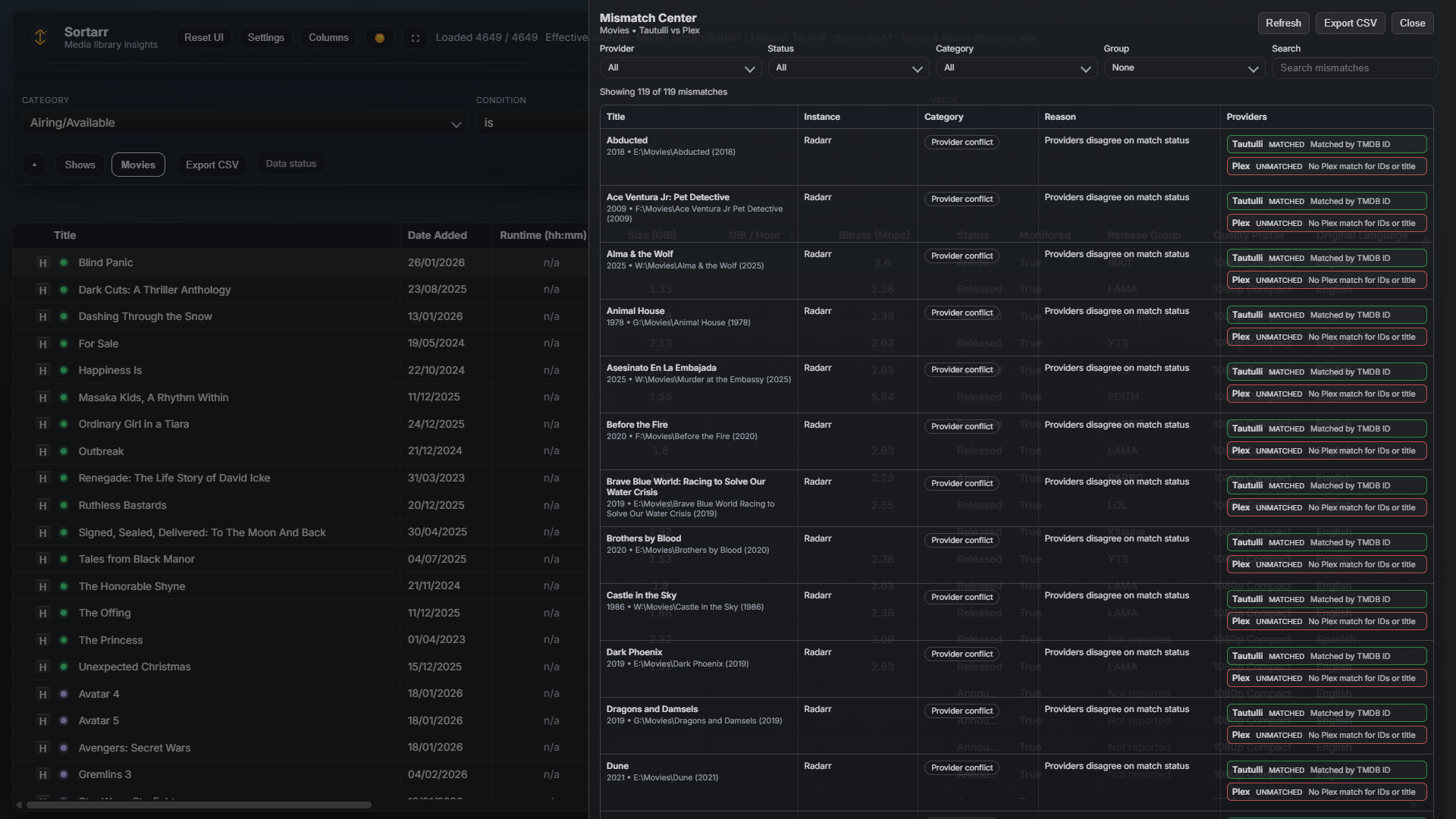
- Cross-Provider Validation: Compares metadata IDs (TVDB, TMDB, IMDB) and titles across all active providers to surface mismatches.
- Root Cause Analysis: Categorizes issues into "Provider Conflicts" (where different providers report different IDs) or "Unmatched/Skipped" states.
- Diagnostic Reasons: Displays specific reasons for a failure, such as "Missing ID in Plex" or "Title mismatch in Tautulli".
- Provider Filter: Isolate issues to a specific provider (e.g., show only items that failed to match in Tautulli).
-
Status Filter: View items based on their match state:
- Unmatched: No match was found using the available IDs.
- Skipped: The item was intentionally skipped due to configuration limits (e.g., Tautulli lookup limit).
- Unavailable: The provider returned no data for the item.
- Grouping: Group the results by Provider, Status, Reason, or Category to identify patterns (e.g., grouping by Reason might show a large number of items failing due to a specific library configuration issue).
- Search: Quickly find specific titles or paths within the mismatch list.
Use the Export CSV button to download the current filtered view. This is useful for:
- Creating a "to-do" list for manual metadata fixes in Plex or Tautulli.
- Sharing mismatch patterns with the development team for bug reporting.
If a title shows missing or incorrect Tautulli stats, the fastest fix is to refresh the item inside Tautulli after you confirm it is matched correctly in Arr and Plex.
If you're using Plex as the playback provider (no Tautulli/Jellystat), confirm the Plex metadata IDs are correct and that Plex has recent playback history for the item.
Steps:
- In Sonarr/Radarr, confirm the title/year and IDs are correct for the item.
- In Plex, confirm the item metadata (title/year/IDs) matches Sonarr/Radarr.
- In Plex, play the item for 30-60 seconds (this creates fresh Tautulli history).
- In Tautulli, open the Now Playing entry and confirm it is the correct title.
- In Tautulli, go to the matching library and search for the item by name.
- If it is missing or stale, open the item and choose Media Info -> Refresh Media Info.
- After the refresh completes, search again to confirm the item appears.
- Back in Sortarr, click Refresh all data and wait for the load to complete.
If the title still does not match, the issue is likely missing IDs in Plex/Tautulli or a mismatch between libraries. Share the title and the Tautulli history count for that item so we can investigate further.
Sortarr reads totals from the Tautulli History API (full play history). The Tautulli UI can show different totals because:
- The show page "Global Stats" totals are built from the Tautulli metadata cache, which can be incomplete for large/old libraries or after lookup limits.
- The History page footer shows the total for the current page of results, not the full filtered set.
If the show page totals look low, rebuild Tautulli's metadata cache:
- Stop Tautulli.
- In Tautulli, open Settings and note the "Cache Directory: X" path, then back up that directory before clearing it.
- Start Tautulli.
- Refresh the library in Tautulli and wait for metadata to rebuild.
After the rebuild, the show page totals should align with History totals (and with Sortarr).
Sortarr provides a flexible interface for analyzing large media libraries through advanced filtering, virtualization, and focused views.
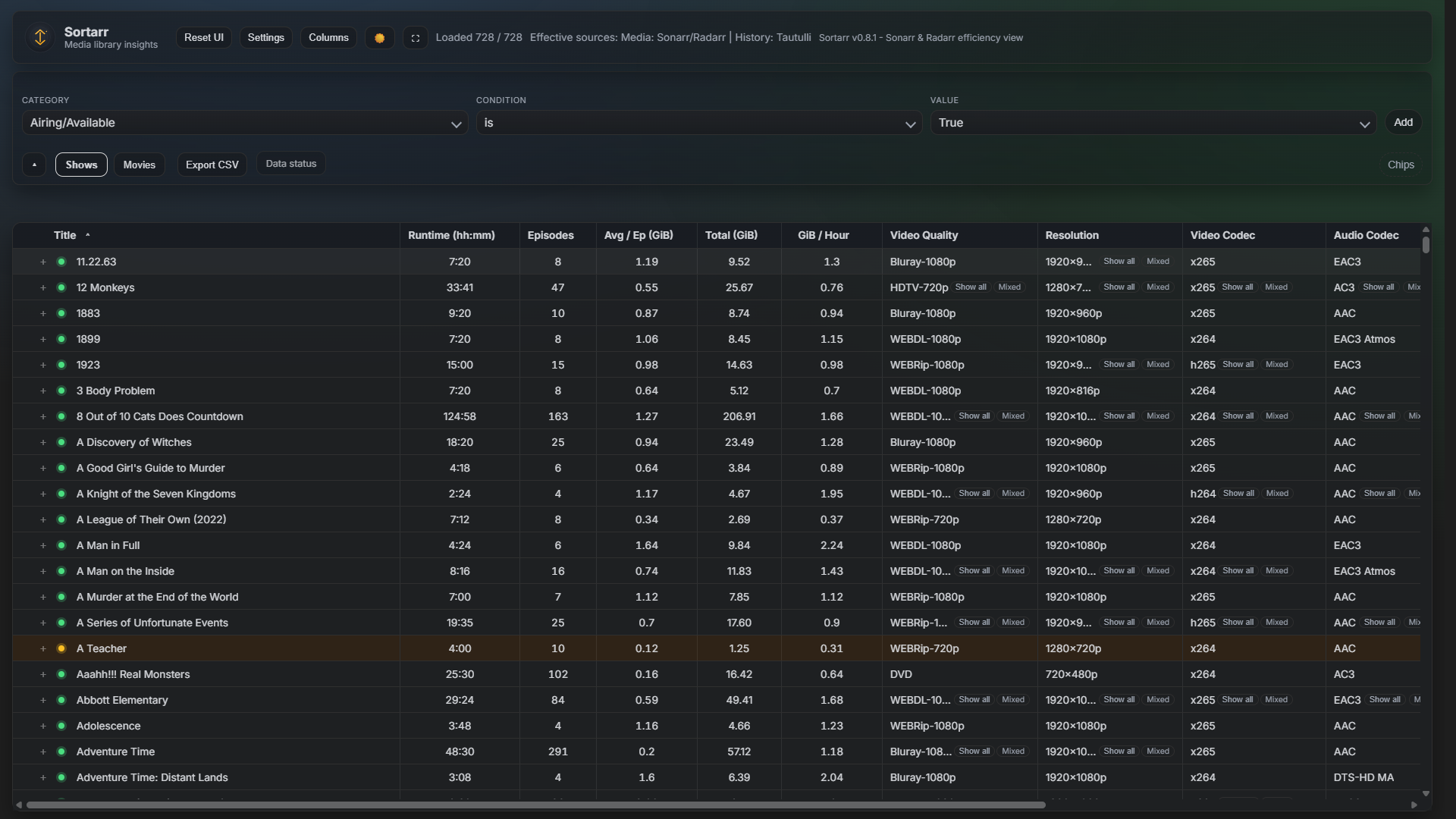
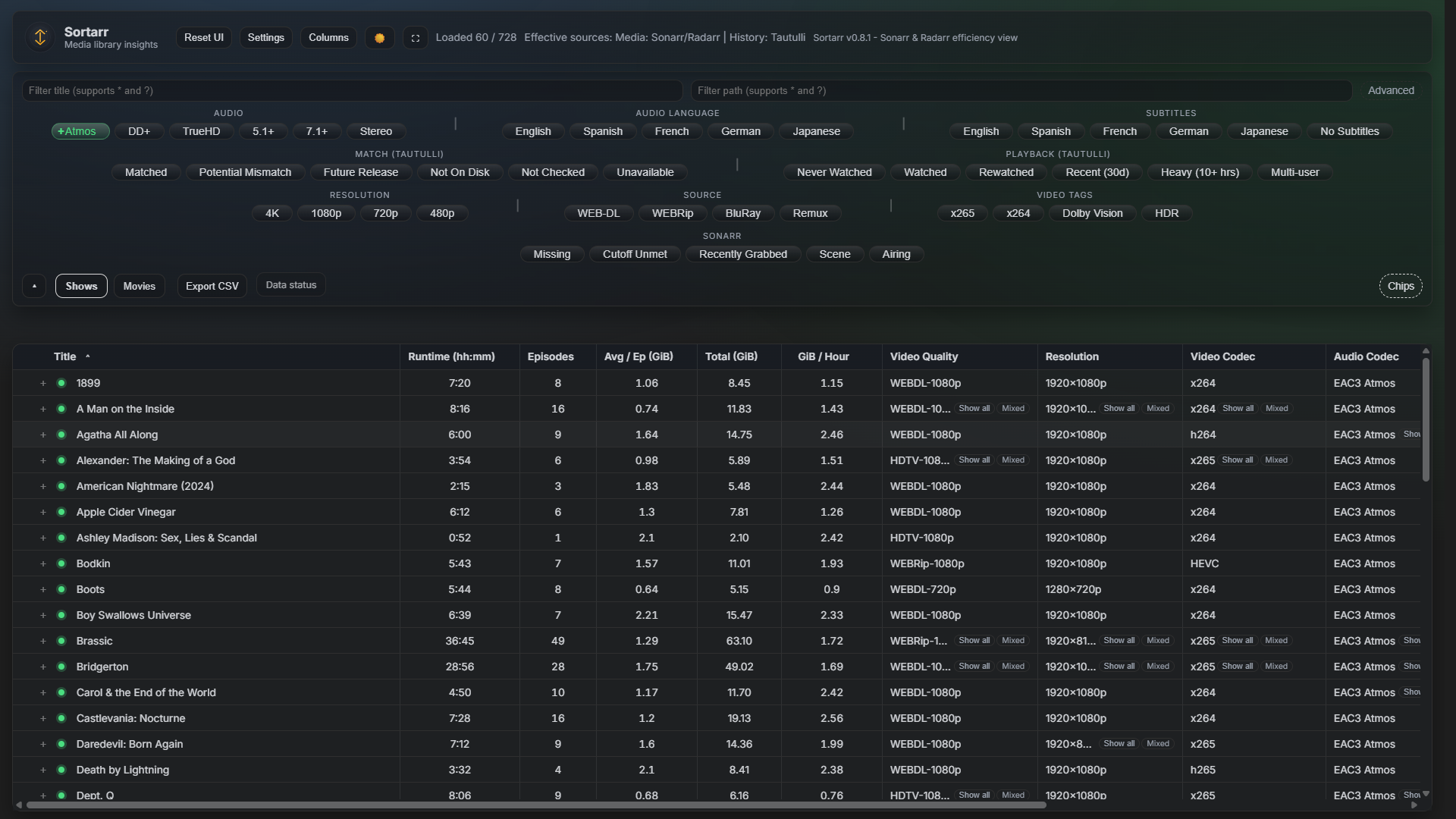
Sortarr supports multiple filtering modes to help you isolate specific subsets of your library.
-
Title/Path Filters: Basic wildcard-supported inputs (
*and?) for quick searching. -
Advanced Filter Input: Supports a
field:valuesyntax for complex queries.-
Syntax: Use
field:valuefor standard matches (is/contains) orfield>=value/field<=valuefor numeric comparisons. -
Numeric Buckets: For fields like
gbperhourortotalsize, integer values match whole-number buckets (e.g.,gbperhour:1matches1.0to1.99). -
Wildcards: Supports
*and?for string fields.
-
Syntax: Use
The Filter Builder provides a structured way to create complex queries without remembering field names. It is toggled via the Chips button in the filter panel footer.
- Category: Select the metadata field (e.g., Audio Language, Resolution, Size). The list is searchable and alphabetized.
- Condition: Select a comparison operator (e.g., "is", "contains", "at least").
- Value: Enter a custom value or select from a dropdown of suggested values.
- Active Filters: Each added filter appears as a "bubble" (chip) below the builder. Clicking a bubble removes it.
Quick chips provide one-click access to common filters like "Missing", "Cutoff Unmet", "Atmos", and "4K". They are grouped by category (Audio, Resolution, Source, etc.) and react to the current library tab.
The Fullscreen Data Table button expands the table to fill the entire browser viewport, hiding the toolbar and filter panels to maximize data visibility.
- Persistence: Fullscreen state is saved to local storage and persists across reloads.
- Exit: Click the ✕ button in the top-right or press Escape.
Use the Columns menu to toggle visibility for dozens of metadata fields.
- Search: Quickly find columns by name.
- Group Toggles: Toggle entire groups like "Sonarr", "Video", or "Playback".
- CSV Columns: Enable advanced columns (e.g., Title Slug, TMDB ID) specifically for CSV export.
Exports the current filtered view of the active tab (Shows or Movies) to a compressed CSV file.
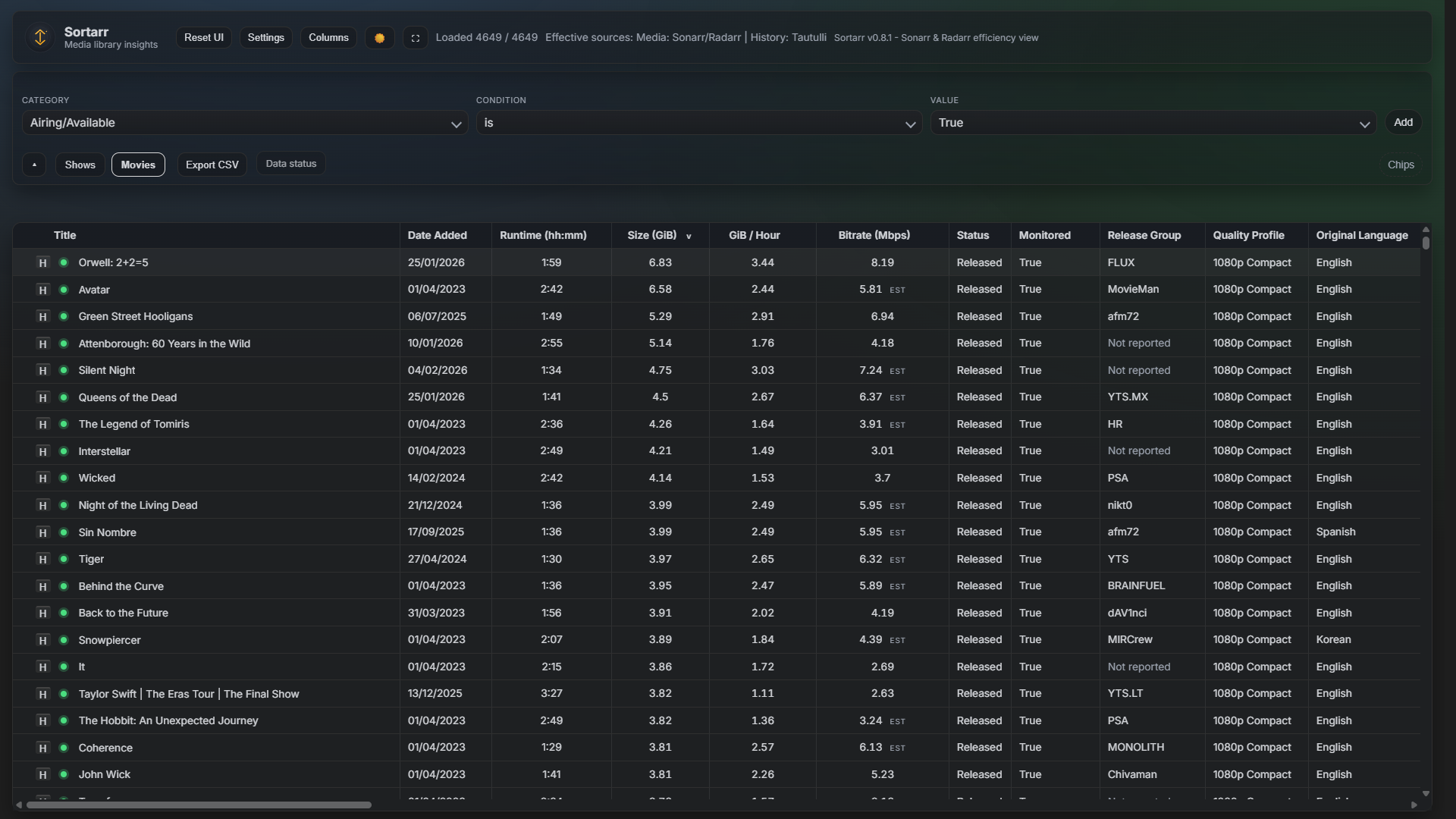
- Scope: Includes all currently visible columns.
- Playback Data: Playback-specific columns are included only if a playback provider (Tautulli, Jellystat, or Plex) is configured.
Sortarr extracts and normalizes advanced media metadata from your media files via the Sonarr and Radarr APIs.
-
Automatic Mapping: 3-letter ISO codes (e.g.,
eng,deu) and 2-letter codes (e.g.,en,de) are automatically mapped to full language names (e.g., "English", "German") for display and filtering. -
Mixed Languages: If a file contains multiple audio or subtitle tracks, Sortarr identifies them as "Mixed" and provides columns (
Audio Languages All,Subtitle Languages All) to see the full list. -
Normalization: Language labels are normalized (e.g.,
English+Spanish) to ensure consistent filtering regardless of how the source Arr instance reports them.
-
Audio Languages: Displays the primary audio language. Filtering supports
audiolang:engor structured selection in the Filter Builder. -
Subtitle Languages: Displays the primary subtitle language. Use
sublang:engor the "Subtitles" quick chips. - Audio Codec & Channels: Specific columns for codecs (e.g., Atmos, EAC3, TrueHD) and channel counts (e.g., 5.1, 7.1, Stereo).
-
No Subtitles: A dedicated filter (
nosubs:true) and quick chip to find media missing subtitle tracks.
One-click filters for common languages and codecs are available in the Quick Chips panel:
- Audio Language: English, Spanish, French, German, Japanese.
- Subtitles: English, Spanish, French, German, Japanese, No Subtitles.
- Audio Codec: Atmos, DD+, TrueHD, 5.1+, 7.1+, Stereo.
The Plex Insights Drawer provides a high-level overview of your Plex server's status and library health. It is opened via the Plex Insights button in the main toolbar (visible only when Plex is configured).
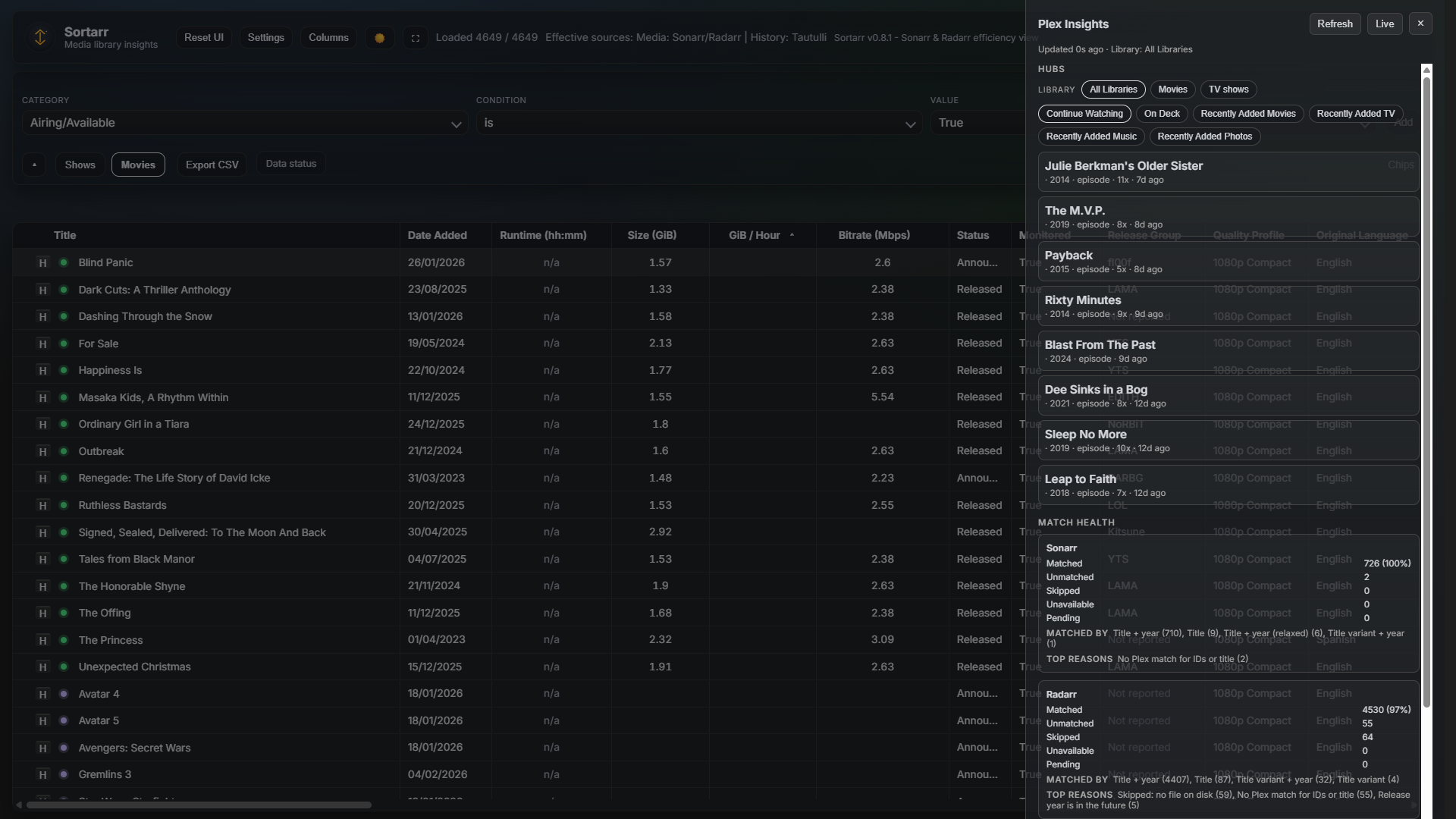
- Library Selection: Use the chips at the top to filter insights by a specific Plex library (e.g., "Movies", "TV Shows") or view "All Libraries".
- Hub Chips: Switch between different metadata hubs like "Recently Added", "Recently Viewed", or "On Deck".
- Hub Items: Displays a list of items from the selected hub, including title, year, view count, and last viewed date.
Provides a breakdown of how well your Sonarr and Radarr libraries match your Plex library.
- Statuses: Counts for Matched, Unmatched, Skipped, Unavailable, and Pending items.
- Matched by: Lists the metadata fields used for successful matches (e.g., "Matched by TVDB ID").
- Top reasons: Surfaces common reasons for mismatches or skips.
- Activities: Real-time display of active Plex server tasks, such as library scans, metadata refreshes, or media analysis, including progress percentages.
- Butler: Monitoring of Plex Butler tasks (maintenance tasks like "Clean Old Cache Files" or "Refresh Local Metadata") with their current status and schedule.
The Live button in the drawer header toggles real-time updates. When enabled, Sortarr uses Server-Sent Events (SSE) to listen for Plex activity and automatically refreshes the insights when changes occur.
Sortarr provides a detailed view of the lifecycle of your media files via the History Drawer. This is useful for tracking when an item was grabbed, imported, or if a download failed.
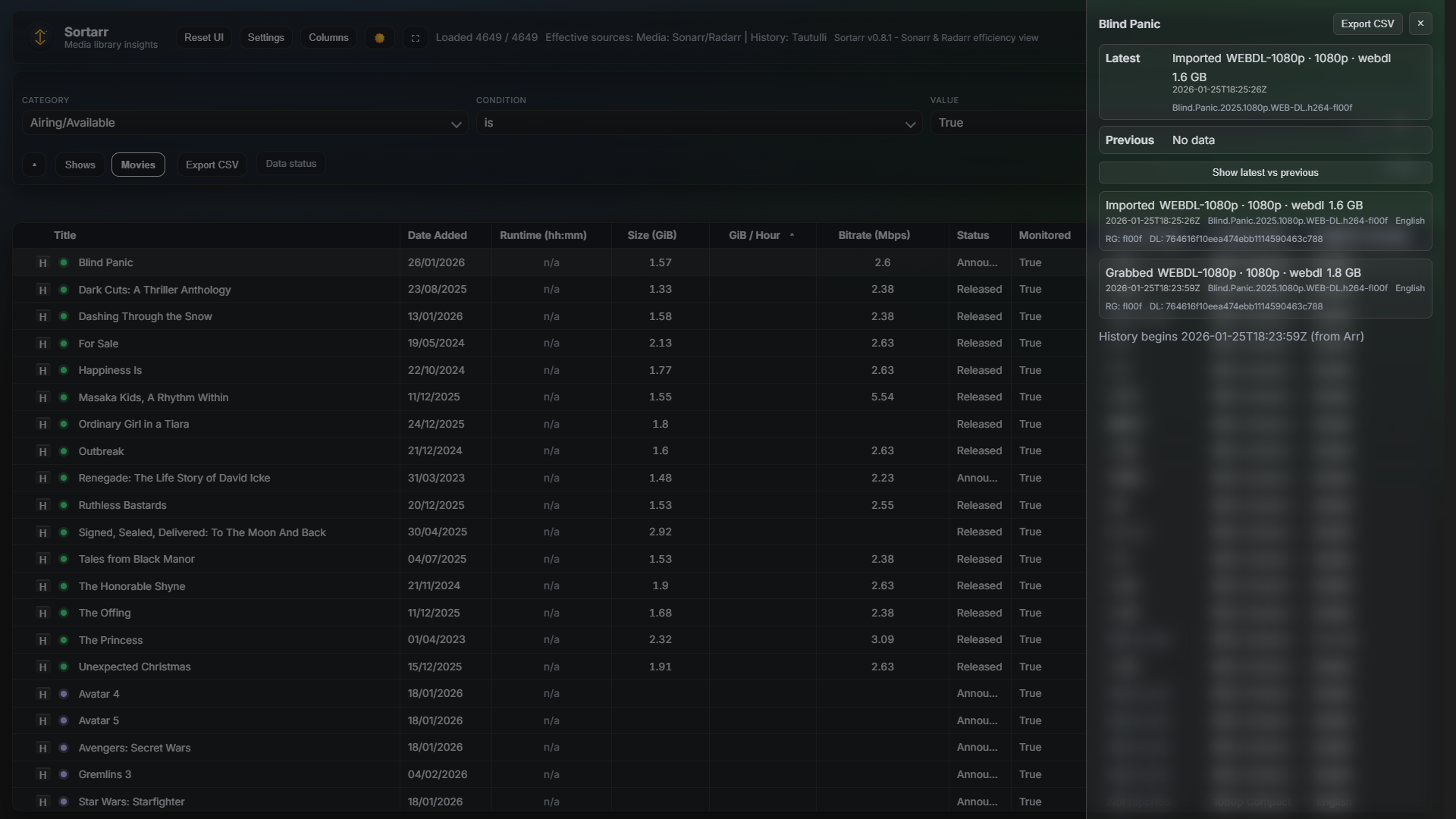
- Trigger: Click the H icon (or clock icon) next to an episode title in the expanded Sonarr series view, or next to a movie title in the Radarr view.
- Scope: The history is specific to the selected episode or movie across all configured Arr instances.
When first opened, the drawer shows a summary comparing the current (Latest) file event with the one immediately preceding it (Previous).
- Event Type: Displays if the item was "Grabbed", "Imported", "Renamed", "Deleted", or "Failed".
-
Deltas: Highlights changes in File Size and Custom Format Score between the two events. For example,
CF +20or+1.2 GB. - Metadata: Shows the quality (resolution/source), date of the event, and the original source title.
Clicking Show all events expands the drawer to show the full history retrieved from the Arr API.
- Event List: A chronological list of all relevant events for that item.
-
Detailed Metadata: Includes:
-
Quality: The specific quality profile used (e.g.,
Web-DL 1080p). - Release Group (RG): The group responsible for the release.
- Download ID (DL): The internal identifier for the download client task.
- Languages: Lists the audio/subtitle languages identified during import.
-
Quality: The specific quality profile used (e.g.,
Use the Export CSV button in the drawer header to download the full history for the item as a compressed CSV file, including raw data fields for advanced diagnostics.
Sortarr uses visual indicators to quickly surface the health of your media instances and the status of playback data matching.
Health badges appear in the filter panel footer when a configured Sonarr or Radarr instance reports an issue.
- Error (Red): Critical issues, such as an unreachable instance or authentication failure.
- Warning (Orange): Non-critical issues, such as indexers being down or missing root folders.
- Notice (Blue): Informational alerts or minor configuration recommendations.
- Dismissal: Clicking the × on a badge hides it for the current session. Sortarr remembers dismissed alerts to prevent repetitive clutter.
- Details: For long messages, an i button provides the full text of the alert.
Small colored "orbs" appear next to titles in the main table when a playback provider (Tautulli, Jellystat, or Plex) is enabled. Hovering over an orb displays the specific match reason.
- Matched (Green): The item was successfully identified in the playback history via metadata IDs or title matching.
- Potential Mismatch (Orange): An item was found but metadata IDs do not match, or multiple potential matches were found.
- Future Release (Purple): Matching was skipped because the item has not yet aired or been released.
- Not on Disk (Red): Matching was skipped because the item is missing from your local storage.
- Not Checked / Unavailable (Gray): Matching has not been performed for this item, or the provider has no data.
Sortarr provides a read-only HTTP API that powers the frontend and can be used for external integrations or custom dashboards.
Sortarr has two auth modes:
-
basic: Sortarr handles login itself./api/*endpoints require Basic Authentication whenBASIC_AUTH_USERand the matching password are configured. -
external: your trusted reverse proxy handles login and Sortarr trusts the configured upstream identity header (defaultX-Forwarded-User) from that proxy. Direct spoofed headers are rejected.
If you use basic, include the Authorization: Basic <credentials> header in your requests.
If you use external, send requests through the trusted proxy boundary rather than directly to the Sortarr port.
For state-changing requests (POST, PUT, PATCH, DELETE), Sortarr enforces CSRF protection.
-
Required Header:
X-CSRF-Token -
Matching Cookie: The header value must match the value of the
sortarr_csrfcookie. -
Origin Policy:
OriginorReferermust match the current request origin unless an exact trusted origin is explicitly configured. - Trusted Origins: Trusted-origin fallback remains token-gated and same-host by default; cross-host trust requires explicit opt-in.
-
Validation: Requests without a matching token or allowed origin will return
403 Forbidden("CSRF validation failed.").
| Endpoint | Method | Description |
|---|---|---|
/api/shows |
GET | Returns a JSON array of all series from Sonarr, enriched with playback stats if configured. |
/api/movies |
GET | Returns a JSON array of all movies from Radarr, enriched with playback stats if configured. |
/api/shows.csv |
GET | Returns series data in CSV format. |
/api/movies.csv |
GET | Returns movie data in CSV format. |
/api/status |
GET | Returns the status of the data load and playback matching. Supports lite=1 for a faster response with fewer details. |
/api/config |
GET | Returns the current sanitized application configuration (e.g., instance URLs, active providers). |
/api/sonarr/refresh |
POST | Triggers a metadata and library refresh for Sonarr. Can target a specific seriesId. |
/api/radarr/refresh |
POST | Triggers a metadata and library refresh for Radarr. Can target a specific movieId. |
/api/tautulli/refresh |
POST | Triggers a playback provider (e.g., Tautulli) library refresh. |
/api/sonarr/health |
GET | Returns health check alerts from all configured Sonarr instances. |
/api/radarr/health |
GET | Returns health check alerts from all configured Radarr instances. |
/api/history |
GET | Returns grab/import history for a specific item. Requires app (sonarr/radarr) and seriesId/episodeId or movieId. |
/api/version |
GET | Returns the current Sortarr version. |
If an API request to a backend provider (Sonarr/Radarr) fails, Sortarr returns a 502 Bad Gateway error. A sanitized hint about the failure is provided in the X-Sortarr-Error response header.
- Expanded efficiency views and comparisons
- Performance improvements for very large libraries
- More grouping and filtering options
Feedback and ideas are welcome.
Press Ctrl+Shift+P to toggle a lightweight perf overlay (FPS estimate, long task count when supported, render time, visible rows, and DOM counts).
You can render synthetic datasets without connecting Sonarr/Radarr:
?bench=1&app=radarr&rows=1000?bench=1&app=radarr&rows=5000?bench=1&app=radarr&rows=20000- Add
&wide=1to show more columns.
Sortarr can display small poster previews streamed directly from Sonarr and Radarr:
- Sonarr: series poster appears only inside the expanded series panel header.
- Radarr: movie poster appears as a hover tooltip (table row heights do not change).
Disable all image loading with ?images=0.