Releases: LSXPrime/ProseFlow
ProseFlow v0.3.0

🎉 ProseFlow v0.3.0 – Release Notes
We are excited to launch ProseFlow v0.3.0, a landmark release that transforms how you create and use AI-powered actions. This update introduces Templated Actions with Placeholders, a powerful new Generation Mode for creating content from scratch, and a completely overhauled Actions UI with bulk-management capabilities.
These features turn simple prompts into dynamic, reusable, and shareable tools, elevating ProseFlow from a text processor to a comprehensive AI workflow engine.
🌟 Highlights
1. Templated Actions with Placeholders
Actions are no longer static prompts! You can now create dynamic, multi-step workflows by embedding placeholders (e.g., [language]) in your instructions. When you run a templated action, the floating menu guides you through a step-by-step form to fill in the details.
- Multiple Input Types: Choose from Text, Multiline Text, Choice (dropdown), Boolean (Yes/No), Number, Date, and even a File Picker.
- Validation Rules: Enforce required fields, set character limits, or define numeric ranges to ensure valid input.
- Conditional Logic: Create intelligent workflows by showing or hiding subsequent steps based on user input.
- Smart Defaults: Pre-fill values with dynamic tokens like
{clipboard},{date:yyyy-MM-dd}, and{appContext}to accelerate common tasks. - New Presets: Get started with powerful new templated actions, including Summarize, Translate, Rephrase, Write an Email, and Create Social Media Post.
💡 This feature transforms simple actions into sophisticated, reusable applications for complex tasks.
| Advanced Action Editor | Templated Action Menu |
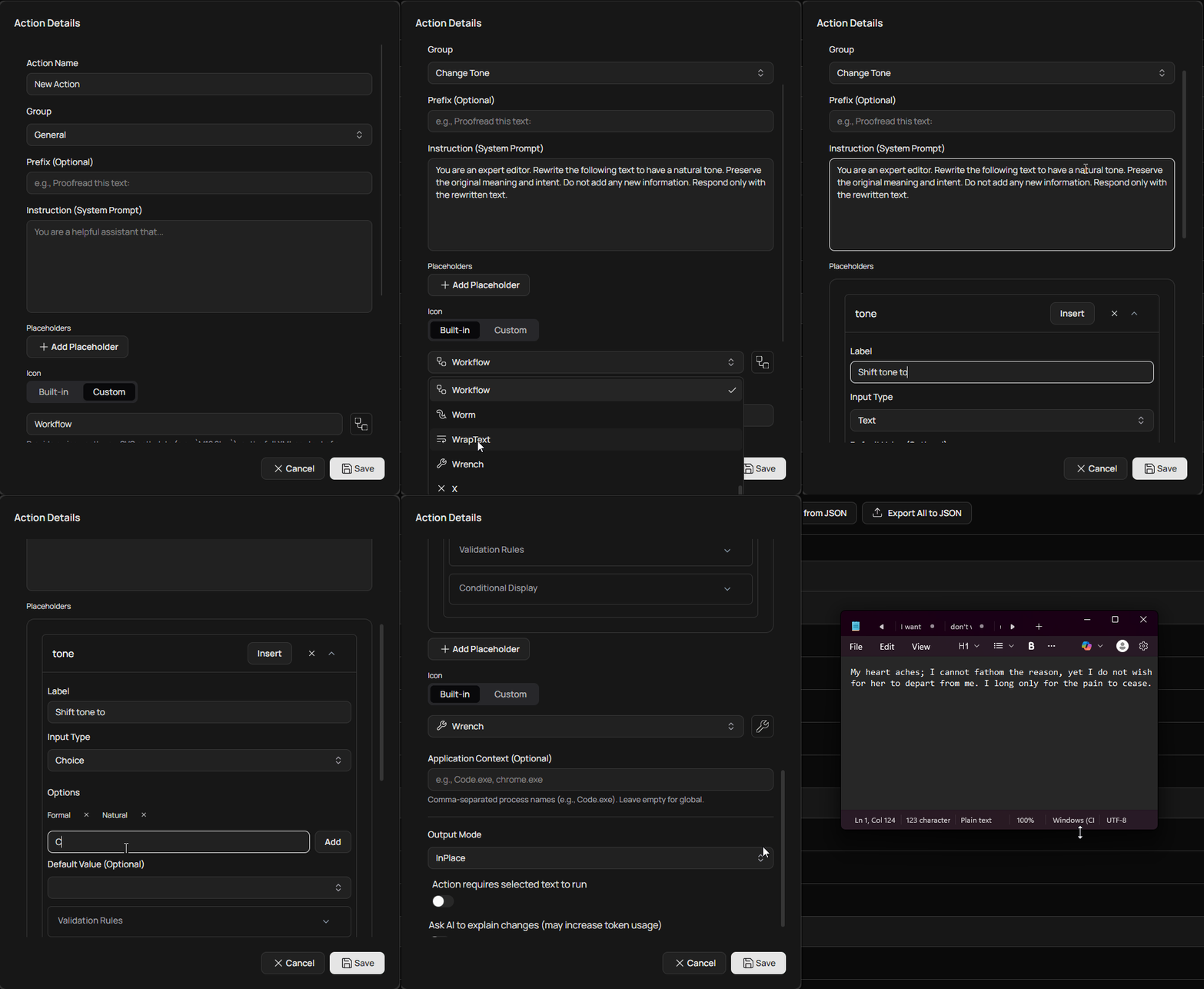 |
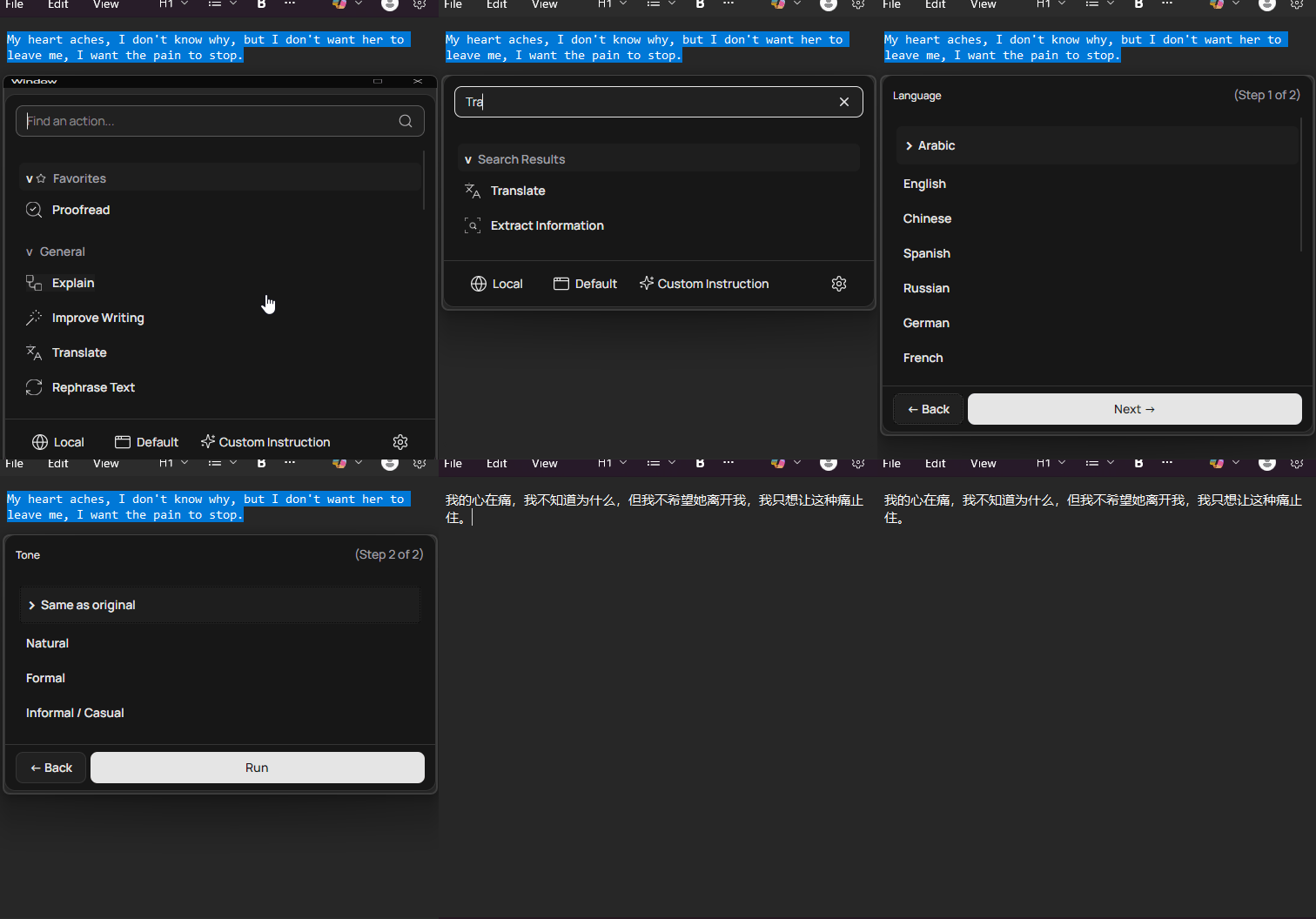 |
2. Generation Mode & Enhanced Custom Instructions
ProseFlow now excels at creating content from scratch. Actions can be designated as not requiring selected text (requiresSelection: false), enabling a new Generation Mode.
- Generate from Scratch: When no text is selected, the floating menu filters for generation-capable actions. The search bar becomes a prompt input field, allowing you to describe what you want to create.
- Save Custom Instructions: The "Custom Instruction" feature now logs the full instruction to your history. You can save these ad-hoc prompts as new, reusable actions directly from the history view with a single click.
3. Overhauled Actions UI with Bulk Management
The Actions screen has been completely redesigned for power users and teams managing large sets of actions.
- Multi-Selection: Use checkboxes to select multiple actions at once.
- Contextual Toolbar: A new toolbar appears when items are selected, enabling bulk operations:
- Bulk Delete: Permanently remove multiple actions.
- Bulk Move: Move selected actions to another group in one step.
- Bulk Export: Export only the selected actions to a JSON file.
- Action Management: Actions can now be easily duplicated or moved up/down within their group from a new context menu.
🛠️ Core & Infrastructure Improvements
📄 New Document Reader Service
A powerful new IDocumentReaderService can now extract plain text from various file types, enabling the new "File Picker" placeholder. Supported formats include:
.pdf.docx.xlsx,.xls.epub.txt,.md, and many other plain-text-like formats.
🚀 Refactored Startup Logic
The application's startup process has been decomposed into modular, single-responsibility services (DatabaseInitializer, BackgroundServiceInitializer, UiInitializer, DependencyInjectionSetup, etc.).
- Improved Maintainability: Cleaner, more organized code makes future development easier.
- Resilient Database Handling: A new recovery flow gracefully handles database corruption by prompting the user to back up the corrupt file and reset the application data, preventing startup failures.
🎨 UI & UX Refinements
✍️ Redesigned Action Editor
The Action Editor has been rebuilt from the ground up to support templated actions:
- An intuitive interface for adding, configuring, and removing placeholders.
- Dedicated sections for setting up validation rules and conditional display logic.
- A smart token inserter for easily adding dynamic default values.
🎓 Enhanced Onboarding
- A new tutorial step introduces users to the power of templated actions with an interactive simulation.
- A visual progress indicator now tracks your journey through the setup process.
- The hotkey tutorial has been updated to better reflect the Diff View output mode.
❤️ Thank You
This release is a huge step forward for ProseFlow, making it a more versatile and powerful tool for everyone.
If you encounter any issues or have suggestions, please open an issue on GitHub.
— LSXPrime
ProseFlow v0.2.0
🎉 ProseFlow v0.2.0 – Release Notes
We’re thrilled to announce ProseFlow v0.2.0, a major milestone that significantly expands the application’s capabilities with powerful new features, refined user experience, and robust infrastructure improvements. This release introduces shared workspace support, a floating action orb, diff view for safe editing, background task tracking, and much more.
🌟 Highlights
1. Shared Workspace & Team Sync
Collaborate seamlessly with your team! ProseFlow now supports shared workspaces—a folder (local or cloud-synced) that stores your Actions and Provider configurations.
- Connect to a shared workspace during onboarding or via Settings.
- Encrypt sensitive data (like API keys) using a workspace password.
- Choose between Manual or Automatic sync modes.
- Resolve conflicts with configurable strategies: Overwrite, Skip, or Prompt.
💡 Ideal for teams wanting consistent AI workflows across machines.
2. Floating Action Orb
A persistent, draggable orb floats on your screen—offering instant access to ProseFlow without memorizing hotkeys.
- Click to open the Floating Action Menu.
- Right-click for a quick context menu (Open App, Quit, Close Orb).
- Drag & drop text onto the orb to trigger the new Arc Menu—a radial menu of your favorite or context-relevant actions.
- Shows a live badge indicating active background tasks.
- Fully customizable: hide it in Settings if preferred.
3. Diff View for Safe Editing
When using actions with Diff output mode, you’ll now see a side-by-side comparison of your original and AI-generated text.
- Accept, Refine, Regenerate, or Cancel with confidence.
- Powered by DiffPlex with word-level highlighting for precise changes.
- Supports inline refinement instructions for iterative improvements.
✅ Perfect for critical edits where you need full control over AI output.
4. Background Task Tracker
All AI actions are now tracked in real time on the Overview Dashboard.
- See active processes, their status (Queued/Processing), and elapsed time.
- Cancel long-running tasks directly from the UI.
- Visual feedback on the Floating Orb and in notifications.
🛠️ Core & Infrastructure Improvements
🔐 Enhanced Clipboard Service
A new multi-layered fallback system ensures reliable text selection and pasting across all platforms:
- Avalonia API (primary)
- Native shell commands (
xclip,pbcopy,clip.exe) - TextCopy library (fallback)
Greatly improves compatibility with WSL, remote desktops, and sandboxed environments.
⌨️ Advanced Hotkey System
- Hotkey recording UI in Settings with live feedback.
- Conflict detection to prevent duplicate shortcuts.
- Unified APIs for key registration and monitoring and enhance support for non-U.S. keyboards.
🧠 Local Model Enhancements
- GPU selection: Choose a specific GPU or let the system auto-select.
- Flash Attention support for faster inference (enabled by default).
- Thread control: Adjust CPU thread count for optimal performance.
- Context and token limits increased to 65,536.
📊 Hardware Monitoring
- GPU detection and VRAM reporting (NVIDIA, AMD, Intel).
- Polling pauses when the main window is hidden to conserve resources.
- Hardware metrics now feed into the Local Dashboard sidebar.
🎨 UI & UX Refinements
📁 History View Overhaul
- Searchable and filterable history (by Action Name, Input, or Output).
- Delete individual entries or clear all.
- Improved layout with virtualization for performance.
⚙️ Settings Revamp
- Workspace Sync section with full connection management.
- Behavior toggles: Start minimized, hide Floating Orb.
- Improved hotkey input with recording UI.
- Preset import cards now show hover-to-reimport.
📈 Dashboard Upgrades
- Overview Dashboard now includes:
- Total tokens (cloud + local combined)
- Application log console (real-time)
- Active background processes widget
- Local Dashboard gains inference speed metrics and hardware sidebar.
- Animated KPIs using the new
AnimatingTextBlockBehavior.
🪟 Window Management
- Main window now saves/restores visibility state.
- Splash screen provides visual feedback during startup.
- Smoother page transitions in the main window.
🧪 Developer & Quality Improvements
- Structured logging with class names and real-time UI display.
- Enum-based output modes (
InPlace,Windowed,Diff,Default) replace boolean flags. - Action favorites system for prioritizing frequently used commands.
- Onboarding flow is now non-modal and runs atop a fully initialized app.
- Database schema updated to support new features (migrations included).
- Dependency updates: Avalonia 11.3.7, LlmTornado 3.7.45, SharpHook 7.0.3.
🐞 Bug Fixes
- Fixed issues with hardware monitoring on macOS ARM64.
- Resolved clipboard restoration edge cases.
- Corrected token usage reporting for cloud providers.
- Improved error handling for network interruptions and provider failures.
- Fixed drag-and-drop reordering in Actions and Providers grids.
❤️ Thank You
This release represents hundreds of hours of work and community feedback.
If you encounter any issues or have suggestions, please open an issue on GitHub.
— LSXPrime
ProseFlow v0.1.0
🎉 ProseFlow v0.1.0 - Initial Release!
We are thrilled to announce the first public release of ProseFlow!
ProseFlow is your universal AI text processor, designed to integrate powerful AI workflows into any application on your desktop. With a simple hotkey, you can proofread, summarize, refactor, or transform text using either cutting-edge cloud models or private, offline-capable local models running on your own hardware.
This initial release is packed with features for power, privacy, and productivity.
✨ Key Features
- Global Hotkey Activation: Access the ProseFlow menu from any application with a customizable system-wide hotkey (default
Ctrl+J). - Floating Action Menu: An elegant, searchable menu of your AI actions appears right where you need it.
- Smart Paste: Assign a dedicated hotkey to your most frequent action for one-press text transformation.
- Flexible Output: Choose to have results instantly replace your text or open in an interactive window for review.
- Iterative Refinement: Conversationally refine AI output in the result window until it's perfect.
- Context-Aware Actions: Configure actions to only appear when you're working in specific applications (e.g., show "Refactor Code" only in your code editor).
🧠 Hybrid AI Engine
- Run 100% Locally & Offline: Use GGUF-compatible models on your own hardware for maximum privacy and offline access.
- Cloud Provider Support: Connect to services like OpenAI, Groq, Anthropic, Google, and any other OpenAI-compatible endpoint.
- Intelligent Fallback Chain: Configure multiple cloud providers. If one fails, ProseFlow automatically tries the next one in your prioritized list.
- Secure Credential Storage: API keys are always encrypted and stored securely on your local machine.
🛠️ Customization & Management
- Powerful Action Editor: Create and manage reusable AI instructions with unique names, icons, system prompts, and output behaviors.
- Drag-and-Drop Organization: Intuitively organize your actions into custom groups.
- Import & Export: Share your action sets with others or back them up to a JSON file. A conflict resolution dialog makes importing seamless.
- Action Presets: Get started quickly by importing curated sets of actions for common tasks like writing and coding.
📊 Dashboard & Analytics
- Comprehensive Dashboard: Visualize your token usage, provider performance, and hardware status in one place.
- Performance Monitoring: Track provider latency and tokens/second to optimize your setup.
- Live Hardware Monitor: See real-time CPU, GPU, RAM, and VRAM usage when running local models.
- Interaction History: Review a detailed log of all your past AI operations, including the input and output.
💻 Platform Support
- Cross-Platform: Native support for Windows, macOS, and Linux.
- System Tray Control: Runs quietly in the background with a tray icon for quick access to key functions like loading/unloading models and switching provider types.
- Launch at Login: Configure ProseFlow to start automatically with your system.
- Guided Onboarding: A smooth setup process for new users to get configured in minutes.
🚀 Getting Started
Download the installer for your operating system from the official website or from the assets below. The first time you launch ProseFlow, a guided onboarding window will help you configure your first AI provider and set your global hotkey.
➡️ Download from the Official Website ⬅️
We're excited for you to try ProseFlow and look forward to your feedback