A robust, asynchronous video transcoding pipeline built on AWS, leveraging Java Quarkus, FFmpeg, and a Multi-Tier Architecture. This system converts media files (e.g., .mp4 to .gif) with high availability, automated scaling, and secure private networking.
This repository contains the full source code and infrastructure definitions for a production-grade video transcoding engine. Unlike simple converters, this system is designed for scale:
- Decoupled Processing: Uses SQS to buffer tasks, ensuring no video is ever lost even during traffic spikes.
- Auto-Scaling: Compute power grows and shrinks dynamically based on the number of messages in the queue.
- Secure Networking: All processing happens in private subnets. Communication with AWS services is handled via VPC Gateway and Interface Endpoints.
IAC.yml: CloudFormation yml template for VPC, ASG, Load Balancer, and Data tiers./transcoder: Java Quarkus application code responsible for SQS polling, S3 upload & download, DynamoDB state management, and FFmpeg execution.bake_ami.sh: Bash script for automated AMI baking and environment preparation.
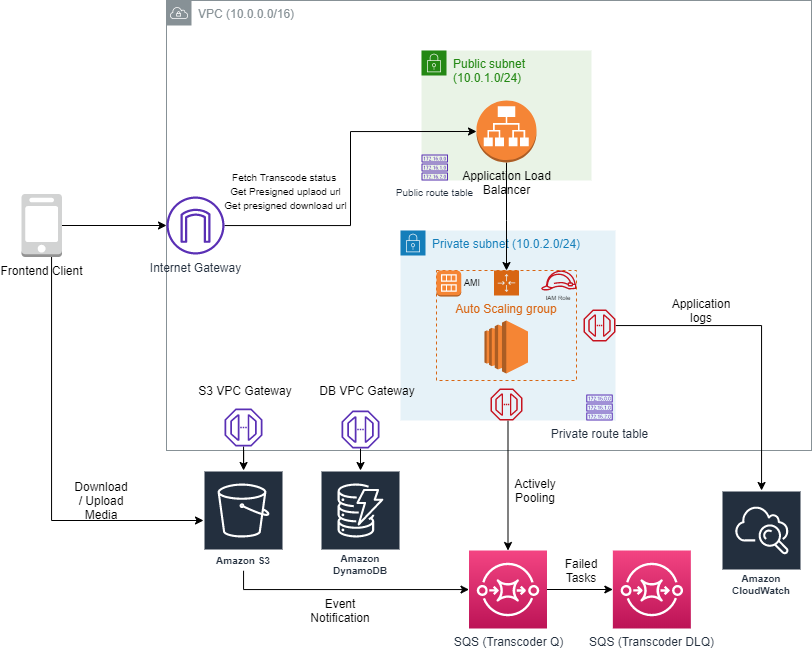
The system follows a Multi-Tiered Immutable Architecture:
- Ingress Tier: An Application Load Balancer (ALB) handles client requests for Presigned URLs and job status checks.
- Logic Tier: Worker nodes (EC2) inside an Auto Scaling Group (ASG) poll SQS for tasks, process videos locally using FFmpeg, and update task states.
- Data Tier: S3 buckets store raw ("Pre-process") and converted ("Post-process") media. DynamoDB tracks the lifecycle and metadata of every job.
- Integration Layer: All communication to SQS, S3, DynamoDB, and CloudWatch Logs stays within the AWS backbone using VPC Gateway and Interface Endpoints, enhancing security and reducing latency.

Follow these steps to deploy the transcoder system into your AWS environment.
Automate the environment setup using the provided baking script:
1- Launch a base Amazon Linux 2023 instance.
2- Build the java application as shown in here. Upload your quarkus-run.jar and bake_ami.sh script to the instance through SSH.
3- Run the script:
chmod +x ./bake_ami.sh
sudo ./bake_ami.sh
4- Once completed, stop the instance and create an AMI from it (Actions > Image and templates > Create image).
1- Retrieve your new AMI ID.
2- Update the BakedAmiId parameter in the CloudFormation IAC.yml template.
3- Deploy the template from your own AWS environment. The ASG will automatically launch nodes using your baked AMI.