
This is an emulator for the Minirechner 2a microcomputer. The microcomputer is used during a practical course at the university of Leipzig. This emulator was created for my bachelor thesis and is published under the GNU GPLv3. It's main purpose is to aid students in creating correct solutions for the assignments that are part of the course. It was meant to solve the issue of not having the real hardware at hand while coming up with solutions for the given problems. This FOSS should run on most major platforms and is versatile enough to test solutions.
Please report all bugs! Just create an issue on Github or message me!
To use one of the prebuild binaries, you can download one of the release packages. These are always a little outdated, for more up-to-date versions of the emulator download one of the artifacts created by the CI!
Download and install rustup for your operating system and follow the instructions on how to install Rust using rustup.
Clone this repository and compile and run your own binary using Cargo (which should have already been installed by rustup):
$ cargo run --releaseYou may also install the binary using:
$ cargo install --git https://github.com/MalteT/2a-emulatorSee the Cargo Manual on where the binary is installed to. The PATH-variable will probably need some tweaking.
To simply start an interactive session, run 2a-emulator in the terminal.
If you want to adjust some options before starting the interface, supply them
on the command line like this:
$ 2a-emulator interactive --ff 42 path_to_a_program.asmThe above runs an interactive session with path_to_a_program.asm compiled
and loaded into main memory. Additionally the input register FF contains 42.
For a full list of options, see 2a-emulator interactive --help.
You may also be interested in the run mode which emulates the execution of a
given program for a number of clock cycles before printing the state of the machine.
Have a look at 2a-emulator run --help for more information.
To simply verify the syntax of an assembler file run
2a-emulator verify my_faulty_program.asm.
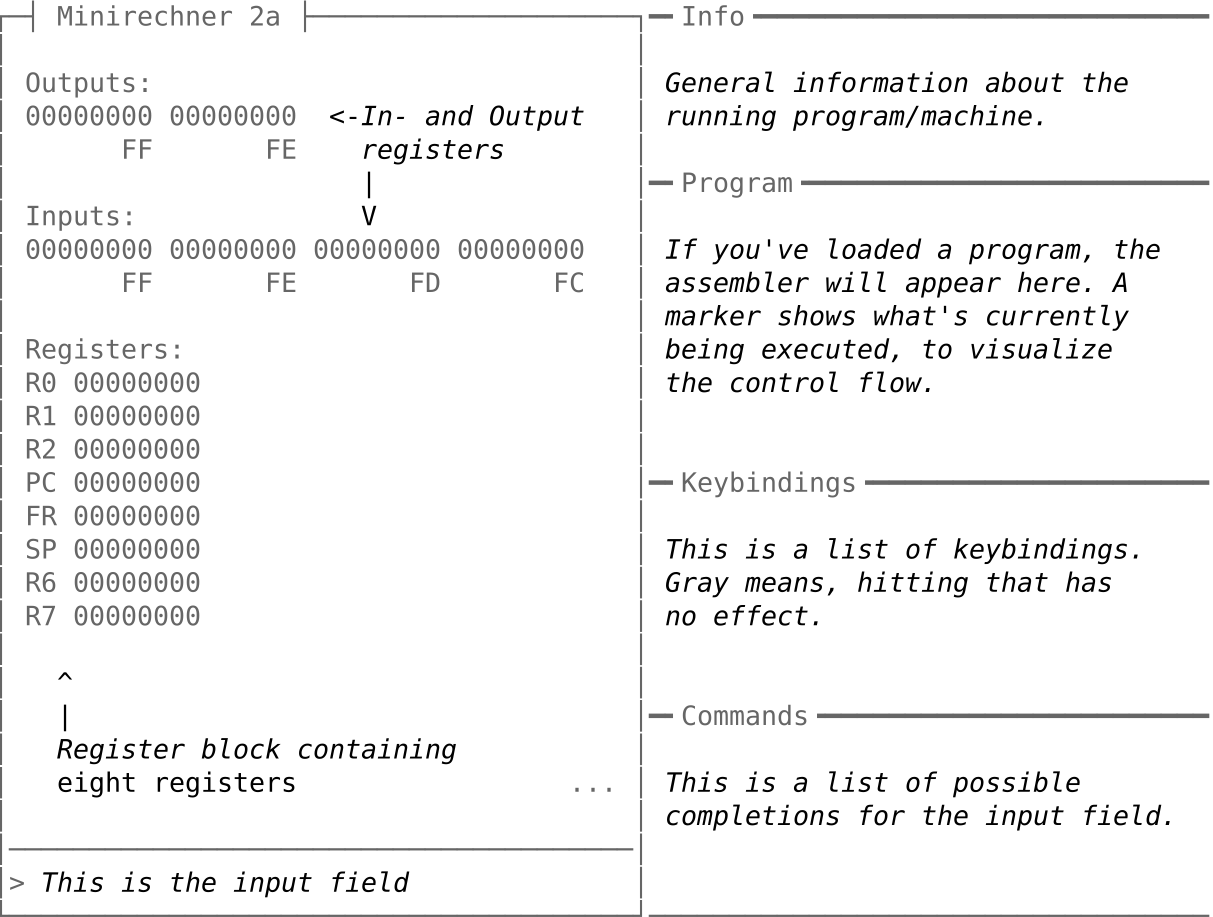
When starting the 2a-emulator without any parameters or by using 2a-emulator interactive the interactive terminal user interface (TUI) is started.
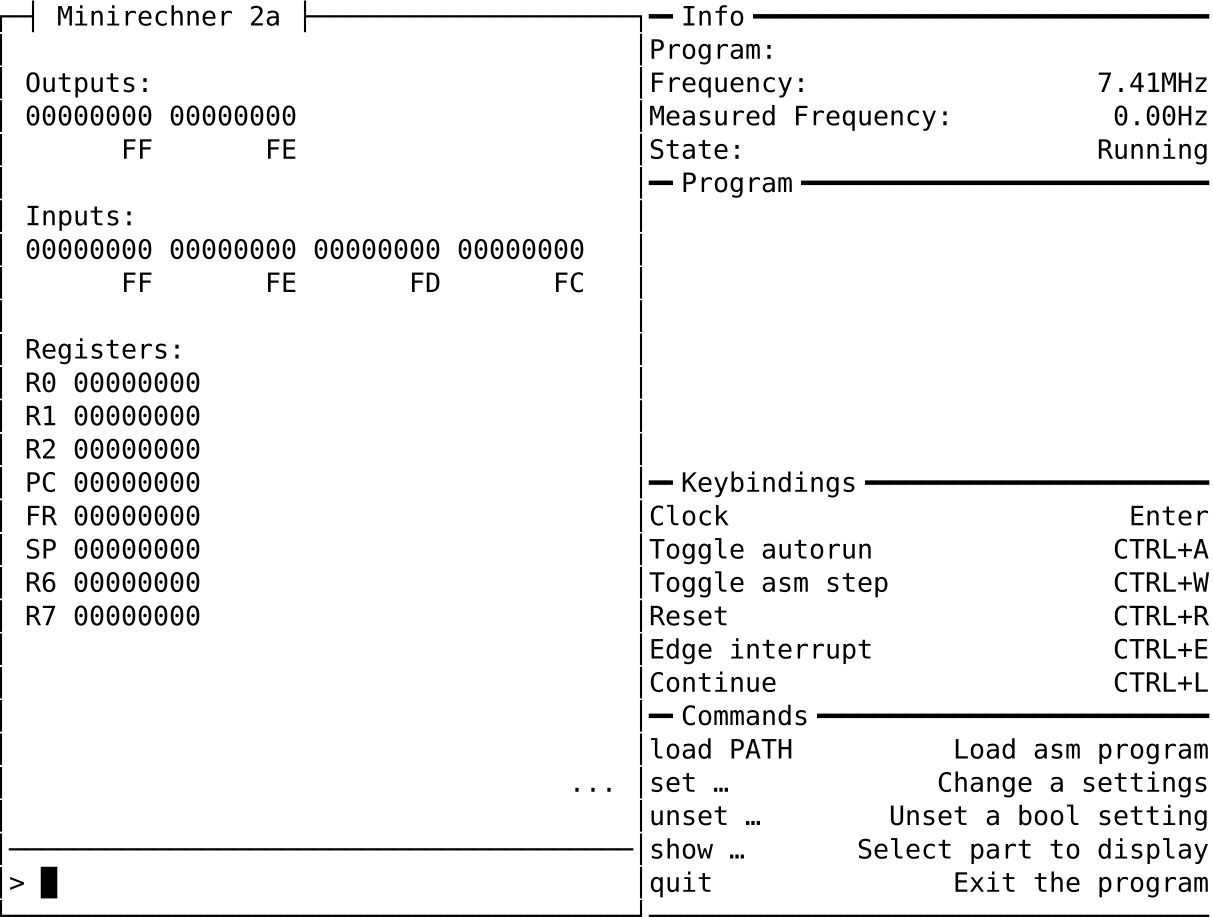
Let's annotate the interface to make sure that we're all on the same page.
See 2a-emulator interactive --help for a full list of options.
Most commands are self-explanatory and the included command completion should serve as an inline documentation. For those seeking a more explicit explanation, here is a list of commands that the input field will understand:
-
loadPATHwill load the program given byPATH. The file is opened and the syntax verified. It will then be compiled to byte code and loaded into the main memory. -
setVALwill update an internal variable. Boolean variables can be changed withset BOOL_VAR. Non-boolean variables need a more explicit syntax ofset NON_BOOL_VAR = VALUE.The following boolean variables are understood by the set/unset command:
J1/J2sets the state of Jumper 1 or Jumper 2 respectively. Setting them means connecting the jumper, while unsetting removes the connection.UIO1/UIO2/UIO3refer to universal I/O pins 1/2/3. Their values can be read from inside a program. Setting them does not set the direction of the pin. That'll have to be done by a program.
The following non-boolean variables are understood by the set command:
FC/FD/FE/FF =bytechanges the value of the corresponding input register to the given 8-bit value.bytewill be interpreted as decimal if it is not prefixed with either0xor0bwhich will result in a hexadecimal or binary interpretation.IRG =byterefers to updating the value of the 8-bit input register that is located on the extension board MR2DA2.TEMP =voltagechanges the voltage of the temperature sensor. The voltage is clamped between0.0and5.0Volts and emulates the possible voltage levels that would be delivered by the temperature sensor on the real MR2DA2 extension board.I1/I2 =voltageupdates the voltage at the analog input pin on the MR2DA2 extension board.voltageis clamped between0.0and5.0Volts.
-
unsetVALwill set a boolean variable tofalse. Seesetfor a list of boolean variables. -
showPARTselects a part to be displayed beneath the main I/O registers. Selectable parts are:register, the default part which is the register block containing the eight registers.memory, the main memory which has a size of0xF0bytes and can be accessed from addresses0x00to0xEF.
-
next<N>emulates the nextNcycles. IfNis omitted,1is used. Thusnext,next 1and hitting enter once are equivalent. -
quitwhich lives up to it's name.
Using 2a-emulator run it is possible to run assembler programs without
interaction.
Consider the following example:
$ 2a-emulator run \
        programs/11-simple-addition.asm \
        100 \
        --fc 10 \
        --fd 42
The first parameter is the path to the program we want to execute, the second
the number of clock cycles to emulate at most. These are the only two required
parameters. Now, programs/11-simple-addition.asm takes the inputs from FC/FD
and adds them. The result is written to output register FF. To make this example
worthwhile we added --fc and --fd to the argument list and supplied values
which will be written to the input registers FC/FD respectively.
This may result in the following output:
Program: programs/11-simple-addition.asm
Time:    10us 35ns
Cycles:  100/100
State:   Running
Output:  FE: 0
         FF: 52
As we can see, 52 has indeed been written to output register FF, while output
register FE was either untouched or containes a zero. Additionally some information
about the run is shown, most importantly the number of cycles that were executed
and the state of the machine after executing these cycles. In our example the machine
is still running, alternatives are stopped and error.
See 2a-emulator run --help for a full list of options.
Basic functionality exists to verify programs. As of yet only three machine parameters can be tested against and it works like this. Consider the above example, now extended like this:
$ 2a-emulator run \
        programs/11-simple-addition.asm \
        100 \
        --fc 10 \
        --fd 42 \
        verify \
        --ff 52 \
        --state running
Note the last three lines which weren't there before. The verify begins the
verification arguments. The first thing we expect from the simple addition program
is the correct sum in output register FF. The second expectation includes the
state after execution. The machine should neither stop nor throw an error.
The output after executing the above command is the same as without the verify suffix,
but only because all expectation were met.
If we would've written the following instead:
$ 2a-emulator run \
        programs/11-simple-addition.asm \
        100 \
        --fc 10 \
        --fd 42 \
        verify \
        --ff 51 \
        --state running
The result would include the following line of output:
Error: Verification failed: "Output register FF" did not match expectations
Additionally the exit code of the program is non-zero, which marks that something failed. This can be used to build more complex verifications using shell scripts.
See 2a-emulator run verify --help for a full list of options.
The following feature flags can be used to influence the generated binary. See here.
-
interactive-tui(opt-out) enables the interactive session. Without it, no interactive session is possible. -
utf8(opt-in) enables the use of character codes which are supported by fewer terminals. Note, that at the moment the difference is marginal.Warning: The Ubuntu Terminal in combination with the Ubuntu Mono font has troubles displaying some characters. Thus the
utf8feature should not be used on machines running Ubuntu.
The binary is based on the emulator-2a-lib library, that is contained in this crate.
Contributions are very welcome! Additionally, other frontends could be added. I.e. a web-based
emulator is planned and might be added in the future.
Current version: 8.2.1
License: GPL-3.0