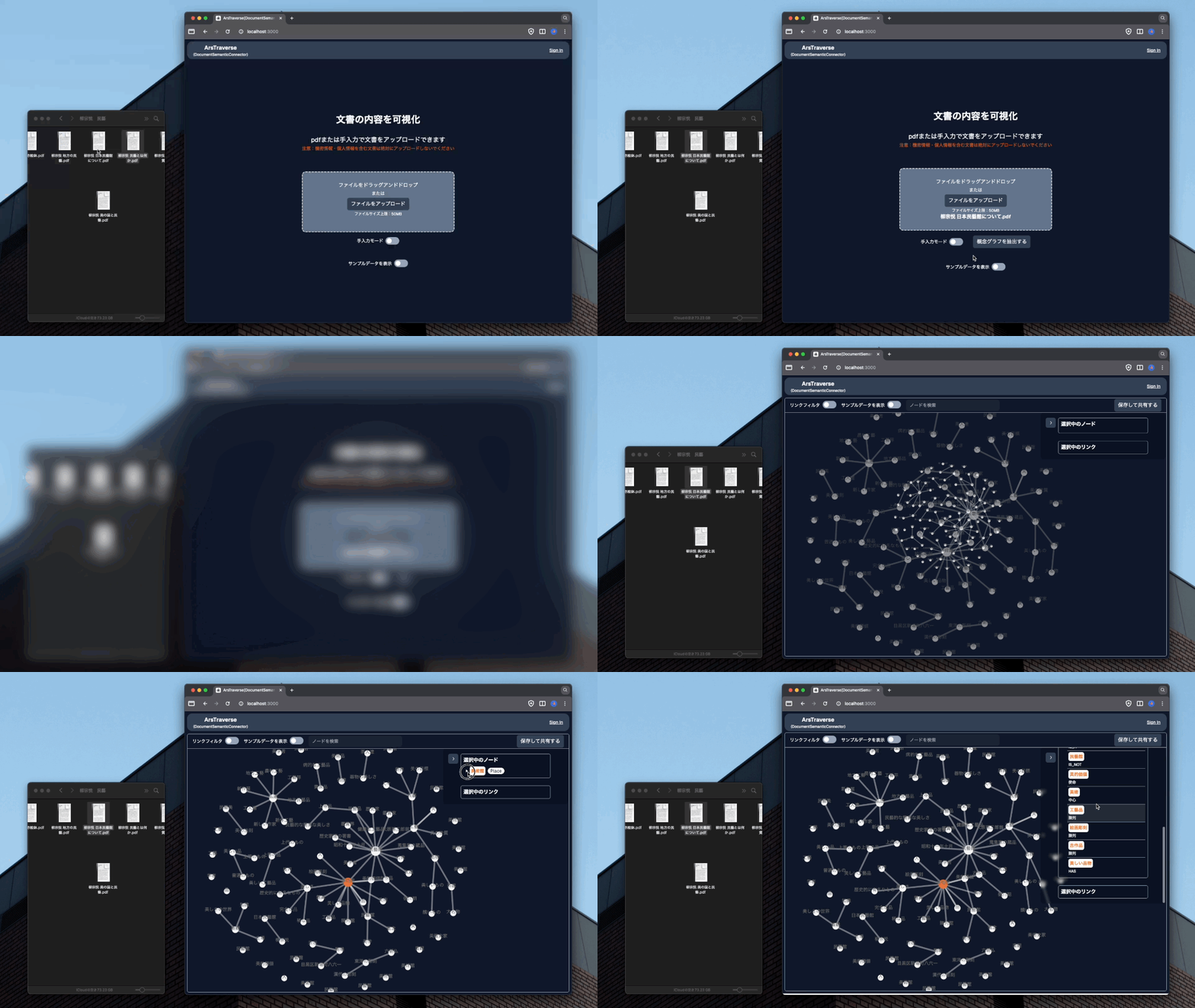
ArsTraverse is a knowledge graph visualization tool designed for art and cultural researchers, curators, and scholars. It automatically extracts conceptual relationships from PDF documents and other text sources using Large Language Models (LLMs), then visualizes these connections as interactive knowledge graphs.
The platform enables users to discover hidden connections between artists, artworks, movements, concepts, and cultural phenomena, making complex contextual information accessible and editable for collaborative research and exhibition planning.
 |
 |
Art and cultural research involves navigating complex webs of relationships between artists, artworks, movements, and concepts. Traditional research methods require extensive manual effort to:
- Extract and organize relationships from vast literature
- Visualize complex contextual information effectively
- Collaborate on knowledge construction and archival work
- Structure and preserve cultural knowledge for future generations
ArsTraverse aims to create a "GitHub-like bidirectional archive" for art and culture. We envision a platform where:
- Cultural context is actively edited, shared, and preserved
- Researchers can collaboratively build and refine knowledge graphs
- Complex relationships are made accessible through intuitive visualization
- Knowledge construction becomes a community-driven process
The ultimate goal is to democratize cultural knowledge creation and make the rich contextual information that surrounds art and culture more accessible to researchers, curators, and the broader public.
- Next.js 15 (
^15.5.xinpackage.json) - React framework with App Router - TypeScript - Type-safe development
- Tailwind CSS - Utility-first styling
- PostgreSQL - Primary database
- Prisma - Type-safe ORM and database toolkit
- Supabase - Vector storage and embeddings (pgvector extension)
- NextAuth.js - Authentication with Google OAuth provider
- tRPC - End-to-end type-safe APIs
- OpenAI GPT-4 - Large Language Model for text processing
- LangChain - LLM application framework
- D3.js - Interactive graph visualization
- Tiptap - Rich text editor for annotations
- React Hook Form - Form handling
- TanStack Query - Data fetching and caching
- Zod - Schema validation
ArsTraverse follows a monolithic Next.js architecture with clear separation of concerns:
- Pages & Components (
/src/app) - User interface and routing - Visualization Engine - D3.js-based graph rendering and interaction
- Rich Text Editor - Tiptap-powered annotation system
- API Routers (
/src/server/api) - Business logic and data processing - LLM Integration - Document processing and knowledge graph extraction
- Authentication - NextAuth.js session management
- Prisma Schema - Type-safe database models
- Vector Storage - Supabase pgvector for embeddings
- Migration System - Version-controlled schema changes
- Document Upload - PDF/text processing and storage
- LLM Extraction - Automated relationship extraction using GPT-4
- Graph Construction - Node and edge creation with embeddings
- Visualization - Interactive D3.js graph rendering
- Collaboration - Annotation and editing capabilities
- Node.js 24.x(
.nvmrc参照) - Docker (for local database)
- PostgreSQL 15+ (if not using Docker)
-
Clone the repository
git clone <repository-url>
cd ArsTraverse
-
Install dependencies
npm install
-
Environment Variables Create a
.envfile with the following variables:# Database DATABASE_URL="postgresql://postgres:password@localhost:5432/arstraverse" DIRECT_URL="postgresql://postgres:password@localhost:5432/arstraverse" # OpenAI OPENAI_API_KEY="your-openai-api-key" # NextAuth NEXTAUTH_SECRET="your-nextauth-secret" NEXTAUTH_URL="http://localhost:3000" GOOGLE_CLIENT_ID="your-google-client-id" GOOGLE_CLIENT_SECRET="your-google-client-secret" # Supabase NEXT_PUBLIC_SUPABASE_URL="your-supabase-url" NEXT_PUBLIC_SUPABASE_ANON_KEY="your-supabase-anon-key" NEXT_PUBLIC_BASE_URL="http://localhost:3000" # File Storage TMP_DIRECTORY="./public/tmp" DELETE_KEY="your-delete-key"
-
Database Setup
Using Supabase (Recommended)
- Install Supabase CLI:
npm install -g supabase - Start local Supabase:
supabase start - Update environment variables with your local Supabase credentials:
DATABASE_URL="postgresql://postgres:postgres@localhost:54322/postgres"
DIRECT_URL="postgresql://postgres:postgres@localhost:54322/postgres"
NEXT_PUBLIC_SUPABASE_URL="http://localhost:54321"
NEXT_PUBLIC_SUPABASE_ANON_KEY="your-local-anon-key"
- Install Supabase CLI:
-
Run database migrations (development)
npm run db:generaterunsprisma migrate dev(create/apply migrations from schema changes). The Prisma client is generated onnpm installvia thepostinstallscript (prisma generate).npm run db:generate
-
Start Development Server
npm run dev
-
Access the Application Open http://localhost:3000 in your browser.
Concept and flow diagrams for the writing workspace, story generation, auto-highlighting, and the public scroll-linked storytelling viewer live under docs/. Notable entries:
docs/concept-writing-experience.md/docs/concept-writing-data-linkage.md— writing UX vs datadocs/story-generation-text-mode-flow.md— text-to-meta-graph pipelinedocs/auto-annotation-information-reference-flow.md— entity highlight ↔ graph focusdocs/storytelling-scroll-viewer.md— published articleScrollStorytellingViewerUnified, URL params, scroll guards
src/
├── app/                    # Next.js App Router
│   ├── _components/        # Reusable UI components
│   ├── _hooks/            # Custom React hooks
│   ├── _utils/            # Utility functions
│   ├── api/               # API routes
│   └── [pages]/           # Application pages
├── server/                # Backend logic
│   ├── api/               # tRPC routers
│   ├── lib/               # Server utilities
│   └── auth.ts            # Authentication configuration
├── trpc/                  # tRPC client setup
└── styles/                # Global styles

prisma/
├── schema.prisma          # Database schema
└── migrations/           # Database migrations

supabase/
├── functions/            # Edge functions for embeddings
└── config.toml          # Supabase configuration
- PDF Upload - Automatic text extraction and processing
- Manual Input - Direct text input for knowledge graph creation
- Batch Processing - Multiple document handling
- LLM-Powered Extraction - Automated relationship detection using GPT-4
- Schema-Based Processing - Configurable node and relationship types
- Vector Embeddings - Semantic search and similarity matching
- D3.js Graphs - Dynamic, interactive knowledge graph visualization
- Filtering & Search - Advanced filtering and semantic search
- Zoom & Pan - Intuitive navigation of large graphs
- Annotation System - Rich text annotations with history tracking
- Workspace Management - Collaborative writing and research spaces
- Edit Proposals - GitHub-like pull request system for graph changes
- Discussion Threads - Commenting and discussion on graph elements
- Version Control - Complete history tracking for all changes
- Export/Import - Graph data export and sharing capabilities
- User Management - Role-based access control
概念図・処理フロー・公開ビューの URL 挙動など、開発向けの補足は docs/ を参照する。
- 執筆体験とデータの関係(概念図)
- データ連携の概念
- テキストからストーリー生成(処理フロー)
- 自動アノテーションと情報参照
- 公開記事のストーリーテリングと URL クエリ
- 公開 Unified ビューのスクロール・ガード・レイアウト詳細
# Development
npm run dev              # Start development server
npm run build            # Build for production
npm run start            # Start production server
npm run lint             # Run ESLint

# Database
npm run db:generate      # prisma migrate dev (dev migrations; client via postinstall)
npm run db:migrate       # Deploy migrations to production (prisma migrate deploy)
npm run db:push          # Push schema changes without migration files
npm run db:studio        # Open Prisma Studio

# Utilities
npm run mcp:i           # Model Context Protocol inspector
npm run kg:align # KG alignment CLI agent (see docs/kg-alignment-agent/)We welcome contributions to ArsTraverse! Please feel free to:
- Report bugs and suggest features
- Submit pull requests for improvements
- Contribute to documentation
- Share use cases and feedback
This project is licensed under the MIT License - see the LICENSE file for details.
ArsTraverse - Navigating the universe of relationships through visualization and collaborative knowledge construction.