
Know where your Claude Code tokens go


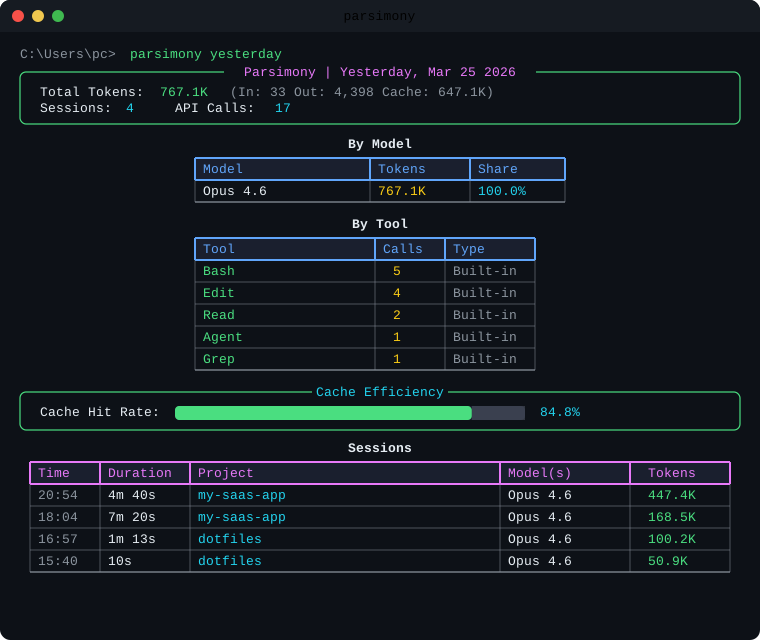
Claude Code subscribers have session and weekly token limits, not per-token charges. But there is no built-in way to see where those tokens went. Parsimony gives you that visibility. It reads the JSONL files Claude Code already saves on your machine and shows exactly which sessions, models, and tools consumed your usage allowance. No API keys needed.
v0.3.0 reframes the entire tool around token usage. Cost is now opt-in via --show-cost for users who want API cost comparisons. New features: custom token budgets, token-based filtering, and visual usage gauges.
pip install parsimony-cliFor the live dashboard:
pip install parsimony-cli[dashboard]Other methods
pipx install parsimony-cli              # isolated install
pipx install parsimony-cli[dashboard]   # with live dashboard
uv tool install parsimony-cli           # with uv
python -m parsimony # if not in PATHparsimony # today's token usage summary (default)
parsimony yesterday # yesterday's report
parsimony week # this week
parsimony week --last # last week
parsimony month # this month
parsimony month 2026-03 # specific monthAll reports lead with token usage. To include API cost estimates, add --show-cost:
parsimony --show-cost week # tokens + cost columnsSet custom session and weekly token limits in ~/.parsimony/config.yaml to track your usage against your subscription allowance. Check your Claude Code usage page to see your actual limits and set these values accordingly:
token_budget:
  session_limit: 500000         # max tokens per session
  weekly_limit: 5000000         # weekly token cap
When configured, reports show a usage gauge at the top:
Weekly:  [████████████████░░░░░░░░░░░░░░]  3.2M / 5.0M  (64.0%)
Session Peak:  [██████████████████████░░░░░░░░]  447.4K / 500.0K  (89.5%)
View budget status:
parsimony budget # view token + cost budget statusColor-coded progress bars show: green (<70%), yellow (70-90%), red (>90%).
Narrow any report by model, tool, or token usage:
parsimony week --model sonnet                    # only Sonnet sessions
parsimony today --model opus --model haiku        # Opus or Haiku
parsimony month --tool Read --tool Write          # sessions using Read or Write
parsimony week --min-tokens 50000                 # sessions using 50K+ tokens
parsimony top sessions --max-tokens 10000         # lightweight sessions only
parsimony week --model sonnet --min-tokens 10000  # combine filters
Cost-based filtering is also available when using --show-cost:
parsimony --show-cost week --min-cost 0.50       # sessions costing $0.50+
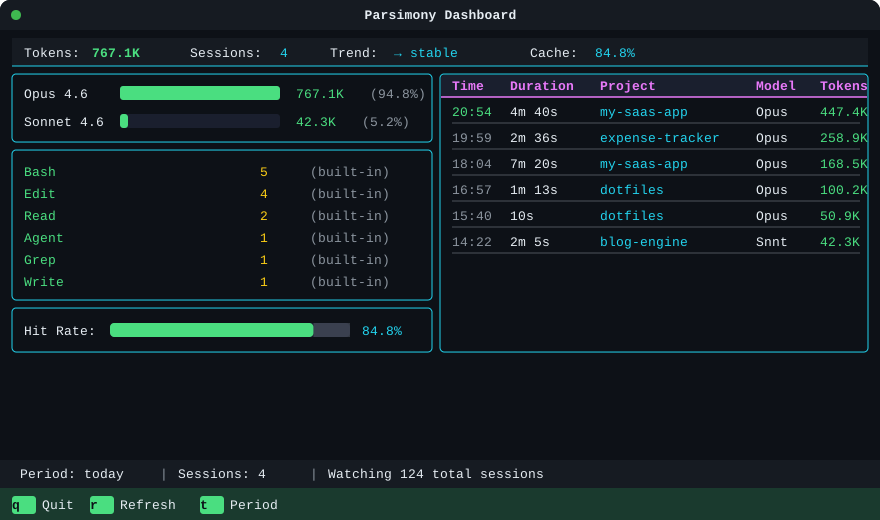
parsimony --show-cost top sessions --max-cost 1 # cheap sessions onlyReal-time terminal dashboard that auto-refreshes as Claude Code sessions generate new data. Requires the dashboard extras.
parsimony live                    # launch dashboard
parsimony live --project myapp # filter by project| Key | Action |
|---|---|
q |
Quit |
r |
Force refresh |
t |
Toggle today/week/month |
The dashboard shows: token usage summary with trend arrow, per-model token bars, top tools by call count, cache hit rate gauge, usage gauges (when token budgets are configured), and a scrollable session log sorted by token usage.
For API cost comparison, set dollar budgets in ~/.parsimony/config.yaml:
budget:
  daily: 5.00
  weekly: 25.00
  monthly: 80.00
Cost budget warnings appear when using --show-cost.
Visualize token usage over time with daily bars, 7-day moving averages, and automatic trend direction detection:
parsimony trend              # 30-day token usage trend (default)
parsimony trend --days 7     # last 7 days
parsimony trend --days 90    # last 90 days
To see cost trends instead:
parsimony --show-cost trend --days 30Compare two sessions side-by-side to see how workflow changes affect token usage:
parsimony diff a1b2c3d4 e5f6a7b8 # compare by prefix or full UUIDShows deltas for total tokens, input/output breakdown, cache efficiency, per-model breakdown, and per-tool usage with color-coded arrows. Add --show-cost to include cost comparison.
parsimony session a1b2c3d4 # prefix match or full UUIDparsimony top sessions --period week # highest-token sessions
parsimony top models --period month # tokens by model
parsimony top tools --period all # most used tools
parsimony top projects --period week # tokens by projectparsimony compare --period week --last 4 # last 4 weeks side-by-side
parsimony compare --period month --last 3 # last 3 monthsparsimony --export json month > report.json
parsimony --export csv week > models.csv
parsimony trend --days 7 --export json > trend.json
parsimony diff a1b2 c3d4 --export json > diff.jsonJSON exports always include both token and cost data regardless of --show-cost.
graph LR
    A["~/.claude/projects/*.jsonl"] --> B["Scanner"]
    B --> C["Reader"]
    C --> D["Session Builder"]
    D --> E["Token Engine"]
    D --> F["Grouper"]
    D --> L["Filters"]
    E --> G["Rollup"]
    F --> G
    L --> G
    G --> H["Rich Tables & Charts"]
    G --> I["JSON / CSV Export"]
    G --> M["Trends & Budgets"]
    H --> J["Terminal"]
    I --> K["File"]
    M --> H
    A --> N["Watcher"]
    N --> O["Live Dashboard"]
    G --> O

    style A fill:#1e3a5f,stroke:#22d3ee,color:#22d3ee
    style B fill:#1a1a2e,stroke:#8b949e,color:#e6edf3
    style C fill:#1a1a2e,stroke:#8b949e,color:#e6edf3
    style D fill:#1a1a2e,stroke:#8b949e,color:#e6edf3
    style E fill:#1a1a2e,stroke:#e879f9,color:#e879f9
    style F fill:#1a1a2e,stroke:#e879f9,color:#e879f9
    style G fill:#1a1a2e,stroke:#4ade80,color:#4ade80
    style H fill:#1a1a2e,stroke:#22d3ee,color:#22d3ee
    style I fill:#1a1a2e,stroke:#22d3ee,color:#22d3ee
    style J fill:#1e3a5f,stroke:#22d3ee,color:#22d3ee
    style K fill:#1e3a5f,stroke:#22d3ee,color:#22d3ee
    style L fill:#1a1a2e,stroke:#e879f9,color:#e879f9
    style M fill:#1a1a2e,stroke:#4ade80,color:#4ade80
    style N fill:#1a1a2e,stroke:#facc15,color:#facc15
    style O fill:#1e3a5f,stroke:#facc15,color:#facc15
graph TD
    subgraph Parse
        A["JSONL line-by-line"] --> B["Dedup by requestId"]
        B --> C["Detect model switches"]
        C --> D["Extract tool usage"]
    end

    subgraph Calculate
        D --> E["Token aggregation"]
        E --> F["Group by model / tool / project / day"]
        F --> G["Cache efficiency metrics"]
        G --> G2["Filters / Trends / Budgets"]
    end

    subgraph Output
        G2 --> H["Rich tables"]
        G2 --> I["Bar charts & gauges"]
        G2 --> J["JSON / CSV"]
        G2 --> K["Live Dashboard (Textual)"]
    end

    style A fill:#0d1117,stroke:#22d3ee,color:#22d3ee
    style B fill:#0d1117,stroke:#22d3ee,color:#22d3ee
    style C fill:#0d1117,stroke:#22d3ee,color:#22d3ee
    style D fill:#0d1117,stroke:#22d3ee,color:#22d3ee
    style E fill:#0d1117,stroke:#e879f9,color:#e879f9
    style F fill:#0d1117,stroke:#e879f9,color:#e879f9
    style G fill:#0d1117,stroke:#e879f9,color:#e879f9
    style G2 fill:#0d1117,stroke:#e879f9,color:#e879f9
    style H fill:#0d1117,stroke:#4ade80,color:#4ade80
    style I fill:#0d1117,stroke:#4ade80,color:#4ade80
    style J fill:#0d1117,stroke:#4ade80,color:#4ade80
    style K fill:#0d1117,stroke:#facc15,color:#facc15
| Section | Details |
|---|---|
| Summary | Total tokens (input/output/cache), session count |
| By Model | Per-model tokens, share %, cost (with --show-cost) |
| By Tool | Tool call counts, MCP vs built-in |
| Cache | Hit rate gauge, read/write breakdown |
| Sessions | Time, duration, project, model, tokens |
| Budgets | Token usage vs custom limits with progress bars |
| Trends | Daily token bars, 7-day moving average, direction |
| Diff | Side-by-side session comparison with deltas |
| Dashboard | All of the above, live-updating in real time |
When using --show-cost, Parsimony estimates what your usage would cost via the Anthropic API. This is for comparison only and does not reflect your subscription charges.
Built-in pricing for all Claude models. Override at ~/.parsimony/pricing.yaml:
Default pricing table
| Model | Input | Output | Cache Write | Cache Read |
|---|---|---|---|---|
| Opus 4.6 | $5.00/M | $25.00/M | $6.25/M | $0.50/M |
| Sonnet 4.6 | $3.00/M | $15.00/M | $3.75/M | $0.30/M |
| Haiku 4.5 | $1.00/M | $5.00/M | $1.25/M | $0.10/M |
Unknown models fall back to Sonnet pricing.
graph TD
    CLI["cli.py - Click entry point"] --> Parser
    CLI --> Models
    CLI --> Aggregator
    CLI --> Output
    CLI --> Cache
    CLI --> Dashboard
    CLI --> Budget

    subgraph Parser
        P1["scanner.py - discover files"]
        P2["reader.py - stream JSONL"]
        P3["session_builder.py - dedup & segments"]
        P4["events.py - frozen dataclasses"]
    end

    subgraph Models
        M1["session.py - domain model"]
        M2["cost.py - Decimal engine"]
        M3["tool_usage.py - MCP parsing"]
    end

    subgraph Aggregator
        A1["time_range.py - time windows"]
        A2["grouper.py - group by dimension"]
        A3["rollup.py - full aggregation"]
        A4["filters.py - model/tool/token filters"]
        A5["trends.py - moving averages & direction"]
        A6["diff.py - session comparison"]
    end

    subgraph Output
        O1["tables.py - Rich tables"]
        O2["charts.py - bar charts & gauge"]
        O3["formatters.py - $1.23, 1.2M"]
        O4["export.py - JSON & CSV"]
        O5["diff_table.py - diff renderer"]
        O6["gauges.py - usage progress bars"]
        O7["display_config.py - show_cost toggle"]
    end

    subgraph Dashboard
        D1["app.py - Textual TUI"]
        D2["widgets.py - live-updating panels"]
        D3["watcher.py - filesystem monitor"]
    end

    subgraph Budget
        B1["budget.py - cost & token budgets"]
    end

    subgraph Cache
        C1["store.py - SQLite cache"]
    end

    style CLI fill:#1e3a5f,stroke:#22d3ee,color:#22d3ee
    style Parser fill:#0d1117,stroke:#8b949e,color:#e6edf3
    style Models fill:#0d1117,stroke:#e879f9,color:#e6edf3
    style Aggregator fill:#0d1117,stroke:#4ade80,color:#e6edf3
    style Output fill:#0d1117,stroke:#facc15,color:#e6edf3
    style Dashboard fill:#0d1117,stroke:#f97316,color:#e6edf3
    style Budget fill:#0d1117,stroke:#f43f5e,color:#e6edf3
    style Cache fill:#0d1117,stroke:#60a5fa,color:#e6edf3
git clone https://github.com/MinaSaad1/parsimony.git
cd parsimony
pip install -e ".[dev,dashboard]"
pytest                # 325 tests, 80%+ coverage
ruff check src/       # lint
mypy src/ # type checkMIT License. See LICENSE for details.