



Blink AI is an intelligent desktop AI assistant built with Electron, React, TypeScript, and Mastra. It serves as a powerful, extensible workspace that seamlessly manages tasks, answers complex queries, and automates workflows through an intuitive chat interface.
With natively integrated capabilities like voice recognition, screen capture analysis, and expansive tool routing, Blink acts as a highly capable AI teammate tailored to dramatically accelerate your productivity.
- 🔒 Privacy-First: Your data stays exactly where it belongs—with you. All processing happens locally on your machine.
- 🧠 240+ Tools: Connect to Gmail, GitHub, Google Calendar, WhatsApp, and 240+ other tools via Composio and MCP servers.
- ⚡ Open Source: Fully transparent, extensible, and built for the community.
- 🎨 No Account Required: Download, configure your API keys, and start using immediately.
It's 3 PM. Sarah is deep in debugging mode when she gets a Slack ping about a critical GitHub issue. She:
- Alt+tabs to her browser
- Opens 5 different tabs (GitHub issue, Stack Overflow, ChatGPT, team docs, Jira)
- Copy-pastes the error message into ChatGPT
- Waits for a response while her flow state evaporates
- Switches back to her IDE, having lost 15 minutes and her train of thought
Now she has to check her Gmail, respond to 3 meeting requests, and oh—someone just asked on WhatsApp if she saw that email. Context-switching chaos.
Marcus starts his day with 47 unread emails. He needs to:
- Draft responses to customer feedback
- Summarize yesterday's meeting notes for the team
- Create GitHub issues from the design team's requests
- Schedule follow-ups in Google Calendar
- Send a WhatsApp update to the remote team
By the time he's done, it's 2 PM and he hasn't started his actual work.
Blink lives where you work—on your desktop, always ready.
"Hey Blink, what's this error about?"
- Screen capture reads her error message instantly
- AI analyzes the stack trace with full context
- Suggests a fix in 3 seconds—no tab switching
- Creates a GitHub issue with one command: "Blink, file this as an issue"
- Drafts her email response while she keeps coding
Result: Sarah stays in flow. Her 15-minute context switch becomes a 30-second question.
"Blink, summarize my emails from the design team"
- Scans Gmail and pulls relevant threads
- Generates a summary with action items
- Drafts replies in his tone (learned from past emails)
- Creates calendar events for follow-ups
- Sends WhatsApp updates to the team—all from one chat interface
Result: Marcus reclaims his mornings. What took 4 hours now takes 45 minutes.
| Feature | Description |
|---|---|
| AI Chat | Intelligent conversational assistant for drafting content, summarizing docs, brainstorming, and solving development challenges |
| Cloud-Powered | Enterprise-grade backend harnessing AWS (S3, DynamoDB, SQS) for robust file storage, complex knowledge graphs, and task queues |
| Voice Input | Hands-free interactivity with real-time Deepgram transcription and Voice Activity Detection (VAD) |
| Screen Capture | Capture full screens or active windows with integrated OCR for contextual AI analysis |
| File Handling | Drag-and-drop support for documents, images, and codebase context directly in chat |
| Integrations | Deep connections to Gmail, Google Calendar, GitHub, and 80+ other platforms via Composio and MCP |
| Skills & Superpowers | Extend capabilities with Mastra skills and MCP servers from the community |
| Autopilot Mode | Let AI autonomously handle tasks like monitoring issues, sending emails, and managing workflows |
| App Builder | Visual UI editor for building internal tools and dashboards with AI-generated code |
flowchart TB
    %% Core Interactions
    subgraph Clients ["💻 User Interfaces"]
        Electron["Electron App<br>(Desktop)"]
        WhatsApp["WhatsApp<br>(Baileys)"]
        Web["Web Widget<br>(React)"]
    end

    subgraph API ["🌐 API Routes"]
        Harness["Harness Pool<br>(Thread Manager)"]
        Router["Message Router<br>(Hono)"]
    end

    subgraph CoreAgent ["🤖 Blink AI Core (Mastra)"]
        Agent["Main Agent<br>(BUILD/PLAN/FAST)"]

        subgraph SubAgents ["Specialized Sub-Agents"]
            Execute["Execute & Plan"]
            Voice["Voice Activity<br>(Deepgram)"]
            Screen["Screen Analysis<br>(OCR)"]
        end
    end

    %% Agent internal capabilities
    subgraph Storage ["Local Storage"]
        Memory["🧠 Memory System<br>(FastEmbed)"]
        SQLite["💽 LibSQL<br>(Vector DB / Threads)"]
    end

    subgraph ToolsLayer ["🔧 Tools Layer"]
        Tools["Tool Orchestrator"]
        Composio["Composio Hub<br>(250+ Tools)"]
        MCP["MCP Servers<br>(Community)"]
        Workspace["Workspace<br>(File Ops)"]
    end

    %% Enterprise Cloud Architecture
    subgraph AWSCloud ["☁️ AWS Cloud Infrastructure"]
        S3["📦 Amazon S3<br>(File & Object Storage)"]
        Dynamo["⚡ Amazon DynamoDB<br>(Knowledge Graph)"]
        SQS["📨 Amazon SQS<br>(Task Queues)"]
    end

    Clients --> Router
    Router --> Harness
    Harness --> Agent

    Agent --> SubAgents
    Agent --> Memory
    Agent --> Tools

    Memory --> SQLite

    Tools --> Composio
    Tools --> MCP
    Tools --> Workspace

    Tools --> AWSCloud
    Agent --> AWSCloud

    %% AWS Theme styling
    classDef aws fill:#FF9900,stroke:#232F3E,stroke-width:2px,color:white;
    class S3,Dynamo,SQS aws;
Blink AI is built to scale gracefully. By integrating natively with Amazon Web Services (AWS), Blink offloads heavy operations to the cloud for maximum reliability and speed:
- 📦 Amazon S3: Secure, scalable object storage for managing user uploads, file context, and shared documents.
- ⚡ Amazon DynamoDB: Blazing-fast NoSQL database operating as the backbone for Blink's overarching Knowledge Graph, enabling deep associative recall of concepts and workflows.
- 📨 Amazon SQS: Robust message queuing infrastructure that handles asynchronous tasks, background scraping, and delayed scheduling workloads securely without blocking the UI.
sequenceDiagram
    participant Client
    participant Routes
    participant Agent
    participant AWS as AWS Cloud
    participant Storage as Local LibSQL

    Client->>Routes: Send Query (e.g. "Analyze this file")
    Routes->>Agent: Route thread to active agent
    Agent->>AWS: Upload to S3 / Fetch entity from DynamoDB
    AWS-->>Agent: Cloud Resources ready
    Agent->>Tools: Invoke relevant workflow / tools
    Agent->>Storage: Store thread & semantic vectors
    Agent-->>Routes: Return generated insights
    Routes-->>Client: Stream SSE output to UI
| Component | Location | Description |
|---|---|---|
| Query Classifier | src/mastra/agents/coworker/ |
Regex-based complexity analysis - avoids loading heavy tools for simple queries |
| Harness Pool | src/mastra/harness/pool.ts |
Thread lifecycle management with 30-min idle TTL |
| Blink Agent | src/mastra/agents/coworker/agent.ts |
Main agent with BUILD/PLAN/FAST modes |
| AWS Cloud Services | src/aws/ |
Enterprise data backbone utilizing S3 for files, DynamoDB for knowledge graphs, and SQS for workflows |
| Composio / MCP | src/mastra/composio/ |
Expansive tool hub enabling 250+ workflow integrations locally |
| Memory System | src/mastra/memory.ts |
Embedded LibSQL vector database storing conversation context securely |
| WhatsApp Bridge | src/mastra/whatsapp/ |
Baileys-powered messaging with group support |
| Layer | Technology |
|---|---|
| Runtime & Framework | Bun, Mastra v1.6.0+ |
| Desktop & Frontend | Electron, React, TypeScript, Tailwind CSS |
| Cloud Infrastructure | AWS (S3, DynamoDB, SQS) |
| Local Database | LibSQL (SQLite) with FastEmbed |
| AI Models | OpenAI, Anthropic, Google Gemini, Ollama, LM Studio |
| Integrations | Deepgram (Voice), Composio (250+ tools), MCP |
- Frontend: React, TypeScript, Tailwind CSS
- Desktop: Electron
- Cloud Infrastructure: AWS (Amazon S3, DynamoDB, SQS)
- AI Framework: Mastra
- Runtime: Bun
- Integrations: Deepgram (Voice), Composio (Tool Routing), MCP (Model Context Protocol)
- Local Database: LibSQL (SQLite)

Seamlessly switch between chat, files, skills, and settings with a modern, intuitive navigation system

Automate your GitHub workflow: AI monitors repositories, summarizes issues, reviews PRs, and manages automation tasks

Intelligent email automation: AI fetches relevant emails, summarizes conversations, and drafts intelligent replies
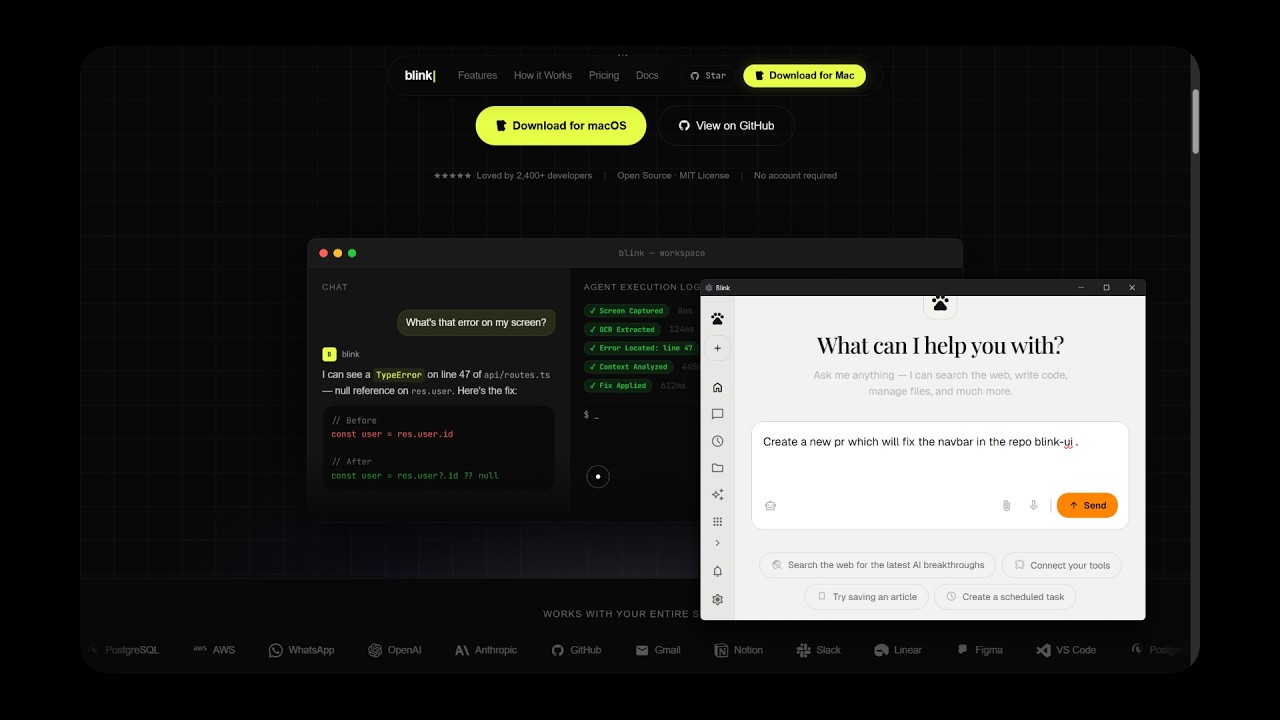
Watch the full demo on YouTube
- Bun runtime
- Node.js 18+
- API keys for AI providers (OpenAI, Anthropic, Google Gemini, etc.)
# 1. Clone the repository
git clone https://github.com/MohitGoyal09/coworker.git
cd Blink

# 2. Install dependencies
bun install

# 3. Configure environment
cp .env.example .env
# Edit .env with your API keys

# 4. Start the development server
bun run dev

# 5. Launch the Electron desktop app (in another terminal)
cd app
bun install
bun run dev
The desktop app will connect to http://localhost:4111 by default. To connect to a remote server, go to Settings → Advanced and update the Server URL.
docker compose up- GitHub: https://github.com/MohitGoyal09/coworker
- UI Demo: https://ui-blink.vercel.app/
- Documentation: Mastra Docs
- Issues: https://github.com/MohitGoyal09/coworker/issues
Contributions are welcome! Please read our Contributing Guide for details on how to get started.
This project is licensed under the MIT License - see the LICENSE file for details.
Built with ❤️ using Mastra, Electron, and React