Linux installation
- [Node.js] We recommend using nvm to get a proper Node.js installation, so that node is tied to your user privileges thus preventing any security issues resulting from the use of the root user (or sudo):
wget -qO- https://raw.githubusercontent.com/creationix/nvm/v0.34.0/install.sh | bash
nvm install 8- [PM2] We also strongly recommend you install PM2 to manage your Node.js processes. It will restart your processes if they crash.
npm install -g pm2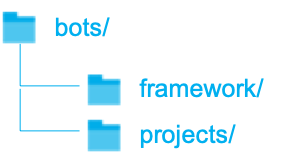
The VISEO Bot Maker relies on a set of Node-RED modules (this repo) already deployed on NPM and used by a core project and a bot project.
At the end of the installation, you should have your folders organized according to the opposite tree structure.
# install the framework

mkdir ~/bots && cd ~/bots
git clone https://github.com/NGRP/node-red-viseo-bot.git framework
cd framework
git checkout v0.1.0
npm install
The framework folder will contain :
-

conf: configuration files for Node-RED and the framework -
node_modules: all the installed nodes (node-red-viseo-contriband packages) -

start.shorstart.batis used to launch any bot when configured -
package.jsoncontains all the targeted nodes - ...