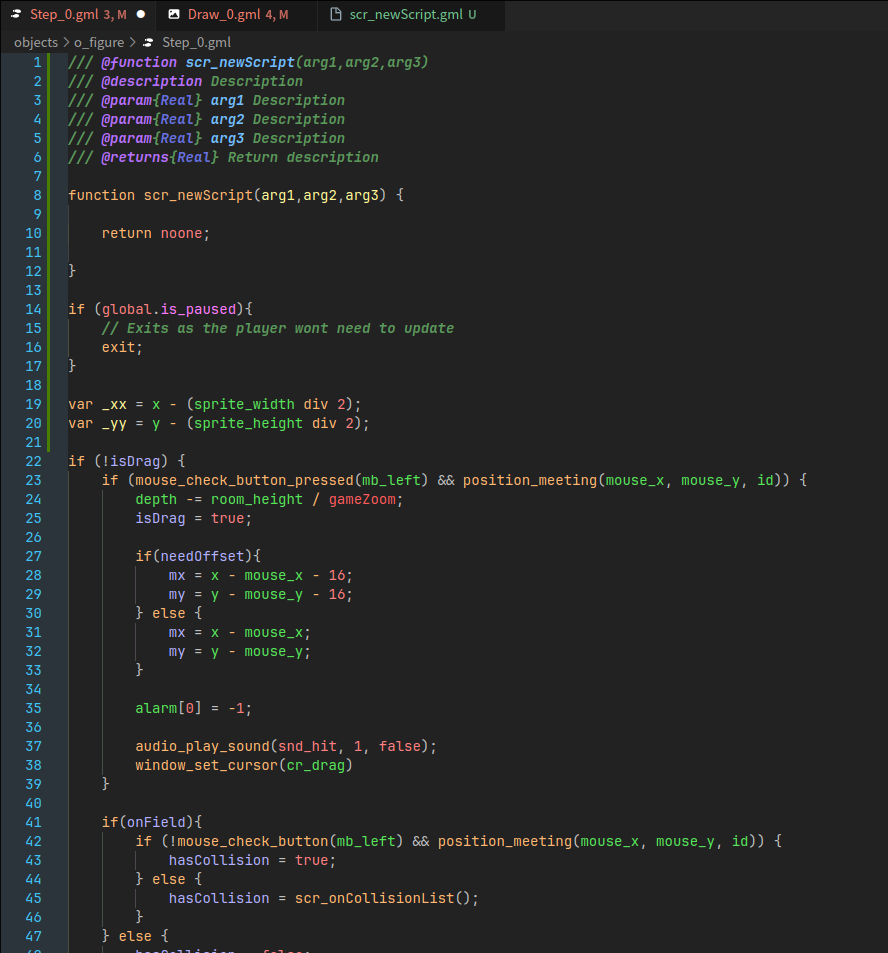
A custom VS Code theme inspired by the look and feel of GameMaker Studio 2.
It includes tailored syntax highlighting for GML, JSDoc annotations, built-in functions, and variables.
Better used together with Stitch.
- Highlighting for:
- Keywords and built-in functions
- Local, instance, and global variables
- JSDoc tags (
@param,@returns,@desc) - Built-in GML constants and macros
- Custom colors for operators, brackets, and comments
- Support for semantic highlighting
- Partially ported keybindings and snippets from GameMaker
Snippet access with F4 — press F4 + key to insert a specific snippet, or double-press F4 to open the snippet menu.
| Shortcut | Action |
|---|---|
F4 F4 |
Snippet menu |
F4 1 |
GML block |
F4 2 |
GML if |
F4 3 |
GML if-else |
F4 4 |
GML for-loop reverse |
F4 5 |
GML for-loop |
F4 6 |
GML while-loop |
F4 7 |
GML do-until |
F4 8 |
GML repeat |
F4 9 |
GML switch |
F4 C |
GML comment |
F4 M |
GML multi-line comment |
F4 R |
GML region |
F4 S |
GML array sort |
Ctrl+K |
Comment selected lines |
Ctrl+Shift+K |
Uncomment selected lines |
- When installation completes, select Gamemaker Studio 2 Theme as your color theme (Preferences → Workbench: Color Theme → Gamemaker Studio 2 Theme)