This repository contains python and MATLAB code along with CSVs that serve the purpose of classifying features extracted from images of mice retina blood vessels, this was done as part of a Project/Investigation based on automated methods of classification.
This Repo contains CSV files, the name of the numbered CSVs correspond to how many features are in the CSV, therefore for optimal training purposes please use the 14k.csv file when running your one time training session.
Basic user guide This guide is for the basic user looking to use the classifier for predictions/querying their input CSV.
Clone or download the system from github.
Ensure that your input features are held in a CSV with the file name ‘input.csv’
--- Make sure that the CSV file is created manually using a program (preferably excel), copy and pasting CSV files can cause reading errors for the program.
Ensure that the CSV file only contains the features shown in the red rectangle in figure 16 and is of the exact same format.
Ensure that the ‘input.csv’ file is located in the same directory as the classifier program.
If this is your first time running the program, The classifier must be trained and serialized one time, to do this simply open the classifier file in an editor and comment/uncomment lines such that it looks the same as figure 19 below, then once this is done, undo the changes you made to the comments and continue to the next step.
STEP 6: On any command line, change your directory to that of the classifier and:
------If you’re a windows user type: python -m svm.py
------If you’re a linux or mac user type: python svm.py
------These commands will run the SVM classifier, if you wish to use the ANN or KNN scripts simply replace ‘svm’ with ‘ann’ or ‘knn’ respectively.
The predicted output of your CSV should now have been printed out to the command terminal, -1 indicates remodelling, 0 indicated mixed/uncertainty and 1 indicates inactive cell junction.
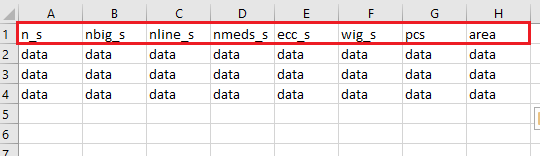
(Figure 16)
System administrator guide
This guide is for the system administrator looking to train the classifiers on their own supervised input. This guide assumes that this user is familiar with the patcher.
Clone or download the system from github
Use the ‘struct2csv’ file provided in the github with MATLAB to convert your intended .dat struct to a CSV file containing it’s features.
Put this CSV file in the same directory as the classifier
Open the classifier of your choice and input the csv filename into the ‘trainAndTestModel’ method, as depicted by ‘yourInput’ in figure 17.
Uncomment the ‘loadModel()’, ‘trainAndTestModel()’ and ‘saveModel()’ methods and comment out the ‘predict()’ method, so it looks the same as in figure 18.
Run the python script using the same instructions from step 6 of the Basic User Guide above.
Instructions on how to run unit tests are provided in comments in the classifier python files.
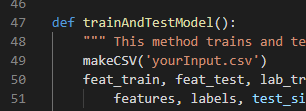
(Figure 17)
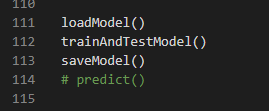
(Figure 18)
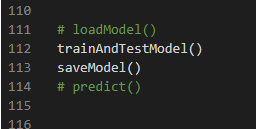
(Figure 19)