BurrowGate is a self-hosted reverse proxy and access gateway built with Bun. It protects websites and APIs from bots, scrapers, and malicious requests using route‑level policies, GeoIP network controls, browser challenges, rate limiting, managed request protection (WAF rules), header manipulation, request limits, WebSocket transport controls, static asset caching with purge support, TLS termination, and live traffic monitoring.
- Native HTTP and HTTPS listeners on ports 80 and 443
- Multi-site reverse proxy routing by hostname
- Automatic Let's Encrypt certificates using ACME HTTP-01
- Uploaded PEM certificate support
- SNI certificate selection for multiple domains
- Transparent HTTP, HTTPS, WebSocket, and secure WebSocket proxying
- Managed request protection with monitor/block modes, per-route overrides, rule exclusions, and auditable outcomes
- Native TCP and UDP stream proxying, including optional incoming TCP TLS termination
- Per-site and per-route access policies
- Fixed-window, sliding-window, and token-bucket rate limits
- Safe bounded static-asset caching with per-site/route controls, metrics, and scoped purge
- Pluggable challenge providers and ordered challenge chains
- SHA-256 browser proof of work
- Opaque and revocable visitor sessions
- IPv4, IPv6, CIDR, and country pass, bypass, block, and challenge rules
- Site-wide default IP and country actions for allowlists and blocklists
- Signed origin verification headers
- Paginated traffic, session, route, rule, and site monitoring
- Separate client-side and upstream bandwidth monitoring with per-site, per-IP, protocol, and country totals
- Stream connection logs, live TCP/UDP peers, GeoIP enrichment, and bandwidth by IP and incoming port
- Per-site traffic retention
- Country-level GeoIP analytics with an interactive SVG world map
- Country codes, country filters, and country tooltips in traffic and session tables
- Per-site customizable HTML or JSON error responses
- Multi-origin load balancing with priority failover, round robin, weighted round robin, session affinity, and deterministic IP fallback
- Per-origin health checks, automatic unhealthy-origin removal, optional 503 maintenance mode, and durable webhook alerts
- Per-site customizable HTML challenge pages
- Prometheus and OpenTelemetry Collector export through an OpenMetrics endpoint
- SQLite by default with PostgreSQL, MySQL, and MariaDB support
- Docker Compose deployment
Requirements:
- A Linux VPS with Docker and Docker Compose
- Public TCP ports 80 and 443
- A domain pointing to the VPS for trusted TLS certificates
Create a directory for BurrowGate and download only the Compose file:
mkdir burrowgate && cd burrowgate
curl -fsSLO https://raw.githubusercontent.com/Rabbit-Company/BurrowGate/main/docker-compose.yml
Alternatively, create a docker-compose.yml file and copy the following content into it:
services:
  burrowgate:
    image: rabbitcompany/burrowgate:latest
    container_name: burrowgate
    restart: unless-stopped
    init: true
    ports:
      - "${BG_HTTP_PUBLIC_PORT:-80}:${BG_HTTP_PORT:-80}"
      - "${BG_HTTPS_PUBLIC_PORT:-443}:${BG_HTTPS_PORT:-443}"
    env_file:
      - path: .env
        required: false
    cap_add:
      - NET_BIND_SERVICE
    volumes:
      - ./data:/app/data
    healthcheck:
      test: ["CMD", "bun", "-e", "const response = await fetch('http://127.0.0.1/_burrowgate/health'); if (!response.ok) process.exit(1)"]
      interval: 30s
      timeout: 5s
      start_period: 20s
      retries: 3

  geoipupdate:
    image: ghcr.io/maxmind/geoipupdate
    container_name: geoipupdate
    restart: unless-stopped
    profiles: ["geoip"]
    environment:
      GEOIPUPDATE_ACCOUNT_ID: "${MAXMIND_ACCOUNT_ID:-}"
      GEOIPUPDATE_LICENSE_KEY: "${MAXMIND_LICENSE_KEY:-}"
      GEOIPUPDATE_EDITION_IDS: GeoLite2-Country
      GEOIPUPDATE_FREQUENCY: "${GEOIPUPDATE_FREQUENCY:-72}"
    volumes:
      - ./data/geoip:/usr/share/GeoIP
Start BurrowGate:
docker compose up -d
docker compose logs burrowgate
BurrowGate generates a dashboard password, encryption key, and temporary self-signed certificate on the first startup. Read the generated dashboard password with:
docker compose exec burrowgate cat /app/data/bootstrap-admin-password.txtOpen the dashboard:
https://SERVER_IP/_burrowgate/admin
The browser will warn about the temporary certificate until a trusted certificate is uploaded or issued.
Create a site from the Sites tab:
Name: Sonarr
Public host: sonarr.example.com
Origin URL: http://10.0.0.20:8989
Point sonarr.example.com to the VPS, open the site's TLS settings, and request a Let's Encrypt certificate.
The default Compose configuration is production ready:
- host port 80 maps to BurrowGate port 80
- host port 443 maps to BurrowGate port 443
- runtime data is stored in the
./datadirectory - only
NET_BIND_SERVICEis added for low-port binding
An .env file is optional. Copy the example file only when overriding defaults:
cp .env.example .env
nano .env
docker compose up -d --build --force-recreate| Variable | Default | Description |
|---|---|---|
BG_ENV |
production |
Runtime environment |
BG_HOST |
0.0.0.0 |
Listener address |
BG_HTTP_ENABLED |
true |
Enable the HTTP listener |
BG_HTTP_PORT |
80 |
Internal HTTP port |
BG_HTTP_PUBLIC_PORT |
80 |
Public HTTP port used in redirects and ACME validation |
BG_HTTPS_ENABLED |
true |
Enable the HTTPS listener |
BG_HTTPS_PORT |
443 |
Internal HTTPS port |
BG_HTTPS_PUBLIC_PORT |
443 |
Public HTTPS port used in redirects |
BG_TLS_LISTENER_DRAIN_TIMEOUT_MS |
5000 |
Grace period before the previous HTTPS listener is force-closed after a certificate reload |
DATABASE_URL |
sqlite://./data/burrowgate.db |
Bun.SQL database URL |
BG_ADMIN_USERNAME |
admin |
Dashboard username |
BG_ADMIN_PASSWORD |
generated | Dashboard password |
BG_COOKIE_SECURE |
auto |
Use secure cookies on HTTPS and ordinary cookies on HTTP |
BG_MASTER_KEY |
generated | Encrypts certificate and ACME private keys |
BG_EVENT_RETENTION_DAYS |
7 |
Default monitoring retention assigned to new sites and streams |
BG_BANDWIDTH_FLUSH_INTERVAL_MS |
10000 |
Interval for flushing aggregated bandwidth counters to the database |
BG_BANDWIDTH_MAX_PENDING_KEYS |
50000 |
Maximum exact in-memory site/IP/minute keys before new IPs use country overflow buckets |
BG_HTTP_CACHE_MAX_ENTRIES |
2048 |
Maximum static-asset cache entries held by one BurrowGate process |
BG_HTTP_CACHE_MAX_BYTES |
268435456 |
Maximum total in-memory static-asset cache size |
BG_HTTP_CACHE_MAX_OBJECT_BYTES |
33554432 |
Instance ceiling for one cacheable response body |
BG_ACCESS_LOGIN_MAX_FAILURE_KEYS |
50000 |
Maximum access-login failure keys retained in memory |
BG_MAINTENANCE_INTERVAL_SECONDS |
3600 |
Interval between GeoIP and certificate housekeeping runs |
BG_MAINTENANCE_CLEANUP_INTERVAL_SECONDS |
60 |
Interval between short incremental retention-cleanup runs |
BG_MAINTENANCE_CLEANUP_BATCH_SIZE |
250 |
Maximum rows removed by one cleanup write |
BG_MAINTENANCE_CLEANUP_PAUSE_MS |
25 |
Event-loop pause between cleanup writes |
BG_MAINTENANCE_CLEANUP_TIME_BUDGET_MS |
5000 |
Maximum incremental-cleanup time per maintenance run |
BG_GEOIP_ENABLED |
true |
Enable country-level GeoIP enrichment |
BG_GEOIP_DATABASE_PATH |
./data/geoip/GeoLite2-Country.mmdb |
Local MaxMind database path |
BG_GEOIP_CACHE_ENTRIES |
4096 |
Maximum GeoIP reader cache entries |
BG_GEOIP_RETRY_SECONDS |
30 |
Retry interval when the MMDB file is not available yet |
BG_OPENMETRICS_ENABLED |
false |
Expose /_burrowgate/metrics for Prometheus-compatible scraping |
BG_OPENMETRICS_TOKEN |
empty | Optional bearer token protecting the OpenMetrics endpoint |
BG_DEFAULT_POW_DIFFICULTY |
18 |
Default SHA-256 challenge difficulty |
BG_WEBSOCKET_ENABLED |
true |
Enable WebSocket proxying |
BG_WEBSOCKET_IDLE_TIMEOUT_SECONDS |
120 |
WebSocket idle timeout from 10 to 960 seconds |
BG_STREAM_IDLE_TIMEOUT_SECONDS |
300 |
Idle timeout for established TCP streams |
BG_STREAM_UDP_PEER_IDLE_TIMEOUT_SECONDS |
60 |
Inactivity interval used to close a synthetic UDP peer session |
BG_STREAM_MAX_BUFFERED_BYTES |
1048576 |
Maximum queued TCP data per proxied connection |
BG_STREAM_MAX_UDP_PEERS |
10000 |
Maximum tracked UDP peers per configured stream |
BG_STREAM_MAX_PENDING_EVENTS |
100000 |
Maximum queued Stream lifecycle events during a database outage |
BG_ACME_DIRECTORY_URL |
Let's Encrypt production | ACME directory URL |
BG_ACME_EMAIL |
empty | Default ACME contact email |
See .env.example for every available setting.
DATABASE_URL=sqlite://./data/burrowgate.db
DATABASE_URL=postgres://user:password@postgres:5432/burrowgate
DATABASE_URL=mysql://user:password@mysql:3306/burrowgate
Bun.SQL selects the database adapter from the URL.
Each site contains:
- a public hostname and optional port
- an HTTP or HTTPS origin URL
- an enabled state
- a default access mode
- default IP and country actions
- a visitor session lifetime
- a traffic retention period
- a challenge policy
- a signing secret for origin verification headers
- TLS and force-HTTPS settings
- HTML or JSON error-response settings
- origin health-check thresholds, failure behavior, and webhook alerts
- a load-balancing algorithm, sticky affinity behavior, and an origin pool with per-origin priority, weight, drain state, and health-path override
- HTTP request/response header policies and request-size limits, with route-level overrides
The selected site is stored in the dashboard URL. Traffic, sessions, network rules, route policies, and actions are scoped to that site.
Editing a site exposes a permanent delete action protected by typed-name confirmation. Deletion removes the site's request and bandwidth history, sessions, access memberships and settings, challenges, route and network policies, origins, health history and alerts, ACME challenges, TLS settings, certificate, and certificate events in one transaction. Global access users and ACME accounts are preserved because they may be shared. A site cannot be deleted while its certificate is assigned to a TCP Stream or while certificate issuance is active.
Environment-based site seeding is disabled by default. It can be enabled for automated deployments:
BG_SEED_DEFAULT_SITE=true
BG_DEFAULT_SITE_NAME=Sonarr
BG_DEFAULT_PUBLIC_HOST=sonarr.example.com
BG_DEFAULT_ORIGIN=http://10.0.0.20:8989
Environment settings only seed an empty database. Existing sites are managed from the dashboard.
BurrowGate can store an ISO country code with each request event, visitor session, and bandwidth bucket. The dashboard renders an interactive SVG world map for request volume, newly created sessions, and client bandwidth.
Lookups use a local GeoLite2-Country.mmdb file. BurrowGate reuses one database reader, keeps a bounded LRU cache, and stores only the two-letter country code. It does not call an external GeoIP API for each request.
The included optional Compose profile runs MaxMind's official database updater:
MAXMIND_ACCOUNT_ID=123456
MAXMIND_LICENSE_KEY=replace-with-license-key
docker compose --profile geoip up -d --buildSee docs/GEOIP.md.
Third-party map and data attribution is documented in THIRD_PARTY_NOTICES.md.
The Bandwidth tab separates payload traffic between users and BurrowGate from traffic between BurrowGate and origin servers. It provides time-series charts, HTTP/WebSocket totals, the busiest client IPs, one-click site blocking, and client bandwidth by country. Counters are streamed without buffering bodies and persisted as efficient one-minute aggregates.
See docs/BANDWIDTH.md.
Each site can define a default IP action, a default country action, explicit IP or CIDR rules, and explicit country rules. This supports blocklists, deny-by-default allowlists, and trusted clients that bypass browser verification.
Policy precedence is:
- Longest matching IP or CIDR rule
- Explicit country rule
- Default country action
- Default IP action
- Route policy
Country policy fails open when the GeoIP database is unavailable. IP rules and the default IP action continue to apply.
Route policies can override a site's default behavior by path and HTTP method.
Available access modes:
inherit: use the site defaultchallenge: require the site or route challenge chainbypass: proxy without browser verificationblock: return HTTP 403 without contacting the origin
Example JSON API policy:
Name: JSON API
Path: /api/**
Access mode: Bypass browser verification
Rate limiter: Sliding window
Maximum: 120
Window: 60000 ms
Identity: IP address
This allows non-browser API clients to work normally while BurrowGate applies request limits at the edge.
Rate limits can use the client IP, a verified BurrowGate session, or a selected application header. Counters can be shared across the policy or separated by path and method.
The site's HTTP tab can set or remove request headers before an origin request and response headers before the origin response is returned to the client. Route policies can add their own rules. A route rule for the same header takes precedence over the site rule. Connection framing, public-host forwarding, client-IP forwarding, and signed X-BurrowGate-* identity headers remain proxy-managed and cannot be overridden.
Each site can also limit request-body bytes, request-target bytes (path plus query string), and combined parsed request-header bytes. A value of 0 is unlimited. Route limits are blank when inherited and can use 0 to explicitly remove the site limit. BurrowGate rejects violations with 413, 414, or 431, records a request-limited traffic event, and counts streamed request bodies so chunked uploads cannot bypass the configured maximum.
Static caching is disabled by default and can be enabled from the site's HTTP tab, with per-route enable, disable, TTL, object-size, and extension overrides. Entries live only in bounded process memory and are isolated by site, route-policy version, URL query, and accepted encoding. Origin max-age or s-maxage can shorten the configured TTL.
BurrowGate only considers GET assets with an allowed extension. Authorization, application cookies, range and conditional requests, explicit refreshes, non-200 responses, HTML or JSON, Set-Cookie, attachments, Content-Range, unsafe Vary, and private, no-store, or no-cache responses bypass storage. These checks use the original origin headers, so a downstream header policy cannot turn a private response into a cacheable response. HEAD can reuse an existing cached GET without storing a body.
Responses expose X-BurrowGate-Cache: HIT, MISS, or BYPASS. The dedicated Cache dashboard tab reports historical outcomes, hit ratio, origin requests avoided, top paths, runtime entries, memory, stores, evictions, expiry, and bytes served. Administrators can purge a site, a path prefix, one route policy, or every site. Site, route, and origin configuration changes purge affected entries automatically. Every applicable traffic event stores hit, miss, or bypass independently from its access decision, so a cache hit still remains classified as verified, authenticated, allowlisted, or unprotected traffic.
Each site can choose HTML or JSON for errors generated by BurrowGate. HTML mode provides an editable template with escaped placeholders and a reset-to-default action. JSON mode allows the administrator to select exactly which response fields are exposed.
Custom responses cover network blocks, route blocks, rate limits, verification-required API requests, origin failures, and WebSocket handshake failures. They do not replace successful origin responses; configured HTTP header and cache policies can still adjust their headers.
Each site can probe a path such as /health with a direct GET request to every enabled origin in its pool. A response from 200 through 299 is healthy; redirects, timeouts, connection errors, and other status codes are failures. Checks use configurable intervals, timeouts, failure thresholds, and recovery thresholds. Individual origins can override the site health path.
Unhealthy origins are removed from normal selection while another usable origin exists. The default Keep proxying and alert behavior still attempts an origin if every health check is unhealthy. The optional maintenance behavior skips new HTTP and WebSocket origin connections when the complete pool is unhealthy and returns the site's custom error response with status 503, Retry-After, and error code origin_unhealthy. Unknown and degraded states never activate maintenance mode.
Alerts support generic signed JSON webhooks, Slack, Discord, and ntfy. BurrowGate reports individual origin transitions while the pool remains available, and reports pool-down and pool-recovery transitions when availability changes. Deliveries use a durable outbox with exponential retry. Webhook URLs and signing secrets are encrypted at rest.
Every site keeps its original URL as the primary origin and can add more origins from the site editor. Available algorithms are priority failover, round robin, and smooth weighted round robin. Priority failover chooses the lowest healthy priority number; weight controls proportional selection in weighted mode. An origin can be drained to keep existing sticky sessions while preventing new assignments.
With sticky affinity enabled, BurrowGate stores an origin ID on an existing visitor session. Requests without a valid session (including unprotected API calls) use a deterministic client-IP assignment without storing additional per-IP load-balancer state. If the assigned origin becomes unavailable, BurrowGate selects another origin and updates the session assignment. Safe GET and HEAD requests receive one connection-level failover retry; non-idempotent requests are never replayed automatically.
Each protected site can require a BurrowGate user login after the browser challenge. Users are global identities and can be linked to multiple sites without copying password hashes. Passwords are Argon2id-hashed, login attempts are rate limited, and password changes or disabling a user revoke their authenticated sessions.
Proxy authentication uses the existing HTTP-only BurrowGate session, so an application's Authorization: Basic or Authorization: Bearer header remains available to the origin. An optional setting sends the authenticated username in client-spoof-resistant, HMAC-signed identity headers and browser-readable signed cookies; passwords are never forwarded.
See docs/ACCESS_LISTS.md.
A site or route stores an ordered challenge policy:
[
	{
		"provider": "pow-sha256",
		"config": {
			"difficulty": 18
		}
	}
]
The challenge registry is designed to support additional providers such as CAPTCHA services without changing the proxy or session flow.
See docs/ADDING_CHALLENGES.md.
Each site supports:
- disabled TLS
- an uploaded certificate chain and private key
- automatic Let's Encrypt certificates
BurrowGate serves ACME HTTP-01 challenges directly from port 80 before redirects, route policies, IP rules, sessions, or browser challenges.
Private keys are encrypted with AES-256-GCM before they are stored in SQL. The encryption key is read from BG_MASTER_KEY, BG_MASTER_KEY_FILE, or the generated data/master.key file.
Back up the database and master key together. Losing the master key makes stored private keys unusable.
See docs/TLS.md.
Open the Streams dashboard from the switcher at the top of the control panel. Each stream configures an incoming port, forward host and port, TCP and/or UDP, optional TCP TLS termination, and its own monitoring-retention period.
The dashboard provides live TCP connections and UDP peers, connect/disconnect and error logs, client country, and payload totals grouped by IP, incoming port, and protocol. Because UDP has no transport connection lifecycle, BurrowGate opens a synthetic peer session on the first datagram and closes it after the configured inactivity timeout.
Docker bridge networking must publish each configured port. A TCP and UDP stream on port 25565 requires both mappings:
ports:
  - "25565:25565/tcp"
  - "25565:25565/udp"
Selecting a certificate terminates incoming TCP TLS and forwards decrypted bytes. Leaving the certificate empty performs raw TCP forwarding and therefore supports TLS passthrough. TLS/DTLS termination is not available for UDP.
See docs/STREAMS.md.
WebSocket upgrades pass through the same site, route, IP, rate-limit, and session checks as normal HTTP requests.
Protocol mapping is automatic:
http://origin.example.com  -> ws://origin.example.com
https://origin.example.com -> wss://origin.example.com
BurrowGate forwards application cookies, authentication headers, binary messages, text messages, and negotiated subprotocols. BurrowGate credentials are removed before the upstream handshake.
After a successful challenge, BurrowGate creates a random opaque token and stores only its SHA-256 hash. Browsers receive an HTTP-only cookie.
API clients can use:
Authorization: Burrow <token>or:
X-Burrow-Token: <token>Sessions can be monitored and revoked from the dashboard.
Each website's monitoring-retention setting also governs expired/revoked sessions, challenge-flow history, expired network rules, certificate activity, origin health transitions, and completed health-alert deliveries. Challenge step secrets and expired admin sessions are removed as soon as incremental maintenance reaches them. Cleanup runs in small round-robin batches with pauses and a per-run time budget so retention work does not create a large database-latency spike.
BurrowGate signs origin headers with the site's signing secret:
X-BurrowGate-Verified: true
X-BurrowGate-Access-Mode: verified
X-BurrowGate-Session-Id: sess_...
X-BurrowGate-Client-Ip: 203.0.113.10
X-BurrowGate-Timestamp: 1785681000
X-BurrowGate-Signature: <HMAC-SHA256>
Origins should reject direct public traffic. Use a private network, firewall allowlist, WireGuard, or mutual TLS so requests cannot bypass BurrowGate.
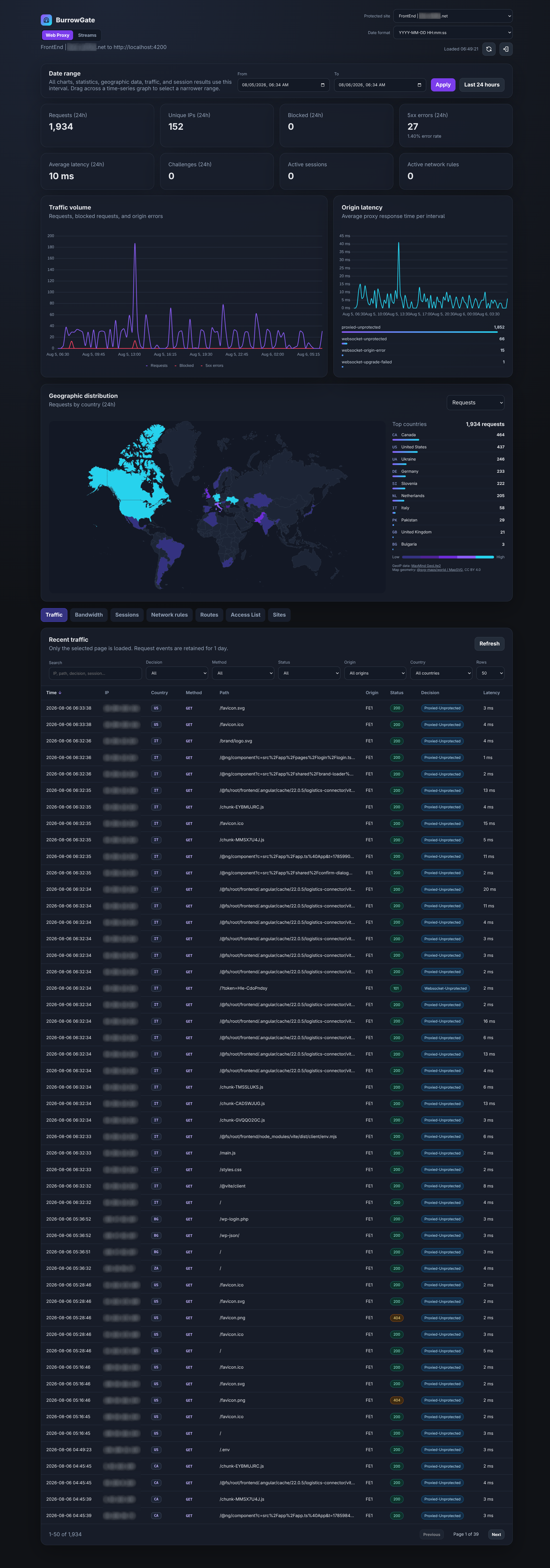
The dashboard includes:
- request volume, blocked requests, errors, and latency
- active, expired, and revoked sessions
- IP-rule activity and current rule state
- route-policy outcomes and configuration totals
- challenge-gated access lists with reusable users and signed upstream identity
- cross-site request and latency comparison
- interactive country map for requests and newly created sessions
- server-side pagination, search, filters, and sorting
- exact From and To date-time selection shared by statistics, graphs, maps, traffic, and sessions
- drag-to-select time ranges directly on time-series graphs
BurrowGate automatically selects a suitable graph bucket size for the chosen interval and limits the result to roughly 120 points. Missing intervals are returned as zero values so graphs remain stable during quiet periods. Dragging across a time-series graph applies the highlighted interval to the full dashboard.
Operational metrics can also be exposed in OpenMetrics format for Prometheus or an OpenTelemetry Collector. The exporter covers request volume and latency, payload bytes, Stream events and active connections, listener health, origin health checks and alert delivery, monitoring queues, persistence failures, retention cleanup, database availability, GeoIP status, and process memory. It deliberately excludes paths, client IPs, countries, sessions, and usernames from labels. See docs/OPENMETRICS.md.
Managed request protection defaults to monitor mode and can be configured per site or overridden per route. Its dashboard separates clean, would-block, and blocked traffic and records versioned rule metadata without storing matching input values. See docs/MANAGED_PROTECTION.md.
Traffic retention is configured per site from 1 to 365 days. Maintenance removes expired events automatically.
Install dependencies:
bun installStart BurrowGate in watch mode:
bun run devStart the example origin server:
bun run originRun tests and TypeScript checks:
bun test
bun run typecheck
Regenerate the compressed world map assets after changing public/world.svg:
bun run build:mapThe project uses .editorconfig and .prettierrc.json with tabs and a width of 2. YAML files use two spaces.
- ACME supports HTTP-01 only. Wildcard certificates require DNS-01 support.
- Route rate-limit counters are stored in memory and reset when the process restarts.
- Multiple gateway nodes do not share rate-limit counters yet.
- Detailed request events are stored in SQL. Very high traffic deployments should use an external log store.
BurrowGate is licensed under the GNU General Public License v3.0. See LICENSE.