React based project that creates a
-
What does AICR do?
As it is well known that the number of emergency calls increased eightfold over a course of four days when Hurricane Katrina hit the Gulf Coast and flooded New Orleans, it is very overwhelming to keep the same amount of first-responder teams organized and efficient in emergency situations where the demand of first-responder teams increase dramtically. AI-mergency Control Room ensures that dispatchers stay productive and creates better workflow for first-responders that are involved in these situations as well as allocate emergency resources more efficiently. AICR includes anything from proper incident prioritization to visibility and traceability of major events.
-
Goal of the project (who are you developing the project for?)
The AICR is primarily to help people in dangerous situations such as natural disasters and other emergency situations by supporting dispatchers to stay fully productive during such circumstances. As a group we would like to contribute to the project by providing a UI and also add more functionality to existing features. We are using some external datasets to further extend our project's prospects to expand the project's analytics.
-
How does AICR work?
AICR automatically transcribes incoming calls and extracts all the detailed information by the help of Watson Natural Language Understanding and Watson Knowledge Studio. The status of the situation and all the incidents are then visualized inorder to give the operator full overview of the current situation which inturn helps the dispatcher to track emergency spots and prioritization. AICR is using a database powered by Db2 to store all the call information and allows to trace calls during and after the emergency.
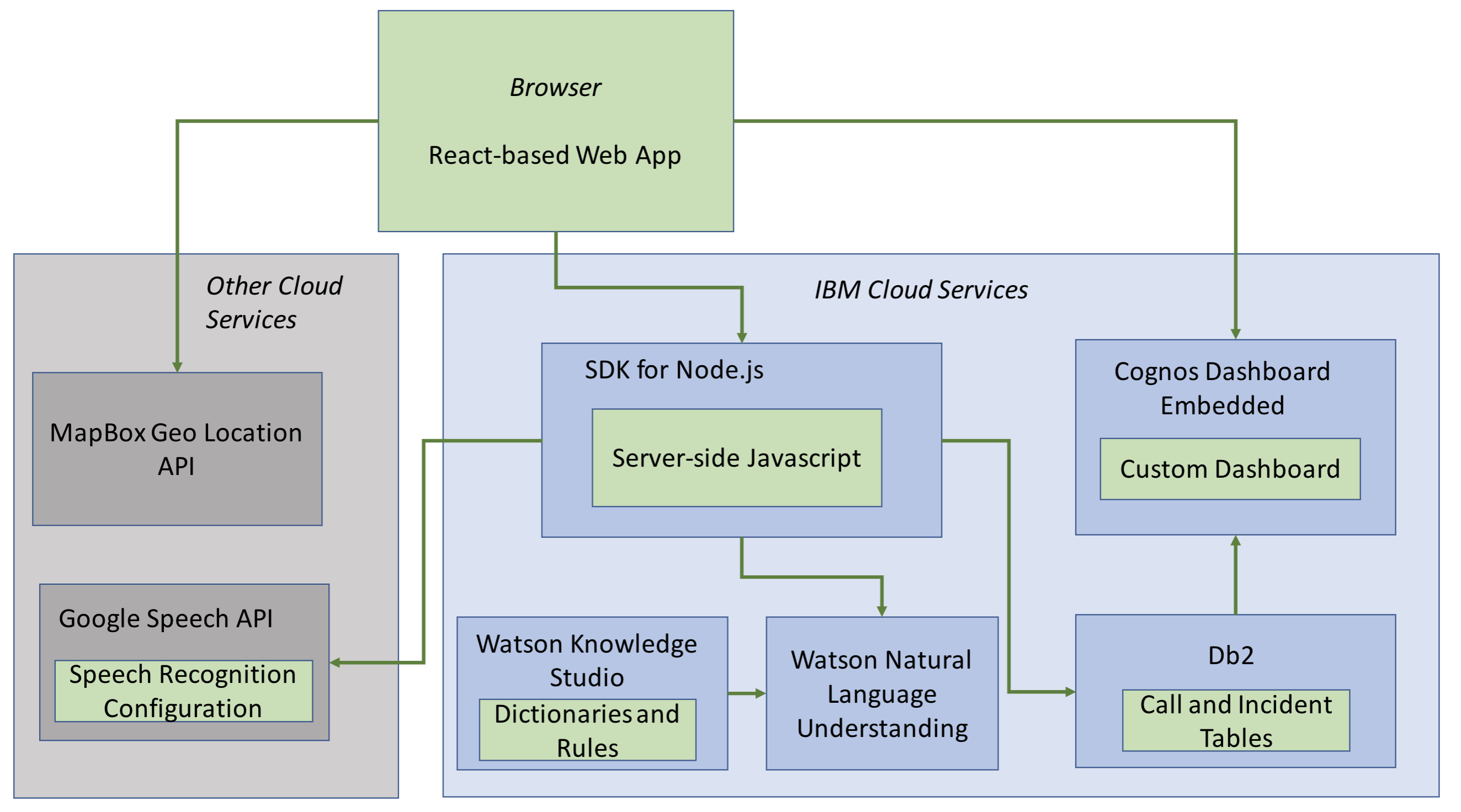
- Front-end: React, Node JS,
- IBM Cloud Services, Server-side Javascript
- Database: Db2
- Watson Natural Language Understanding, Watson Language Studio
- Google Speech-to-Text
- MapBox IO API
git clonethis repo to your machine- Comparing your project with the clone of the actual AICR project, place your db-credentials.json, daas-credentials.json, nlu-credentials.json, and google-speech-credentials.json into the /node_app directory
- Copy/paste your mapbox-credentials.json into /node_app/public/scripts directory. These files are listed in the .gitignore file to that we can practice good security with our files and not push our own credentials to github.
-
Once you have your requirements set, make sure you're on the master branch & go ahead and make a branch with
git checkout -b branch-name-involving-your-feature -
Once you make changes, check your changes with
git statusorgit diff, then add, commit and push your changesgit add .git commit -m 'message about your change'git push origin your-branch-name
-
Make your changes and make sure your code works before you merge it back to master
git checkout mastergit pull origin mastergit merge your-branch-namehopefully there aren't too many merge conflicts, fix those and commit againgit push origin master